---
title: "Test an Agent Before It Ships: Benchmarks, LLM Judges, CSV Export"
slug: "agent-evals-benchmarks-llm-judges-csv-export"
date: "2026-10-14"
tag: "Application"
summary: "A close look at the agent Evals tab in ibl.ai: run an agent against a benchmark of test questions, have a judge model you pick score every answer against your own criteria, add 0–1 scores by hand, and export every trace and score as CSV."
author: "ibl.ai Engineering"
repo: "iblai/vibe"
linkedin: |
Every agent on ibl.ai can be run against a benchmark of your own test questions, uploaded 10,000 at a time from a CSV, and scored by a judge model you choose before anyone outside the team talks to it.
The Evals tab lives in each agent's settings. A benchmark is a set of questions with optional expected answers, typed in by hand, uploaded as a CSV of up to 10 MB, or seeded over the API from real chat traces.
Benchmarks belong to the organization, not to one agent, so the same test set can be run against several agents and compared on equal footing.
A review is an LLM-as-judge pass: you write the criteria in plain language, name the score, set how many traces are judged in parallel, and pick the judge provider first, then the model.
It can be a different model from the one the agent runs on, and it writes its reasoning beside every score.
People can add their own 0–1 scores beside the judge's. And Export CSV gives you one row per test item, with the input, the expected and actual output, the trace ID and a column for every score.
An evaluation you cannot take with you is a vendor's opinion of its own product. On ibl.ai you own all the code and the data, so the test sets, the traces and the scores stay in your deployment.
#iblai #AgenticAI #EnterpriseAI #LLMOps #AIEvaluation #AIGovernance
---
**ibl.ai's agent Evals tab runs an agent against a benchmark of test questions, has a judge model you pick score every answer against criteria you write, lets people add 0–1 scores by hand, and exports every trace and score as CSV, all from the agent's own settings, on a platform where you own all the code and the data.**
This is a deep-dive into a shipped capability, not a launch. The Evals tab first shipped in [Agentic OS](/product/agentic-os) in the production image releases of **July 22–24, 2026** (`1.104.0` → `1.108.0`), recorded in the [July 24 platform update](/updates/platform-update-2026-07-24).
The `/iblai-vibe-agent-evals` skill that mounts the same tab in any app built with [Agentic Vibe](/product/agentic-vibe) followed in [`iblai/vibe`](https://github.com/iblai/vibe) **v1.7.0 on July 27, 2026**.
As of the [October 9 platform update](/updates/platform-update-2026-10-09), the judge picker checks each model's availability individually and disables unavailable ones (`@iblai/web-containers` 1.35.1).
## How do you test an AI agent before it goes live?
You run it against a benchmark. In ibl.ai, open the agent's settings and choose **Evals**. Pick a benchmark, click **New Evaluation**, and the platform sends every question in it to the agent in the background, recording each answer as a trace.
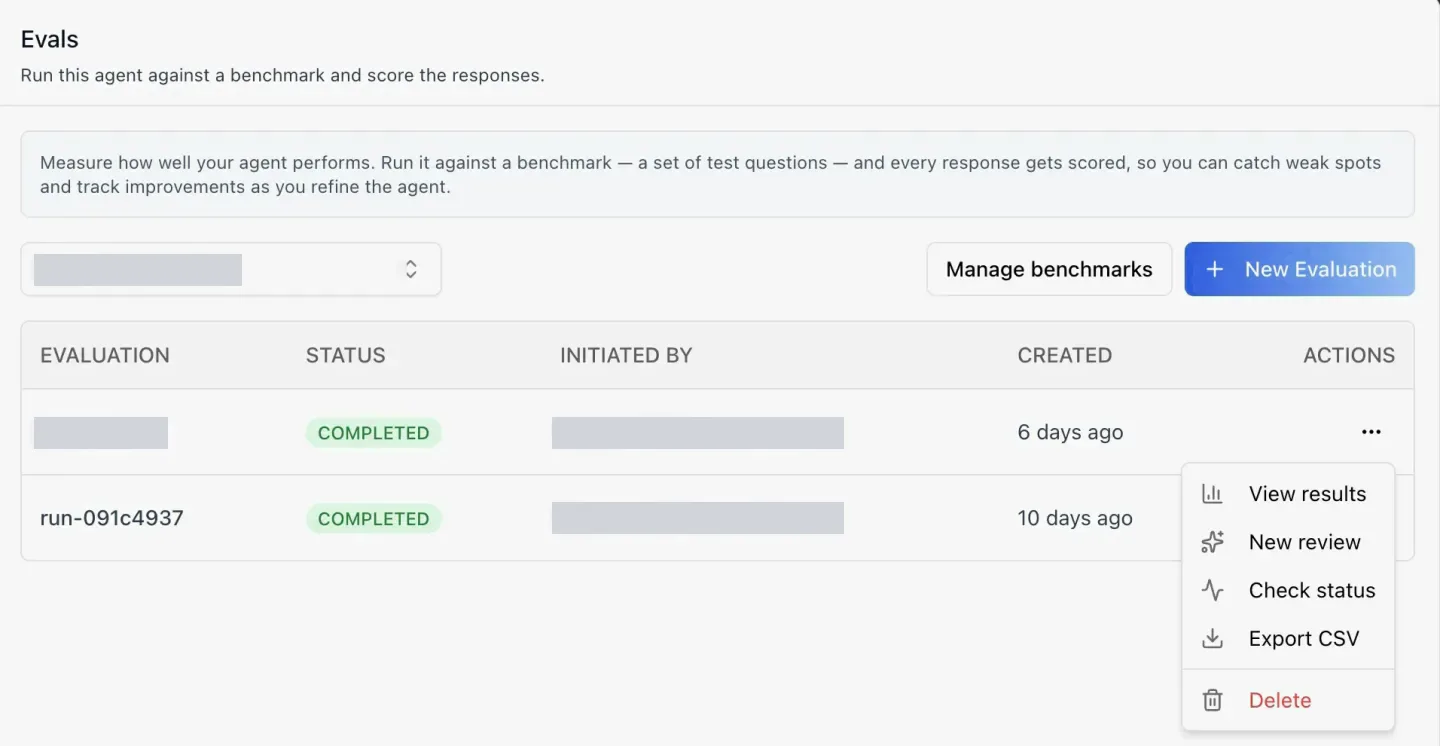 The table lists each run with its status, who started it and when.
A run moves through `pending → in progress → completed`; its badge is green when completed, red when failed and blue while still in flight.
Each row's menu has five actions: **View results**, **New review**, **Check status**, **Export CSV** and **Delete**.
View results, New review and Export CSV stay disabled until the run completes. A run name is optional — leave it blank and the platform generates one, such as the `run-091c4937` in the screenshot.
## What goes into an agent benchmark?
A benchmark is a set of test questions, each with an optional expected answer. Benchmarks belong to the **organization**, not to one agent, so the same test set can be run against several agents and compared on equal footing. Each run, by contrast, is scoped to the agent it tested.
The table lists each run with its status, who started it and when.
A run moves through `pending → in progress → completed`; its badge is green when completed, red when failed and blue while still in flight.
Each row's menu has five actions: **View results**, **New review**, **Check status**, **Export CSV** and **Delete**.
View results, New review and Export CSV stay disabled until the run completes. A run name is optional — leave it blank and the platform generates one, such as the `run-091c4937` in the screenshot.
## What goes into an agent benchmark?
A benchmark is a set of test questions, each with an optional expected answer. Benchmarks belong to the **organization**, not to one agent, so the same test set can be run against several agents and compared on equal footing. Each run, by contrast, is scoped to the agent it tested.
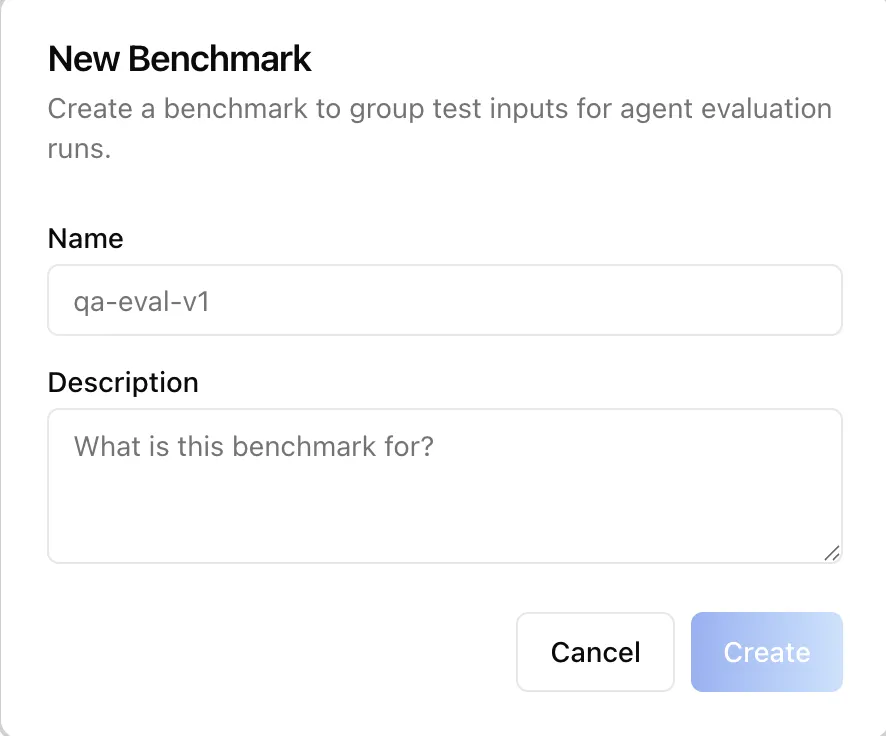 **Manage benchmarks** creates one from a name and a description, then fills it with question/answer pairs two ways: typed in by hand, or uploaded as a CSV. The selector picks the first benchmark automatically, and New Evaluation stays disabled until one exists.
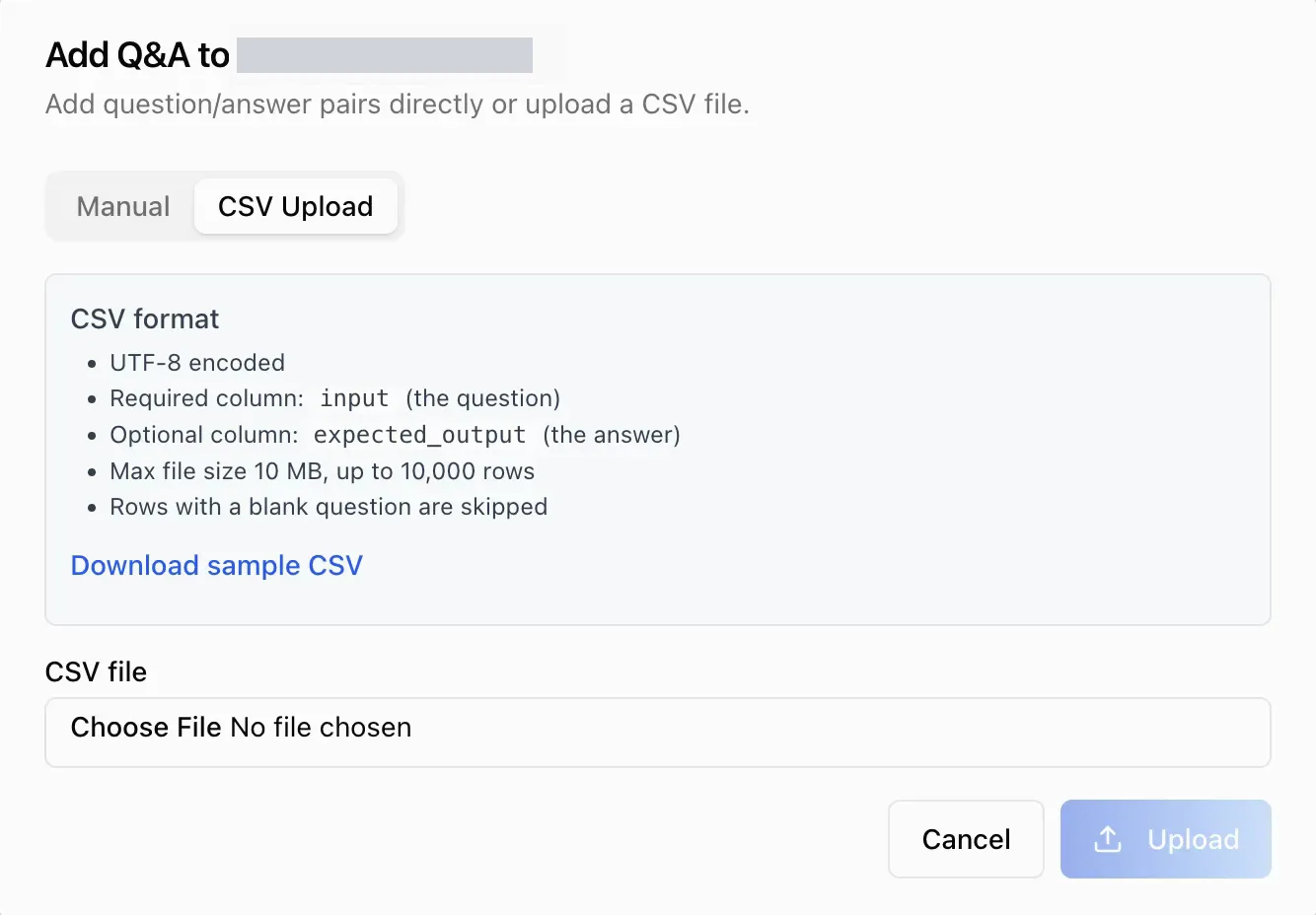 The CSV rules are on the screen: **UTF-8**, a required `input` column for the question, an optional `expected_output` column for the answer, **at most 10 MB and 10,000 rows**, and any row with a blank question is skipped. A sample file downloads from the same dialog.
Over the API, benchmark items can also be seeded from existing chat traces — the input and the agent's response are copied from each trace — so real conversations become test cases.
## How does an LLM-as-judge review score an AI agent?
A review hands every trace in a completed run to a second model, which scores it against your criteria. Choose **New review** and the **Evaluate** dialog asks for four things.
The CSV rules are on the screen: **UTF-8**, a required `input` column for the question, an optional `expected_output` column for the answer, **at most 10 MB and 10,000 rows**, and any row with a blank question is skipped. A sample file downloads from the same dialog.
Over the API, benchmark items can also be seeded from existing chat traces — the input and the agent's response are copied from each trace — so real conversations become test cases.
## How does an LLM-as-judge review score an AI agent?
A review hands every trace in a completed run to a second model, which scores it against your criteria. Choose **New review** and the **Evaluate** dialog asks for four things.
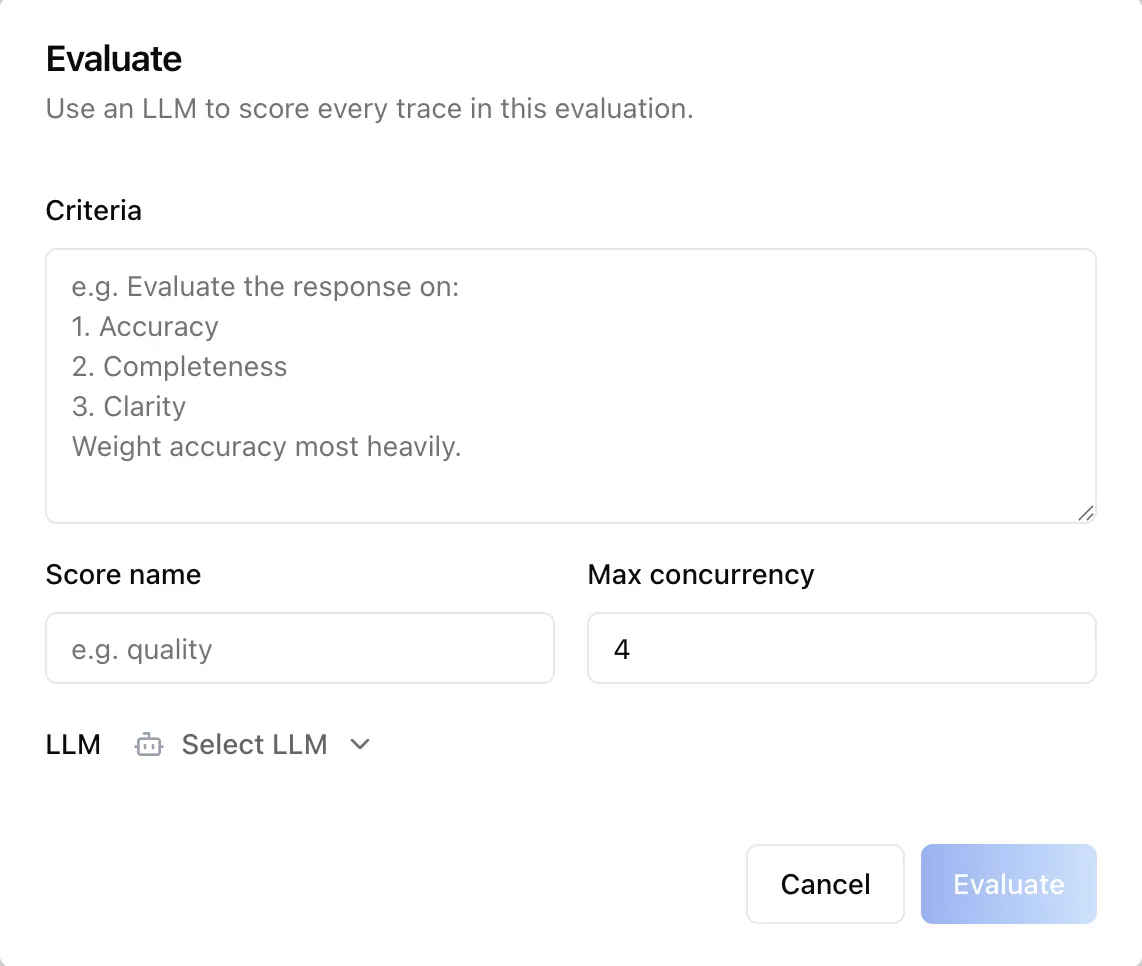 **Criteria** is a rubric in plain language — the placeholder suggests accuracy, completeness and clarity, with accuracy weighted most.
**Score name** is the label the scores are filed under, such as `quality`. **Max concurrency**, **4** by default and capped at 20, sets how many traces are judged in parallel. The fourth is the judge model.
**Criteria** is a rubric in plain language — the placeholder suggests accuracy, completeness and clarity, with accuracy weighted most.
**Score name** is the label the scores are filed under, such as `quality`. **Max concurrency**, **4** by default and capped at 20, sets how many traces are judged in parallel. The fourth is the judge model.
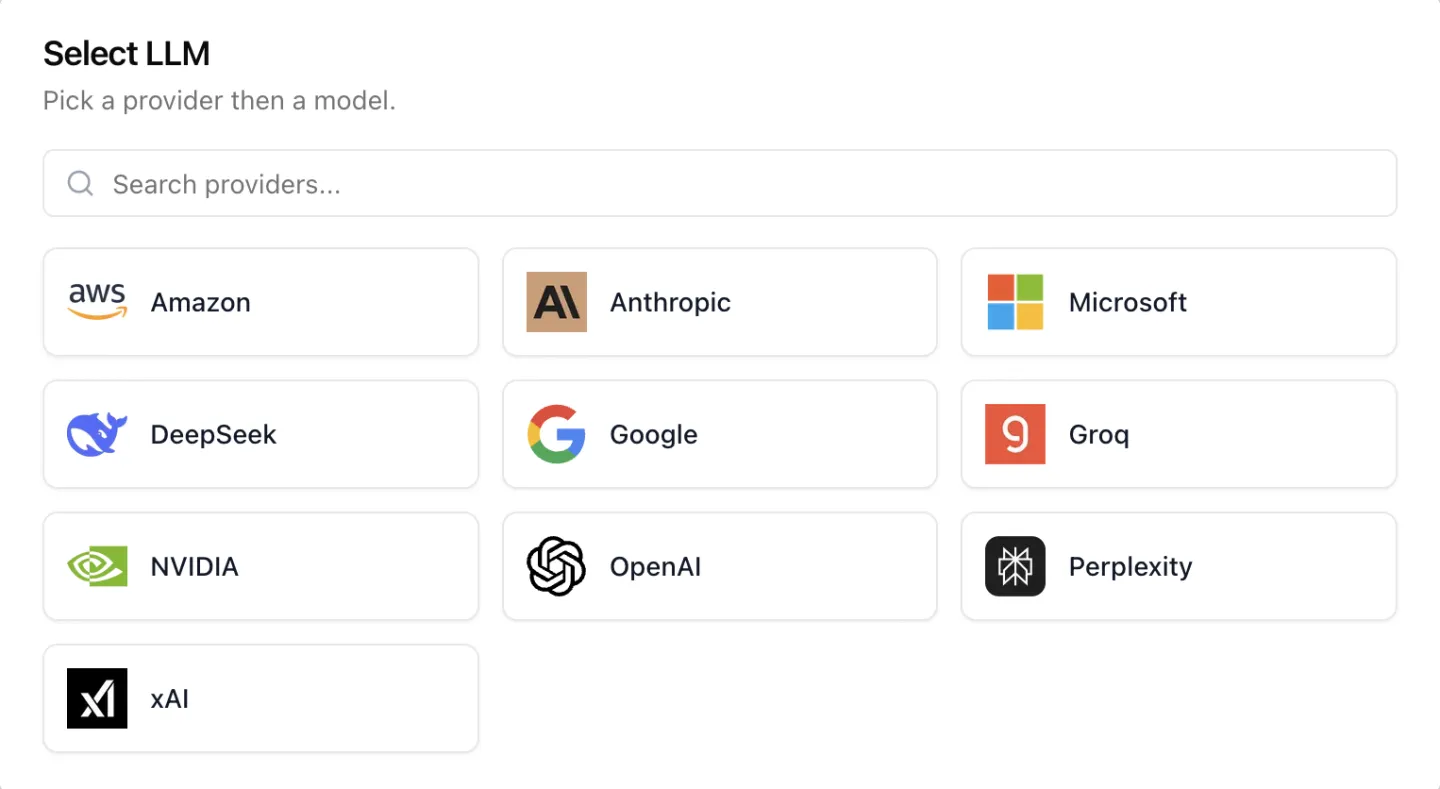 The judge is chosen provider first, then model. The organization in this screenshot offered **ten providers**, from Amazon and Anthropic to NVIDIA and xAI; yours lists whatever your organization has configured.
The judge can differ from the model the agent runs on, which is how you get an independent second opinion. Every score the judge files comes with its written reasoning for that item, so a low score explains itself.
Scores are not only the judge's. From any trace, a person can add a manual score — a name, a value **between 0 and 1** and an optional comment — and it sits beside the judge's scores on the same item. One item can carry several scores from several reviews.
## What does an agent evaluation export contain?
**Export CSV** downloads one row per benchmark item, with `item_id`, `input`, `expected_output`, `actual_output` and `trace_id`, plus **one column per score**. That is enough to diff two runs in a spreadsheet, or to feed a regression check that blocks a prompt change from shipping.
Everything in the tab is also available over the platform's REST API: benchmarks and their items (including CSV upload), runs, judge reviews, scores and the export.
So an evaluation can run from CI or from another agent, not only from a person at a screen. The API side is packaged as the [`iblai-api-agent-eval`](https://github.com/iblai/vibe/blob/main/skills/agents/iblai-api-agent-eval/SKILL.md) skill.
## Who can run agent evaluations in ibl.ai?
Administrators and agent builders — anyone with permission to view the agent's analytics.
Learners never see it: for them the tab renders nothing, even when someone deep-links to it. An app can also show benchmarks in the organization's settings, as a **Benchmarks** tab under **AI & data**.
The full walkthrough, screen by screen, is in [Agent Settings: Evals](/docs/os/agent-settings/evals). Agents can also do their own work on a calendar — see [agents that work on a schedule](/updates/scheduled-agent-tasks-with-run-logs).
## Want to see your agents scored against your own questions?
We'll run an evaluation on a benchmark of your questions and walk through the judge's scores with you. [Book a 30-minute demo](https://cal.com/iblai/30min) or [talk to the ibl.ai team](/contact) — ibl.ai is family-owned and operated from New York, NY.
The judge is chosen provider first, then model. The organization in this screenshot offered **ten providers**, from Amazon and Anthropic to NVIDIA and xAI; yours lists whatever your organization has configured.
The judge can differ from the model the agent runs on, which is how you get an independent second opinion. Every score the judge files comes with its written reasoning for that item, so a low score explains itself.
Scores are not only the judge's. From any trace, a person can add a manual score — a name, a value **between 0 and 1** and an optional comment — and it sits beside the judge's scores on the same item. One item can carry several scores from several reviews.
## What does an agent evaluation export contain?
**Export CSV** downloads one row per benchmark item, with `item_id`, `input`, `expected_output`, `actual_output` and `trace_id`, plus **one column per score**. That is enough to diff two runs in a spreadsheet, or to feed a regression check that blocks a prompt change from shipping.
Everything in the tab is also available over the platform's REST API: benchmarks and their items (including CSV upload), runs, judge reviews, scores and the export.
So an evaluation can run from CI or from another agent, not only from a person at a screen. The API side is packaged as the [`iblai-api-agent-eval`](https://github.com/iblai/vibe/blob/main/skills/agents/iblai-api-agent-eval/SKILL.md) skill.
## Who can run agent evaluations in ibl.ai?
Administrators and agent builders — anyone with permission to view the agent's analytics.
Learners never see it: for them the tab renders nothing, even when someone deep-links to it. An app can also show benchmarks in the organization's settings, as a **Benchmarks** tab under **AI & data**.
The full walkthrough, screen by screen, is in [Agent Settings: Evals](/docs/os/agent-settings/evals). Agents can also do their own work on a calendar — see [agents that work on a schedule](/updates/scheduled-agent-tasks-with-run-logs).
## Want to see your agents scored against your own questions?
We'll run an evaluation on a benchmark of your questions and walk through the judge's scores with you. [Book a 30-minute demo](https://cal.com/iblai/30min) or [talk to the ibl.ai team](/contact) — ibl.ai is family-owned and operated from New York, NY.