---
title: "Agent Sandboxes: A Real Linux VM, Locked to Hosts You Allow"
slug: "agent-sandbox-virtual-machines-network-policies"
date: "2026-09-28"
tag: "Application"
summary: "ibl.ai agents can now run code in a full Linux virtual machine that has no network by default — opened only to the hosts an organization allowlists, with API secrets the agent can use but never read, and runtime billed per second."
author: "ibl.ai Engineering"
repo: "iblai/vibe"
linkedin: |
  Our AI agents now get a real Linux virtual machine with no network by default — opened only to the hosts you allow, using API keys they can call but never read.

  An agent with a real machine is powerful; one with a real machine and open internet access is a risk. We shipped the version with a lock on the door.

  ibl.ai agents can now run in a Virtual Machine Shell: a full Linux VM where the agent writes files and runs real shell commands, isolated from everything else. By default that VM has no network at all.

  The organization decides what it may reach. Package registries only. The public internet with private ranges and cloud metadata blocked. Or a named network policy — an exact list of host:port pairs, up to 100, reused across agents and never shared across organizations.

  The part we like most is how secrets work.

  An agent can call your API with your key without ever being able to read the key: inside the VM the environment variable holds a placeholder, and the real value is substituted only on encrypted requests to the hosts that key is allowed to reach.

  A secret can point at a credential the organization already stores, so rotating it once updates every agent.

  VM time is billed per second against the credits of the person chatting — $1 per ten minutes by default, set per organization.

  With ibl.ai you own all the code and the data, and now you also decide exactly what your agents' code can touch.

  #iblai #AgenticAI #EnterpriseAI #AISecurity #ZeroTrust #AIAgents
---

**ibl.ai agents can now run code in a full Linux virtual machine that has no network by default, opened only to the hosts your organization allows, using API secrets the agent can call with but never read — on ibl.ai, where you own all the code and the data.**

The Virtual Machine Shell extends that ownership to what an agent's code can reach.

Network policies, credential-backed secrets and runtime billing reached the platform in the [September 25 platform update](/updates/platform-update-2026-09-25), and the `/iblai-vibe-agent-sandbox` skill documented them on **September 23, 2026**.

The sandbox type is a toggle on an agent's Sandbox tab in [Agentic OS](/product/agentic-os); network policies, secrets and their bindings are set by administrators over the platform's REST API.

## How do ibl.ai agents run code?

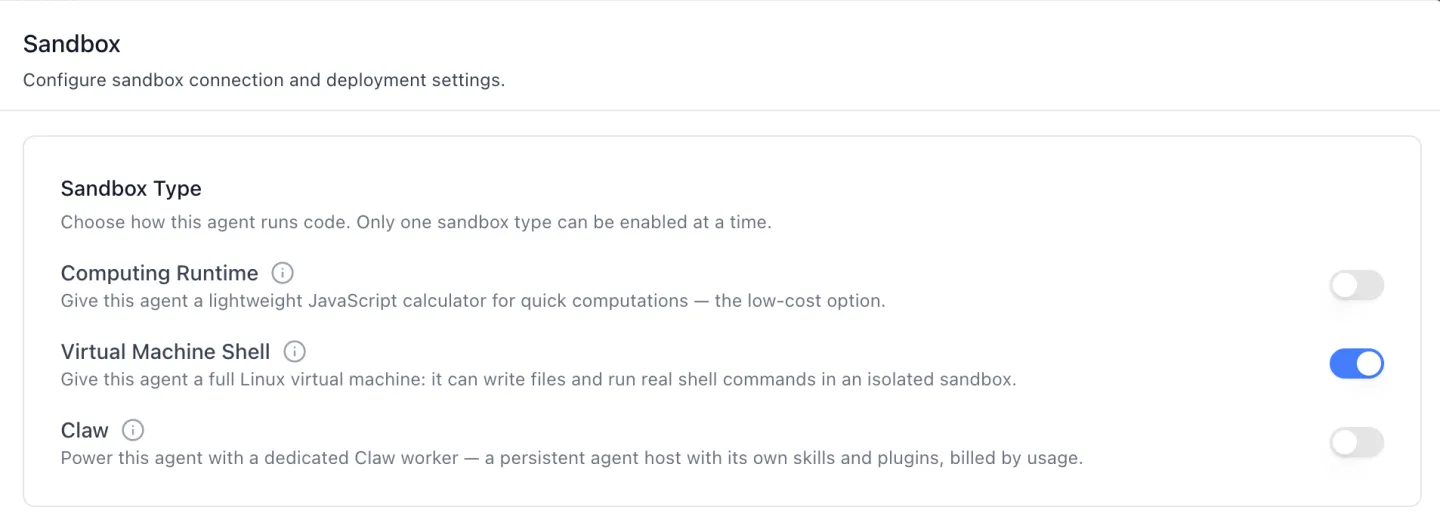
Each agent picks **one of three sandbox types** on its Sandbox tab. They are mutually exclusive: switching one on switches the others off in the same save.

<a href="/images/updates/agent-sandbox-virtual-machines-network-policies-sandbox-type.webp" target="_blank" rel="nofollow noopener noreferrer"><img src="/images/updates/agent-sandbox-virtual-machines-network-policies-sandbox-type.webp" alt="The Sandbox Type card on an ibl.ai agent's Sandbox tab, reading Choose how this agent runs code. Only one sandbox type can be enabled at a time, with toggles for Computing Runtime, a lightweight JavaScript calculator; Virtual Machine Shell, a full Linux virtual machine, switched on; and Claw, a dedicated persistent worker billed by usage." width="1440" height="529" loading="lazy" decoding="async" /></a>

- **Computing Runtime** — a lightweight JavaScript calculator for quick computations; the low-cost option.
- **Virtual Machine Shell** — a full Linux virtual machine in which the agent writes files and runs real shell commands, isolated from everything else.
- **Claw** — a dedicated, persistent agent host with its own skills and plugins, billed by usage, and configured through its workspace files.

## What can an AI agent's virtual machine reach on the network?

Nothing, until you say otherwise. Every chat runs in its own isolated virtual machine, which starts with **no network**, and each agent is given one of four egress profiles.

<table style="width:100%; border-collapse:collapse; margin:1.5rem 0; font-size:0.95rem;">
  <thead>
    <tr style="background:#f5f5f0; border-bottom:2px solid #2175C5;">
      <th style="text-align:left; padding:0.75rem; color:#5f6368;">Egress profile</th>
      <th style="text-align:left; padding:0.75rem; color:#5f6368;">What the VM can reach</th>
    </tr>
  </thead>
  <tbody>
    <tr style="background:#f0f9ff; border-bottom:1px solid #e5e7eb;"><td style="padding:0.75rem;"><strong>None</strong> (default)</td><td style="padding:0.75rem;">No network at all</td></tr>
    <tr style="border-bottom:1px solid #e5e7eb;"><td style="padding:0.75rem;"><strong>Registries</strong></td><td style="padding:0.75rem;">Package registries only — PyPI, npm, apt and apk</td></tr>
    <tr style="border-bottom:1px solid #e5e7eb;"><td style="padding:0.75rem;"><strong>Public</strong></td><td style="padding:0.75rem;">The public internet, with private ranges, loopback and cloud metadata addresses denied</td></tr>
    <tr style="border-bottom:1px solid #e5e7eb;"><td style="padding:0.75rem;"><strong>Custom</strong></td><td style="padding:0.75rem;">Deny by default; only the hosts in a named network policy</td></tr>
  </tbody>
</table>

A **network policy** is a named allowlist an organization admin writes once and reuses across agents — never across organizations. Entries are exact `host:port` pairs, with no wildcards and at most **100** per policy; loopback, link-local and metadata addresses are refused outright.

## How can an AI agent use an API key without seeing it?

Through **VM secrets**. Inside the virtual machine, the secret's environment variable holds a placeholder. The real value is substituted only on encrypted requests to the hosts that secret is allowed to reach, so the agent can call the API but cannot print, log or leak the key.

<div style="display:flex; flex-wrap:wrap; gap:0.5rem; align-items:stretch; margin:1.5rem 0; font-size:0.9rem;">
<div style="flex:1 1 150px; border:1px solid #e5e7eb; border-radius:10px; padding:0.75rem; background:#fff;"><strong>1. Inside the VM</strong><br />The agent sees <code>ACME_KEY=placeholder</code> — never the real value.</div>
<div style="flex:1 1 150px; border:1px solid #e5e7eb; border-radius:10px; padding:0.75rem; background:#fff;"><strong>2. The agent calls out</strong><br />An encrypted request leaves the VM carrying the placeholder.</div>
<div style="flex:1 1 150px; border:1px solid #e5e7eb; border-radius:10px; padding:0.75rem; background:#fff;"><strong>3. The host is checked</strong><br />Only a host on the secret's own allowlist gets the substitution.</div>
<div style="flex:1 1 150px; border:2px solid #2175C5; border-radius:10px; padding:0.75rem; background:#f0f9ff;"><strong>4. The API gets the key</strong><br />The real value is swapped in on the way out — and never enters the VM.</div>
</div>

A secret either carries its own value or points at one field of a credential the organization already stores for an integration. Pointing at the stored credential means the key is never typed twice, and **rotating it once updates every agent** that uses it.

The platform also checks the combination. Secrets need the Public or Custom profile, and under Custom every host a secret may reach must also be in the agent's network policy — so a secret can never open a path the policy does not.

## Who can configure agent network access, and what does a VM cost?

Only people granted it. Creating, changing or deleting network policies and secrets is a separate permission for each, and organization admins hold them by default. Ordinary users do not, and binding a secret to an agent needs the secret-writing permission too.

VM time is charged to the credits of the person chatting, **prorated per second**, at **$1 per ten minutes** by default — a figure each organization can set for itself, and that can be set to zero.

Each session's cost is recorded with the rest of the agent's usage, next to its model calls. Organizations that cap AI spend can do it with [spend limits](/updates/spend-limits).

The full reference, with every endpoint, is in the [`/iblai-vibe-agent-sandbox` skill](https://github.com/iblai/vibe/blob/main/skills/agents/iblai-vibe-agent-sandbox/SKILL.md).

## Want to give your agents real tools without giving up control?

We can walk your security team through a sandboxed agent on your own policies. [Book a 30-minute demo](https://cal.com/iblai/30min) or [talk to the ibl.ai team](/contact) — ibl.ai is family-owned and operated from New York, NY.