 ## What is Shared Memory on an ibl.ai agent?
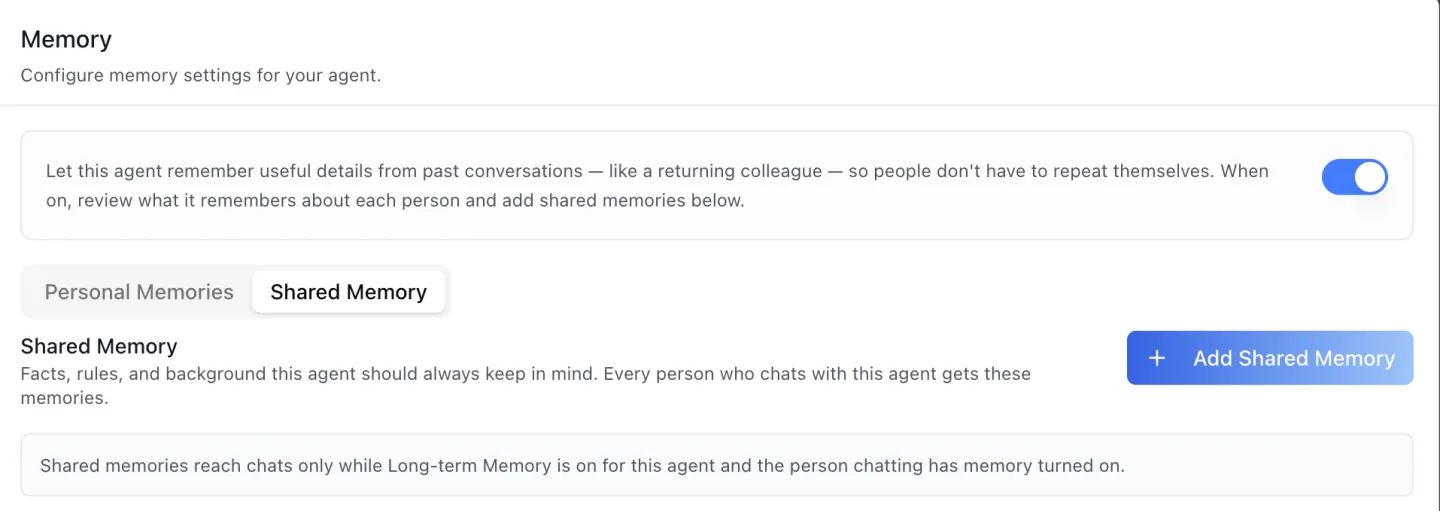
Shared Memory is one agent's institutional knowledge, with no user attached to it. The sub-tab describes itself exactly: *"Facts, rules, and background this agent should always keep in mind. Every person who chats with this agent gets these memories."*
Behind it is what the API calls **agent knowledge** — the `agent-memories` collection, listed 20 entries per page and capped at a `page_size` of 100.
Each entry is a short fact of **at least 10 characters**, and the list renders one card per entry showing the text and *"Added by {name} · {time ago}"*, so a reviewer can see who curated a line and when.
The distinction that matters to a compliance officer is that nothing here is inferred. Personal memories are extracted from conversations by a background job; shared memories are written only by hand.
That is enforced by the absence of a column rather than by a default. An agent-knowledge row carries **no `is_auto_generated` field at all** — the flag that marks an LLM-extracted memory elsewhere does not exist on this store, so there is no code path that could set it.
## How does an administrator add something an agent must always know?
Through one dialog on the agent's own Memory tab. **Add Shared Memory** opens a single textarea — *"Write what this agent should always keep in mind..."* — under a counter that reads **"0/10 characters minimum"** until ten characters are typed, then switches to a plain character count.
## What is Shared Memory on an ibl.ai agent?
Shared Memory is one agent's institutional knowledge, with no user attached to it. The sub-tab describes itself exactly: *"Facts, rules, and background this agent should always keep in mind. Every person who chats with this agent gets these memories."*
Behind it is what the API calls **agent knowledge** — the `agent-memories` collection, listed 20 entries per page and capped at a `page_size` of 100.
Each entry is a short fact of **at least 10 characters**, and the list renders one card per entry showing the text and *"Added by {name} · {time ago}"*, so a reviewer can see who curated a line and when.
The distinction that matters to a compliance officer is that nothing here is inferred. Personal memories are extracted from conversations by a background job; shared memories are written only by hand.
That is enforced by the absence of a column rather than by a default. An agent-knowledge row carries **no `is_auto_generated` field at all** — the flag that marks an LLM-extracted memory elsewhere does not exist on this store, so there is no code path that could set it.
## How does an administrator add something an agent must always know?
Through one dialog on the agent's own Memory tab. **Add Shared Memory** opens a single textarea — *"Write what this agent should always keep in mind..."* — under a counter that reads **"0/10 characters minimum"** until ten characters are typed, then switches to a plain character count.
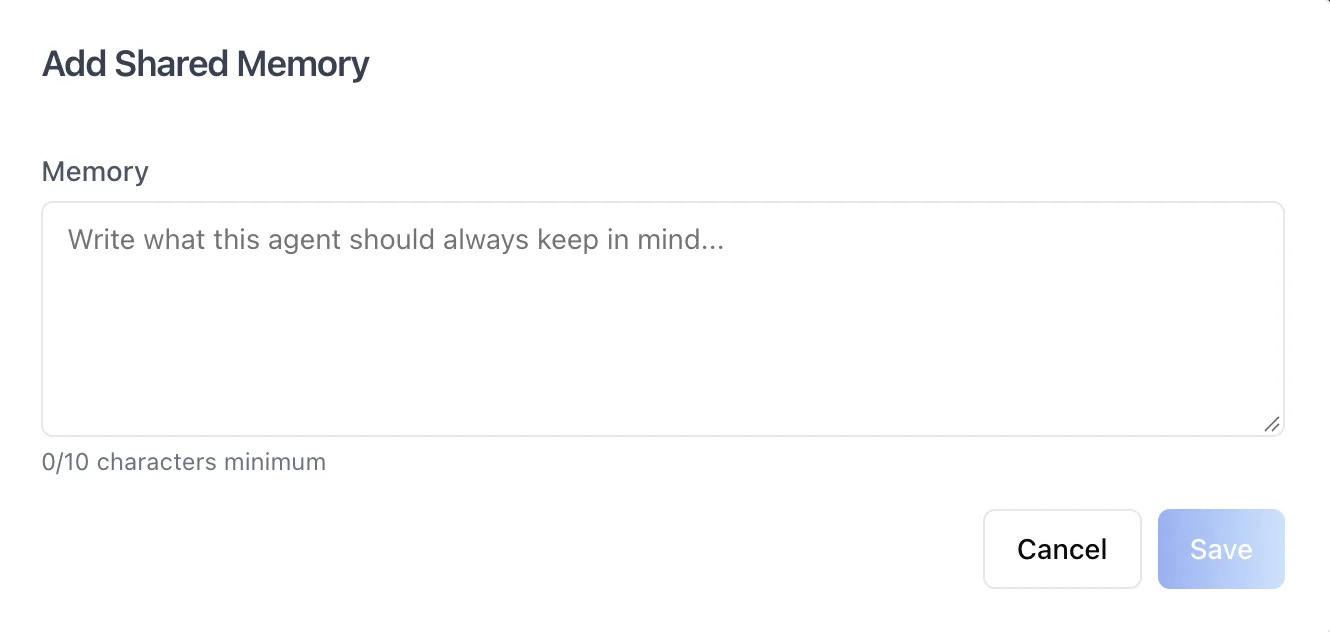 **Save** stays disabled below the ten-character floor. Entries also deduplicate on a content hash, so saving a line that already exists returns a **409** and the field shows *"This shared memory already exists."*
You therefore cannot accumulate four slightly different versions of the refund policy by accident.
The content is the kind of thing an organization already writes down somewhere worse — the toolkit's own examples are *"Our refund window is 30 days"* and *"Always cite the policy handbook"*.
## What happens when a shared memory is wrong, and who may change it?
Every entry carries a kebab menu with **Edit** and **Delete**. Editing reopens the same dialog with the text loaded; deleting asks first, and the confirmation says plainly what the blast radius is.
**Save** stays disabled below the ten-character floor. Entries also deduplicate on a content hash, so saving a line that already exists returns a **409** and the field shows *"This shared memory already exists."*
You therefore cannot accumulate four slightly different versions of the refund policy by accident.
The content is the kind of thing an organization already writes down somewhere worse — the toolkit's own examples are *"Our refund window is 30 days"* and *"Always cite the policy handbook"*.
## What happens when a shared memory is wrong, and who may change it?
Every entry carries a kebab menu with **Edit** and **Delete**. Editing reopens the same dialog with the text loaded; deleting asks first, and the confirmation says plainly what the blast radius is.
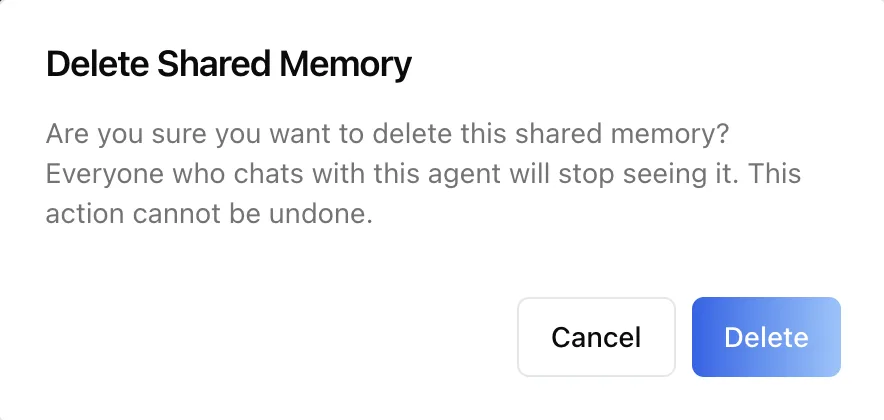 *"Everyone who chats with this agent will stop seeing it. This action cannot be undone."* That sentence is the honest version of what deleting an entry does, and it is why the write path is permissioned rather than open.
There is no dedicated shared-memory permission, so the agent's own `write` action stands in. With RBAC on and the agent present in the permission tree, a **Limited Editor** can add and edit shared memories and a **Limited Viewer** cannot.
Where the tree carries no entry for that agent, the interface stays permissive and the server's **403** is the only authority — which is why the UI treats one as final: when a 403 arrives, the add button and the per-entry menus disappear for the rest of the session rather than offering an action that will fail.
## How is shared memory different from what the agent remembers about each person?
They are different stores with different scopes, different authors and different governance. The **Personal Memories** sub-tab is the per-person side: a user search, a date range, category tabs, a Categories manager and an Add Memory button.
*"Everyone who chats with this agent will stop seeing it. This action cannot be undone."* That sentence is the honest version of what deleting an entry does, and it is why the write path is permissioned rather than open.
There is no dedicated shared-memory permission, so the agent's own `write` action stands in. With RBAC on and the agent present in the permission tree, a **Limited Editor** can add and edit shared memories and a **Limited Viewer** cannot.
Where the tree carries no entry for that agent, the interface stays permissive and the server's **403** is the only authority — which is why the UI treats one as final: when a 403 arrives, the add button and the per-entry menus disappear for the rest of the session rather than offering an action that will fail.
## How is shared memory different from what the agent remembers about each person?
They are different stores with different scopes, different authors and different governance. The **Personal Memories** sub-tab is the per-person side: a user search, a date range, category tabs, a Categories manager and an Add Memory button.
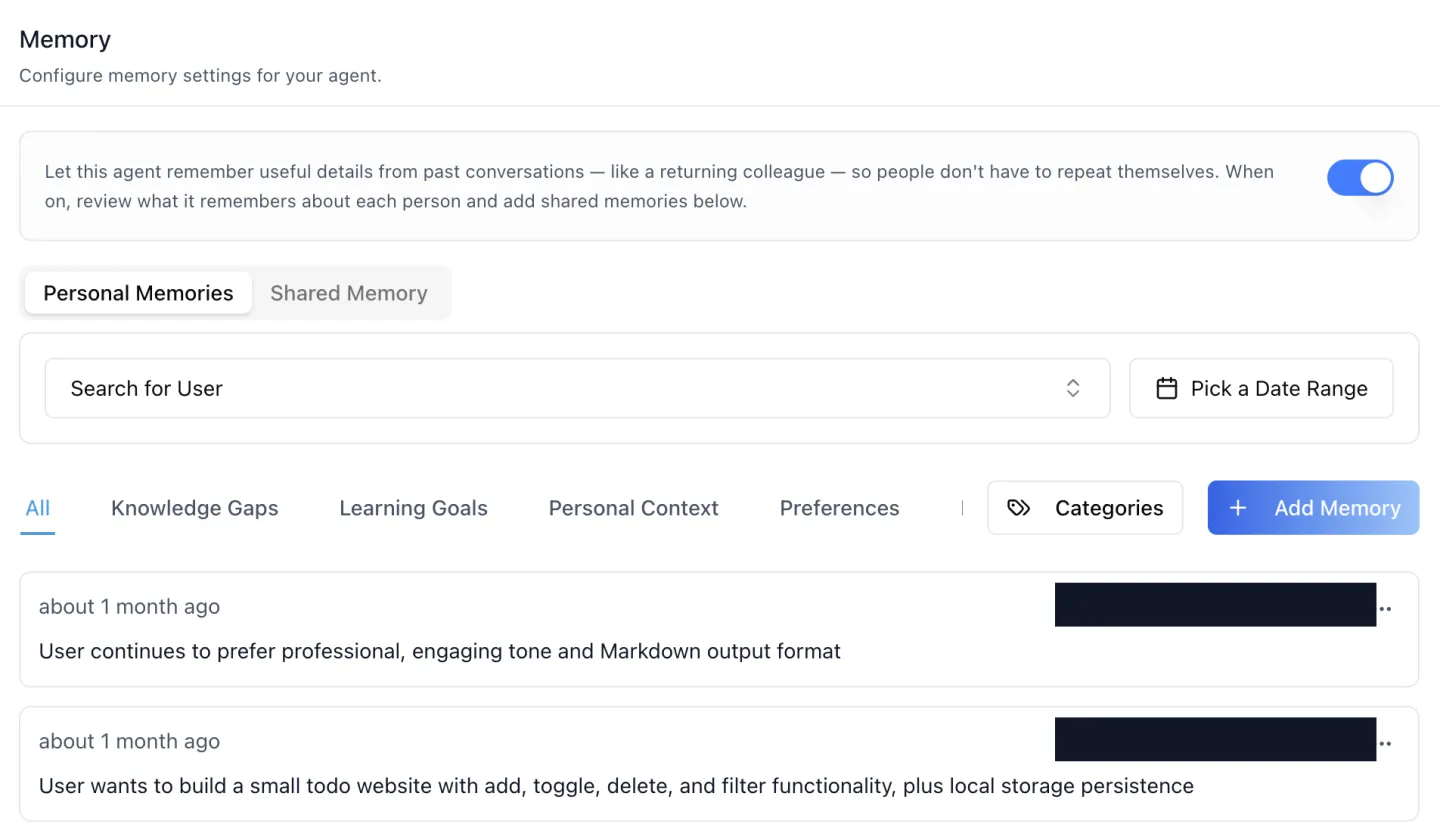 Five categories auto-seed the first time an agent extracts anything — `knowledge_gaps`, `learning_goals`, `preferences`, `progress_milestones` and `personal_context` — which is why a brand-new agent's category list can come back empty, and why the tab above shows only the four it has used so far.
An administrator can rename those categories, delete them, or write a new one with its own extraction prompt. Here is how the three stores divide:
Five categories auto-seed the first time an agent extracts anything — `knowledge_gaps`, `learning_goals`, `preferences`, `progress_milestones` and `personal_context` — which is why a brand-new agent's category list can come back empty, and why the tab above shows only the four it has used so far.
An administrator can rename those categories, delete them, or write a new one with its own extraction prompt. Here is how the three stores divide:
| Store | Scope | Written by |
|---|---|---|
| Global memories | One person, every agent in the organization | Auto-captured from chat, or by hand |
| Agent memories (Personal Memories) | One person × one agent, filed by category | Auto-captured per the category's extraction prompt, or by hand |
| Agent knowledge (Shared Memory) | One agent, no person — everyone gets it | Only by hand, never auto-captured |
## Agent Knowledge
- Our refund window is 30 days

## User Information
- The user is a software engineer with 5 years of experience

## Relevant Context from Previous Conversations
- [Knowledge Gaps] The user struggled with recursion
- [Preferences] Prefers Python examples over pseudocode| Level | Flag | Who sets it, and what off means |
|---|---|---|
| Organization | enable_memsearch |
Organization administrator. Off = no memory for anyone, however many agents are configured |
| Agent | enable_memory_component |
Whoever may edit the agent — the switch on this tab. Off = no memory for this agent |
| Person | auto_capture_enabled, use_memory_in_responses |
The individual. Either can be switched off for privacy even while the organization and the agent are both on |