---
title: "The Assistant: Your Default Agent Docked Beside Every Page"
slug: "assistant-default-agent-beside-every-page"
date: "2026-11-25"
tag: "Application"
products: ["agentic-os", "agentic-base"]
summary: "Apps built with Agentic Base can now keep the organization's Default Agent one click away: a header button docks it beside every page, signed in as the app's user, resizable from 320 to 1200 px, full screen on demand, and added with three SDK components."
author: "ibl.ai Engineering"
repo: "iblai/base"
linkedin: |
  Every internal app your team builds on ibl.ai can now keep your organization's own AI agent one click away, docked beside every page.

  We call it the Assistant. A robot button in the app's header opens the organization's Default Agent in a column beside the page. The page narrows to make room; nothing is covered.

  Your admins choose which agent it is, once, in the organization's settings. Users can drag it wider, switch it to full screen, or close it, and the conversation stays put while they move between pages.

  It is signed in as the app's own user, so nobody signs in a second time, and on a phone it simply covers the screen.

  It is the same Assistant the ibl.ai app puts in its own header, and a developer adds it to an Agentic Base app with three SDK components. With ibl.ai you own all the code and the data, the Assistant included.

  #iblai #AgenticAI #EnterpriseAI #AIAgents #InternalTools #DeveloperTools
---

**Every app your team builds with ibl.ai's Agentic Base can now keep the organization's Default Agent one click away, docked beside every page, signed in as the app's user and chosen by your admins, in an app where you own all the code and the data.**

It is called the **Assistant**, and it is the same feature the ibl.ai app puts in its own header. It first shipped in the platform's `@iblai/web-containers` 1.81.0, listed in the [November 20 platform update](/updates/platform-update-2026-11-20).

[Agentic Base](/product/agentic-base) **v2.27.0, on November 23, 2026**, added the `/iblai-vibe-agent-assistant` skill that puts it in any app with three SDK components.

## What is the ibl.ai Assistant?

The Assistant is a robot button in an app's header that opens the organization's agent in a column beside the page. The button sits next to the notifications bell; its tooltip reads *Assistant*, and it stays pressed while the panel is open.

<a href="/images/updates/assistant-default-agent-beside-every-page-button.webp" target="_blank" rel="nofollow noopener noreferrer"><img src="/images/updates/assistant-default-agent-beside-every-page-button.webp" alt="The header of an app built with Agentic Base, with Home, Agents, Profile, Users, Analytics, Billing, Memory and Organization tabs, and the robot Assistant button on the right showing its tooltip, Assistant." width="1440" height="120" loading="lazy" decoding="async" /></a>

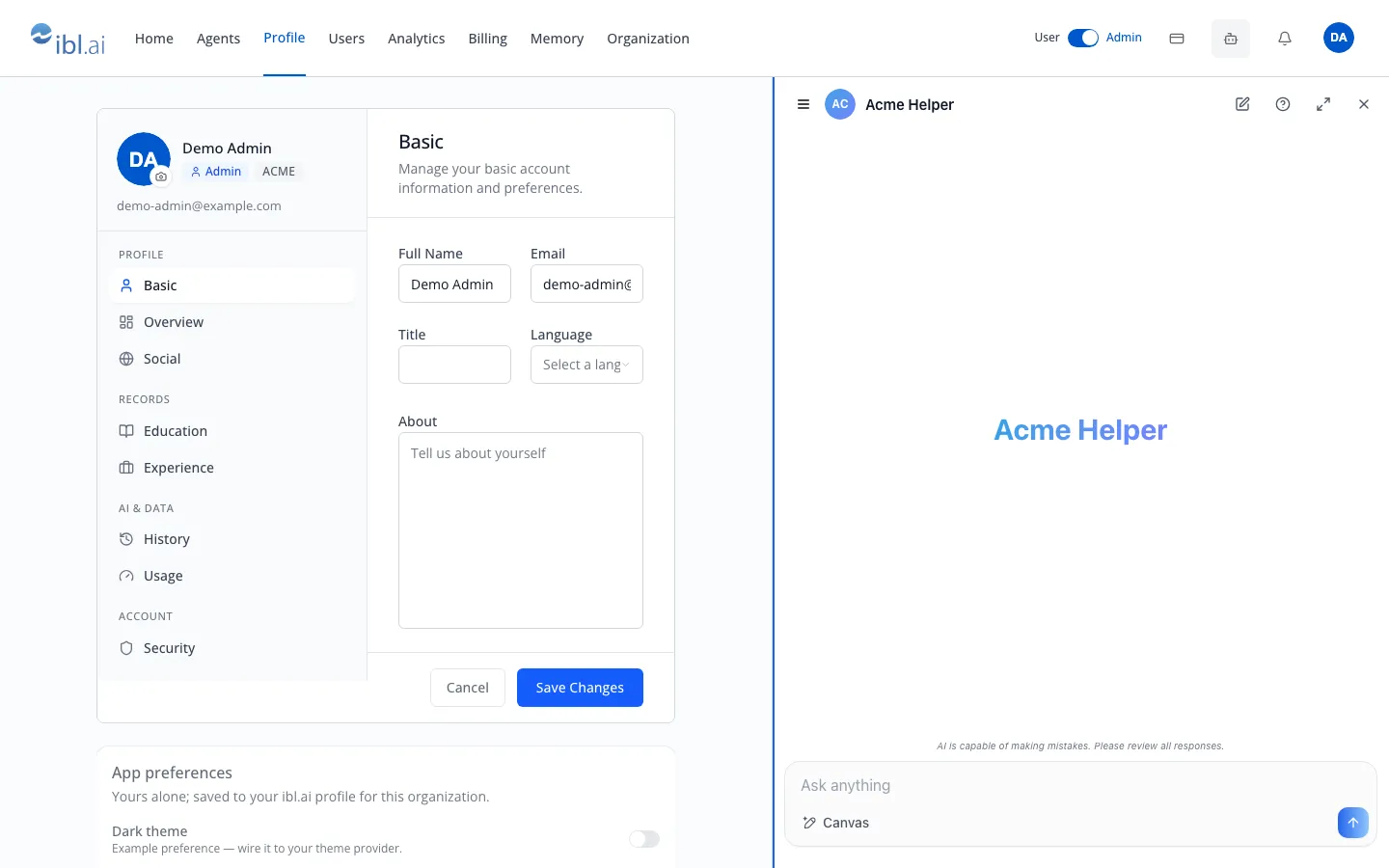
One click docks the agent flush under the header against the window's right edge, **400 px wide** the first time. The page narrows to make room, so nothing is covered, and the conversation stays open while the user moves from page to page.
<a href="/images/updates/assistant-default-agent-beside-every-page-docked.webp" target="_blank" rel="nofollow noopener noreferrer"><img src="/images/updates/assistant-default-agent-beside-every-page-docked.webp" alt="A Profile page for a demo admin of the Acme organization, narrowed to make room for the Assistant docked on the right: the Acme Helper agent with its chat box and its full screen and close buttons, the header's Assistant button pressed." width="1440" height="900" loading="lazy" decoding="async" /></a>

## Which agent does the Assistant open?

The organization's own agent, chosen by its admins rather than by each developer. The Assistant looks for an agent in this order and opens the first it finds:

<table style="width:100%; border-collapse:collapse; margin:1.5rem 0; font-size:0.95rem;">
  <thead>
    <tr style="background:#f5f5f0; border-bottom:2px solid #2175C5;">
      <th style="text-align:left; padding:0.75rem; color:#5f6368;">Order</th>
      <th style="text-align:left; padding:0.75rem; color:#5f6368;">Agent the Assistant opens</th>
    </tr>
  </thead>
  <tbody>
    <tr style="background:#f0f9ff; border-bottom:1px solid #e5e7eb;"><td style="padding:0.75rem;"><strong>1</strong></td><td style="padding:0.75rem;">The organization's <strong>Default Agent</strong>, set by an admin, skipped once that agent no longer exists</td></tr>
    <tr style="border-bottom:1px solid #e5e7eb;"><td style="padding:0.75rem;"><strong>2</strong></td><td style="padding:0.75rem;">Else the agent set in the organization's older Skills setting</td></tr>
    <tr style="border-bottom:1px solid #e5e7eb;"><td style="padding:0.75rem;"><strong>3</strong></td><td style="padding:0.75rem;">Else the agent the user starred</td></tr>
    <tr style="border-bottom:1px solid #e5e7eb;"><td style="padding:0.75rem;"><strong>4</strong></td><td style="padding:0.75rem;">Else the agent the user used last</td></tr>
  </tbody>
</table>

Admins pick the Default Agent on the **Advanced** tab of the app's Account page. In Agentic OS it is Admin mode → settings → **Advanced**, as the [Advanced organization settings](/docs/os/organization-settings/advanced) guide shows. A new choice shows after a reload.

A developer can also pin one agent by passing its ID, and the button appears only once there is an agent to open.

Use it as a helper beside every page: questions about the app, or a copilot over the screen the user is on. Its two labels, *Assistant* and *Resize Assistant*, ship in English, Spanish, French and Chinese.

## How does the docked agent panel resize, go full screen and work on phones?

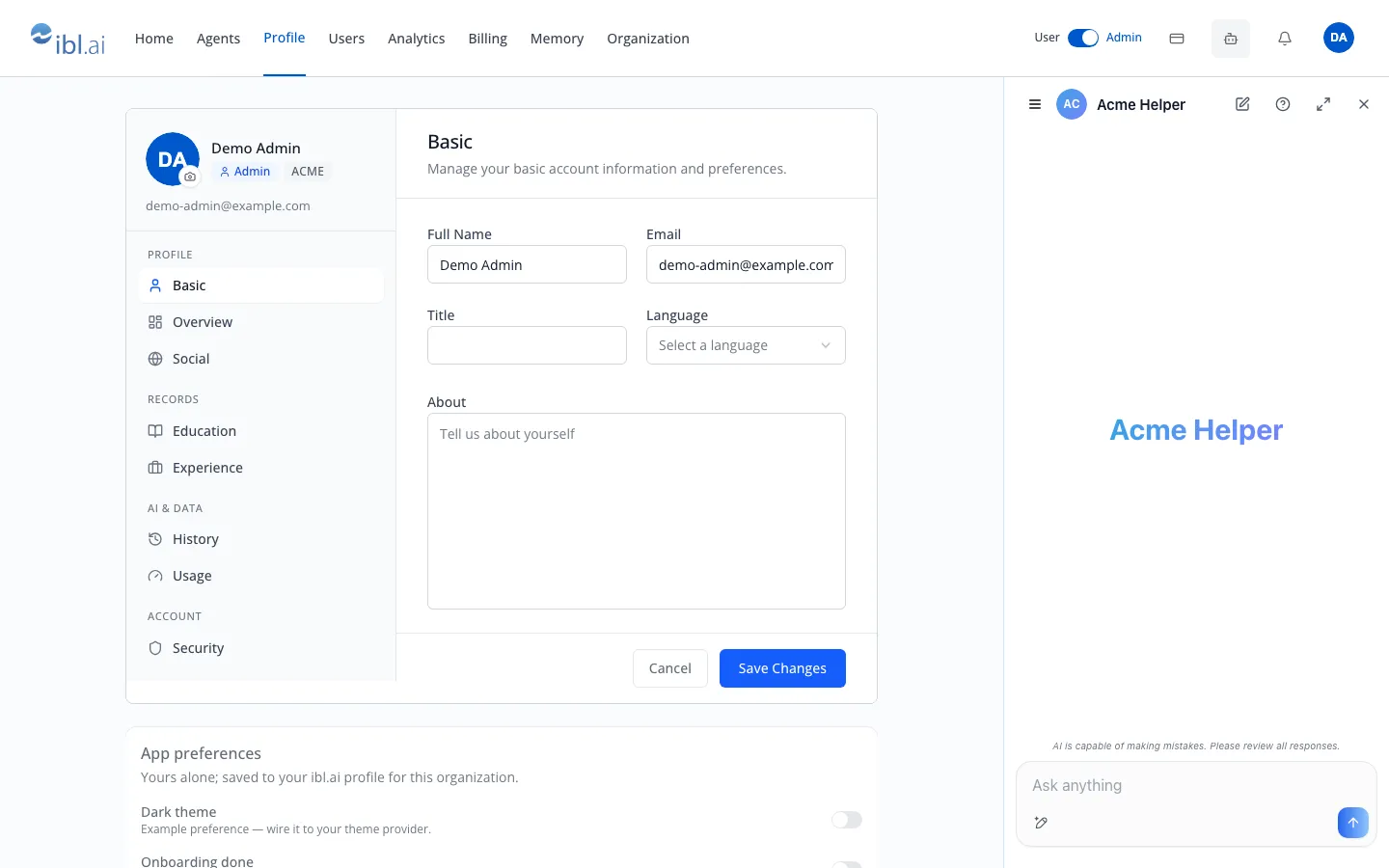
The panel's left edge is a drag handle that turns blue. Users drag it, or focus it and press the arrow keys, **24 px a step**. The width runs from **320 px to 1200 px**, always leaves the page at least 320 px, and is remembered on that device.

<a href="/images/updates/assistant-default-agent-beside-every-page-resize.webp" target="_blank" rel="nofollow noopener noreferrer"><img src="/images/updates/assistant-default-agent-beside-every-page-resize.webp" alt="The Assistant dragged wider, to 640 px, its left edge highlighted blue, with the Profile page narrower beside it and its form fields reflowed." width="1440" height="900" loading="lazy" decoding="async" /></a>

The agent's own **Full screen** button turns the panel into a popup over the dimmed page, with the chat sidebar beside the conversation. While it is open, the page behind it is out of reach for the keyboard and screen readers; **Exit full screen** docks it again.
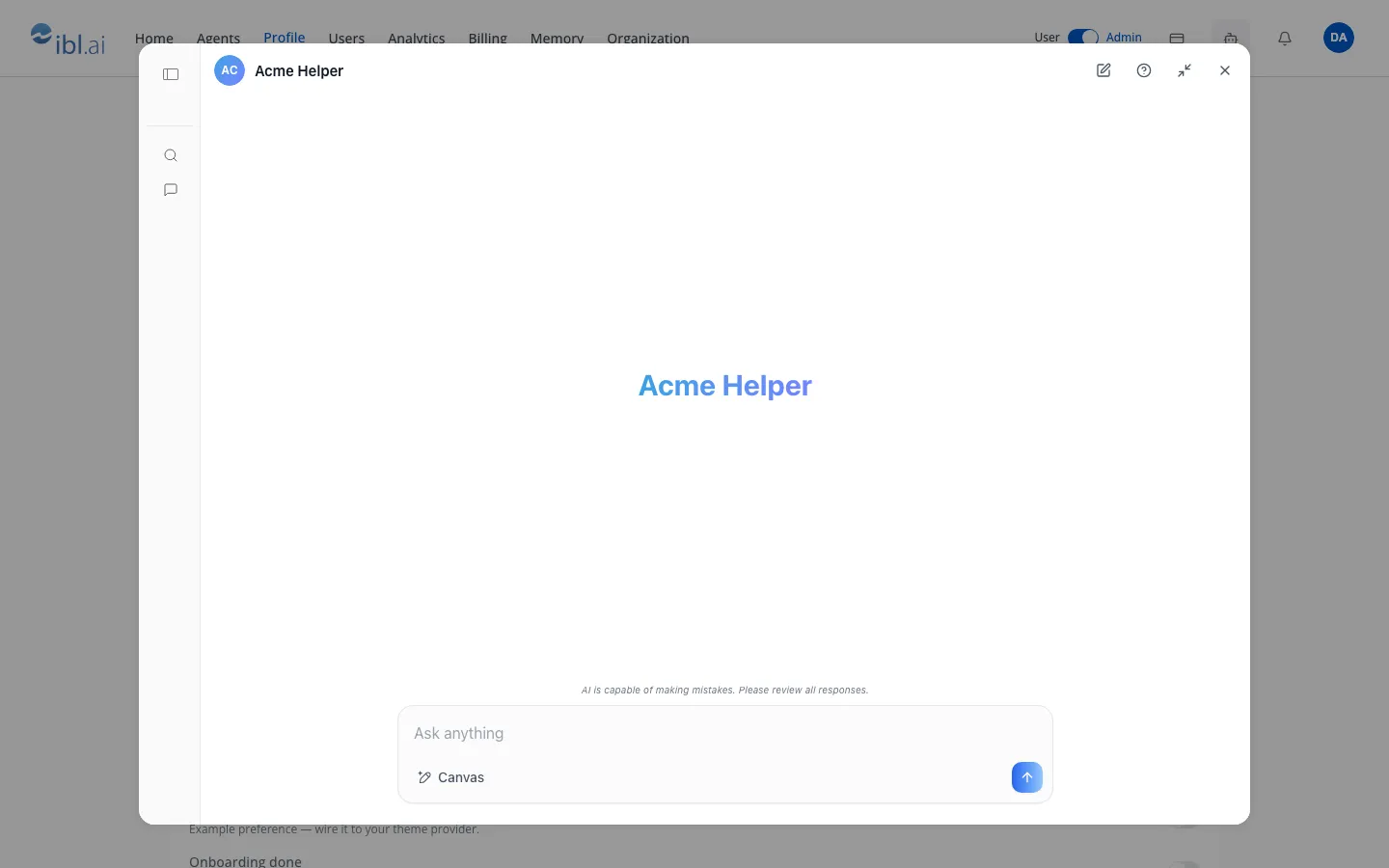
<a href="/images/updates/assistant-default-agent-beside-every-page-full-screen.webp" target="_blank" rel="nofollow noopener noreferrer"><img src="/images/updates/assistant-default-agent-beside-every-page-full-screen.webp" alt="The Assistant in full screen: the Acme Helper agent as a large popup over the dimmed app, with the chat sidebar's search and chats icons on the left and the exit full screen and close buttons at top right." width="1440" height="900" loading="lazy" decoding="async" /></a>

**Close chat** hides the panel and returns focus to the header button, but the chat stays loaded: the next click shows the same conversation. Below **768 px**, on phones, the panel covers the screen with no drag edge, and Close chat returns to the page.
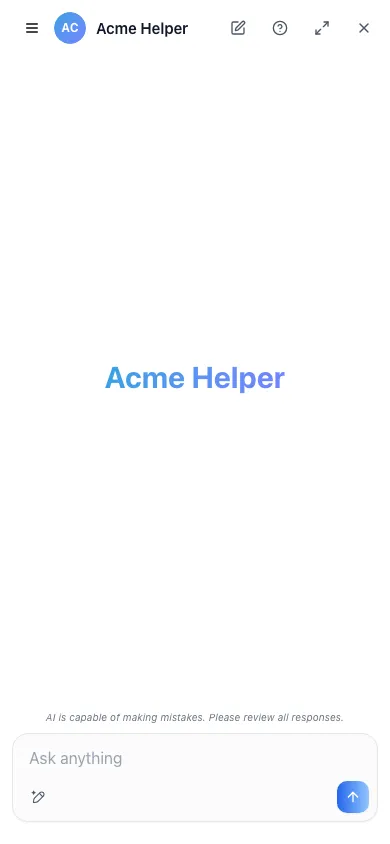
<a href="/images/updates/assistant-default-agent-beside-every-page-phone.webp" target="_blank" rel="nofollow noopener noreferrer"><img src="/images/updates/assistant-default-agent-beside-every-page-phone.webp" alt="On a phone, the Assistant covering the whole screen: the Acme Helper agent with its menu, new chat, help, full screen and close buttons at the top and an Ask anything box at the bottom." width="390" height="844" loading="lazy" decoding="async" style="display:block; max-width:240px; width:100%; height:auto; margin:1.5rem auto;" /></a>

## Is the Assistant signed in as the app's user?

Yes. The panel loads the agent from the hosted ibl.ai app, or your own self-hosted copy of it, and hands it the session your app already stored, instead of sending the user to a login page.

Signed out, or inside an embed of the app, it looks nothing up and shows nothing.

Because the panel carries the user's session, three rules keep it where it belongs:

- **Point it only at the ibl.ai app**, hosted or self-hosted, because the panel passes it the user's session; never at an address a user or a setting can change.
- **The panel listens to its own frame only.** It acts only on that frame's full-screen and close messages, and ignores messages from any other window.
- **The app's chat and the Assistant's never mix.** In an Agentic Base app the agent runs on another origin, so the two conversations are kept apart.

## How does a developer add the Assistant to an Agentic Base app?

In four steps, with three components from the ibl.ai SDK. It needs `@iblai/iblai-js` 2.85.1 or later, which resolves `@iblai/web-containers` 1.81.1, and `@iblai/agent-ai` 2.14.0 or later for full screen.

<div style="display:flex; flex-wrap:wrap; gap:0.5rem; align-items:stretch; margin:1.5rem 0; font-size:0.9rem;">
<div style="flex:1 1 150px; border:1px solid #e5e7eb; border-radius:10px; padding:0.75rem; background:#fff;"><strong>1. The provider</strong><br />Copy the shipped <code>assistant-provider.tsx</code>, which wraps <code>MasterAgentProvider</code> with the app's sign-in and organization.</div>
<div style="flex:1 1 150px; border:1px solid #e5e7eb; border-radius:10px; padding:0.75rem; background:#fff;"><strong>2. The panel</strong><br />Wrap the app shell in the provider and put <code>MasterAgentPanel</code> in a row beside the page's <code>&lt;main&gt;</code>.</div>
<div style="flex:1 1 150px; border:1px solid #e5e7eb; border-radius:10px; padding:0.75rem; background:#fff;"><strong>3. The button</strong><br />Add <code>MasterAgent</code> to the header, before the notifications bell.</div>
<div style="flex:1 1 150px; border:2px solid #2175C5; border-radius:10px; padding:0.75rem; background:#f0f9ff;"><strong>4. Room for it</strong><br />Pages sized from the window, like <code>md:w-[75vw]</code>, become <code>md:w-3/4</code> so they narrow beside the panel.</div>
</div>

Because the provider sits above every page, the panel stays open at its width as the user navigates. Controls pinned to the right edge can step left of it using the `--master-agent-inset` width the panel publishes.

The full walkthrough is on the [`/iblai-vibe-agent-assistant` skill page](/developer/skills/iblai-vibe-agent-assistant). The agent it opens is one of the organization's agents on [Agentic OS](/product/agentic-os), the ibl.ai platform every Agentic Base app builds on.

## Want your organization's agent beside every app your team builds?

We can show the Assistant docked in an internal app of yours, opening the agent your admins choose. [Book a 30-minute demo](https://cal.com/iblai/30min) or [talk to the ibl.ai team](/contact) — ibl.ai is family-owned and operated from New York, NY.