 We've shipped a **Course Authoring agent** that builds Canvas courses through the Canvas REST API — the whole course, not a single resource at a time.
You describe the course in plain English. The agent creates the shell, authors the pages, creates the assignments and quizzes, assembles the modules, wires every item into place, and hands you back a course that a human can review before anyone takes it.
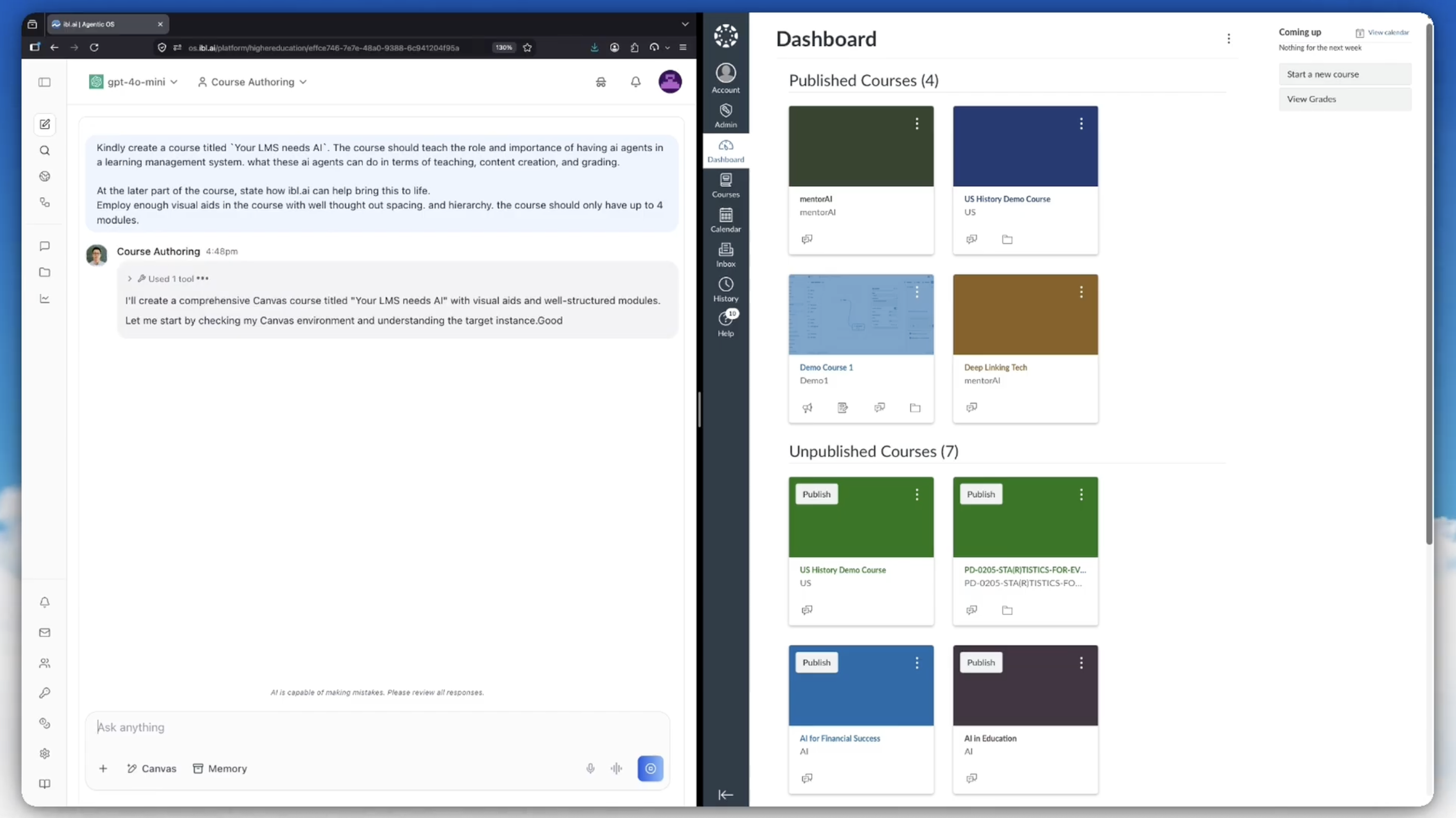
The prompt in the screenshot above is the entire input: a title, what the course should teach, a note about visual hierarchy, and a cap of four modules.
## Watch it build a course
We've shipped a **Course Authoring agent** that builds Canvas courses through the Canvas REST API — the whole course, not a single resource at a time.
You describe the course in plain English. The agent creates the shell, authors the pages, creates the assignments and quizzes, assembles the modules, wires every item into place, and hands you back a course that a human can review before anyone takes it.
The prompt in the screenshot above is the entire input: a title, what the course should teach, a note about visual hierarchy, and a cap of four modules.
## Watch it build a course
| # | Step | Why it's here |
|---|---|---|
| 1 | Course shell | Created unpublished. Everything else hangs off its ID. |
| 2 | Sections | Enrollments later need somewhere to land. |
| 3 | Assignment groups | Assignments need a group to belong to. |
| 4 | Files | A three-step upload, before anything links to them. |
| 5 | Pages, assignments, discussions, quizzes | The actual content. Quiz questions come after their quiz. |
| 6 | Modules | The containers students actually navigate. |
| 7 | Module items | Needs every ID from step 5. This is where hand-rolled scripts break. |
| 8 | Front page and syllabus | The front page has to exist as a page first. |
| 9 | Enrollments | Real people. Added only once the course is worth looking at. |
| 10 | Publish | Modules first, then the course — and the last step is a human's. |
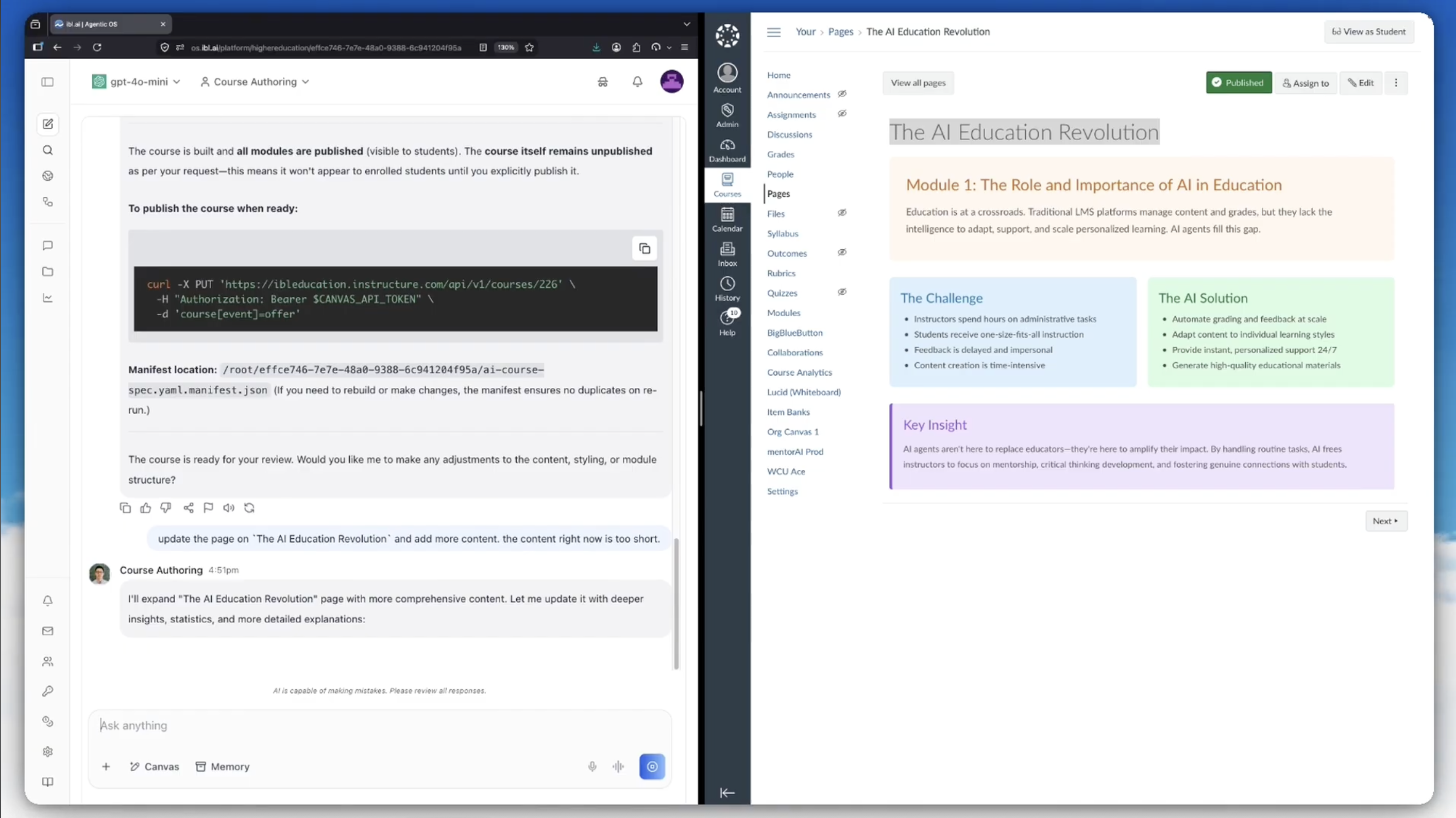 That screenshot is the finished result on the right: a real Canvas page with a module heading, a two-column Challenge/Solution comparison, and a highlighted Key Insight block. The visual hierarchy came from the prompt asking for it.
## Run it twice, get one course
Canvas has no upsert. A second run of a naive script produces a **second copy of every page, assignment, and module** — and nobody notices until a student does.
The agent writes a **manifest**: a JSON file mapping each object in the spec to the ID Canvas assigned it. On a re-run, anything already in the manifest gets updated in place instead of created again.
That also makes a failed build resumable. If it dies halfway through step 7, you run the same command and it picks up from where it stopped rather than starting a duplicate course beside the broken one.
The manifest path is reported at the end of every build, so re-runs are predictable and you always know which state file governs which course.
## Keep talking to it after the build
The build isn't the end of the conversation. In the screenshot above, the follow-up is just: *"update the page on `The AI Education Revolution` and add more content. the content right now is too short."*
The agent finds the page, rewrites the body, and pushes it back — no rebuild, no duplicate. Reviewing a course and revising it are the same interface.
## Things it knows that cost hours to learn
A handful of Canvas behaviors return `200 OK` while quietly doing nothing. The agent is built to expect them:
- **Pages are referenced by slug, not by ID.** Every other content type wires into a module with `content_id`; pages use `page_url`. This is the single most common module-wiring failure.
- **Course dates need a flag to exist.** `start_at` and `end_at` are silently discarded unless the course is set to restrict enrollments to course dates. Canvas returns the course with null dates and no error.
- **A new course may not be empty.** If the account has a course template, Canvas copies it into every new course — so a build can land on top of someone else's content unless it asks for a clean shell.
- **Some create parameters are not nested.** Nest them the way the rest of the API works and they're accepted and ignored. The most visible symptom: the course simply doesn't publish.
- **Collections paginate at 10 by default,** through a `Link` header rather than a page count. Anything that reads existing objects has to follow it or it silently sees a fraction of the course.
- **Throttling looks like a permissions error.** Canvas returns `403` for rate limiting, distinguishable from a real permissions failure only by the body text. Sequential requests almost never hit it; parallel ones are the usual cause.
## Use a migration when a migration is the answer
If you're duplicating an existing course, copying between instances, or importing from another LMS, the **Content Migrations API does in one call** what would otherwise be hundreds — and it preserves internal links and dates, which hand-built copies do not.
The agent is built to recognize that case and say so, rather than hand-rolling something a migration would handle better.
For roster loading at scale, SIS imports beat per-user enrollment calls by orders of magnitude, but they can deactivate enrollments not present in the file. That one stays a deliberate human decision.
## All of this is a skill
Everything above — the build order, the publish discipline, the manifest, the Canvas quirks — lives in a single **Markdown skill file** attached to the agent.
That screenshot is the finished result on the right: a real Canvas page with a module heading, a two-column Challenge/Solution comparison, and a highlighted Key Insight block. The visual hierarchy came from the prompt asking for it.
## Run it twice, get one course
Canvas has no upsert. A second run of a naive script produces a **second copy of every page, assignment, and module** — and nobody notices until a student does.
The agent writes a **manifest**: a JSON file mapping each object in the spec to the ID Canvas assigned it. On a re-run, anything already in the manifest gets updated in place instead of created again.
That also makes a failed build resumable. If it dies halfway through step 7, you run the same command and it picks up from where it stopped rather than starting a duplicate course beside the broken one.
The manifest path is reported at the end of every build, so re-runs are predictable and you always know which state file governs which course.
## Keep talking to it after the build
The build isn't the end of the conversation. In the screenshot above, the follow-up is just: *"update the page on `The AI Education Revolution` and add more content. the content right now is too short."*
The agent finds the page, rewrites the body, and pushes it back — no rebuild, no duplicate. Reviewing a course and revising it are the same interface.
## Things it knows that cost hours to learn
A handful of Canvas behaviors return `200 OK` while quietly doing nothing. The agent is built to expect them:
- **Pages are referenced by slug, not by ID.** Every other content type wires into a module with `content_id`; pages use `page_url`. This is the single most common module-wiring failure.
- **Course dates need a flag to exist.** `start_at` and `end_at` are silently discarded unless the course is set to restrict enrollments to course dates. Canvas returns the course with null dates and no error.
- **A new course may not be empty.** If the account has a course template, Canvas copies it into every new course — so a build can land on top of someone else's content unless it asks for a clean shell.
- **Some create parameters are not nested.** Nest them the way the rest of the API works and they're accepted and ignored. The most visible symptom: the course simply doesn't publish.
- **Collections paginate at 10 by default,** through a `Link` header rather than a page count. Anything that reads existing objects has to follow it or it silently sees a fraction of the course.
- **Throttling looks like a permissions error.** Canvas returns `403` for rate limiting, distinguishable from a real permissions failure only by the body text. Sequential requests almost never hit it; parallel ones are the usual cause.
## Use a migration when a migration is the answer
If you're duplicating an existing course, copying between instances, or importing from another LMS, the **Content Migrations API does in one call** what would otherwise be hundreds — and it preserves internal links and dates, which hand-built copies do not.
The agent is built to recognize that case and say so, rather than hand-rolling something a migration would handle better.
For roster loading at scale, SIS imports beat per-user enrollment calls by orders of magnitude, but they can deactivate enrollments not present in the file. That one stays a deliberate human decision.
## All of this is a skill
Everything above — the build order, the publish discipline, the manifest, the Canvas quirks — lives in a single **Markdown skill file** attached to the agent.
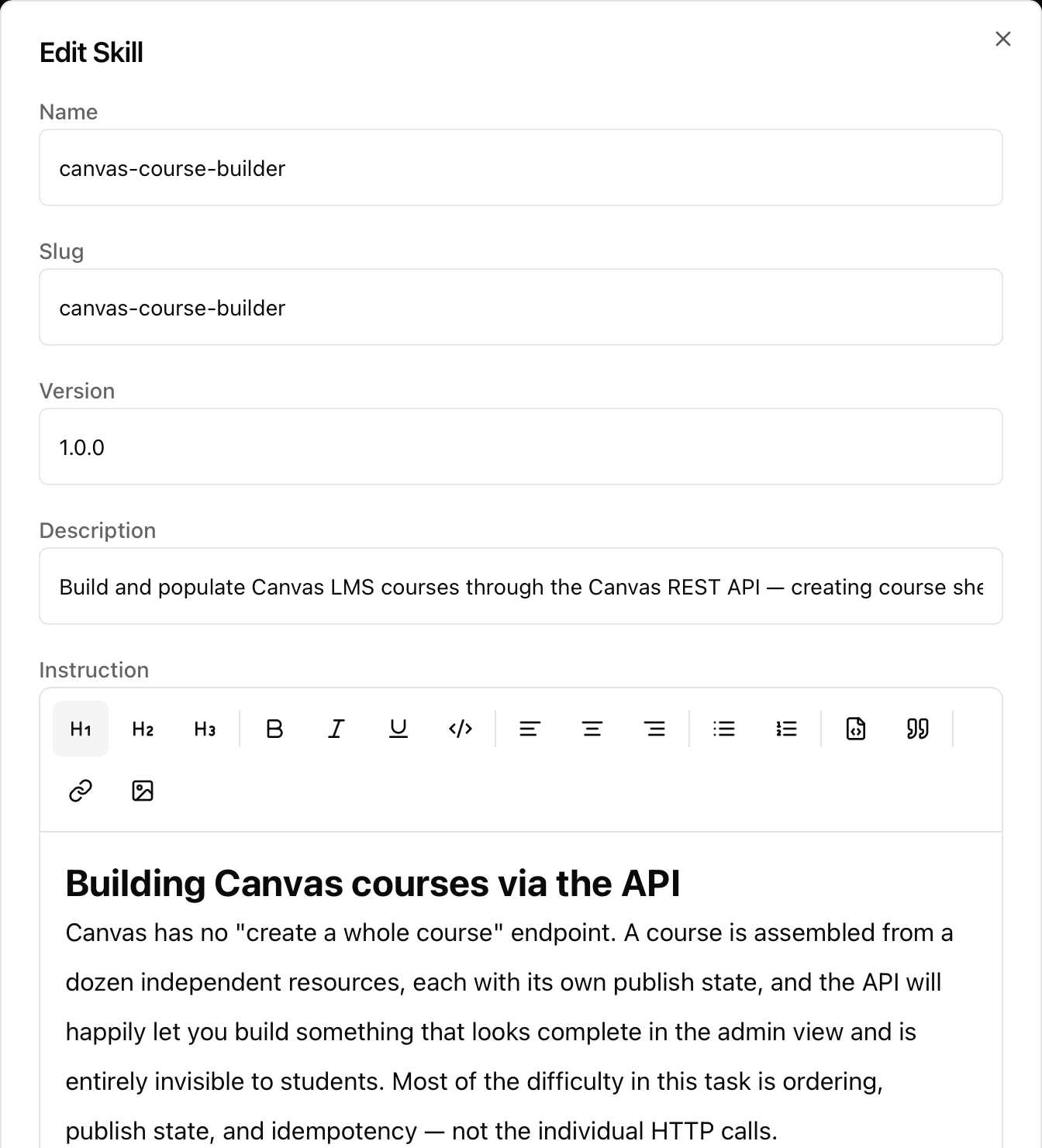 It's a named, versioned entry in the agent's Skills tab — `canvas-course-builder`, version `1.0.0` — with a description that tells the agent when to reach for it and an instruction body it reads at the point of use.
Which means the interesting part is editable by the people who own the process. If your institution has a house style for module naming, or a rule that quizzes are never auto-published, you write that sentence into the skill. No plugin, no deployment, no code review.
Skills are portable across agents, too. The same file can back a course-authoring agent, a curriculum-review agent, and an LMS-migration agent without being rewritten three times.
## Where to find it
The Course Authoring agent is available in Agentic OS. Skills are configured per agent under **Configurations → Skills**, and the same editor is where you'd add your own.
If you want to see what else agents on the platform can be given: the [ibl.ai agent catalog](https://ibl.ai/solutions/higher-education#agents) has around a hundred pre-built configurations across higher education, K-12, enterprise, government, and regulated verticals — each one a set of Markdown files you can read, edit, and own.
It's a named, versioned entry in the agent's Skills tab — `canvas-course-builder`, version `1.0.0` — with a description that tells the agent when to reach for it and an instruction body it reads at the point of use.
Which means the interesting part is editable by the people who own the process. If your institution has a house style for module naming, or a rule that quizzes are never auto-published, you write that sentence into the skill. No plugin, no deployment, no code review.
Skills are portable across agents, too. The same file can back a course-authoring agent, a curriculum-review agent, and an LMS-migration agent without being rewritten three times.
## Where to find it
The Course Authoring agent is available in Agentic OS. Skills are configured per agent under **Configurations → Skills**, and the same editor is where you'd add your own.
If you want to see what else agents on the platform can be given: the [ibl.ai agent catalog](https://ibl.ai/solutions/higher-education#agents) has around a hundred pre-built configurations across higher education, K-12, enterprise, government, and regulated verticals — each one a set of Markdown files you can read, edit, and own.