---
title: "Code Mode From Your Phone: Pair It to Your Desktop"
slug: "code-mode-from-your-phone"
date: "2026-09-28"
tag: "Application"
summary: "Code Mode, the coding agent in Agentic OS, now runs from a phone: scan a QR code on the desktop app, and the phone drives the same agent editing files, running commands and committing in a workspace on your own computer — with every change still approved or denied from the chat."
author: "ibl.ai Engineering"
repo: "iblai/vibe"
linkedin: |
Our coding agent now fits in your pocket — and your code never leaves your own computer.
Code Mode is the agentic coding tool built into Agentic OS: switch on the Code pill and the agent edits files, runs shell commands and commits changes in a workspace on your machine, asking before each operation or working automatically in folders you trust.
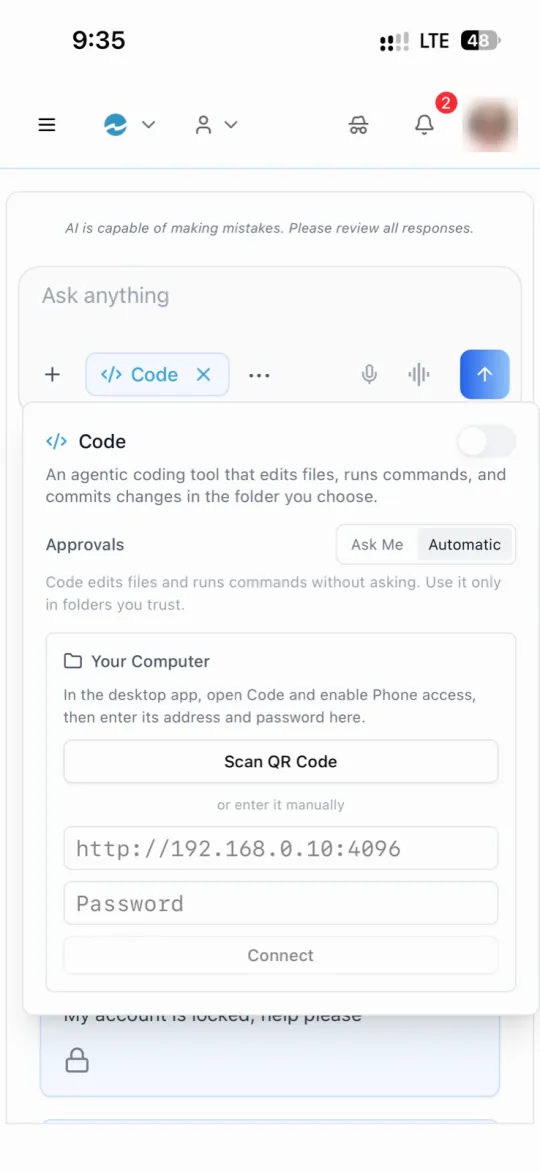
As of this release, a phone can drive it. The desktop app shows a QR code under Phone Access; the phone scans it, or takes the address and password by hand, and connects over the local network.
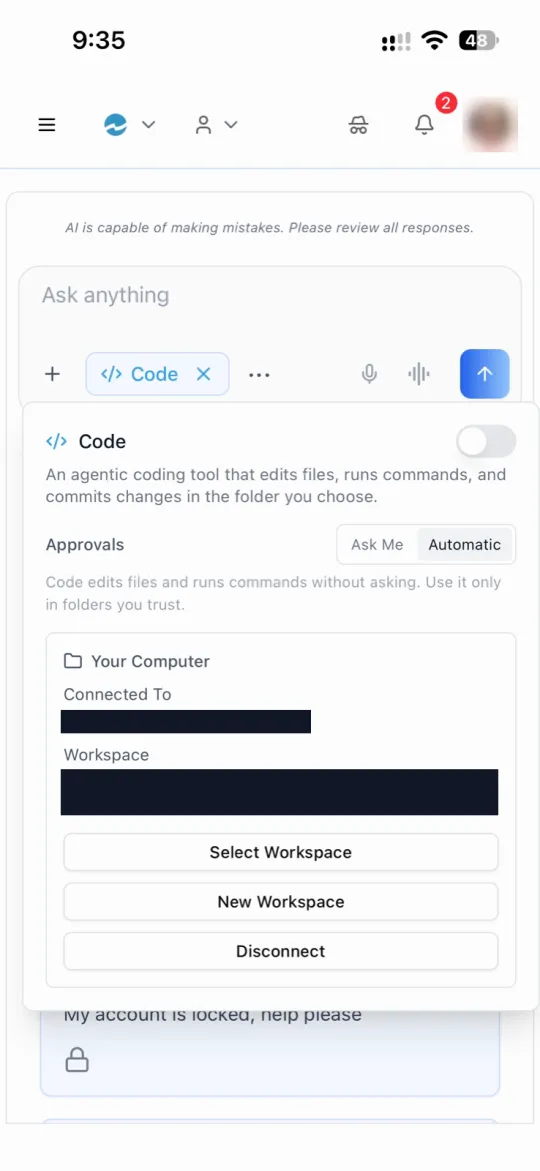
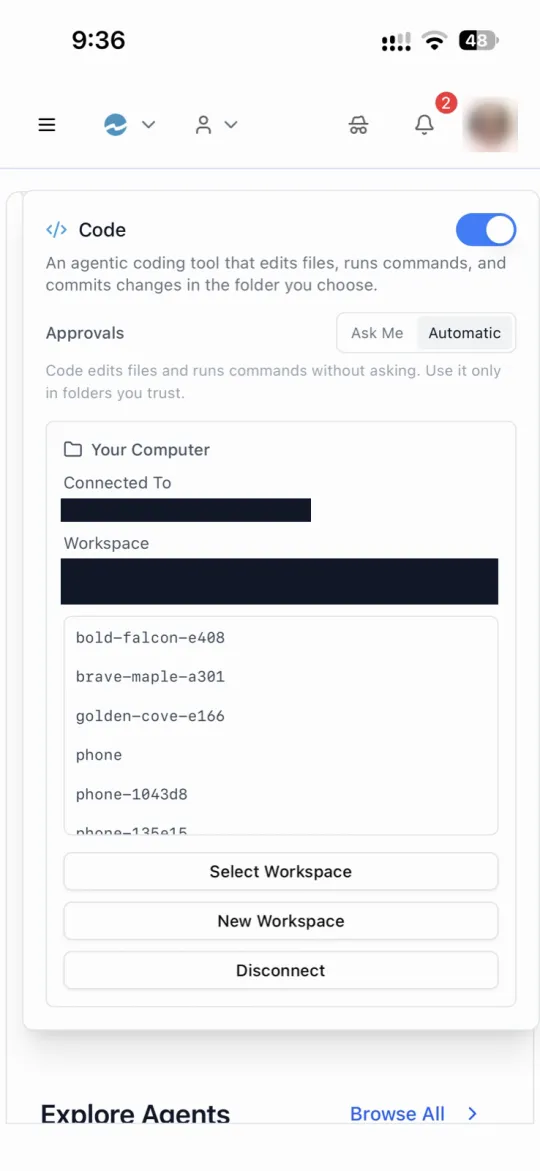
From then on you can pick any of the desktop's workspaces, start a new one, and run the same turns from the couch that you would at your desk.
The design choice underneath is the part we care about. A phone can't run a coding agent, so it doesn't: the work stays on your computer, in your workspace, under your approvals. The phone is a remote control, not a copy.
The agent never holds your real credentials either: its model calls go through a local proxy that injects your token out of its reach, and on macOS and Linux it runs sandboxed.
It ships in Agentic OS, and as a skill that adds the same Code Mode to any desktop app you build with Agentic Vibe. With ibl.ai you own all the code and the data — including the code your agent writes.
#iblai #AgenticAI #EnterpriseAI #CodingAgents #DeveloperTools #AIApps
---
**Code Mode, the coding agent built into ibl.ai's Agentic OS, now runs from a phone: pair it to the desktop app with a QR code, and the phone drives the same agent editing files, running commands and committing in a workspace on your own computer.**
On ibl.ai you own all the code and the data — and with Code Mode, the code the agent writes never leaves your machine.
Phone access shipped with the `/iblai-vibe-os-agent-code-mode` skill on **September 17, 2026**, which adds the whole of Code Mode — desktop and phone — to any app built with [Agentic Vibe](/product/agentic-vibe). For what Code Mode does on the desktop, see the original [Code Mode](/updates/code-mode) announcement.
## How does Code Mode work in Agentic OS?
Switch on the **Code** pill in the chat composer, and a chat turn stops going to the hosted agent. The desktop app starts the open-source [opencode](https://github.com/anomalyco/opencode) coding agent for that chat, and it edits files, runs shell commands and commits changes in a git-backed **workspace** on your computer.
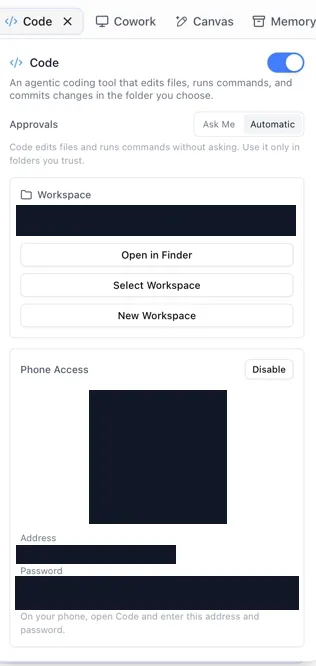 Every operation the agent wants surfaces as a **permission card** in the reply, which you allow or deny. Switch Approvals from **Ask Me** to **Automatic** and it proceeds on its own — the app's own advice is to use that only in folders you trust.
In these screenshots, the pairing code, password, workspace path and network address are redacted.
## How do you use Code Mode from a phone?
A phone can't run a coding agent itself, so it pairs with the desktop instead.
On the desktop, turn on **Phone Access** in the Code settings; it shows a QR code, an address on your local network, and a password — a fresh one every time Phone Access is switched on, and the host shuts down with the app.
On the phone, open Code and **scan the QR code**, or type the address and password. Once connected, the phone shows which computer it is talking to and which workspace is open, and can select another workspace, start a new one, or disconnect.
From there, a turn typed on the phone runs on the desktop against that workspace — the same agent, the same files, the same approval cards. The phone is a remote control, not a second copy of your code.
## Is it safe to give a coding agent access to your computer?
Code Mode is built so the agent works inside limits you set, rather than on trust.
- **It never holds your real token.** Its model calls go to ibl.ai's OpenAI-compatible API through a local proxy that injects your token out of the agent's reach; the only credential the agent receives is a scoped, week-long, revocable API key.
- **It runs sandboxed** — through the operating system's own sandbox on macOS, and bubblewrap on Linux.
- **It works in a workspace you choose**, git-backed, so every change is a commit you can inspect or undo.
- **It asks first** unless you tell it not to; a permission card left unanswered for 180 seconds counts as a denial.
The agent also picks up skills: each agent's skills sync from the platform, along with the latest [Agentic Vibe](/developer/vibe) release, so the coding agent knows how to build on ibl.ai before you ask.
## Where does Code Mode run?
Code Mode runs on **macOS and Linux** desktops, in the directly distributed build of the desktop app, and phones on **iOS and Android** use it as paired clients.
The skill ships the implementation itself — the desktop app's Rust modules and the chat components — rather than a specification to re-implement, so an app built with Agentic Vibe gets the same Code Mode that [Agentic OS](/product/agentic-os) runs.
## Want your team coding with agents on your own machines?
We can show Code Mode running end to end — desktop, phone and approvals. [Book a 30-minute demo](https://cal.com/iblai/30min) or [talk to the ibl.ai team](/contact) — ibl.ai is family-owned and operated from New York, NY.
Every operation the agent wants surfaces as a **permission card** in the reply, which you allow or deny. Switch Approvals from **Ask Me** to **Automatic** and it proceeds on its own — the app's own advice is to use that only in folders you trust.
In these screenshots, the pairing code, password, workspace path and network address are redacted.
## How do you use Code Mode from a phone?
A phone can't run a coding agent itself, so it pairs with the desktop instead.
On the desktop, turn on **Phone Access** in the Code settings; it shows a QR code, an address on your local network, and a password — a fresh one every time Phone Access is switched on, and the host shuts down with the app.
On the phone, open Code and **scan the QR code**, or type the address and password. Once connected, the phone shows which computer it is talking to and which workspace is open, and can select another workspace, start a new one, or disconnect.
From there, a turn typed on the phone runs on the desktop against that workspace — the same agent, the same files, the same approval cards. The phone is a remote control, not a second copy of your code.
## Is it safe to give a coding agent access to your computer?
Code Mode is built so the agent works inside limits you set, rather than on trust.
- **It never holds your real token.** Its model calls go to ibl.ai's OpenAI-compatible API through a local proxy that injects your token out of the agent's reach; the only credential the agent receives is a scoped, week-long, revocable API key.
- **It runs sandboxed** — through the operating system's own sandbox on macOS, and bubblewrap on Linux.
- **It works in a workspace you choose**, git-backed, so every change is a commit you can inspect or undo.
- **It asks first** unless you tell it not to; a permission card left unanswered for 180 seconds counts as a denial.
The agent also picks up skills: each agent's skills sync from the platform, along with the latest [Agentic Vibe](/developer/vibe) release, so the coding agent knows how to build on ibl.ai before you ask.
## Where does Code Mode run?
Code Mode runs on **macOS and Linux** desktops, in the directly distributed build of the desktop app, and phones on **iOS and Android** use it as paired clients.
The skill ships the implementation itself — the desktop app's Rust modules and the chat components — rather than a specification to re-implement, so an app built with Agentic Vibe gets the same Code Mode that [Agentic OS](/product/agentic-os) runs.
## Want your team coding with agents on your own machines?
We can show Code Mode running end to end — desktop, phone and approvals. [Book a 30-minute demo](https://cal.com/iblai/30min) or [talk to the ibl.ai team](/contact) — ibl.ai is family-owned and operated from New York, NY.