---
title: "Cowork: Your ibl.ai Agent Can Now Use Your Computer"
slug: "cowork-agent-uses-your-computer"
date: "2026-11-22"
tag: "Application"
summary: "Cowork lets an agent in the ibl.ai desktop app see your screen and click and type for you, after a one-time consent and a guided two-step macOS setup. It runs on your organization's models or a model on your own computer, and next to Code one message can edit files and work the screen under the same approvals."
author: "ibl.ai Engineering"
repo: "iblai/base"
linkedin: |
Our agents can now use your computer: switch on Cowork in the ibl.ai desktop app and the agent sees your screen, opens apps, and clicks and types for you.
It asks first. The first click on the Cowork pill shows what it means in plain words: it sees your screen, can act as you on sites you are signed in to, and some of what it does can't be undone. Not Now leaves it off and remembers nothing.
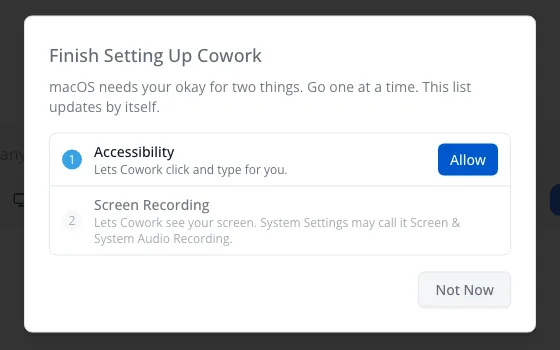
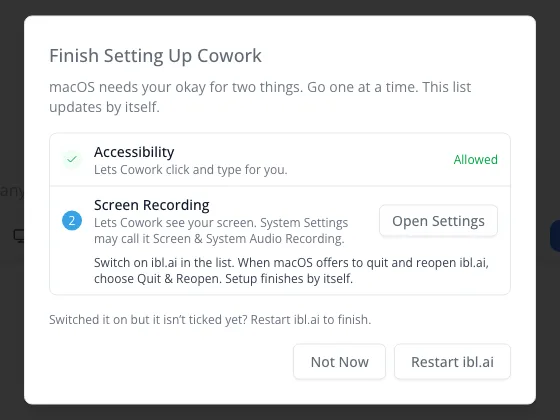
On a Mac, a two-step checklist walks you through the Accessibility and Screen Recording permissions, one at a time, and picks itself back up after the relaunch macOS needs.
It can run on your organization's models, or on a model on your own computer (12 GB or larger), where what it sees never leaves the machine.
Turn on Code as well and one message can edit a file and then click through an app to check it. With Approvals set to Ask Me, every file change, command and screen action waits for your Allow.
It ships in Agentic OS, and as an Agentic Base skill that adds the same Cowork to a desktop app you build. With ibl.ai you own all the code and the data.
#iblai #AgenticAI #EnterpriseAI #ComputerUse #AIAgents #DeveloperTools
---
**Cowork, now in the ibl.ai desktop app, lets an agent see your screen and click and type for you, after a one-time consent and a guided two-step macOS setup, on your organization's models or a model on your own computer, and Agentic Base adds the same Cowork to desktop apps you build; with ibl.ai you own all the code and the data.**
The `/iblai-vibe-os-agent-cowork` skill shipped in [Agentic Base](/product/agentic-base) **v2.26.0 on November 20, 2026**, one of six Agentic Base releases between v2.25.0 and v2.26.1 on November 19 and 20.
The platform's changelog first lists screen capture for Cowork computer use on [August 7, 2026](/updates/platform-update-2026-08-07).
## What does Cowork let an ibl.ai agent do on your computer?
Cowork is a pill under the message box in [Agentic OS](/product/agentic-os). Switch it on and the agent can see what is on the screen, open apps, and click and type for you, including in your browser on sites you are already signed in to.
That is the work agents usually stop short of: the steps that live in a desktop app or a signed-in web page with no API. Cowork is the same agent in the same chat, given hands.
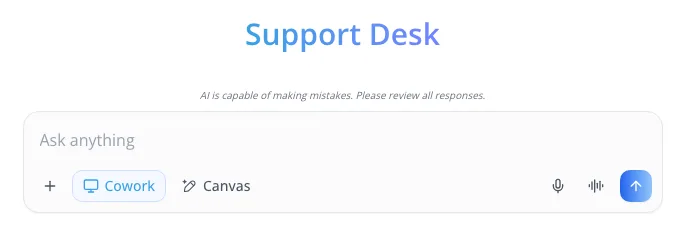 Once it is on, the app confirms with **Cowork is on.** and the pill turns blue. Click it again to turn it off, which also stops the screen driver.
## How does Cowork ask for consent before it touches the screen?
The first click on the pill asks **Let Cowork Use Your Computer?** before anything is downloaded or any operating-system permission is requested.
It says what that means in plain words: it sees the screen, acts as you on signed-in sites, sends what it sees to the ibl.ai platform, and some of what it does can't be undone. Close anything private first. On Local Models, nothing it sees leaves the computer.
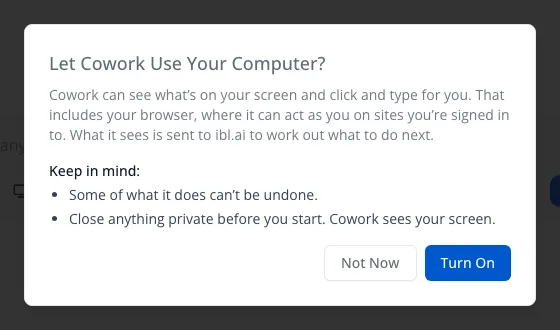 **Turn On** remembers the answer and downloads the screen driver once. **Not Now**, or Escape, leaves Cowork off and remembers nothing. Cowork never turns itself on, and the toolkit's own rule for developers is never to switch it on for a user.
## How does Cowork handle the macOS Accessibility and Screen Recording permissions?
On a Mac, the dialog becomes **Finish Setting Up Cowork**, a 2-step checklist: **Accessibility**, so Cowork can click and type, then **Screen Recording**, so it can see. Only the current step has a button, so two macOS alerts never pile up, and the list refreshes itself every second.
macOS applies a Screen Recording grant only to processes started after it, so the app has to restart. Cowork offers **Restart ibl.ai**, then picks the setup back up by itself, as long as the relaunch comes within 10 minutes of the last step.
Windows and Linux ask for no permissions: after the consent, Cowork turns straight on. The Mac App Store build shows the pill disabled, because a sandboxed app cannot drive other apps; Cowork ships in the directly distributed build.
## Which models can run Cowork, and can it stay on the computer?
Signed in, Cowork runs on **your organization's models**, on its credits. Switch on **Local Models** and it runs on the model on your own computer instead, which must be at least **12 GB**; a smaller one gets *Your local model is too small for Cowork*.
On Local Models, what Cowork sees stays on the computer: the request goes to Ollama at a fixed local address that nothing in the request can change, on a copy of the model sized to 32,768 tokens.
The toolkit is candid about the trade-off: the first reply in a chat can take a few minutes, and small models still make mistakes on long tasks.
## Can one message both edit files and work the screen?
Yes. Turn on [Code](/updates/code-mode) and Cowork together and Code keeps the turn, with the screen tools added: one message can edit a file and then click through an app to check the result. Switching Cowork on or off mid-chat keeps the conversation.
**Approvals** sits beside Send while Code is on and covers both. **Ask Me** puts a permission card in the reply before every file change, every command and every screen action, and a card left alone for three minutes counts as Deny.
**Automatic** shows no cards, and its hint says so plainly: with Cowork on, it also acts on your screen without asking.
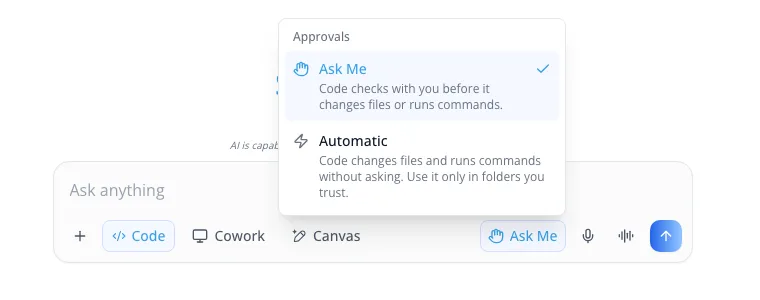
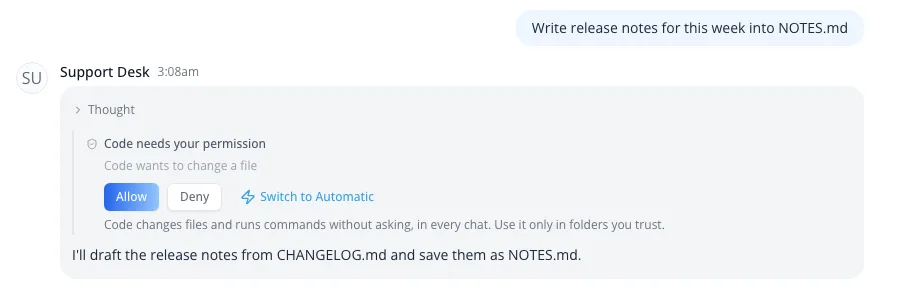 A computer where nobody has chosen yet runs Automatic. An Ask Me chosen on another computer carries over to one with no choice saved; an Automatic does not. Code itself runs on macOS and Linux, and can also hand a turn to [Codex or Claude Code](/updates/code-mode-codex-claude-code).
## What does Cowork do in the ibl.ai Chrome extension?
In the [Chrome extension's side panel](/updates/chrome-extension-agents-side-panel), the same pill drives the tab you are looking at instead of the whole computer, so there is no driver to install and no macOS setup. It never reads password or payment fields.
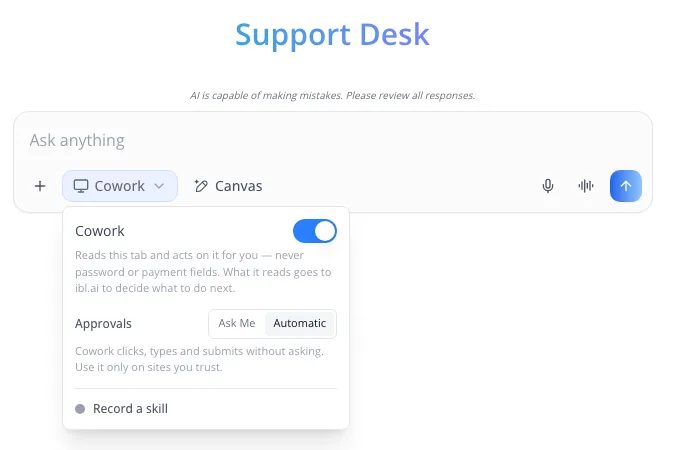 The panel has its own Approvals choice. **Automatic**, the default, clicks, types and submits without asking; **Ask Me** checks with you before it submits a form. New in SDK 2.83.0, **Record a skill** watches what you do on the page and reports how many steps it caught.
## How do developers add Cowork to their own desktop app?
The skill ships the Agentic OS desktop app's own Rust files, not a specification to re-implement. The SDK's chat component owns everything people see: the pill, the consent, the macOS steps and the loop that runs each screen action. Your Tauri app supplies the driver.
That driver is the open-source **cua-driver**, pinned at version 0.17.0 from the [trycua/cua](https://github.com/trycua/cua/releases) releases. The app downloads it the first time Cowork is switched on, checks its SHA-256 against the release's checksums.
It runs the driver as a plain child process of the app, never from the webview, so macOS ties the grants to your signed app. One driver owns the screen: starting Cowork closes any Code session holding the screen tools.
Cowork needs `@iblai/iblai-js` 2.83.0 or later, on macOS, Windows, or Linux under X11 or Sway. KDE Plasma is not supported yet, GNOME needs its WinRects helper, and phones never show the pill.
A desktop build without the Rust side can hide the pill with one switch, `features: { cowork: false }`. The full recipe is in the [skill on GitHub](https://github.com/iblai/base/blob/main/skills/agents/iblai-vibe-os-agent-cowork/SKILL.md).
## Want to see an agent work your team's desktop apps?
We can show Cowork and Code working one task end to end, on your models or on a model on your own machine. [Book a 30-minute demo](https://cal.com/iblai/30min) or [talk to the ibl.ai team](/contact) — ibl.ai is family-owned and operated from New York, NY.