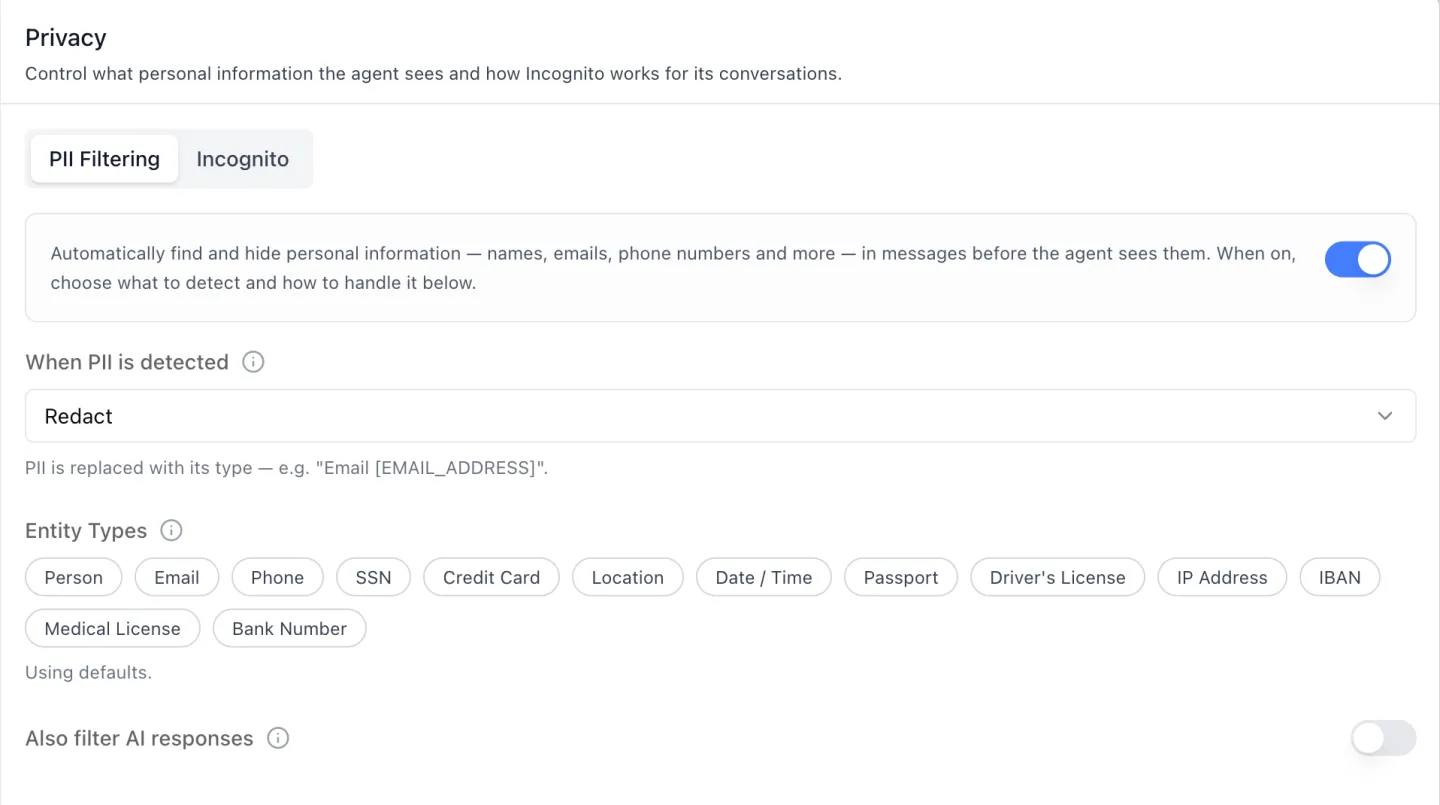
 **When PII is detected** offers four actions, each with its own on-screen description:
| Action | What reaches the model |
|---|---|
| Allow | The message, untouched. Detection still runs, for monitoring or auditing without altering what people write. |
| Redact (default) | The value replaced with its type — Email [EMAIL_ADDRESS]. |
| Mask | The value hidden behind asterisks. |
| Block | Nothing. The message is rejected and the block message you wrote is shown to the person instead. |
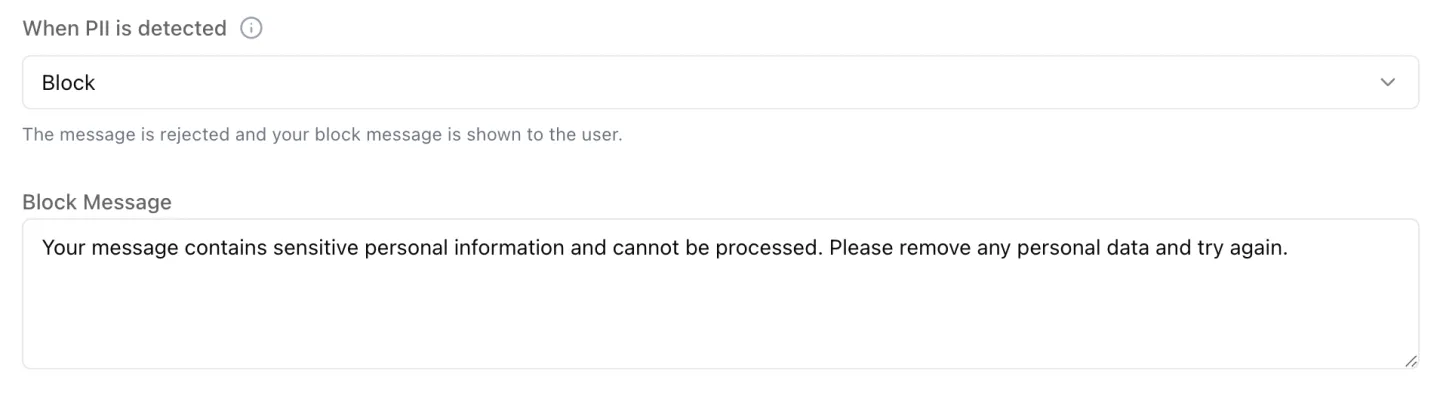 **Entity Types** is a row of thirteen chips — Person, Email, Phone, SSN, Credit Card, Location, Date / Time, Passport, Driver's License, IP Address, IBAN, Medical License and Bank Number. Select none and the hint reads *"Using defaults."*
## Who decides whether a conversation is saved at all?
Four tiers do, and the Incognito sub-tab is one of them. Incognito keeps a conversation out of chat history and memory; the question of who may turn it on is answered in this order, highest first.
**Entity Types** is a row of thirteen chips — Person, Email, Phone, SSN, Credit Card, Location, Date / Time, Passport, Driver's License, IP Address, IBAN, Medical License and Bank Number. Select none and the hint reads *"Using defaults."*
## Who decides whether a conversation is saved at all?
Four tiers do, and the Incognito sub-tab is one of them. Incognito keeps a conversation out of chat history and memory; the question of who may turn it on is answered in this order, highest first.
| Tier | Who sets it | Where |
|---|---|---|
| Agent policy | Agent administrator | Agent → Privacy → Incognito |
| Organization gate | Administrator | Account → Advanced → Allow users to control chat privacy |
| This conversation | The person chatting | The Incognito toggle in the chat header |
| User default | Each person | Profile → Privacy |
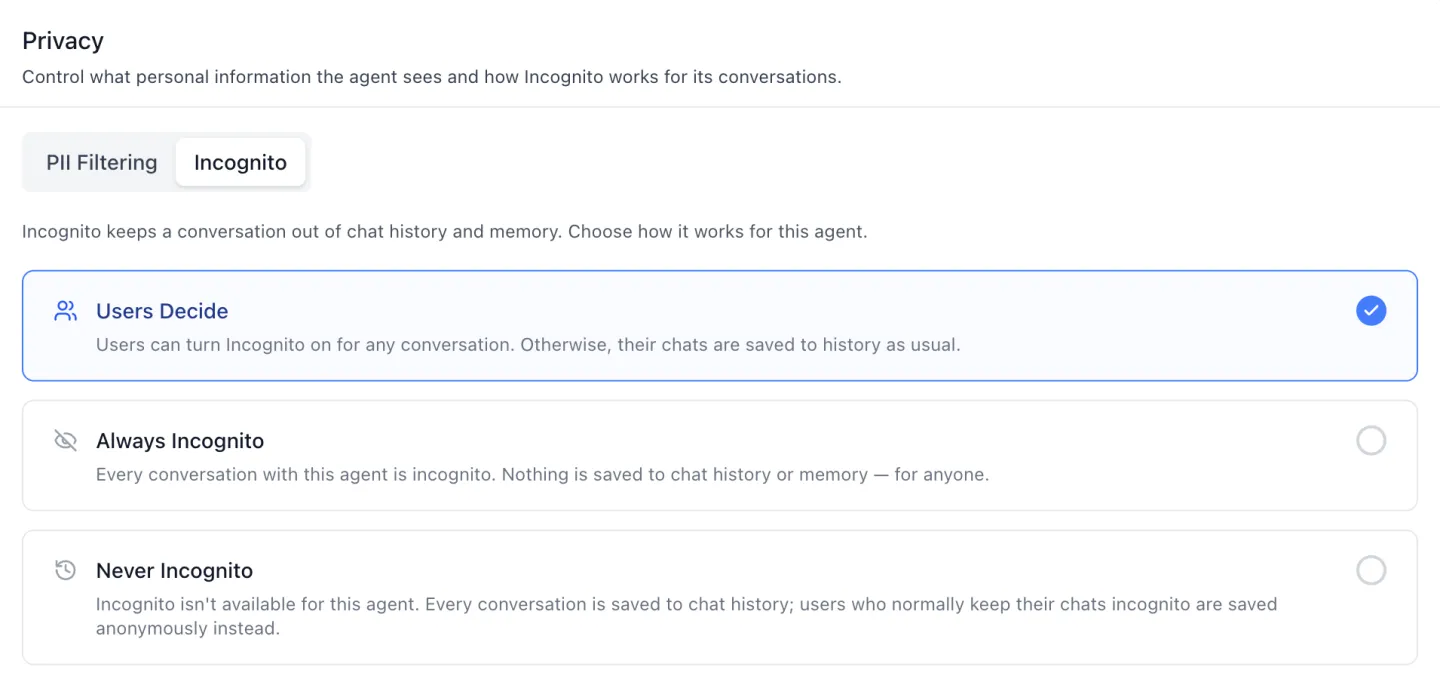 One control writes both underlying flags in a single save, so the contradictory "always *and* never" pair cannot be configured from this screen at all.
## How does an application know which tier won?
It asks. Over the platform's REST API, one endpoint resolves all four tiers for a given organization, user, agent and session, and answers three things: the resolved `mode`, the `source` that decided it, and whether the result is locked.
The three modes are **normal**, **anonymized** and **disabled** — and disabled is Incognito. That resolved answer is what lets a chat header render an honest locked state with a tooltip explaining which tier decided, instead of a toggle that quietly does nothing.
Saving an Incognito card also refreshes that resolution and the agent's public settings, so an open chat's pill locks, unlocks or disappears without a reload.
## What does Incognito actually withhold?
The message text. No chat-history row is written for an incognito turn and nothing from it feeds memory — and a chat *started* in Incognito is created with no owner at all, so the guarantee rests on a missing ownership record rather than a flag someone can flip back.
Each turn is still recorded against the user for usage, so an incognito conversation still counts against consumption. What Incognito withholds is the history row and the memory write.
Turning Incognito on mid-conversation is the one action that asks first, because it is the one that is easy to misread — the earlier messages do not disappear.
One control writes both underlying flags in a single save, so the contradictory "always *and* never" pair cannot be configured from this screen at all.
## How does an application know which tier won?
It asks. Over the platform's REST API, one endpoint resolves all four tiers for a given organization, user, agent and session, and answers three things: the resolved `mode`, the `source` that decided it, and whether the result is locked.
The three modes are **normal**, **anonymized** and **disabled** — and disabled is Incognito. That resolved answer is what lets a chat header render an honest locked state with a tooltip explaining which tier decided, instead of a toggle that quietly does nothing.
Saving an Incognito card also refreshes that resolution and the agent's public settings, so an open chat's pill locks, unlocks or disappears without a reload.
## What does Incognito actually withhold?
The message text. No chat-history row is written for an incognito turn and nothing from it feeds memory — and a chat *started* in Incognito is created with no owner at all, so the guarantee rests on a missing ownership record rather than a flag someone can flip back.
Each turn is still recorded against the user for usage, so an incognito conversation still counts against consumption. What Incognito withholds is the history row and the memory write.
Turning Incognito on mid-conversation is the one action that asks first, because it is the one that is easy to misread — the earlier messages do not disappear.
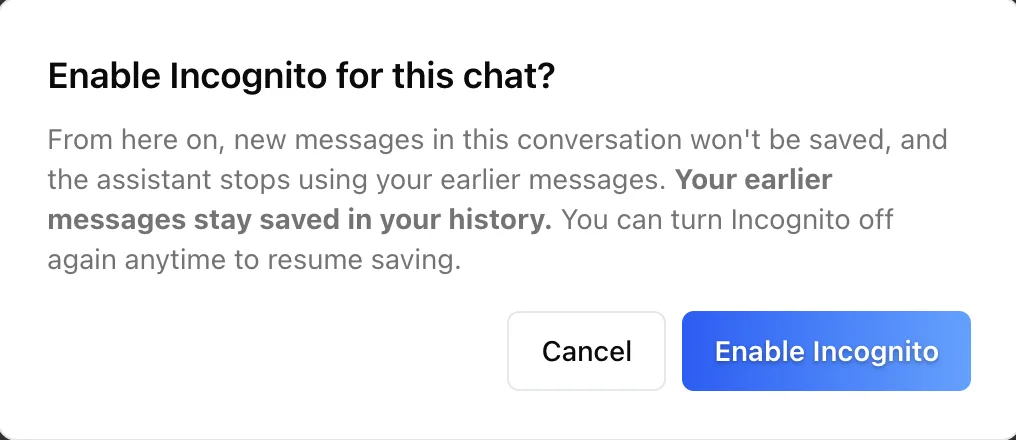 Turning it back off, and either direction on a chat with no messages yet, act immediately with a toast.
Once an ownerless incognito chat holds messages it can never be converted back: the toggle locks, and its tooltip points the person to a new chat.
## Can a person set their own default rather than per chat?
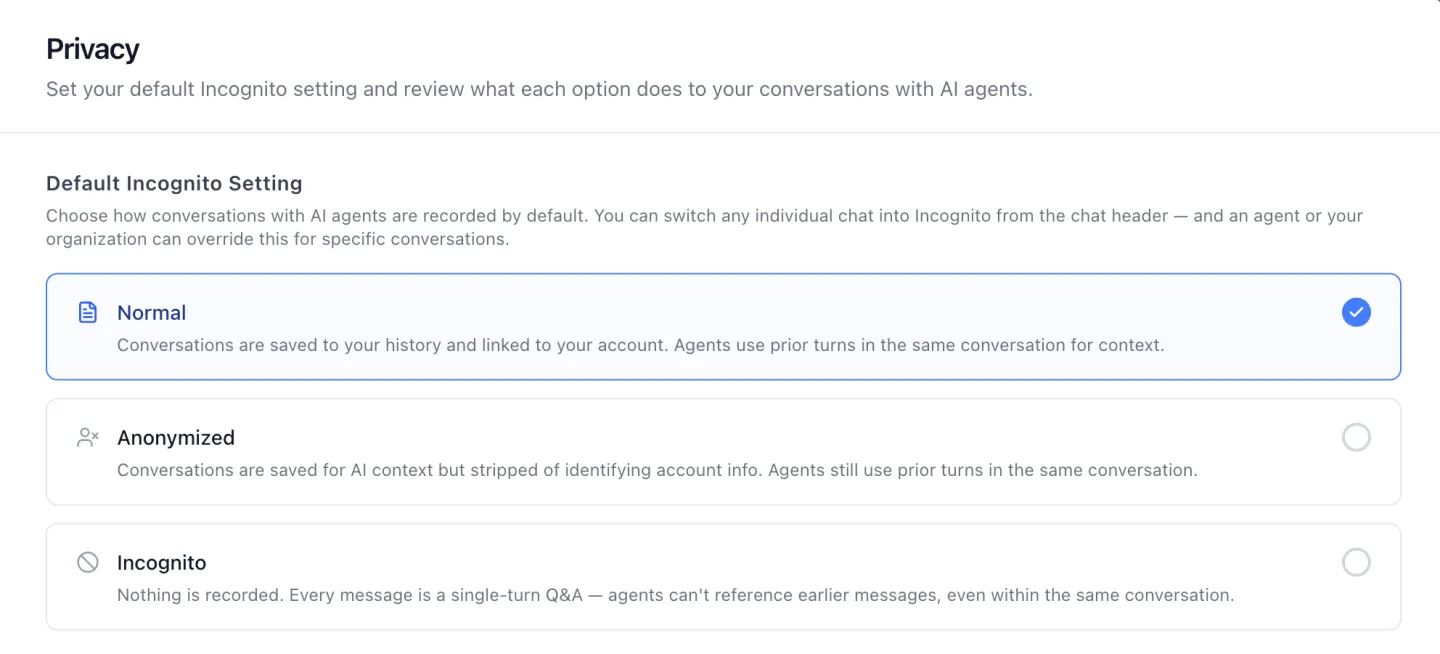
Yes. The **Privacy** tab of each person's own profile sets a default Incognito setting across three options — **Normal**, **Anonymized** and **Incognito** — with the platform's own description of each on screen.
Anonymized is the middle ground that is easy to miss: conversations are still saved for context, but stripped of the identifying account information.
Turning it back off, and either direction on a chat with no messages yet, act immediately with a toast.
Once an ownerless incognito chat holds messages it can never be converted back: the toggle locks, and its tooltip points the person to a new chat.
## Can a person set their own default rather than per chat?
Yes. The **Privacy** tab of each person's own profile sets a default Incognito setting across three options — **Normal**, **Anonymized** and **Incognito** — with the platform's own description of each on screen.
Anonymized is the middle ground that is easy to miss: conversations are still saved for context, but stripped of the identifying account information.
 That tab is the successor to the Default Private Mode panel covered in [User Profile and Organization Settings](/updates/profile-and-organization-settings) — same place in the profile, renamed, and now one tier of four rather than a standalone preference.
## What happened to Private Mode?
It is called Incognito now, on every surface: the chat toggle, the agent's Privacy tab, the profile tab, the toasts and the dialog. The agent-level switch also moved — it used to sit among the capabilities on the Settings tab and is now the Incognito sub-tab beside PII Filtering.
Three underlying wire fields keep their older names — `disable_chathistory`, `disable_privacy_mode` and `chat_privacy_mode` — so nothing built against the API breaks on the rename.
That is the kind of detail a platform you host yourself can afford to get right, because the upgrade is yours to schedule.
## Which of these can an administrator lock down?
All of them, field by field. With role-based access control enabled, **seven** fields on this tab carry independent permissions — the PII capability switch, the action, the block message, the entity list, the response filter, and the two Incognito flags.
A field someone may read but not write renders disabled rather than hidden, and when nothing on the tab is readable it shows a single notice instead. Members typically see Incognito read-only and no PII Filtering at all.
Underneath the agent's own policy sits the organization gate in **Account → Advanced**. With it off, user control disappears everywhere — no Incognito sub-tab, no profile Privacy tab, no chat toggle.
Unless an agent's policy already decided, the resolver then answers `normal` and names the organization as the tier that decided.
## What does this change for a regulated buyer?
It moves two decisions a compliance team actually gets asked about — *what personal data reaches the model* and *what gets retained* — out of a model vendor's console and onto screens inside a deployment you control.
Both are per agent, which matters more than it sounds. An intake agent handling applicant records and an internal research agent do not need the same retention posture, and a single organization-wide switch forces the stricter one onto both.
The PII filtering panel is documented in [Agent Settings: Privacy](/docs/os/agent-settings/privacy). Both sub-tabs ship as the `iblai-vibe-agent-privacy` skill in [`iblai/vibe`](https://github.com/iblai/vibe), with the chat toggle in `iblai-vibe-incognito` — **68 releases** from v1.2.0 on May 25, 2026 through v2.12.0 on October 12, 2026.
Apps built with [Agentic Vibe](/product/agentic-vibe) mount the same components; [Agentic OS](/product/agentic-os) runs them today.
1.6M+ users across 400+ organizations run the platform this way, including NVIDIA, MIT, and Syracuse University.
## Want to see agent-level privacy controls on your own stack?
We can walk your privacy and security teams through PII filtering, Incognito policy and the four tiers that resolve it, on infrastructure you own. [Book a 30-minute demo](https://cal.com/iblai/30min) or [talk to the ibl.ai team](/contact) — ibl.ai is family-owned and operated from New York, NY.
That tab is the successor to the Default Private Mode panel covered in [User Profile and Organization Settings](/updates/profile-and-organization-settings) — same place in the profile, renamed, and now one tier of four rather than a standalone preference.
## What happened to Private Mode?
It is called Incognito now, on every surface: the chat toggle, the agent's Privacy tab, the profile tab, the toasts and the dialog. The agent-level switch also moved — it used to sit among the capabilities on the Settings tab and is now the Incognito sub-tab beside PII Filtering.
Three underlying wire fields keep their older names — `disable_chathistory`, `disable_privacy_mode` and `chat_privacy_mode` — so nothing built against the API breaks on the rename.
That is the kind of detail a platform you host yourself can afford to get right, because the upgrade is yours to schedule.
## Which of these can an administrator lock down?
All of them, field by field. With role-based access control enabled, **seven** fields on this tab carry independent permissions — the PII capability switch, the action, the block message, the entity list, the response filter, and the two Incognito flags.
A field someone may read but not write renders disabled rather than hidden, and when nothing on the tab is readable it shows a single notice instead. Members typically see Incognito read-only and no PII Filtering at all.
Underneath the agent's own policy sits the organization gate in **Account → Advanced**. With it off, user control disappears everywhere — no Incognito sub-tab, no profile Privacy tab, no chat toggle.
Unless an agent's policy already decided, the resolver then answers `normal` and names the organization as the tier that decided.
## What does this change for a regulated buyer?
It moves two decisions a compliance team actually gets asked about — *what personal data reaches the model* and *what gets retained* — out of a model vendor's console and onto screens inside a deployment you control.
Both are per agent, which matters more than it sounds. An intake agent handling applicant records and an internal research agent do not need the same retention posture, and a single organization-wide switch forces the stricter one onto both.
The PII filtering panel is documented in [Agent Settings: Privacy](/docs/os/agent-settings/privacy). Both sub-tabs ship as the `iblai-vibe-agent-privacy` skill in [`iblai/vibe`](https://github.com/iblai/vibe), with the chat toggle in `iblai-vibe-incognito` — **68 releases** from v1.2.0 on May 25, 2026 through v2.12.0 on October 12, 2026.
Apps built with [Agentic Vibe](/product/agentic-vibe) mount the same components; [Agentic OS](/product/agentic-os) runs them today.
1.6M+ users across 400+ organizations run the platform this way, including NVIDIA, MIT, and Syracuse University.
## Want to see agent-level privacy controls on your own stack?
We can walk your privacy and security teams through PII filtering, Incognito policy and the four tiers that resolve it, on infrastructure you own. [Book a 30-minute demo](https://cal.com/iblai/30min) or [talk to the ibl.ai team](/contact) — ibl.ai is family-owned and operated from New York, NY.