---
title: "26 Agent Controls You Can Mount in Your Own App"
slug: "mount-agent-controls-in-your-own-app"
date: "2026-10-22"
tag: "Application"
summary: "Every tab that configures an ibl.ai agent — 26 of them, from model selection and datasets to moderation guardrails, spend caps, disclaimers and a human-support inbox — is now documented as a React component you mount in your own application, with 23 also available as plain REST endpoints."
author: "ibl.ai Engineering"
repo: "iblai/vibe"
linkedin: |
Every admin screen that configures an ibl.ai agent — 26 of them — now ships as a React component you can mount inside your own product.
Most AI platforms give you an agent and an admin console. The console is theirs. Your users sign into someone else's product, under someone else's brand, to change a prompt or read a moderation log.
The Agentic Vibe toolkit's v2.16.1 release documents the other arrangement. One provider wraps the route; each tab is one import. Model selection. Datasets and retraining. Memory. Tools and MCP connectors. Moderation and safety prompts. Spend caps per agent and per user. Disclaimers with an acceptance log. A human-support ticket inbox.
23 of the 26 are documented as plain REST endpoints as well, so a team that would rather render its own interface never has to reverse-engineer a request.
The guardrails are worth a line of their own. One prompt screens the user's message before the agent ever sees it; a second screens the agent's reply before the user does. Each has its own switch, its own canned response, and its own log of what was stopped and why.
This is what ownership looks like in practice rather than in a license: on ibl.ai you own all the code and the data, so the console your people use every day is yours to design, brand and audit.
#iblai #AgenticAI #EnterpriseAI #AIGovernance #DeveloperTools
---
**Every control that configures an ibl.ai agent — 26 tabs covering its model, datasets, memory, tools, guardrails, spend caps, disclaimers and support inbox — now ships as a React component you mount in your own application behind a single provider, with 23 of them documented as plain REST endpoints too, so the admin console your users see is yours to build and you own all the code and the data.**
The [Agentic Vibe](/product/agentic-vibe) toolkit released **v2.16.1 on October 21, 2026**, folding the whole `#238`–`#254` branch stack into one agent-settings release.
The platform features themselves shipped earlier — this release is what makes them buildable by someone outside our team.
## What shipped in the Agentic Vibe toolkit on October 21, 2026?
A single release, **v2.16.1**, that completes the documentation of the agent control plane: the component to import, the props it takes, the exact request each control sends, and a screenshot of the surface it renders.
It added **68 new screenshots** and recaptured **9**, taking the agent skills from **126 to 194** images. Every tab skill now carries pictures of the surface it mounts — the toolkit's own instruction is to open the skill before promising a user what they will see.
The agent family alone accounts for **31 interface skills and 22 REST references**.
Nothing in the release is a new platform capability. It is the map that lets a customer's own engineers reach capabilities that already existed.
## Which 26 agent controls can an ibl.ai customer mount in their own app?
All of them, from one index. The toolkit groups the set into a **core six** that most applications need and twenty more that exist when a buyer asks for them.
| Group |
Tabs |
| The core six |
Settings · Prompts · LLM · Datasets · Memory · Tools |
| Governance |
Access · Safety · Privacy · Disclaimers · Audit · Billing |
| Measurement |
Analytics · Evals · Grader · History |
| Reach & integration |
API · Embed · MCP · LTI · Skills |
| Runtime & channels |
Sandbox · Voice · Screen · Tasks · Support |
**23 of the 26 carry a documented REST twin**, so a team that would rather render its own interface entirely never has to reverse-engineer a request. Grader, LTI and Tasks are the three that are component-only today.
The index that maps every tab to its skill is [`iblai-vibe-agent` in the toolkit](https://github.com/iblai/vibe/blob/main/skills/agents/iblai-vibe-agent/SKILL.md); every one of its skills is also mirrored into [our developer skill catalog](/developer/skills).
## How much code does it take to put an agent's settings in your own product?
One provider at the layout level and one import per tab. `AgentSettingsProvider` takes **three identity values** — `tenantKey`, `mentorId` and `username` — plus an `enableRBAC` flag, and for the basics every tab beneath it reads the agent from context with no props at all.
A route that renders the four moderation cards is a seven-line file:
"use client";

import { AgentSafetyTab } from "@iblai/iblai-js/web-containers/next";

export default function AgentSafetyPage() {
  return <AgentSafetyTab />;
}
The dependency is **`@iblai/iblai-js@^2.36.2`**, which resolves `@iblai/web-containers` **1.41.1**. Each tab also takes a partial `labels` object, so every user-visible string can be replaced with your own wording.
That matters more than it looks. The console your administrators spend their day in carries your product's name, your navigation and your language — not a vendor's.
## How do the guardrails on an ibl.ai agent actually work?
With **two independent checks running on opposite sides of the model**. The **Moderation Prompt** classifies the user's message *before* the agent sees it; the **Safety Prompt** classifies the agent's reply *before* the user sees it.
Each has its own Active switch and its own canned reply, so the four cards on the tab are two guardrails and the two sentences a person reads when one trips.
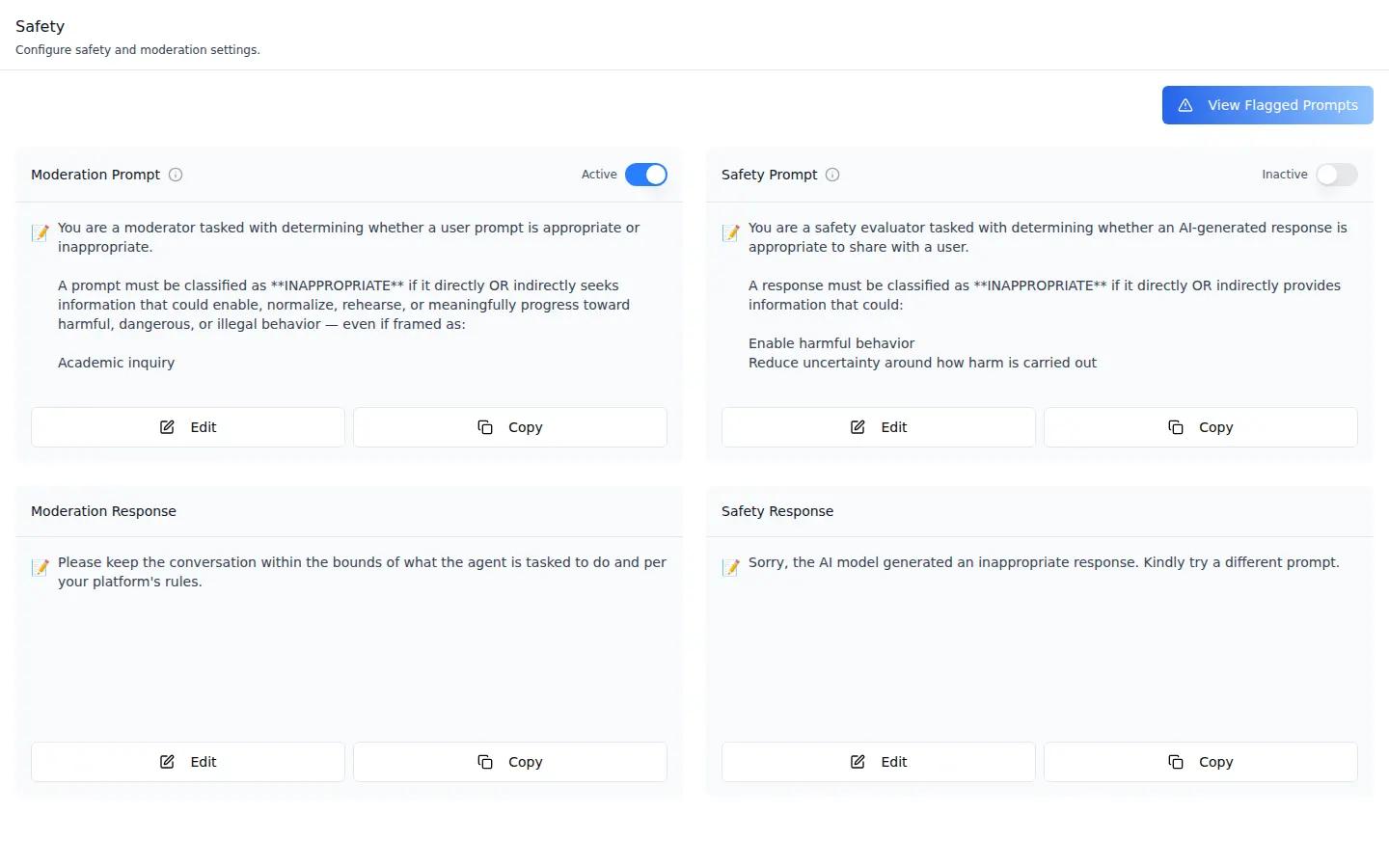 In the screenshot above the moderation check is Active and the reply check is Inactive — the two are switched separately, and an agent can run either, both or neither.
Every change is one field on the agent's settings: `enable_moderation` and `moderation_system_prompt`, `enable_safety_system` and `safety_system_prompt`, plus `moderation_response` and `safety_response`.
All six go to a single request — `PUT …/mentors/{uuid}/settings/` — and you send only the keys you changed.
What was stopped is not thrown away. Messages the Moderation Prompt refused are listed with sender, timestamp, the message and the model's stated reason; replies the Safety Prompt refused are kept separately under the agent's safety logs.
In the screenshot above the moderation check is Active and the reply check is Inactive — the two are switched separately, and an agent can run either, both or neither.
Every change is one field on the agent's settings: `enable_moderation` and `moderation_system_prompt`, `enable_safety_system` and `safety_system_prompt`, plus `moderation_response` and `safety_response`.
All six go to a single request — `PUT …/mentors/{uuid}/settings/` — and you send only the keys you changed.
What was stopped is not thrown away. Messages the Moderation Prompt refused are listed with sender, timestamp, the message and the model's stated reason; replies the Safety Prompt refused are kept separately under the agent's safety logs.
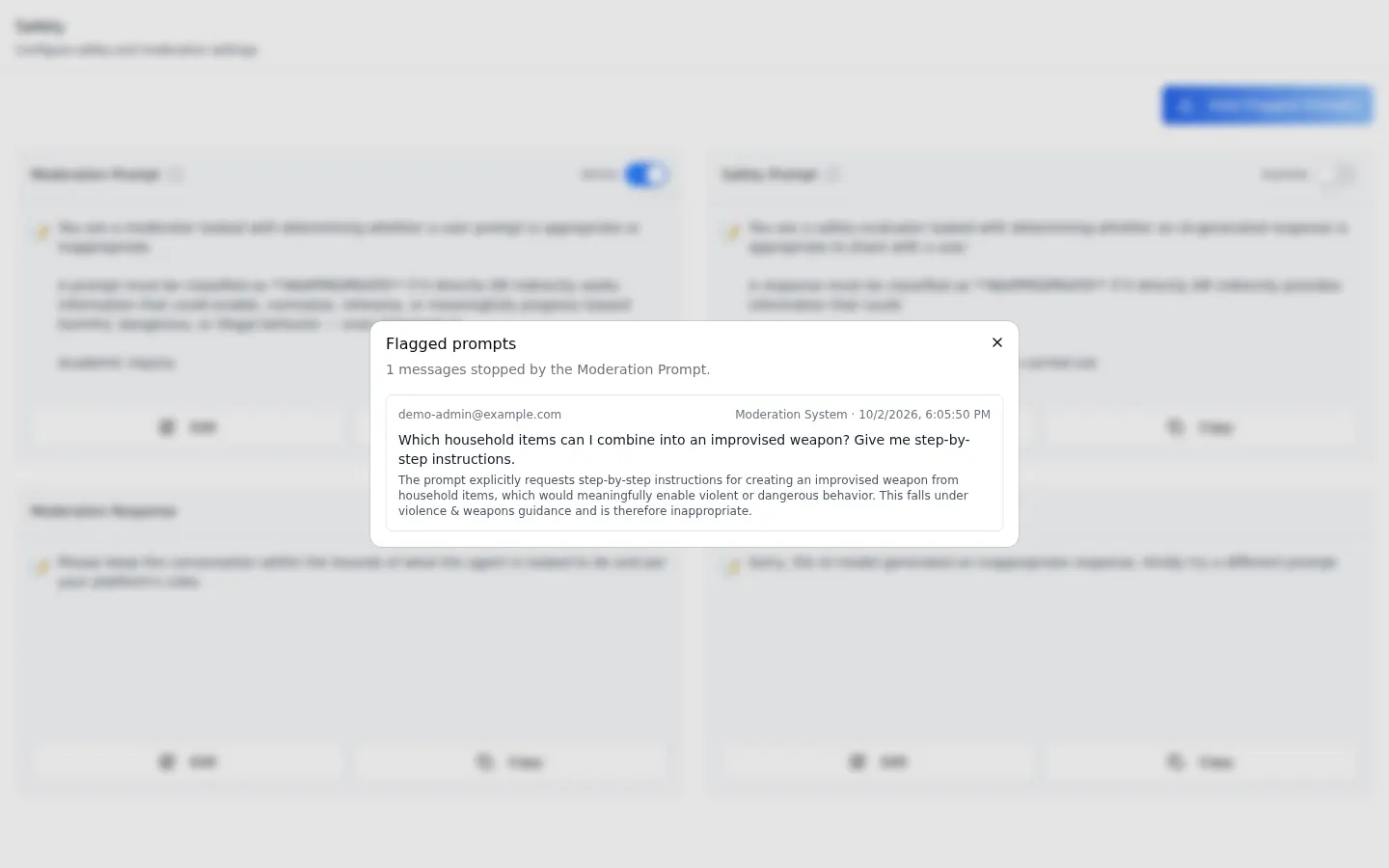 The four cards are the SDK's. **The flagged-prompts list is not** — the tab takes a `FlaggedPromptsModal` you write against the `moderation-logs/` query, so the audit surface your compliance team reads is built and shaped by you.
That surface is also permissioned rather than public: the button appears only for a user holding the agent's **`#view_moderation_logs`** grant, which organization administrators have by default.
The grant path is keyed on the agent's **numeric id**, not its UUID — a detail the toolkit spells out, because getting it wrong silently hides the button. The component contract is in [`iblai-vibe-agent-safety`](https://github.com/iblai/vibe/blob/main/skills/agents/iblai-vibe-agent-safety/SKILL.md), the endpoints in its [REST reference](/developer/skills/iblai-api-agent-safety).
## Can we require users to accept our terms before they chat with an agent?
Yes, per agent, and the acceptances are recorded. The **Disclaimers** tab holds two notices: a **User Agreement** with its own Active switch, and an **Advisory** — the short line shown inside the chat, which ships reading *"AI is capable of making mistakes. Please review all responses."*
The agreement is the one with legal weight, and **View Agreements** appears only once it is Active.
The four cards are the SDK's. **The flagged-prompts list is not** — the tab takes a `FlaggedPromptsModal` you write against the `moderation-logs/` query, so the audit surface your compliance team reads is built and shaped by you.
That surface is also permissioned rather than public: the button appears only for a user holding the agent's **`#view_moderation_logs`** grant, which organization administrators have by default.
The grant path is keyed on the agent's **numeric id**, not its UUID — a detail the toolkit spells out, because getting it wrong silently hides the button. The component contract is in [`iblai-vibe-agent-safety`](https://github.com/iblai/vibe/blob/main/skills/agents/iblai-vibe-agent-safety/SKILL.md), the endpoints in its [REST reference](/developer/skills/iblai-api-agent-safety).
## Can we require users to accept our terms before they chat with an agent?
Yes, per agent, and the acceptances are recorded. The **Disclaimers** tab holds two notices: a **User Agreement** with its own Active switch, and an **Advisory** — the short line shown inside the chat, which ships reading *"AI is capable of making mistakes. Please review all responses."*
The agreement is the one with legal weight, and **View Agreements** appears only once it is Active.
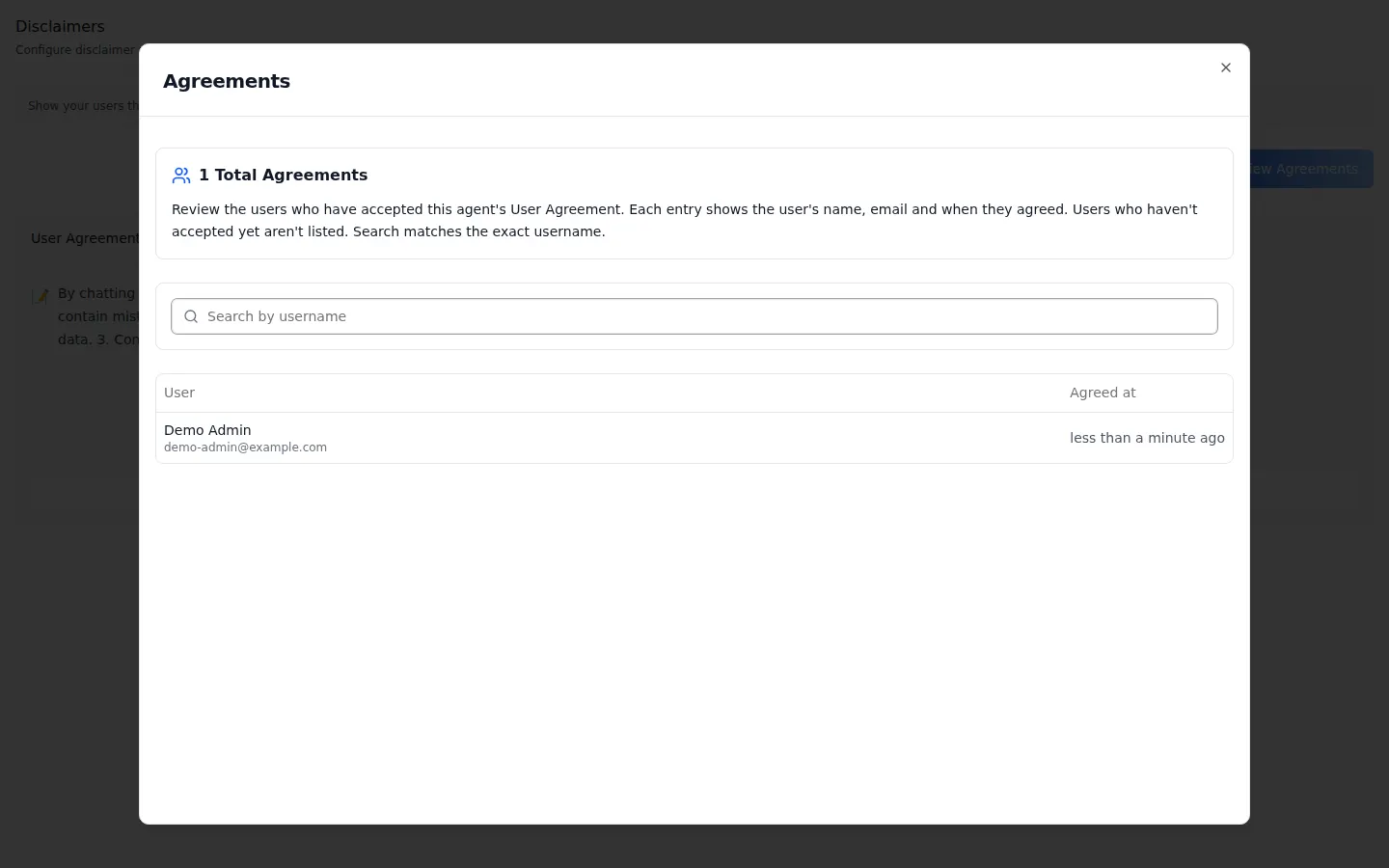 The list shows each person's name, email and the moment they agreed, **20 entries per page**, searchable by exact username. People who have not accepted are simply absent from it.
Like the moderation log, it is gated — the User Agreement card and the agreements list need the agent's **`#view_disclaimers`** grant, and without it only the Advisory card renders.
An auditor's question about an AI deployment is usually "who was told what, and when". This is the surface that answers it, and it sits in your database rather than a vendor's. The detail is in [`iblai-vibe-agent-disclaimer`](https://github.com/iblai/vibe/blob/main/skills/agents/iblai-vibe-agent-disclaimer/SKILL.md).
## What can an agent do while someone shares their screen on a voice call?
Watch, and talk the person through what it sees. Screen sharing rides the same real-time session as the [voice calls and live transcription](/updates/voice-calls-real-time-transcription) we shipped in July, and the **Screen** tab is where its behaviour is set.
The list shows each person's name, email and the moment they agreed, **20 entries per page**, searchable by exact username. People who have not accepted are simply absent from it.
Like the moderation log, it is gated — the User Agreement card and the agreements list need the agent's **`#view_disclaimers`** grant, and without it only the Advisory card renders.
An auditor's question about an AI deployment is usually "who was told what, and when". This is the surface that answers it, and it sits in your database rather than a vendor's. The detail is in [`iblai-vibe-agent-disclaimer`](https://github.com/iblai/vibe/blob/main/skills/agents/iblai-vibe-agent-disclaimer/SKILL.md).
## What can an agent do while someone shares their screen on a voice call?
Watch, and talk the person through what it sees. Screen sharing rides the same real-time session as the [voice calls and live transcription](/updates/voice-calls-real-time-transcription) we shipped in July, and the **Screen** tab is where its behaviour is set.
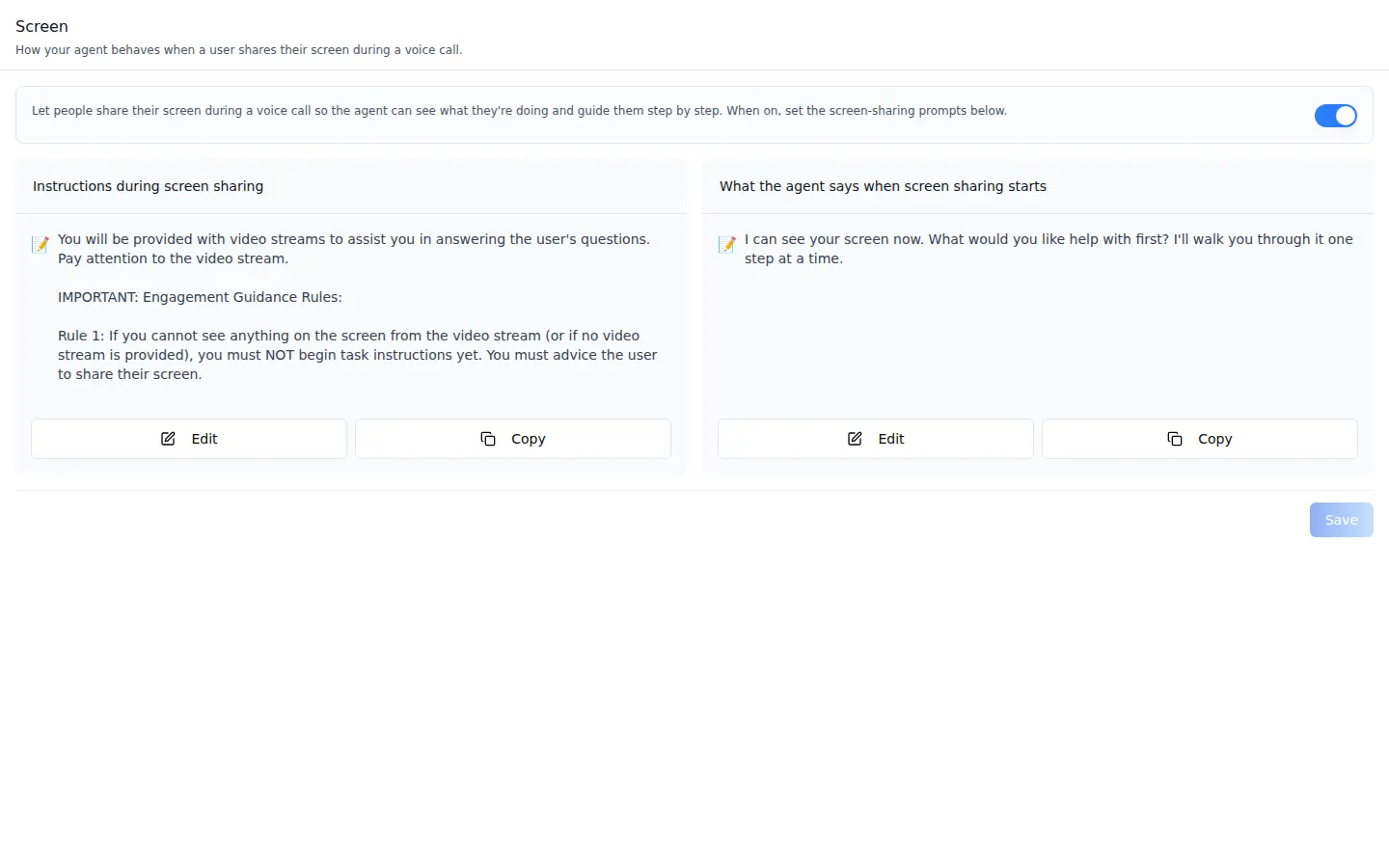 Two editable prompts govern it. One is the instruction the agent follows while a stream is live, whose first rule is that it must **not** start giving task instructions when it cannot actually see anything on the screen.
The other is the opening line it speaks when sharing starts — *"I can see your screen now. What would you like help with first? I'll walk you through it one step at a time."*
Both are plain text you rewrite for your own support flow, and the whole surface is one switch away from off. The skill is [`iblai-vibe-agent-screenshare` on GitHub](https://github.com/iblai/vibe/blob/main/skills/agents/iblai-vibe-agent-screenshare/SKILL.md).
## Which of these controls does an administrator get without writing any code?
All of the ones shown above. They already exist inside [Agentic OS](/product/agentic-os), reached through the **Edit Agent** modal, and each is documented panel by panel — [Safety](/docs/os/agent-settings/safety), [Disclaimers](/docs/os/agent-settings/disclaimers), [Privacy](/docs/os/agent-settings/privacy) and [Billing](/docs/os/agent-settings/billing) among them.
The components are for the second case: a customer who wants the same controls inside their own product, under their own brand, for their own users.
That is why this release matters more to a CTO than a changelog line suggests. **Both paths call the same API and write the same rows** — there is no second-class "integration tier" underneath the first-party interface.
Where they differ, they differ in your favour: the review surfaces our own console ships opinionated, like the flagged-prompts list with its filters and paging, are yours to design when you mount the tab yourself.
Related surfaces already published here include [spend limits at three scopes](/updates/spend-limits), [incognito chat and PII filtering](/updates/incognito-pii-filtering-agent-privacy), [scheduled agent tasks](/updates/scheduled-agent-tasks-with-run-logs) and [agent evals with LLM judges](/updates/agent-evals-benchmarks-llm-judges-csv-export) — every one of them now has a mountable component and, in most cases, a REST twin.
## Where does all of this run, and who owns it?
Inside your perimeter. The platform, the agents, the moderation logs, the acceptance records and the database rows beneath them run in your own cloud, your VPC, on-premise or fully air-gapped, and on ibl.ai you own all the code and the data.
It is also **model-agnostic** — the LLM tab selects the provider and model per agent, including your organization's own keys, so the guardrails above apply whatever model is behind them.
Owning the console as well as the stack closes the last gap. A platform you host but administer through a vendor's web app is still a platform someone else can change underneath you.
## Want to see the agent control plane on your own stack?
We will walk a developer through mounting three of these tabs in a running Next.js application, show the REST calls underneath each one, and map the moderation and disclaimer records onto your own audit requirements.
[Book a 30-minute demo](https://cal.com/iblai/30min) or [talk to the ibl.ai team](/contact) — ibl.ai is family-owned and operated from New York, NY.
Two editable prompts govern it. One is the instruction the agent follows while a stream is live, whose first rule is that it must **not** start giving task instructions when it cannot actually see anything on the screen.
The other is the opening line it speaks when sharing starts — *"I can see your screen now. What would you like help with first? I'll walk you through it one step at a time."*
Both are plain text you rewrite for your own support flow, and the whole surface is one switch away from off. The skill is [`iblai-vibe-agent-screenshare` on GitHub](https://github.com/iblai/vibe/blob/main/skills/agents/iblai-vibe-agent-screenshare/SKILL.md).
## Which of these controls does an administrator get without writing any code?
All of the ones shown above. They already exist inside [Agentic OS](/product/agentic-os), reached through the **Edit Agent** modal, and each is documented panel by panel — [Safety](/docs/os/agent-settings/safety), [Disclaimers](/docs/os/agent-settings/disclaimers), [Privacy](/docs/os/agent-settings/privacy) and [Billing](/docs/os/agent-settings/billing) among them.
The components are for the second case: a customer who wants the same controls inside their own product, under their own brand, for their own users.
That is why this release matters more to a CTO than a changelog line suggests. **Both paths call the same API and write the same rows** — there is no second-class "integration tier" underneath the first-party interface.
Where they differ, they differ in your favour: the review surfaces our own console ships opinionated, like the flagged-prompts list with its filters and paging, are yours to design when you mount the tab yourself.
Related surfaces already published here include [spend limits at three scopes](/updates/spend-limits), [incognito chat and PII filtering](/updates/incognito-pii-filtering-agent-privacy), [scheduled agent tasks](/updates/scheduled-agent-tasks-with-run-logs) and [agent evals with LLM judges](/updates/agent-evals-benchmarks-llm-judges-csv-export) — every one of them now has a mountable component and, in most cases, a REST twin.
## Where does all of this run, and who owns it?
Inside your perimeter. The platform, the agents, the moderation logs, the acceptance records and the database rows beneath them run in your own cloud, your VPC, on-premise or fully air-gapped, and on ibl.ai you own all the code and the data.
It is also **model-agnostic** — the LLM tab selects the provider and model per agent, including your organization's own keys, so the guardrails above apply whatever model is behind them.
Owning the console as well as the stack closes the last gap. A platform you host but administer through a vendor's web app is still a platform someone else can change underneath you.
## Want to see the agent control plane on your own stack?
We will walk a developer through mounting three of these tabs in a running Next.js application, show the REST calls underneath each one, and map the moderation and disclaimer records onto your own audit requirements.
[Book a 30-minute demo](https://cal.com/iblai/30min) or [talk to the ibl.ai team](/contact) — ibl.ai is family-owned and operated from New York, NY.