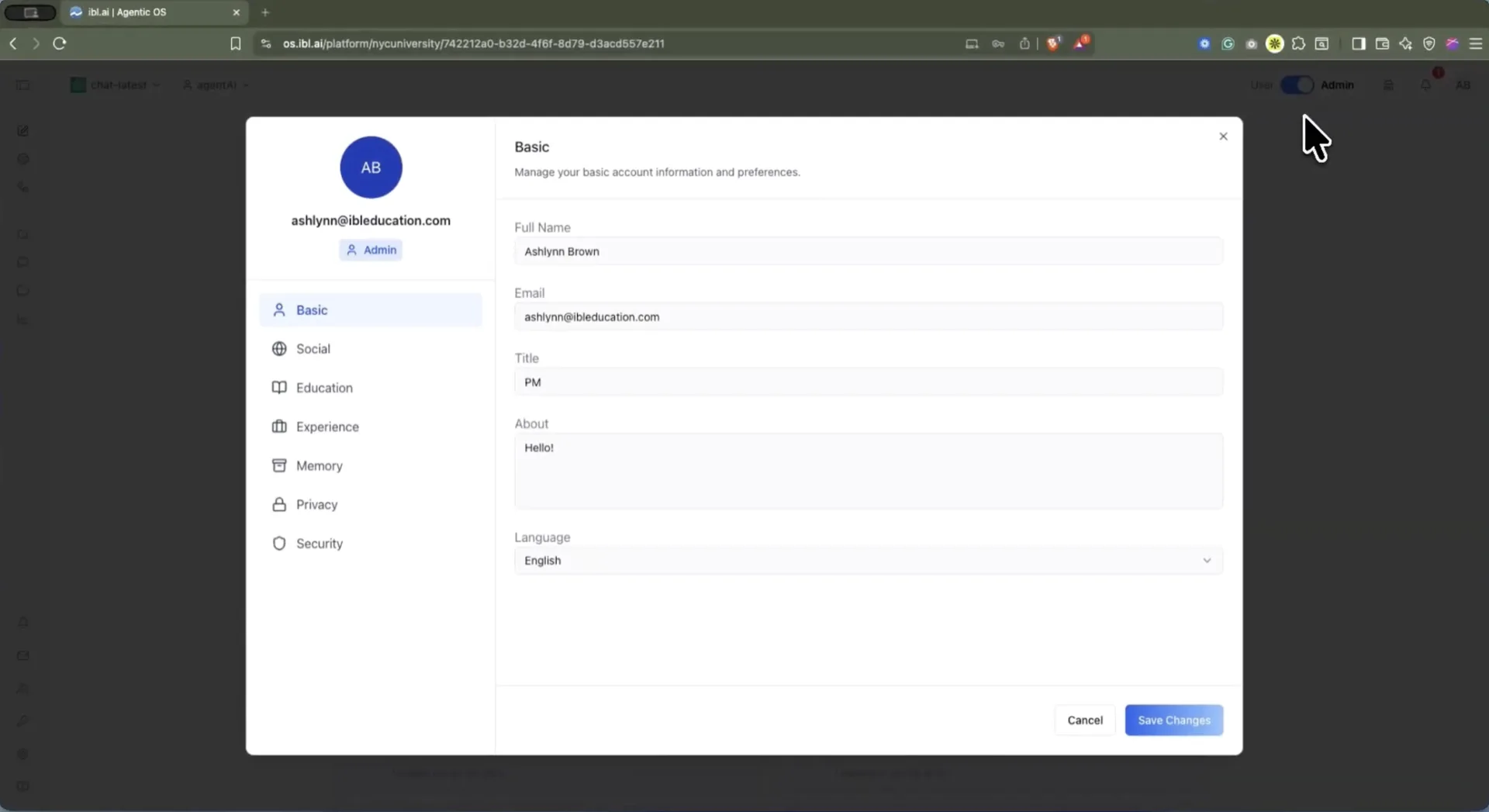
The user profile panel in Agentic OS.
**Basic** holds the identity tied to the account — full name, email, title, a short About bio, and language preference. **Social** connects Facebook, LinkedIn, and X.
**Education** splits into three sub-tabs: Education itself (institution, degree, dates, grade), Credentials (verified credentials and badges tied to a unique ID), and Skills — a searchable list where each entry is tagged **Earned**, **Self-Reported**, or **Desired**, so a person can flag what they want to learn, not only what they already know.
**Experience** records role, organization, and employment dates, with a Resume sub-tab for uploading a résumé to share with agents and administrators.
## Who decides what the AI remembers about you?
The user does. This is the part of the profile worth pausing on, because on most platforms this control does not exist at the individual level at all.
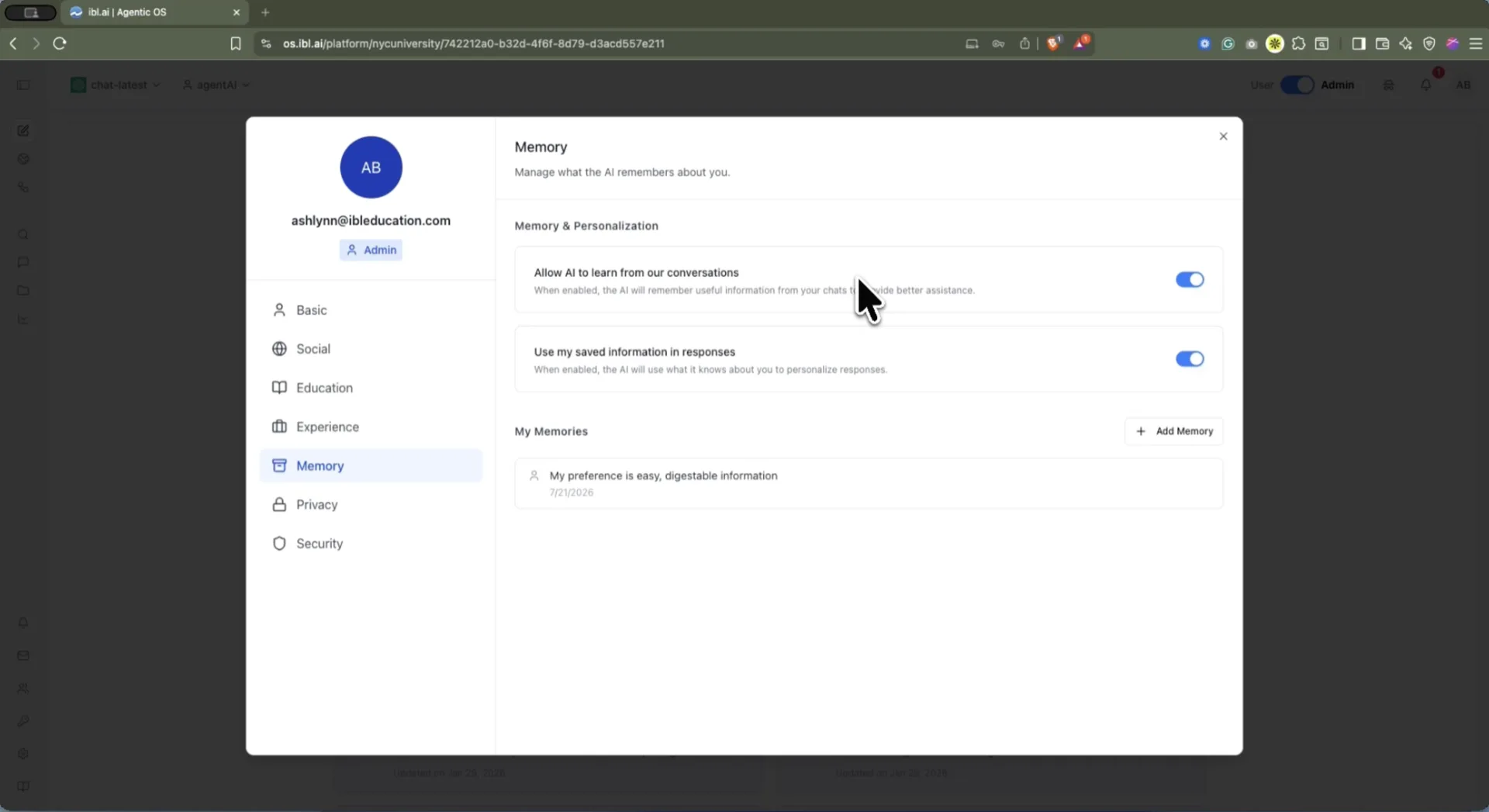 The **Memory** tab is headed *"Manage what the AI remembers about you"* and carries two independent toggles:
- **Allow AI to learn from our conversations** — whether agents may capture new memories from chats at all. Turning it off stops new capture; it does not delete what is already saved.
- **Use my saved information in responses** — whether saved memories are injected into answers. Turning it off leaves the memories stored but unused.
Below them, **My Memories** lists every saved fact in plain language with the date it was created. Auto-captured entries carry a bot icon and an *auto* badge; hand-added ones carry a person icon. The user can add a memory (minimum 10 characters) or delete any entry outright.
That list is the point. Memory here is **legible** — a person can read exactly what the system believes about them and remove a line they disagree with, rather than trusting an opaque profile they never see.
## What does Private Mode actually do?
The **Privacy** tab sets a **Default Private Mode**, with three mutually exclusive options. The wording below is the platform's own.
The **Memory** tab is headed *"Manage what the AI remembers about you"* and carries two independent toggles:
- **Allow AI to learn from our conversations** — whether agents may capture new memories from chats at all. Turning it off stops new capture; it does not delete what is already saved.
- **Use my saved information in responses** — whether saved memories are injected into answers. Turning it off leaves the memories stored but unused.
Below them, **My Memories** lists every saved fact in plain language with the date it was created. Auto-captured entries carry a bot icon and an *auto* badge; hand-added ones carry a person icon. The user can add a memory (minimum 10 characters) or delete any entry outright.
That list is the point. Memory here is **legible** — a person can read exactly what the system believes about them and remove a line they disagree with, rather than trusting an opaque profile they never see.
## What does Private Mode actually do?
The **Privacy** tab sets a **Default Private Mode**, with three mutually exclusive options. The wording below is the platform's own.
| Mode | Saved to history | Linked to the account | Context from prior turns |
|---|---|---|---|
| Normal | Yes | Yes | Yes |
| Anonymized | Yes, for AI context | No — identifying account info stripped | Yes |
| Disabled | No — nothing is recorded | No | No — every message is a single-turn Q&A |
Organization settings in Agentic OS.
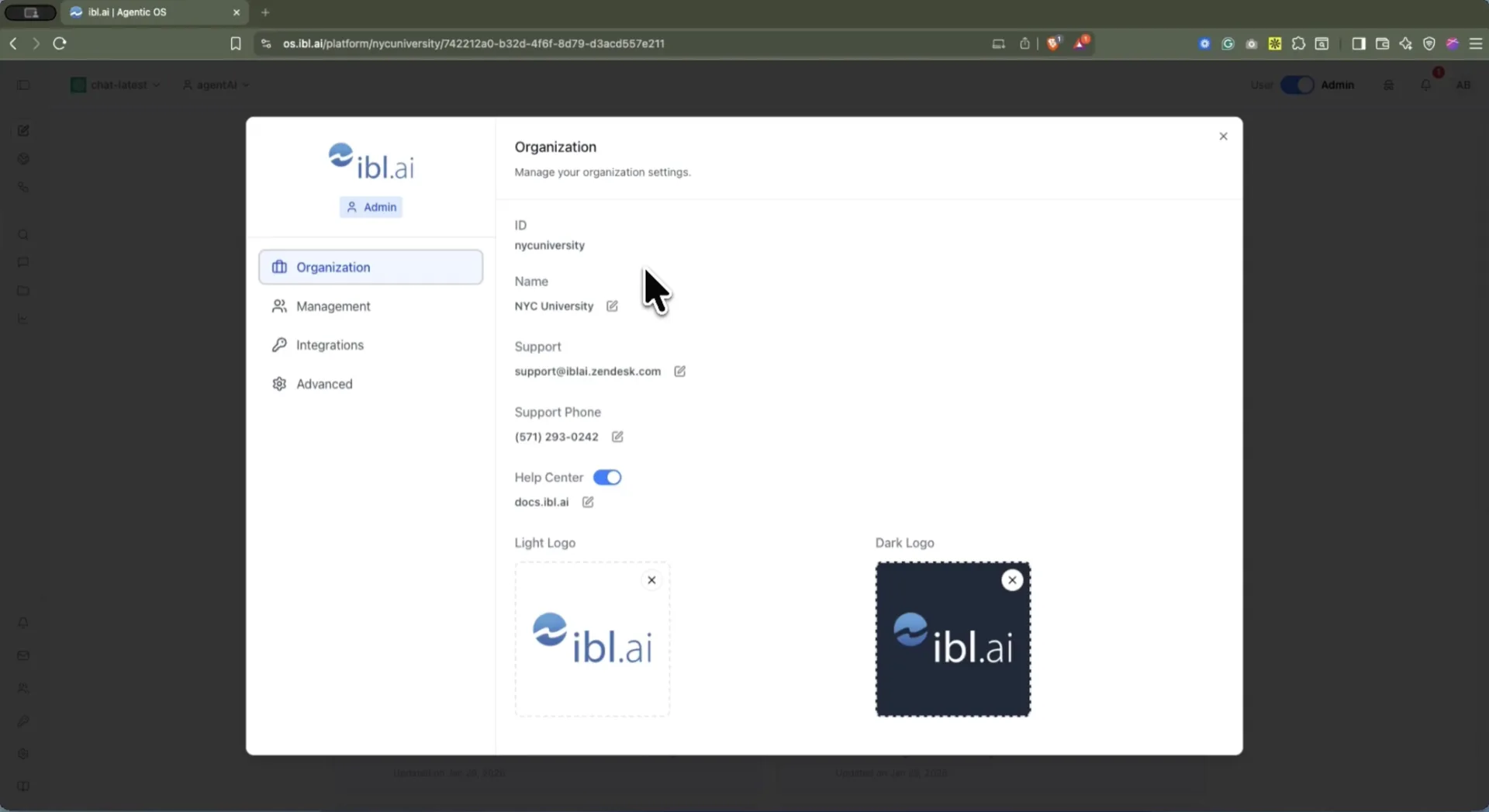 **Organization** is the tenant's identity: its ID, display name, support email and phone, a Help Center toggle with a custom URL, and separate **light and dark logo uploads** for white-labeling the interface to institutional branding.
**Management** covers the people — users, teams, groups, and the roles that define who may do what.
## How do you white-label the platform as your own?
Through **Advanced**, which is where an instance stops looking like a vendor's product and starts looking like the institution's.
**Organization** is the tenant's identity: its ID, display name, support email and phone, a Help Center toggle with a custom URL, and separate **light and dark logo uploads** for white-labeling the interface to institutional branding.
**Management** covers the people — users, teams, groups, and the roles that define who may do what.
## How do you white-label the platform as your own?
Through **Advanced**, which is where an instance stops looking like a vendor's product and starts looking like the institution's.
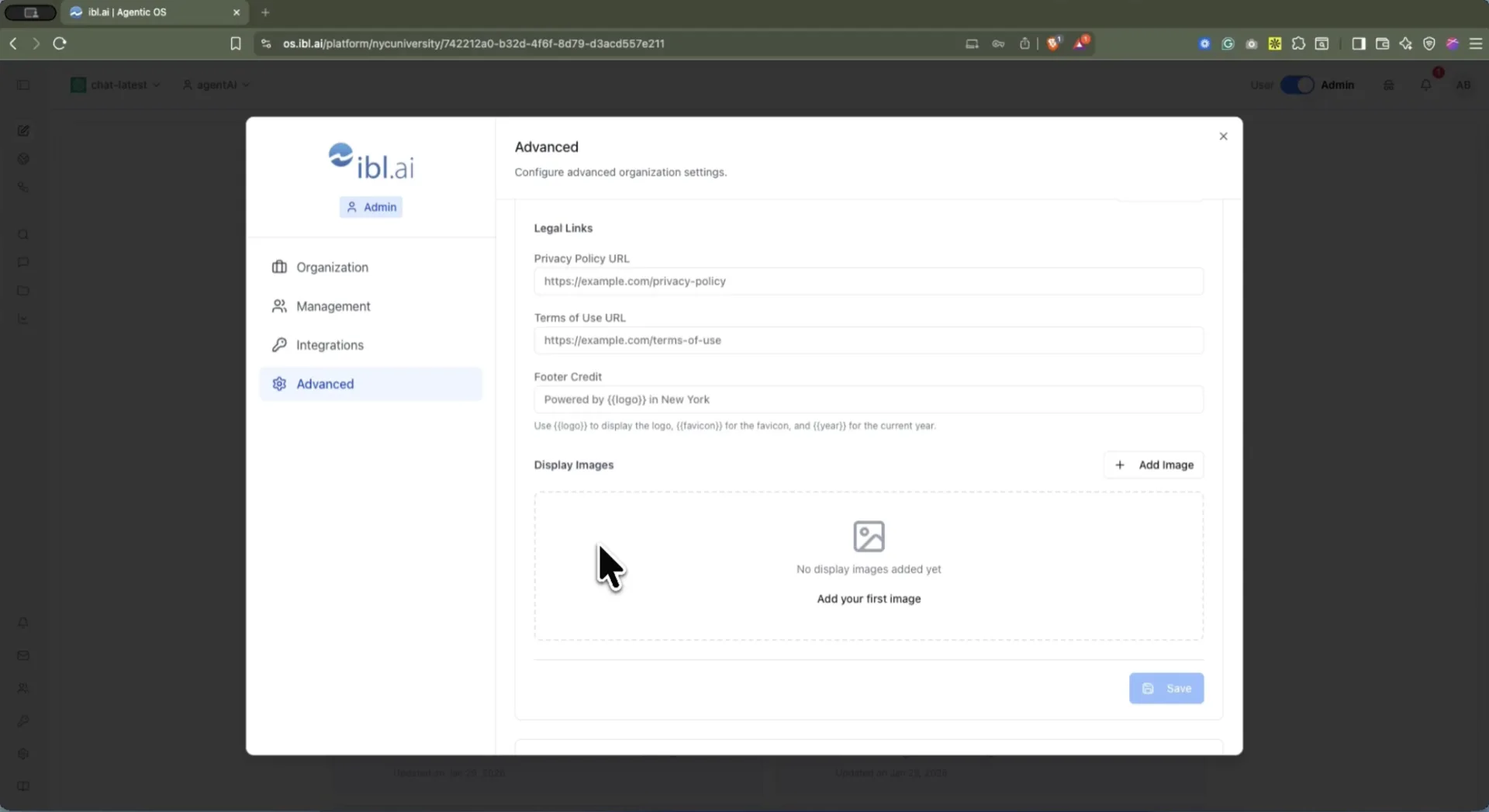 The panel carries **Legal Links** — your own Privacy Policy and Terms of Use URLs — and a **Footer Credit** field that accepts `{{logo}}`, `{{favicon}}`, and `{{year}}` tokens, so the credit line renders your mark and stays current without an annual edit. **Display Images** holds the imagery shown in the workspace.
The rest of Advanced is the platform-wide behavior: chat area width, the authentication interface and **Advanced CSS** for theming, recommendation system prompts, whether users may create their own agents, user-controlled chat privacy, the built-in memory system, public registration, and **DNS and SMTP** configuration so the instance answers on your own domain and sends mail from your own addresses.
Custom domain, custom mail, custom CSS, custom legal links, custom footer. Nothing in that list is a co-branding concession — it is the same theming surface we use ourselves.
## Which models and keys does the organization control?
Its own. **Integrations** has three tabs, and each one is a place where the organization supplies its own credentials rather than consuming ours.
The panel carries **Legal Links** — your own Privacy Policy and Terms of Use URLs — and a **Footer Credit** field that accepts `{{logo}}`, `{{favicon}}`, and `{{year}}` tokens, so the credit line renders your mark and stays current without an annual edit. **Display Images** holds the imagery shown in the workspace.
The rest of Advanced is the platform-wide behavior: chat area width, the authentication interface and **Advanced CSS** for theming, recommendation system prompts, whether users may create their own agents, user-controlled chat privacy, the built-in memory system, public registration, and **DNS and SMTP** configuration so the instance answers on your own domain and sends mail from your own addresses.
Custom domain, custom mail, custom CSS, custom legal links, custom footer. Nothing in that list is a co-branding concession — it is the same theming surface we use ourselves.
## Which models and keys does the organization control?
Its own. **Integrations** has three tabs, and each one is a place where the organization supplies its own credentials rather than consuming ours.
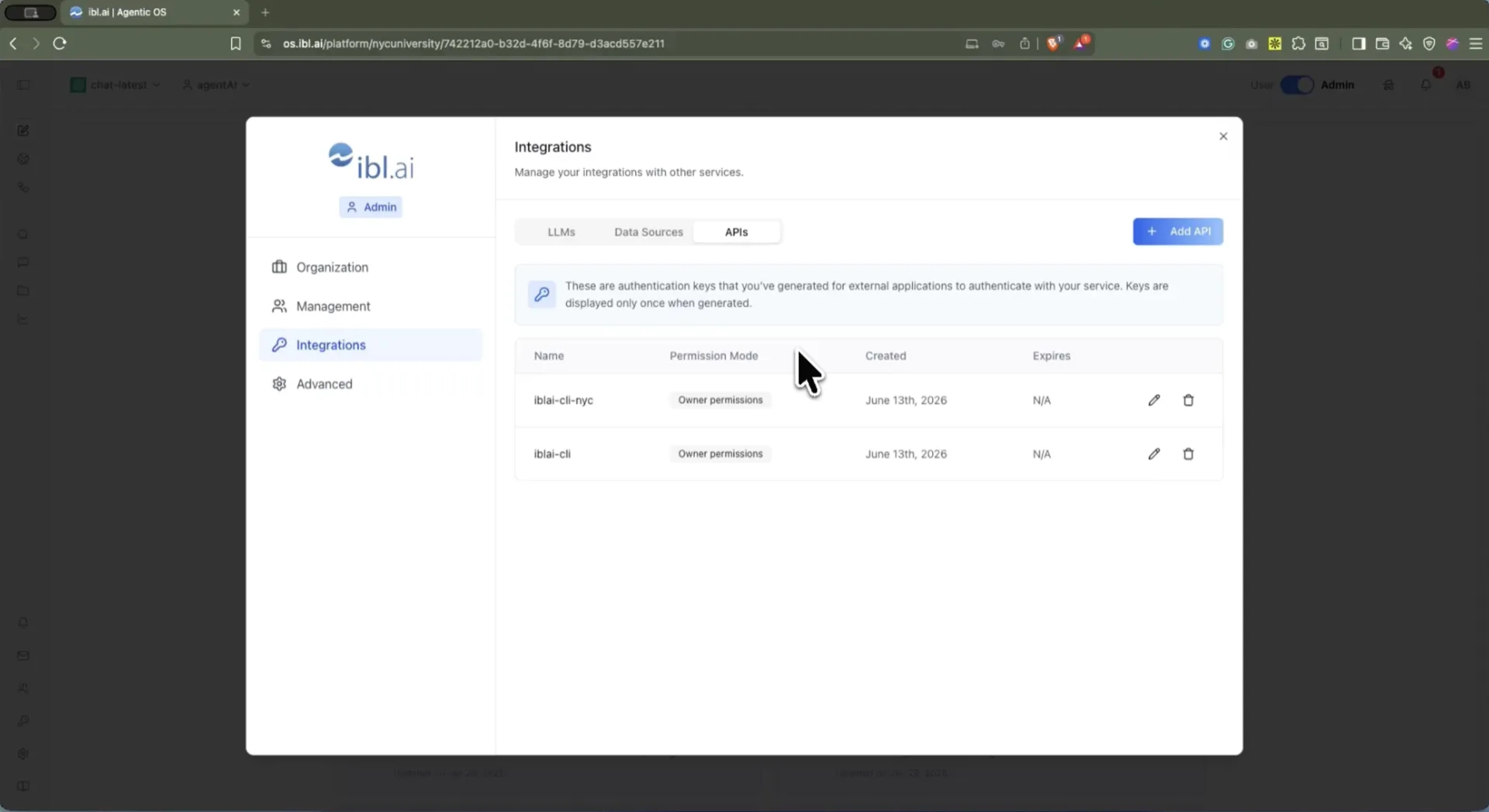 **LLMs** stores the organization's model-provider keys. This is the mechanism behind the model-agnostic claim: agents run on whichever providers you hold keys for, and switching provider is a credential change rather than a migration. Keys are stored per organization and served back masked, so the full secret is never redisplayed.
**Data Sources** holds credentials for connecting external data services.
**APIs** issues authentication keys for external applications to authenticate against the platform, each with a **permission mode** — the two in the screenshot carry *Owner permissions* — and each shown **only once at generation**.
Because the deployment runs on the organization's own infrastructure, these settings are the organization's in the literal sense: its branding, its domain, its email, its models, its keys.
## Documentation
**User profile**
- [Profile: Basic](/docs/os/profile/basic) — name, email, title, bio, and language
- [Profile: Memory](/docs/os/profile/memory) — the two personalization toggles and the My Memories list
- [Profile: Privacy](/docs/os/profile/privacy) — Default Private Mode, and the per-chat override
- [Profile: Education](/docs/os/profile/education) and [Credentials](/docs/os/profile/education-credentials) — degrees, verified credentials, and skills
- [Profile: Experience](/docs/os/profile/experience) and [Résumé](/docs/os/profile/experience-resume)
- [Profile: Security](/docs/os/profile/security) — password reset and account deletion
**Organization settings**
- [Organization](/docs/os/organization-settings/organization) — tenant ID, support contacts, Help Center, and logos
- [Advanced](/docs/os/organization-settings/advanced) — organization-wide defaults and feature flags
- [Integrations: LLMs](/docs/os/organization-settings/integrations-llms) — bring your own model-provider keys
- [Integrations: Data Sources](/docs/os/organization-settings/integrations-data-sources) — external data service credentials
- [Roles](/docs/os/organization-settings/roles) and [Users](/docs/os/organization-settings/users) — who may do what
- [Policies](/docs/os/organization-settings/policies) — organization-level governance settings
**LLMs** stores the organization's model-provider keys. This is the mechanism behind the model-agnostic claim: agents run on whichever providers you hold keys for, and switching provider is a credential change rather than a migration. Keys are stored per organization and served back masked, so the full secret is never redisplayed.
**Data Sources** holds credentials for connecting external data services.
**APIs** issues authentication keys for external applications to authenticate against the platform, each with a **permission mode** — the two in the screenshot carry *Owner permissions* — and each shown **only once at generation**.
Because the deployment runs on the organization's own infrastructure, these settings are the organization's in the literal sense: its branding, its domain, its email, its models, its keys.
## Documentation
**User profile**
- [Profile: Basic](/docs/os/profile/basic) — name, email, title, bio, and language
- [Profile: Memory](/docs/os/profile/memory) — the two personalization toggles and the My Memories list
- [Profile: Privacy](/docs/os/profile/privacy) — Default Private Mode, and the per-chat override
- [Profile: Education](/docs/os/profile/education) and [Credentials](/docs/os/profile/education-credentials) — degrees, verified credentials, and skills
- [Profile: Experience](/docs/os/profile/experience) and [Résumé](/docs/os/profile/experience-resume)
- [Profile: Security](/docs/os/profile/security) — password reset and account deletion
**Organization settings**
- [Organization](/docs/os/organization-settings/organization) — tenant ID, support contacts, Help Center, and logos
- [Advanced](/docs/os/organization-settings/advanced) — organization-wide defaults and feature flags
- [Integrations: LLMs](/docs/os/organization-settings/integrations-llms) — bring your own model-provider keys
- [Integrations: Data Sources](/docs/os/organization-settings/integrations-data-sources) — external data service credentials
- [Roles](/docs/os/organization-settings/roles) and [Users](/docs/os/organization-settings/users) — who may do what
- [Policies](/docs/os/organization-settings/policies) — organization-level governance settings