---
title: "Agents That Work on a Schedule: Tasks With Run Logs"
slug: "scheduled-agent-tasks-with-run-logs"
date: "2026-10-14"
tag: "Application"
summary: "A close look at the agent Tasks tab in ibl.ai: give an agent a named prompt, a start time and a cadence of once, daily, weekly or monthly, then check a log of every run with its status, its timing and the full output."
author: "ibl.ai Engineering"
repo: "iblai/vibe"
linkedin: |
An agent on ibl.ai can run a saved prompt on its own once, daily, weekly or monthly, such as a daily summary or a reminder, and keep a log of every run with its status, its start and end times and the full output.
It is the Tasks tab in each agent's settings, and once a task is set, nobody has to ask the agent again.
A task is a name, a prompt, a start date and time, and a cadence. The start time has to be in the future, or the dialog will not save.
Daily, weekly and monthly become a cron schedule on the platform: weekly repeats on the start date's weekday, monthly on the same day of the month.
Three cards keep score across the agent's tasks: total, completed and failed. Click a task and its run logs open beside it; click a run and you get the status, when it was created, started and ended, and everything the agent wrote.
Scheduled work is where an agent stops being a chat window and starts being a colleague. On ibl.ai it runs in your deployment, because you own all the code and the data.
#iblai #AgenticAI #EnterpriseAI #AIAgents #Automation
---
**ibl.ai's agent Tasks tab gives an agent a named prompt, a start date and time, and a cadence of once, daily, weekly or monthly, and logs every run with its status, its start and end times and the full output, on a platform where you own all the code and the data.**
This is a closer look at a shipped capability, not a launch. The `/iblai-vibe-agent-task` skill that mounts the tab in any app built with [Agentic Vibe](/product/agentic-vibe) was released in [`iblai/vibe`](https://github.com/iblai/vibe) **v1.6.0 on July 27, 2026**; the same tab runs in [Agentic OS](/product/agentic-os).
## Can an AI agent run a task on a schedule without being prompted?
Yes. Every agent in ibl.ai has a **Tasks** tab, in the **Runtime** group of its settings beside Memory, History, Audit and Analytics. The panel says what it is for:
*"Let your agent work on its own schedule. Set up recurring tasks it runs automatically — like daily summaries or reminders — without anyone having to ask."*
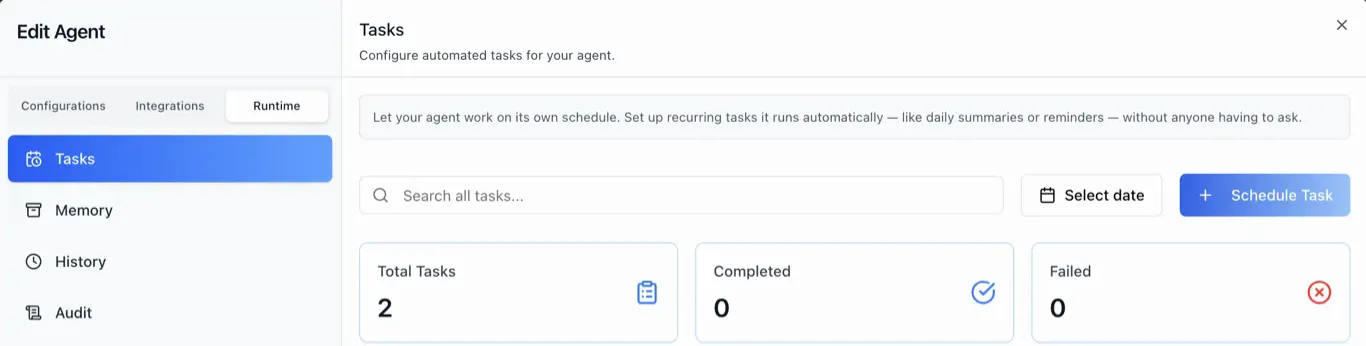 Above the list are a search box, a **Select date** filter and the **Schedule Task** button.
Three metric cards count the agent's tasks: **Total Tasks**, and how many are **Completed** or **Failed** going by each task's latest run, so a schedule that has started failing is visible before anyone opens a log.
## How do you schedule an AI agent task?
Click **Schedule Task**. The dialog has a calendar on the left — past days are disabled — and the task's settings on the right.
Above the list are a search box, a **Select date** filter and the **Schedule Task** button.
Three metric cards count the agent's tasks: **Total Tasks**, and how many are **Completed** or **Failed** going by each task's latest run, so a schedule that has started failing is visible before anyone opens a log.
## How do you schedule an AI agent task?
Click **Schedule Task**. The dialog has a calendar on the left — past days are disabled — and the task's settings on the right.
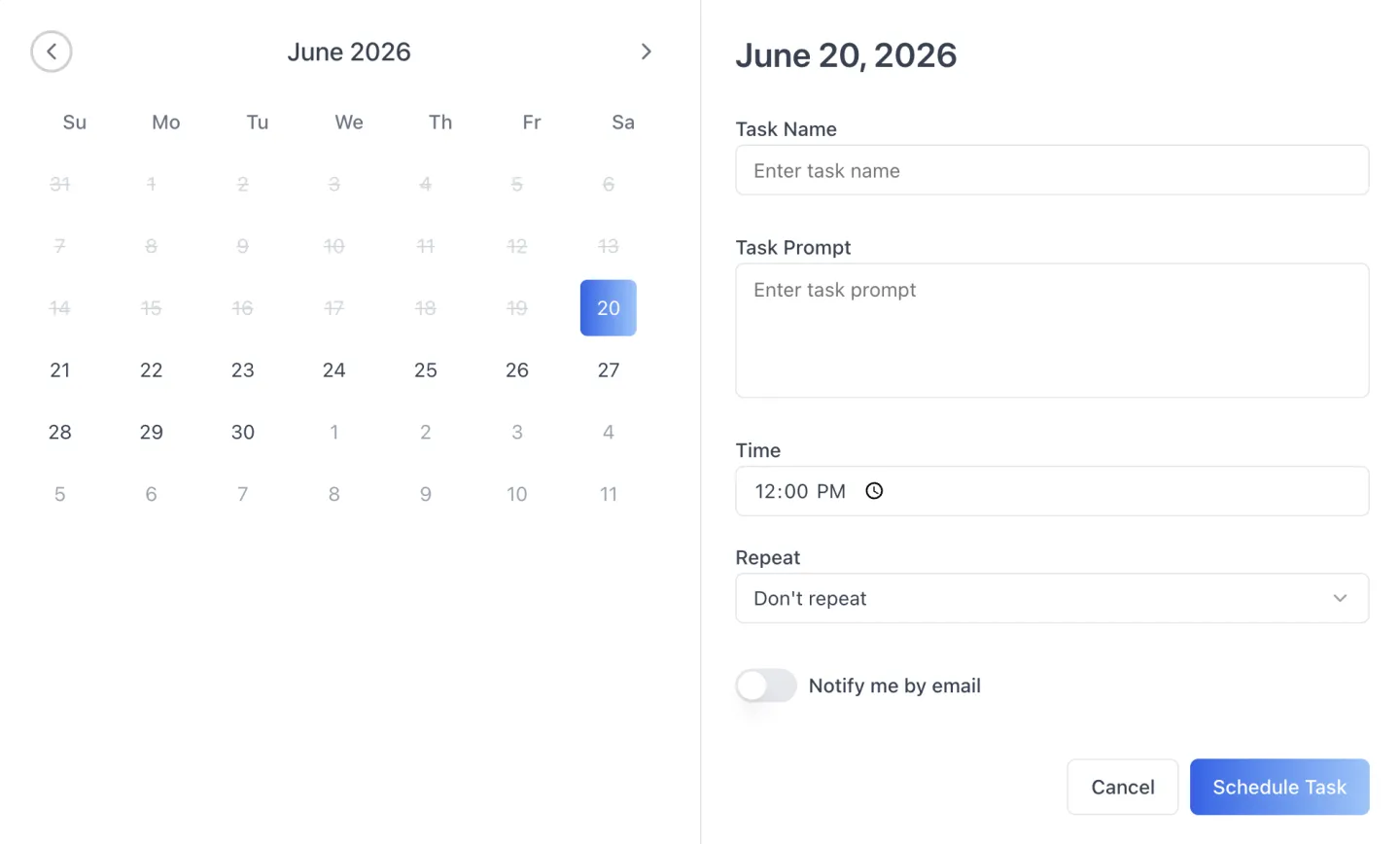 **Task Name** labels it. **Task Prompt** is the instruction the agent carries out on every run. **Time** sets when; the date and time combine into a start time that must be in the future, or the dialog will not save.
**Repeat** has four settings: **Don't repeat**, **Daily**, **Weekly** and **Monthly**. Each maps to a schedule on the platform: Don't repeat creates a one-off task pinned to the chosen date, which runs once and is then switched off by the scheduler.
The other three create a recurring cron schedule at the chosen time: **Daily** every day, **Weekly** on the start date's weekday, and **Monthly** on the same day of the month.
## How do you know whether a scheduled agent run worked?
Every task in the list carries a badge with one of five states: **Scheduled**, **Running**, **Completed**, **Failed** or **Disabled**. The badge comes from the task's latest run together with whether it is switched on, so a one-off that ran successfully shows **Completed**, not Disabled.
Click a task and its run logs open in the panel beside the list, five to a page. Click a run and **Log Details** opens.
**Task Name** labels it. **Task Prompt** is the instruction the agent carries out on every run. **Time** sets when; the date and time combine into a start time that must be in the future, or the dialog will not save.
**Repeat** has four settings: **Don't repeat**, **Daily**, **Weekly** and **Monthly**. Each maps to a schedule on the platform: Don't repeat creates a one-off task pinned to the chosen date, which runs once and is then switched off by the scheduler.
The other three create a recurring cron schedule at the chosen time: **Daily** every day, **Weekly** on the start date's weekday, and **Monthly** on the same day of the month.
## How do you know whether a scheduled agent run worked?
Every task in the list carries a badge with one of five states: **Scheduled**, **Running**, **Completed**, **Failed** or **Disabled**. The badge comes from the task's latest run together with whether it is switched on, so a one-off that ran successfully shows **Completed**, not Disabled.
Click a task and its run logs open in the panel beside the list, five to a page. Click a run and **Log Details** opens.
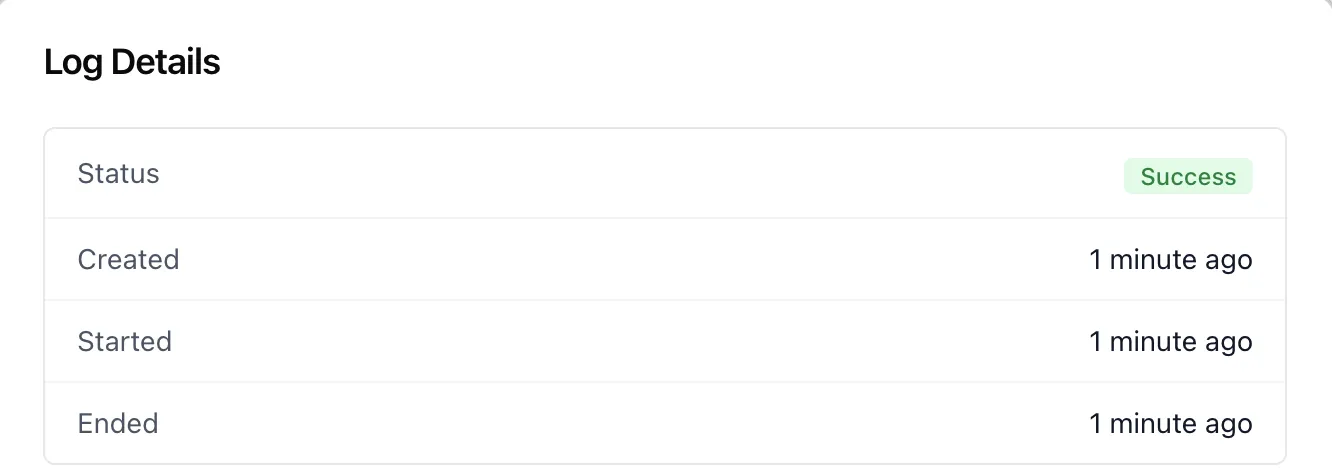 Log Details shows the run's **status** and when it was **created**, **started** and **ended**, followed by the agent's **full output** for that run.
That record is what you check when someone asks what the agent actually produced last Tuesday — and the agent's **Audit** tab sits one click away in the same Runtime group.
## Can you add scheduled agent tasks to your own app?
Yes. The tab ships as one component, ``, from `@iblai/iblai-js/web-containers/next`. **No props are required**: it reads the organization, the agent and the user from the shared agent-settings provider, and handles listing, creating, deleting and run logs itself.
Two props are optional: `labels`, which overrides any string in the tab's ten label groups (header, toolbar, metrics, list, logs, states, the schedule and delete dialogs, log details and toasts), and `PaginationComponent`, which swaps in your own pager.
The [`/iblai-vibe-agent-task`](https://github.com/iblai/vibe/blob/main/skills/agents/iblai-vibe-agent-task/SKILL.md) skill wires it up from a coding agent.
The screen-by-screen walkthrough is in [Agent Settings: Tasks](/docs/os/agent-settings/tasks). To test an agent's answers before it runs unattended, see [benchmarks and LLM judges for agents](/updates/agent-evals-benchmarks-llm-judges-csv-export).
## Which jobs would you hand to an agent on a schedule?
Tell us the report, summary or reminder, and we'll show it scheduled and logged on a live agent. [Book a 30-minute demo](https://cal.com/iblai/30min) or [talk to the ibl.ai team](/contact) — ibl.ai is family-owned and operated from New York, NY.
Log Details shows the run's **status** and when it was **created**, **started** and **ended**, followed by the agent's **full output** for that run.
That record is what you check when someone asks what the agent actually produced last Tuesday — and the agent's **Audit** tab sits one click away in the same Runtime group.
## Can you add scheduled agent tasks to your own app?
Yes. The tab ships as one component, ``, from `@iblai/iblai-js/web-containers/next`. **No props are required**: it reads the organization, the agent and the user from the shared agent-settings provider, and handles listing, creating, deleting and run logs itself.
Two props are optional: `labels`, which overrides any string in the tab's ten label groups (header, toolbar, metrics, list, logs, states, the schedule and delete dialogs, log details and toasts), and `PaginationComponent`, which swaps in your own pager.
The [`/iblai-vibe-agent-task`](https://github.com/iblai/vibe/blob/main/skills/agents/iblai-vibe-agent-task/SKILL.md) skill wires it up from a coding agent.
The screen-by-screen walkthrough is in [Agent Settings: Tasks](/docs/os/agent-settings/tasks). To test an agent's answers before it runs unattended, see [benchmarks and LLM judges for agents](/updates/agent-evals-benchmarks-llm-judges-csv-export).
## Which jobs would you hand to an agent on a schedule?
Tell us the report, summary or reminder, and we'll show it scheduled and logged on a live agent. [Book a 30-minute demo](https://cal.com/iblai/30min) or [talk to the ibl.ai team](/contact) — ibl.ai is family-owned and operated from New York, NY.