The Short Answer
Three kinds of AI let faculty grade and build courses inside Canvas: Instructure's built-in IgniteAI, Google's Gemini LTI, and ibl.ai's agents launched over LTI 1.3 and the Canvas API. ibl.ai's faculty agent drafts rubric scores and feedback for the instructor to approve, its course-authoring agent builds whole Canvas courses unpublished, it runs model-agnostic on your infrastructure, and you own all the code and the data.
The three are not interchangeable. IgniteAI is Instructure's AI inside Instructure's product. Gemini LTI is Google's assistant placed in a course. ibl.ai is an agent platform the university runs itself, which reaches into Canvas the same way any external tool does.
So the useful comparison is the faculty workflow: what happens when an instructor opens SpeedGrader with 120 essays, or starts next term's course from a folder of syllabi, and where each tool sends that work.
What does Canvas IgniteAI do for faculty grading and course building?
IgniteAI is the name Instructure gave Canvas's AI features on 23 July 2025. For grading, Instructure's April 2026 instructor guide describes two pieces.
The rubric generator "creates a draft based on your assignment description and learning outcomes," which the instructor edits before publishing.
Grading Assistance for SpeedGrader means "IgniteAI can score and draft initial feedback based on your rubric," and the instructor revises it.
The same guide lists discussion insights that flag students who may need additional support, quiz questions aligned to Bloom's taxonomy levels, and translation for ten languages. Each is a feature the institution switches on in Canvas.
For course building, Instructure launched IgniteAI Agent on 12 March 2026. From a single prompt it can create and organize course modules, adjust due dates and find supplementary content, with enablement controlled at institution, department or course level.
Instructure says IgniteAI Agent is powered by Amazon Bedrock on AWS.
That release made it free for U.S. Canvas customers through 30 June 2026 and globally through 30 September 2026. Since April 2026 Instructure has placed IgniteAI Agent in its top Canvas Next tier, without a published price, so ask Instructure what your contract now says.
What does Google's Gemini LTI do inside a Canvas course?
Gemini LTI is Google's assistant for third-party learning systems. Google announced it on 9 December 2024 for Canvas by Instructure and PowerSchool Schoology Learning, across Google Workspace Education Fundamentals, Standard and Plus.
At launch Google listed three things for educators: outline a lesson plan with learning objectives, generate a quiz and export it to Google Forms, and create a hook to engage students.
Students get clarification when stuck, a step-by-step learning plan, brainstorming and writing feedback.
On 25 September 2025 Google added Gems to Gemini LTI, after NotebookLM, so an instructor can create a Gem that answers students' common assignment questions. Neither announcement describes scoring submissions in the Canvas gradebook.
Instructure's Gemini LTI post says it is available at no additional cost for Canvas users with Google Workspace for Education accounts, and that with those accounts "your data is not human reviewed or used to train AI models." The model is Google's Gemini.
For the Gemini app itself and what Google AI Pro for Education costs a campus, see our Gemini for Education alternative post.
How does ibl.ai grade and build courses inside Canvas?
ibl.ai reaches Canvas two ways. Agents launch inside a course over LTI 1.3, aware of the roster and course, and agent-assisted assignments can pass grades back to Canvas.
A course-authoring agent builds courses through the Canvas REST API. Both are described on our Canvas page.
For grading, the Faculty Assistant agent applies the instructor's own rubric to a batch of submissions and produces per-criterion scores and comment drafts for the instructor to review.
Its definition says it never modifies grade records directly: it surfaces the draft, and the instructor posts.
It also drafts syllabi, assignments, rubrics and exam questions at specified Bloom's levels, and flags assignment prompts that are easy for a student to complete with AI, suggesting redesigns. Every output is positioned as a draft, and academic decisions stay with the instructor.
For course building, the Course Authoring agent takes a plain-English description and assembles the shell, pages, assignments, quizzes, modules and module items in dependency order.
It leaves the course unpublished, because publishing a course with enrollments emails real students.
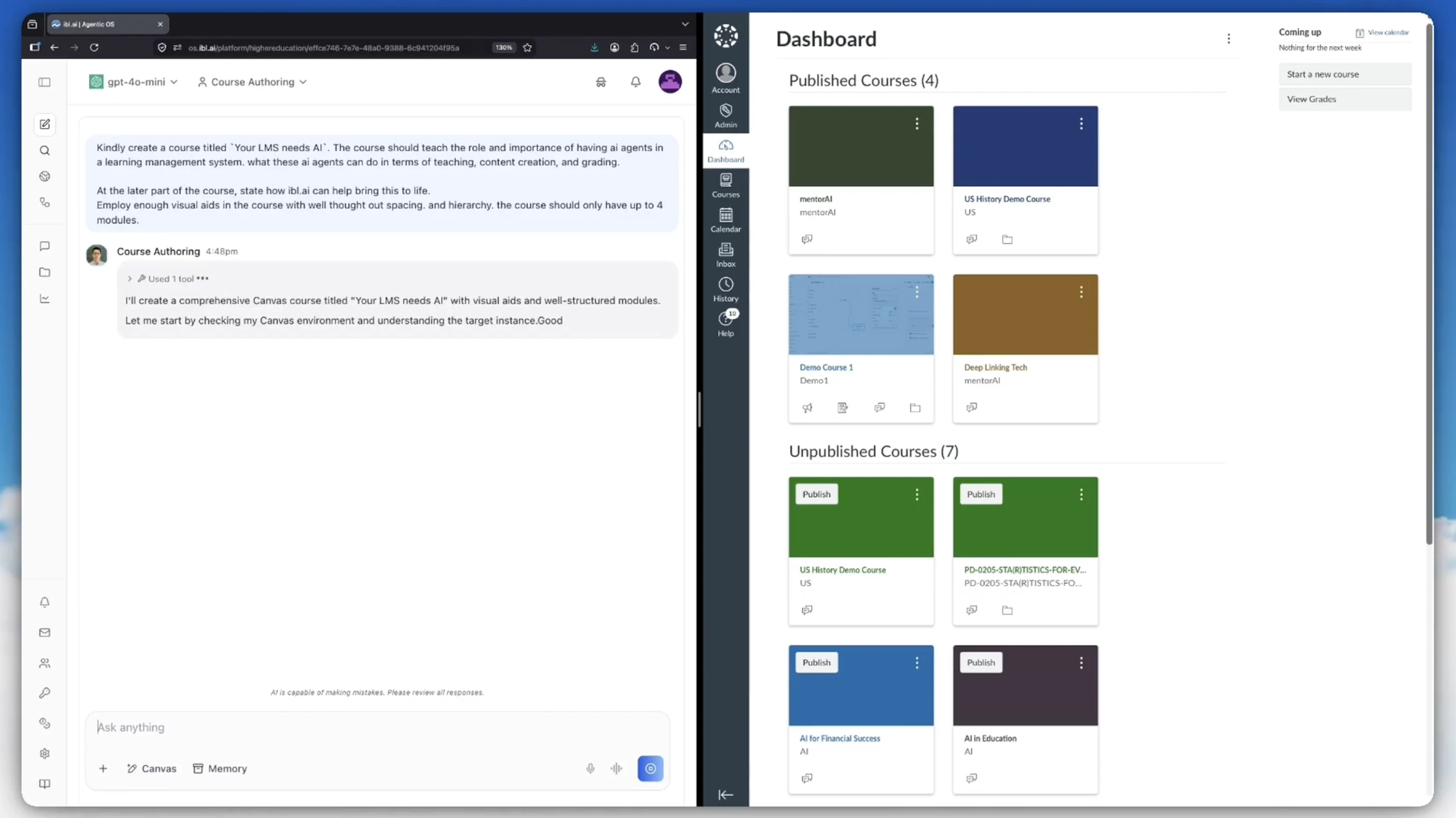
A manifest maps every object to the ID Canvas assigned it, so a second run updates the course in place instead of duplicating it. To start a course from a department's own documents, the Create a Course From Your Own Documents with AI course covers grounding, outcomes, assessments and the faculty review gate.
How do IgniteAI, Gemini LTI and ibl.ai compare for faculty in Canvas?
Each row below states only what the vendor's own published material says. Where a source is silent, the cell says so rather than guessing.
| Faculty question | Canvas IgniteAI | Google Gemini LTI | ibl.ai |
|---|---|---|---|
| Draft scores and feedback from my rubric? | Yes: Grading Assistance in SpeedGrader | Not described in Google's announcements | Yes: Faculty Assistant drafts per-criterion scores for instructor approval |
| Build a course from a prompt? | IgniteAI Agent creates and organizes modules | Lesson outlines and quizzes; Gems and NotebookLM placed in modules | Course Authoring agent builds the whole course, unpublished |
| Which models? | Instructure's platform, powered by Amazon Bedrock | Google's Gemini | Model-agnostic: any LLM, switch anytime |
| Where does it run? | Instructure's hosted platform on AWS | Google-hosted service | Your cloud, on-premise or air-gapped |
| Published price | Free access ended 30 June 2026 (U.S.) and 30 September 2026 (elsewhere); IgniteAI Agent now sits in the Canvas Next tier, price not published | No additional cost with Workspace for Education accounts | No per-seat pricing; pilots from $15K |
| Who owns the agent stack? | Instructure | You own all the code and the data |
IgniteAI is the shortest path for a campus that wants AI grading help switched on in SpeedGrader tomorrow, and Gemini LTI is the obvious add for a campus already on Google Workspace for Education. Both are real features that work as their vendors describe.
The difference is what the institution owns afterwards. With IgniteAI and Gemini LTI the agent, the model choice and the roadmap belong to the vendor. With ibl.ai the university holds the source code, chooses the model per agent, and can keep student submissions inside its own perimeter by running the model there.
Who owns student submissions when an AI grades them inside Canvas?
Grading is the most sensitive thing faculty will ask an AI to do, because the input is student work and the output is a judgment about a student. That makes "where does the submission go" a FERPA and governance question before it is a feature question.
Google's published position is that Workspace for Education data is not human reviewed or used to train AI models. Instructure points institutions to its AI Nutrition Facts for model disclosure. Those are policy commitments by the vendor that hosts the work, and they are worth reading closely.
ibl.ai answers the question architecturally instead. The platform runs on the university's own infrastructure, so a submission read by the Faculty Assistant stays inside the institution's perimeter when the model runs there too, and the faculty agent's definition keeps submission content within the session rather than across unrelated sessions.
Because you own all the code and the data, the audit trail, the retention rules and the model provider are the university's decisions. If a provider changes its terms, ibl.ai is model-agnostic, so the university switches models without rebuilding the agents.
How should a university price AI for every Canvas instructor?
Seat pricing is the wrong shape for a tool every instructor should have. Google lists Google AI Pro for Education, its paid tier, at $20 per user per month on an annual plan and $24 on a flexible plan, so the bill grows with headcount whether each person uses it daily or once a term.
| Users licensed at $20/user/month | Annual seat bill |
|---|---|
| 1,000 faculty and staff | $240,000 |
| 1,000 faculty plus 20,000 students | $5,040,000 |
| ibl.ai, same population | No per-seat pricing: the bill tracks usage |
The seat figures are Google's list price multiplied by headcount; the base Gemini LTI tools carry no added cost, and IgniteAI's post-promotion price is not published. The point is the shape: a seat bill scales with enrollment, a usage bill scales with the grading and authoring actually done.
On ibl.ai's published pricing, pilots start from $15K and integration and deployment engagements run $25K to $80K, followed by ongoing updates, new agents and engineering support as the campus adds use cases. Recurring cost after that is the LLM tokens and infrastructure the university chooses.
Which Canvas AI tool fits which faculty need?
Choose by the decision the institution cares about most, not by the demo. If speed of rollout inside SpeedGrader is the priority and the institution is comfortable with Instructure hosting the AI, IgniteAI is the native option.
If the campus already runs Google Workspace for Education and wants lesson planning help and Gems in modules at no added cost, Gemini LTI fits. If the priority is owning the agents that read student work, choosing the model, and avoiding a seat bill, ibl.ai fits.
The three can also coexist. ibl.ai sits beside Canvas rather than replacing it, as our post on how ibl.ai integrates with Canvas over LTI 1.3 explains, and the LMS AI integration guide covers the same pattern for Moodle, Blackboard and Brightspace.
For the LMS layer itself, our comparison of self-hostable open-source LMS options with AI agents covers where IgniteAI runs compared with Moodle and Open edX. To see the Faculty Assistant grade against your own rubric in a Canvas course, book a demo.
Frequently Asked Questions
Can AI grade assignments in Canvas SpeedGrader?
Yes, as drafts. Instructure's IgniteAI Grading Assistance scores and drafts feedback from the rubric for the instructor to revise. ibl.ai's Faculty Assistant does the same against the instructor's rubric, on the university's own infrastructure, and leaves posting the grade to the instructor.
Can an AI agent build a whole Canvas course?
Yes. Instructure's IgniteAI Agent creates and organizes course modules from one prompt. ibl.ai's Course Authoring agent builds the shell, pages, assignments, quizzes and modules through the Canvas REST API and leaves the course unpublished for faculty review.
Does Gemini LTI grade student work in Canvas?
Google's announcements do not describe it scoring submissions in the Canvas gradebook. They list lesson outlines, quizzes exported to Google Forms, hooks, student learning support, and Gems and NotebookLM notebooks placed in course modules.
Which AI for Canvas lets the university own the data?
ibl.ai. It runs on the university's cloud, on-premise or air-gapped infrastructure, it is model-agnostic, and you own all the code and the data, including every draft grade and course the agents produce.