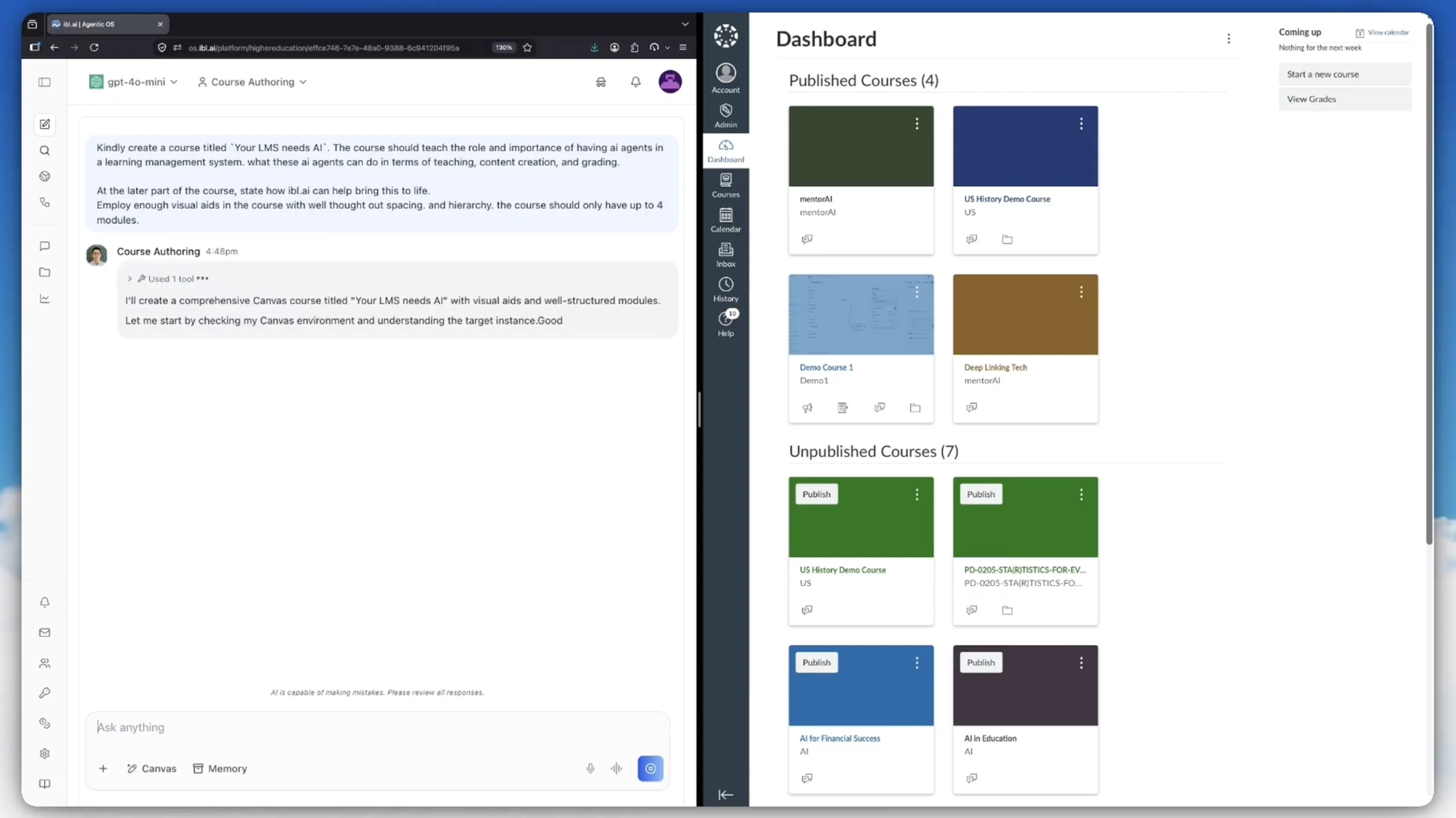
We've shipped a Course Authoring agent that builds Canvas courses through the Canvas REST API — the whole course, not a single resource at a time.
You describe the course in plain English. The agent creates the shell, authors the pages, creates the assignments and quizzes, assembles the modules, wires every item into place, and hands you back a course that a human can review before anyone takes it.
The prompt in the screenshot above is the entire input: a title, what the course should teach, a note about visual hierarchy, and a cap of four modules.
Watch it build a course
Why this is harder than it looks
Canvas has no "create a whole course" endpoint. A course is assembled from a dozen independent resources, and each one carries its own publish state.
The API will happily let you build something that looks complete in the admin view and is entirely invisible to students. A published assignment inside an unpublished module shows up for the instructor and for nobody else.
Most of the difficulty is ordering, publish state, and idempotency — not the individual HTTP calls. Those three are exactly what the agent encodes.
The build order
Dependencies run one direction. Follow it and you never have to backfill an ID:
| # | Step | Why it's here |
|---|---|---|
| 1 | Course shell | Created unpublished. Everything else hangs off its ID. |
| 2 | Sections | Enrollments later need somewhere to land. |
| 3 | Assignment groups | Assignments need a group to belong to. |
| 4 | Files | A three-step upload, before anything links to them. |
| 5 | Pages, assignments, discussions, quizzes | The actual content. Quiz questions come after their quiz. |
| 6 | Modules | The containers students actually navigate. |
| 7 | Module items | Needs every ID from step 5. This is where hand-rolled scripts break. |
| 8 | Front page and syllabus | The front page has to exist as a page first. |
| 9 | Enrollments | Real people. Added only once the course is worth looking at. |
| 10 | Publish | Modules first, then the course — and the last step is a human's. |
Steps 5 and 6 could run concurrently in principle. They don't. Canvas throttles on concurrency and serial execution is barely slower in practice.
Publish last, and publish deliberately
Content objects, modules, module items, and the course each carry an independent published flag. Four levers, and getting any one of them wrong produces a course that is silently invisible.
Publishing a course while enrollments exist sends notification emails to real people. There is no satisfying undo for that — which is why the agent stops short of it.
It builds everything unpublished, publishes the modules once the structure is verified, and leaves the course itself for a person to turn on. When it finishes, it says so explicitly and gives you the one-line command to go live.
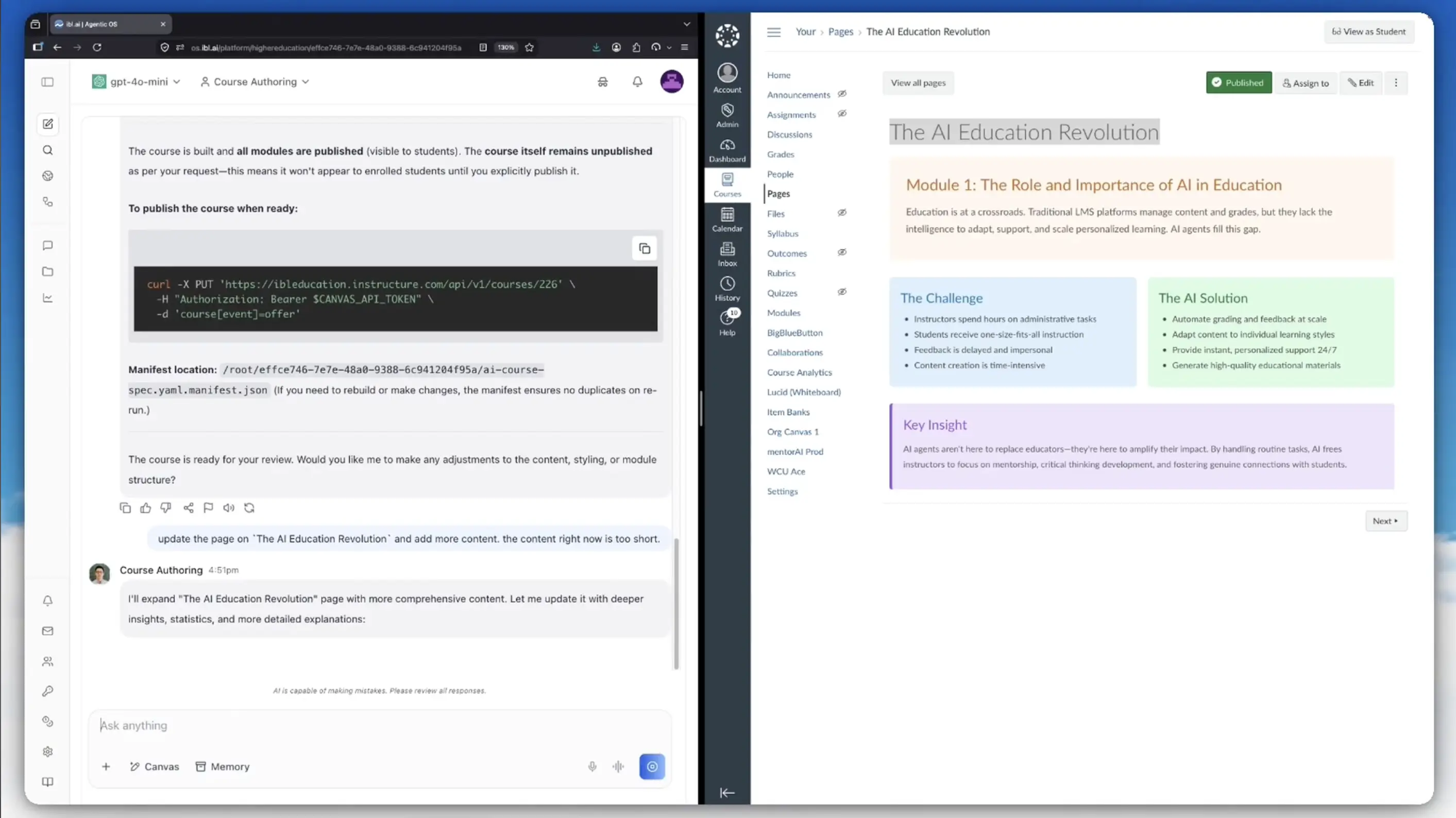
That screenshot is the finished result on the right: a real Canvas page with a module heading, a two-column Challenge/Solution comparison, and a highlighted Key Insight block. The visual hierarchy came from the prompt asking for it.
Run it twice, get one course
Canvas has no upsert. A second run of a naive script produces a second copy of every page, assignment, and module — and nobody notices until a student does.
The agent writes a manifest: a JSON file mapping each object in the spec to the ID Canvas assigned it. On a re-run, anything already in the manifest gets updated in place instead of created again.
That also makes a failed build resumable. If it dies halfway through step 7, you run the same command and it picks up from where it stopped rather than starting a duplicate course beside the broken one.
The manifest path is reported at the end of every build, so re-runs are predictable and you always know which state file governs which course.
Keep talking to it after the build
The build isn't the end of the conversation. In the screenshot above, the follow-up is just: "update the page on The AI Education Revolution and add more content. the content right now is too short."
The agent finds the page, rewrites the body, and pushes it back — no rebuild, no duplicate. Reviewing a course and revising it are the same interface.
Things it knows that cost hours to learn
A handful of Canvas behaviors return 200 OK while quietly doing nothing. The agent is built to expect them:
- Pages are referenced by slug, not by ID. Every other content type wires into a module with
content_id; pages usepage_url. This is the single most common module-wiring failure. - Course dates need a flag to exist.
start_atandend_atare silently discarded unless the course is set to restrict enrollments to course dates. Canvas returns the course with null dates and no error. - A new course may not be empty. If the account has a course template, Canvas copies it into every new course — so a build can land on top of someone else's content unless it asks for a clean shell.
- Some create parameters are not nested. Nest them the way the rest of the API works and they're accepted and ignored. The most visible symptom: the course simply doesn't publish.
- Collections paginate at 10 by default, through a
Linkheader rather than a page count. Anything that reads existing objects has to follow it or it silently sees a fraction of the course. - Throttling looks like a permissions error. Canvas returns
403for rate limiting, distinguishable from a real permissions failure only by the body text. Sequential requests almost never hit it; parallel ones are the usual cause.
Use a migration when a migration is the answer
If you're duplicating an existing course, copying between instances, or importing from another LMS, the Content Migrations API does in one call what would otherwise be hundreds — and it preserves internal links and dates, which hand-built copies do not.
The agent is built to recognize that case and say so, rather than hand-rolling something a migration would handle better.
For roster loading at scale, SIS imports beat per-user enrollment calls by orders of magnitude, but they can deactivate enrollments not present in the file. That one stays a deliberate human decision.
All of this is a skill
Everything above — the build order, the publish discipline, the manifest, the Canvas quirks — lives in a single Markdown skill file attached to the agent.
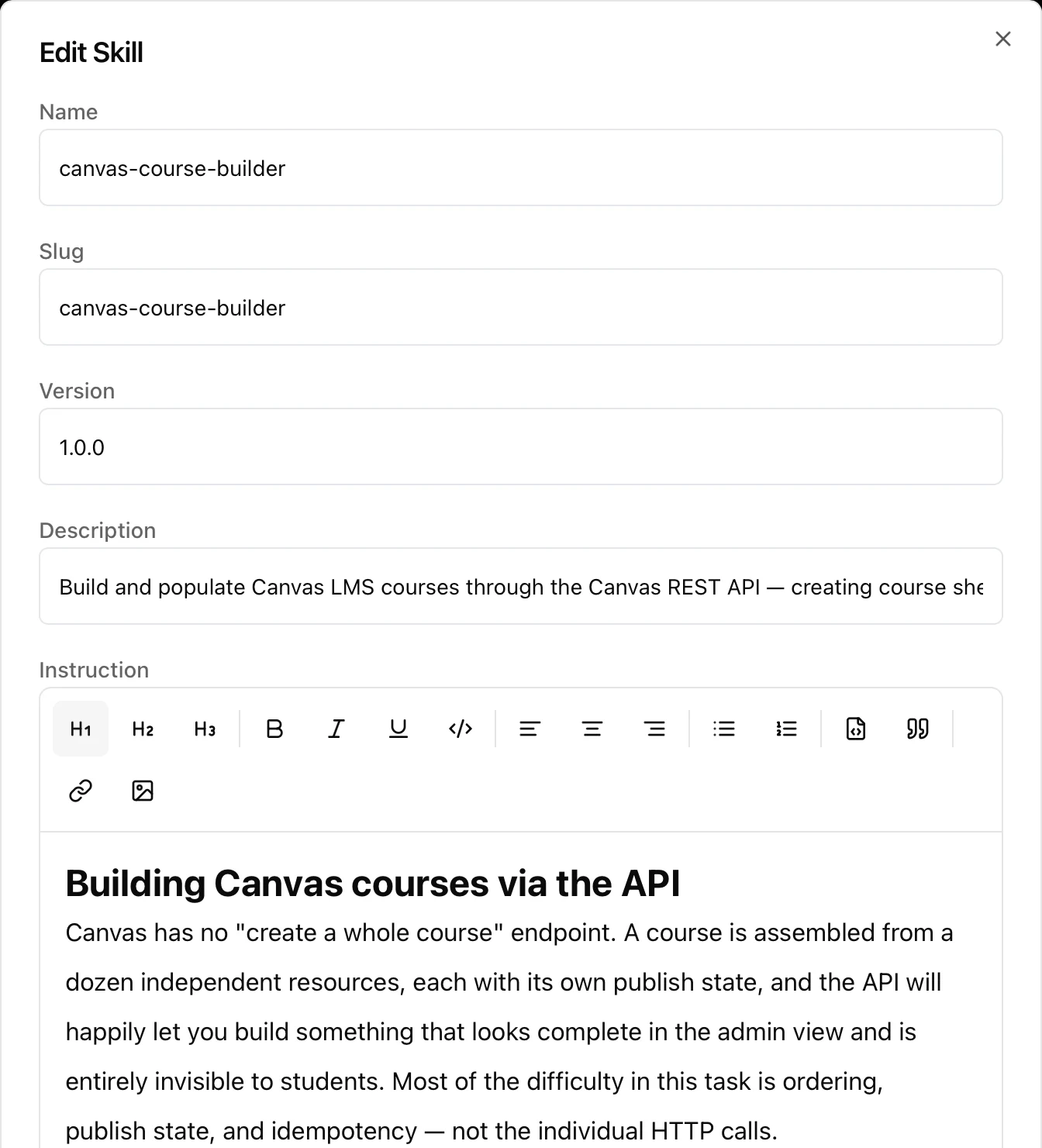
It's a named, versioned entry in the agent's Skills tab — canvas-course-builder, version 1.0.0 — with a description that tells the agent when to reach for it and an instruction body it reads at the point of use.
Which means the interesting part is editable by the people who own the process. If your institution has a house style for module naming, or a rule that quizzes are never auto-published, you write that sentence into the skill. No plugin, no deployment, no code review.
Skills are portable across agents, too. The same file can back a course-authoring agent, a curriculum-review agent, and an LMS-migration agent without being rewritten three times.
The instruction body, in full
This is the text the agent reads. Not pseudocode, not a summary of one — the actual contents of the canvas-course-builder skill, minus the environment-setup section:
# Building Canvas courses via the API

Canvas has no "create a whole course" endpoint. A course is assembled from a dozen
independent resources, each with its own publish state, and the API will happily let you
build something that looks complete in the admin view and is entirely invisible to
students. Most of the difficulty in this task is ordering, publish state, and idempotency
— not the individual HTTP calls.

## Before touching the API

Two things to establish first, because getting them wrong is expensive:

- **Confirm identity and permissions before writing anything.** `GET /api/v1/users/self`
  tells you which identity you are operating as; `GET /api/v1/accounts` tells you which
  accounts can create courses (an empty list means teacher-level access — they can
  populate existing courses but not create new ones, which changes the whole plan). Do
  this even when the user seems certain, because access scoped to the wrong sub-account
  fails halfway through a build and leaves debris.

- **Is this production?** Creating course content is not reversible in a satisfying way —
  deleted objects linger, notifications fire, students see things. Ask which course or
  sub-account to build in, and prefer a sandbox sub-account or a test course for the first
  run. If the user is clearly iterating on a script, suggest they point it at a throwaway
  course first.

## The build order that works

Dependencies run one direction. Follow this and you never have to backfill an ID:

    1. Course shell            POST /accounts/:id/courses          (leave unpublished)
    2. Sections                POST /courses/:id/sections
    3. Assignment groups       POST /courses/:id/assignment_groups (assignments need these)
    4. Files                   3-step upload (see references/recipes.md)
    5. Pages                   POST /courses/:id/pages
       Assignments             POST /courses/:id/assignments
       Discussions             POST /courses/:id/discussion_topics
       Quizzes + questions     POST /courses/:id/quizzes then .../questions
    6. Modules                 POST /courses/:id/modules
    7. Module items            POST /courses/:id/modules/:mid/items (needs IDs from step 5)
    8. Front page / syllabus   PUT  /courses/:id/front_page, PUT /courses/:id
    9. Enrollments             POST /courses/:id/enrollments
    10. Publish everything     modules → then the course itself

Steps 5 and 6 can run concurrently in principle; don't. Canvas throttles on concurrency
(see below) and serial execution is barely slower in practice.

**Publish last, and publish deliberately.** Content objects, modules, module items, and
the course each carry an independent `published` flag. A published assignment inside an
unpublished module is invisible. Publishing the course while enrollments exist sends
notification emails to real people. Build the whole thing unpublished, verify it, then
publish modules and finally the course with `PUT /courses/:id` and `course[event]=offer`.

**A page inside a module is referenced by `page_url`, not by ID.** This is the single most
common failure in module wiring. When you create a page Canvas returns a `url` slug derived
from the title; capture it. Every other content type uses `content_id`. `SubHeader` and
`ExternalUrl` items need neither.

## Idempotency: assume the script will be run twice

Canvas has no upsert. A second run of a naive script produces a second copy of every page,
assignment and module, and the user will not notice until a student does. Two workable
approaches:

- **Manifest file** (preferred for scripted builds): write the created object IDs to a JSON
  file keyed by a stable name from the spec. On re-run, if the key exists, `PUT` instead of
  `POST`. `scripts/build_course.py` does this.

- **Match by title** (for ad-hoc work): list existing objects with `GET` and reuse anything
  whose title matches before creating. Slower and fragile against renames, but needs no
  state.

Say which one you used, and where the manifest lives, so re-runs are predictable.

## Request mechanics that bite

**Parameter encoding.** Canvas accepts both form-encoded bracket notation
(`assignment[submission_types][]=online_upload`) and a JSON body with
`Content-Type: application/json`. Form encoding is what the docs show and what every
endpoint accepts. But anything containing a list of objects — quiz answers, assignment
overrides, module overrides — should go as a JSON body, because bracket-encoded arrays of
hashes (`answers[][text]`) rely on Rails' positional grouping and silently mangle answers
that share key sets. `scripts/canvas_client.py` handles both; use `as_json=True` for those.

**Course dates need a flag to exist.** `course[start_at]` and `course[end_at]` are silently
discarded unless `course[restrict_enrollments_to_course_dates]` is true. Canvas returns 200
and a Course object with null dates. Since assignment availability is computed against
course and term dates, this shows up much later as "why can't students see the assignment I
set a due date on". Set the flag whenever you set dates.

**A new course may not be empty.** If the account has a course template configured, Canvas
copies it into every new course. Pass top-level `skip_course_template=true` when you want a
clean shell to build into, or your build lands on top of someone else's content.

**Four create params are not under `course[...]`.** `offer`, `enroll_me`,
`skip_course_template` and `enable_sis_reactivation` are top-level. Nesting them as
`course[offer]` is accepted and ignored — the course just doesn't publish.

**Booleans and nulls.** Send `true`/`false` as lowercase strings in form encoding. Omitting
a key leaves the existing value; sending an empty string usually clears it. There is no way
to distinguish "unset" from "set to empty" in form encoding, which is why updates should
send only the fields you intend to change.

**Pagination.** Collection endpoints return 10 items by default and paginate via the `Link`
header with `rel="next"` — there is no `page_count` in the body. Set `per_page=100` (the
practical maximum) and follow `next` until it's absent. Do not construct page URLs by hand;
some endpoints use bookmark cursors rather than page numbers.

**Throttling.** Canvas uses a leaky bucket keyed on the caller, not the user or account.
Every response carries `X-Request-Cost`; throttled requests come back as 403 (or 429 on
newer builds) with "Rate Limit Exceeded" in the body, which is otherwise indistinguishable
from a permissions 403 — check the body text. Sequential requests are almost never
throttled; parallel requests take an extra up-front penalty and are the usual cause. If you
hit it, back off exponentially and reduce concurrency to one.

**SIS IDs.** Anywhere Canvas takes an ID you can pass `sis_course_id:BIO101-F26`,
`sis_user_id:0001234`, `sis_section_id:...`. URL-encode the colon-suffixed value. This is
much safer than hardcoding numeric IDs that differ between test and production instances.

**Rich text.** `body`, `description`, `message` and `syllabus_body` are HTML, sanitized
server-side. Relative links to other course objects break on course copy; use Canvas's
`/courses/:id/pages/slug` form or, better, wire content together with modules instead of
inline links.

## When not to build object-by-object

If the user is duplicating an existing course, copying between instances, or importing from
another LMS, the Content Migrations API does in one call what would otherwise be hundreds:
`POST /courses/:id/content_migrations` with `migration_type=course_copy_importer` (or
`common_cartridge_importer` with an uploaded `.imscc`). It preserves internal links and
dates, which hand-built copies do not. See `references/recipes.md`. Say so if the user is
about to hand-roll something a migration would handle.

For roster loading at scale, SIS Imports (`POST /accounts/:id/sis_imports` with a CSV) beat
per-user enrollment calls by orders of magnitude — but they require account-admin rights and
can deactivate enrollments not present in the file, so only reach for them when the user
actually owns the SIS integration.

## Spec vs. API: two different languages

**Critical distinction:** the `build_course.py` spec is an abstraction layer, NOT raw Canvas
API calls.

The spec uses human-friendly names and relies on the builder to translate them into Canvas
API field names. This is why the spec works:

    # SPEC level (what you write)
    modules:
      - name: "Module 1: Foundations"
        items:
          - type: Page              # ← MUST be capitalized (Page, Assignment, Quiz, etc.)
            title: "Course Home"    # ← Uses human-readable title, not page_url
          - type: Assignment
            title: "Problem Set 1"  # ← References by name, not content_id

The builder then translates this to Canvas API calls:

    # API level (what Canvas receives)
    POST /courses/:id/modules/:mid/items
    {
      "module_item": {
        "type": "Page",
        "page_url": "course-home",   # ← Builder looked up the page slug
        "position": 1
      }
    }

Key translation rules:

- **Page items:** use `title:` in the spec. The builder looks up the page slug. Never use
  `page_url` in the spec.
- **Other content items:** use `title:` in the spec. The builder looks up the `content_id`.
  Never use `content_id` directly in the spec.
- **Type names** MUST be capitalized (`Page`, `Assignment`, `Quiz`, `Discussion`, `File`,
  `ExternalUrl`, `SubHeader`, `ExternalTool`). Lowercase types are rejected.
- **Content must be in modules to be visible.** Creating an assignment or discussion is not
  enough — it must also be added as a module item for students to see it.

Common mistake — using API field names in the spec:

    # ❌ WRONG - This bypasses the abstraction layer
    items:
      - type: page                    # lowercase ← WRONG
        page_url: "course-home"       # API field in spec ← WRONG

    # ✅ CORRECT - Use spec abstractions
    items:
      - type: Page                    # capitalized
        title: "Course Home"          # spec-level reference

## Bundled tooling

`scripts/canvas_client.py` — a small `CanvasClient` covering pagination, the bracket/JSON
encoding split, throttle-aware retry, and the three-step file upload. Import it rather than
rewriting requests boilerplate; the retry and pagination logic in particular is easy to get
subtly wrong.

`scripts/build_course.py` — takes a YAML or JSON course spec and builds the whole course in
dependency order, idempotently, with `--dry-run`. Use it when the user wants a repeatable
build; use the client directly for one-off surgery.

    python scripts/build_course.py course.yaml --account 1 --dry-run
    python scripts/build_course.py course.yaml --account 1      # then for real
    python scripts/build_course.py course.yaml --course 12345   # populate an existing course

Both need `requests`; `build_course.py` also wants `pyyaml` for YAML specs (JSON works
without it).

`assets/course_spec.example.yaml` is a fully-commented spec showing every supported content
type. When a user describes a course in prose, translating it into this spec and running the
builder is usually faster and more reviewable than writing a bespoke script — and the spec
is something they can edit and re-run.

## Reference material

Read these when you need exact parameters rather than the shape of the work:

- `references/endpoints.md` — endpoint and parameter cheat sheet for every resource above,
  including the exact `module_item[...]` and `course[...]` field names.
- `references/content-types.md` — request bodies for pages, assignments, discussions,
  Classic quizzes (with all question types and answer formats) and New Quizzes, which use a
  completely different API at `/api/quiz/v1/`.
- `references/recipes.md` — file uploads, enrollments and sections, course copy and Common
  Cartridge migrations, publishing, and a table of error responses with what actually causes
  each one.

## Troubleshooting

**Build failed halfway through. Can I resume?**

Yes. The manifest file tracks what was created. Re-run the same command:

    python build_course.py course.yaml --account 1

The builder will skip any objects that already exist in the manifest, resume from where it
failed, and not create duplicates. Delete the manifest only if you want a completely fresh
build.

**HTTP 400: "Could not find content" on module items**

*Cause 1: type capitalization.* Module item types must be capitalized.

    # ❌ WRONG              # ✅ CORRECT
    items:                  items:
      - type: page            - type: Page
      - type: assignment      - type: Assignment

*Cause 2: using API field names instead of spec abstractions.* `page_url` and `content_id`
are API fields, not spec fields — reference content by `title:`.

*Cause 3: the referenced content doesn't exist.* If you reference a page by title, that page
must have been created in the `pages:` section with the exact same title.

    pages:
      - title: "Course Home"      # ✅ Created with this title
        body: "..."

    modules:
      - name: "Module 1"
        items:
          - type: Page
            title: "Course Home"  # ✅ Matches the page title exactly

**Assignment or discussion is invisible to students**

*Cause: not in a module.* Creating an assignment or discussion doesn't make it visible. It
must be published AND be added to a module (or be the course front page).

    assignments:
      - name: "Problem Set 1"
        published: true           # ✅ Must be published
        # But this alone is not enough!

    modules:
      - name: "Module 1: Foundations"
        items:
          - type: Assignment
            title: "Problem Set 1"  # ✅ Also add to module

**Course created but content is invisible**

*Cause: content exists but modules are unpublished.* A published assignment inside an
unpublished module is invisible to students. Check: are the modules marked
`published: true` in the spec, and has the course itself been published
(`course[event]=offer`)? Both must be true.

**Module item shows but has no content ("No content")**

*Cause: page items using `content_id` instead of `page_url`.* Only other content types
(assignments, quizzes, discussions) use `content_id`. Pages use `page_url` — in the spec,
reference the page by `title:` and let the builder translate it.

## Reporting back

End with what exists now, not what was attempted: the course ID and URL, counts per content
type, publish state of the course and modules, anything that failed, and the manifest path.
If the course is still unpublished — which it should be by default — say so explicitly and
give the one-line command to publish it. Users routinely assume a successful build means a
live course.
Two things are worth noticing about that document. It is almost entirely prose, and the parts that aren't prose are examples rather than code the agent executes. And a large share of it describes what not to do — the wrong publish order, the API field name that belongs in a request but not a spec, the migration you should reach for instead of hand-rolling hundreds of calls.
That's the shape of institutional knowledge. It's what an experienced instructional designer would tell a new hire over a week, and it's exactly the thing that normally never gets written down.
Where to find it
The Course Authoring agent is available in Agentic OS. Skills are configured per agent under Configurations → Skills, and the same editor is where you'd add your own.
If you want to see what else agents on the platform can be given: the ibl.ai agent catalog has around a hundred pre-built configurations across higher education, K-12, enterprise, government, and regulated verticals — each one a set of Markdown files you can read, edit, and own.