ibl.ai agents now pick their outside services from a catalog of MCP connectors, a curated Featured set plus the public MCP directory, with one switch per agent, a per-connector choice of whose account signs in, the organization's own OAuth app when a service needs one, and a per-chat switch in the composer, all mountable in your own Next.js app, because on ibl.ai you own all the code and the data.
The toolkit's /iblai-vibe-agent-mcp skill was rewritten for the SDK's new MCP UI and shipped in iblai/vibe v2.20.0 on November 3, 2026, one of five toolkit releases between v2.18.1 (November 2) and v2.20.1 (November 3).
The MCP tab itself first shipped in the toolkit in v1.2.0 on May 25, 2026. The backend half of this release, MCP Registry sync, per-tenant OAuth and per-user toggles, is in the October 30 platform update.
What does the ibl.ai MCP tab let an agent use?
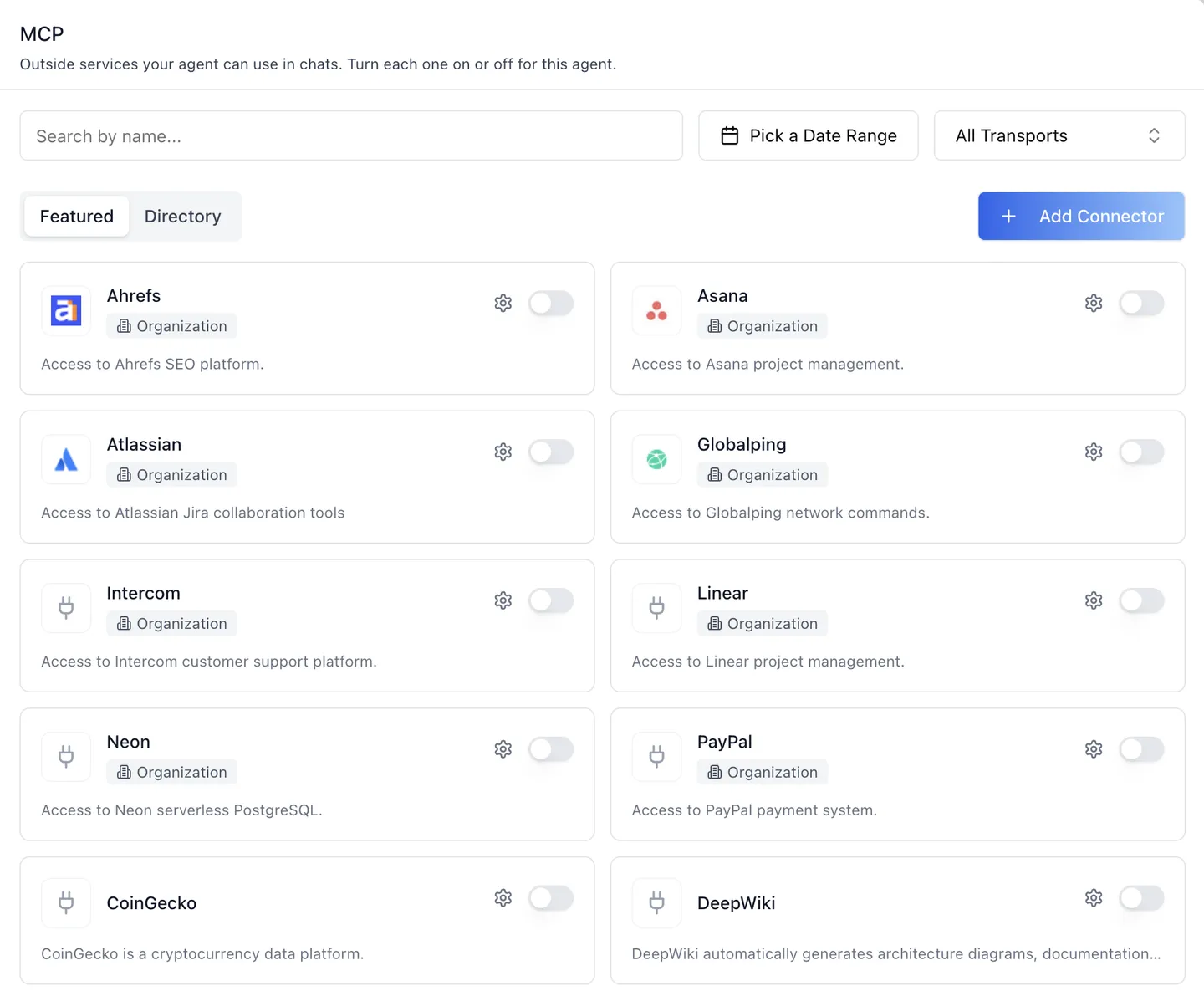
The MCP tab lists the outside services, Model Context Protocol servers, that an ibl.ai agent can use in its chats. It has two sub-tabs, shown as soon as the organization has featured connectors, at 12 cards a page with a pager per list.
Featured is the platform-curated set. Directory is everything else the agent may use: the public MCP directory plus the organization's own connectors.
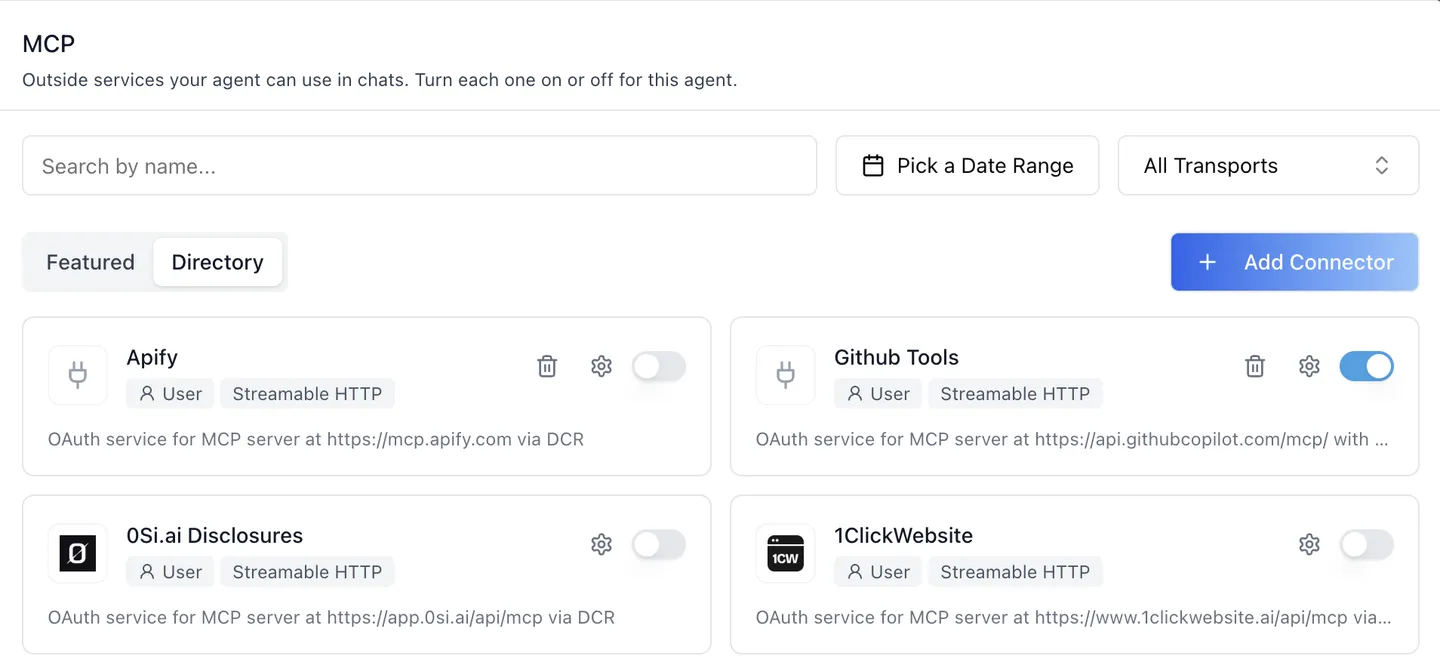
Every card carries one switch: On for this agent or Off for this agent. Turning the first connector on also gives the agent the mcp tool; turning the last one off removes it again, so nobody has to keep the Tools tab in step.
A scope pill on each sign-in connector says whose account the agent uses, a transport chip on Directory cards says how it connects, and the organization's own connectors carry a trash icon. Featured and directory connectors cannot be edited or deleted by an organization.
Whose account does an ibl.ai agent sign in with?
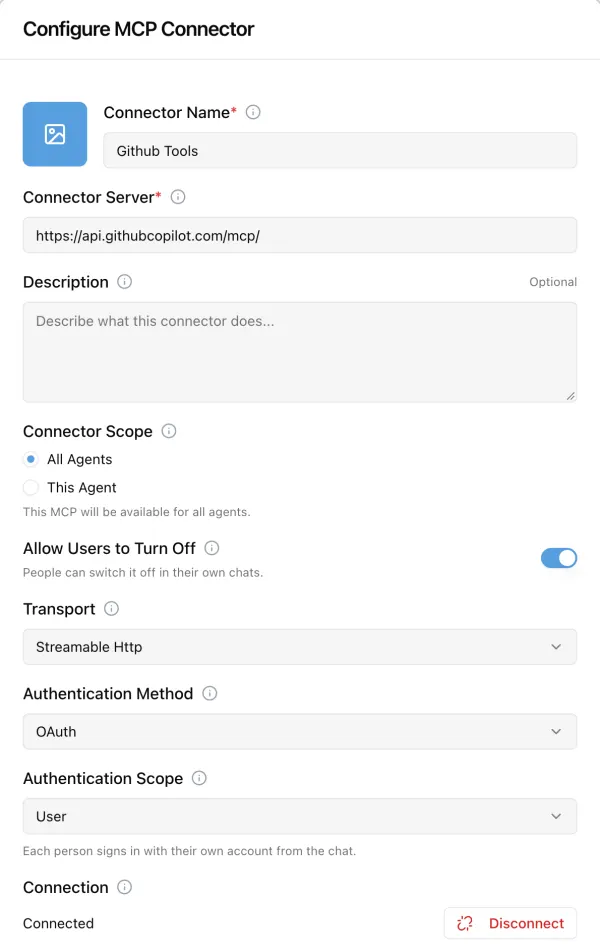
The gear opens Configure, and its Authentication Scope answers that question per connector, with three choices.
The frame shows an organization's own connector, set to User: each engineer's agent reaches GitHub with that engineer's own permissions, not a shared service account.
| Authentication Scope | Whose account the agent uses | Where the sign-in happens |
|---|---|---|
| User | Each person's own account | From the chat, by that person |
| Agent | One shared account for everyone who chats with this agent | From the MCP tab, by someone who manages the agent |
| Organization | One shared account for every agent | From the MCP tab, by someone who manages the agent |
On a featured or directory connector the scope is stored as this agent's override, and the card's pill follows it. Only an organization admin, or the Platform API Token, can change it; the platform answers anyone else with a 403.
Picking Agent or Organization when no shared sign-in exists yet turns the connector off until it is switched on again, which opens that sign-in. Shared sign-ins are never made from the chat.
What if an MCP service cannot register an OAuth app by itself?
Most services let the platform register an OAuth app on the fly, through Dynamic Client Registration with discovery that follows RFC 9728 and RFC 8414, PKCE (S256) and RFC 8707 resource; each organization registers its own client.
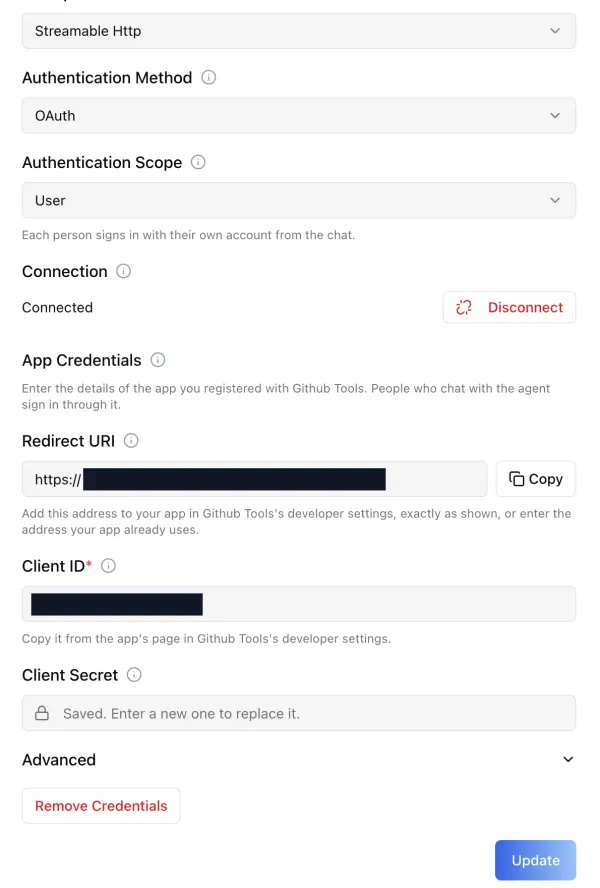
When a service cannot, publishes no sign-in settings, or the organization already has an app for it, the dialog shows App Credentials instead of failing.
It shows the Redirect URI to register with the service, with a copy button, then Client ID and Client Secret.
Advanced holds four settings: the permissions (pre-filled from what was discovered), how the secret is sent (in the request, HTTP Basic, or none), extra sign-in settings, and the authorization and token URLs.
The secret comes back masked after saving. Remove Credentials deletes the app, and everyone who signed in through it must sign in again. In the frame above we blacked out the redirect address and the client id.
Can users switch an MCP connector off in their own chat?
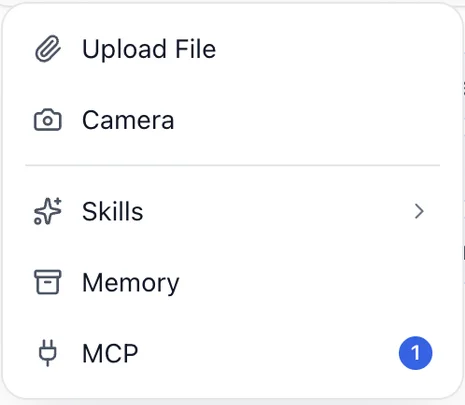
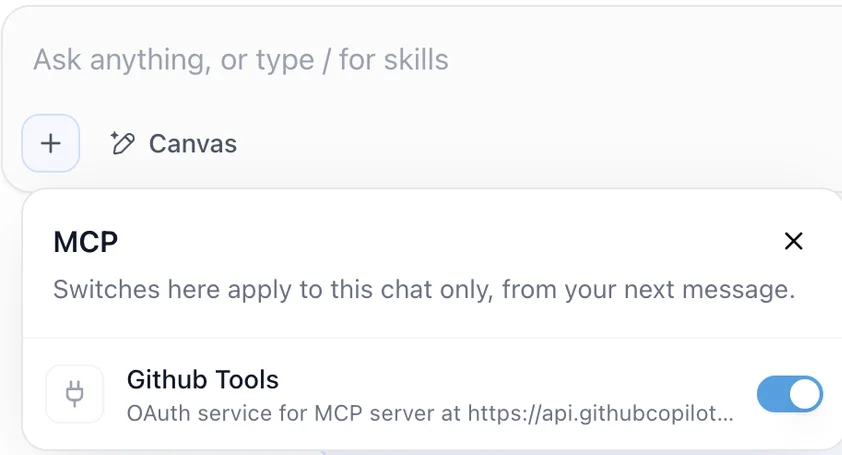
Yes, unless the organization requires it.
The chat composer's + menu gets an MCP row whenever the user is signed in, the chat is not embedded, and the agent has at least one connector on. Its badge counts the connectors that are on for this chat and signed in; in the frame it reads 1, for Github Tools.
The panel lists the agent's connectors with one switch each: on or off for this chat, applied from the next message.
A new chat starts with each signed-in connector on. A connector saved with Allow Users to Turn Off off shows a lock, "Required by your organization", and its switch cannot move.
For a User-scope connector the person has not signed in to, turning it on opens their own sign-in, and the agent uses it from the next message. We cropped the frames to the menu and the panel.
Who controls each MCP setting on ibl.ai?
Five settings decide whether and how a connector runs in a conversation, and each sits at a different level, so an organization can make one mandatory while a user trims another for a single chat.
| Setting | Where | Who it affects |
|---|---|---|
| Connector Scope | Add / Configure | Which agents may list it: all agents or this one |
| On / Off for this agent | The card | This agent's chats |
| Authentication Scope | Configure | Whose account the agent signs in with |
| Allow Users to Turn Off | Add / Configure | Whether the chat's switch can move |
| On / Off for this chat | The chat's MCP panel | One conversation of one user |
Only the organization that owns a connector can make it mandatory, so Allow Users to Turn Off cannot be changed on a featured or directory connector. A connector the organization has switched off over the API is never used, whatever the agent or the user chose.
With role-based access control on, the chat's MCP row needs read access to the agent's mcp_servers field, and the seeded chat role does not have it until it is granted.
How do you add the MCP tab to your own app?
The tab is one component, McpTab, imported from @iblai/iblai-js/web-containers/next and mounted on a page under the shared AgentSettingsProvider; it takes no required props. The chat's panel is exported on its own as McpServersMenu for a custom composer.
Two more pieces come with it: two lines registering mcpApiSlice in the store, and a sign-in return page at /google-oauth-callback/. It needs @iblai/iblai-js 2.62.1 or later; the new controls arrived in @iblai/web-containers 1.58.1.
The skill also lists 20 data-layer hooks for a custom UI and the REST calls behind every control. Read it at MCP tab for your app, or install the skills into your coding agent and let it do the wiring; see Agentic Vibe.
Why does it matter that you own the MCP layer?
MCP connectors are where an agent reaches your Jira, your support desk and your database, so whoever runs that layer holds the keys to them.
On ibl.ai the tab ships as source in the SDK, the platform behind it comes as source under ibl.ai's Full Code License, and the OAuth apps can be your organization's own, so the credentials and the connector choices stay on infrastructure you control.
The same code runs on our hosted cloud or your servers, including air-gapped networks, each agent runs the model you chose for it, and there is no per-seat pricing. 1.6M+ users across 400+ organizations run the platform this way, including NVIDIA, MIT, and Syracuse University.
Want to see your agents use your own tools?
We will switch on a connector for one of your agents, sign it in with the scope you pick, and run a chat against it, in a 30-minute call. Book a 30-minute demo or talk to the ibl.ai team — ibl.ai is family-owned and operated from New York, NY.