ibl.ai now ships its visual agent workflow editor inside the SDK, so the canvas, the step panels, the preview chat and the data model mount in your own Next.js app with two pages and a store slice, letting you draw a run as a graph of agent, logic and data steps, validate and preview it, and publish it as an agent your users chat with, because on ibl.ai you own all the code and the data.
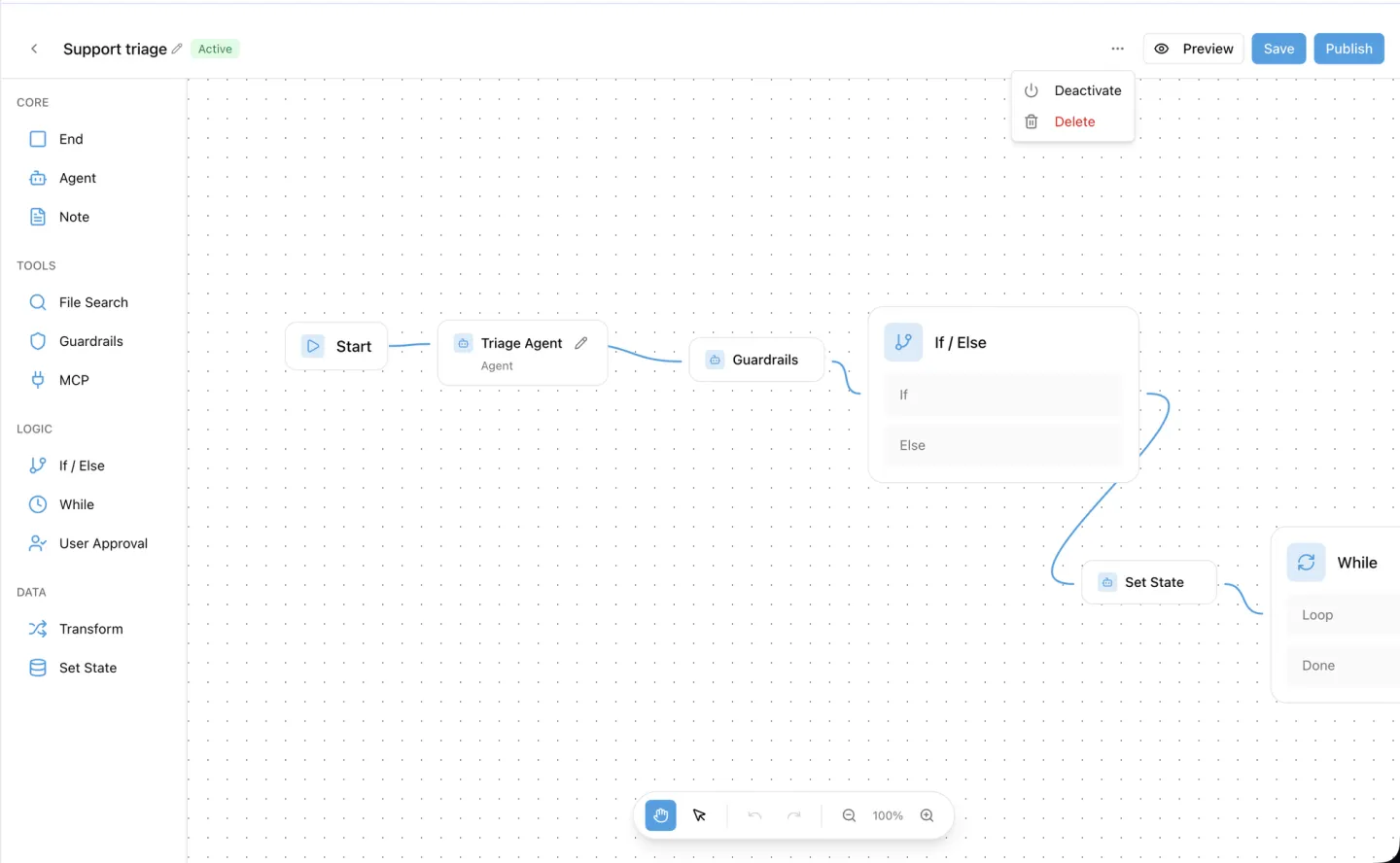
The toolkit's /iblai-vibe-workflow skill was rewritten for the SDK-hosted builder in iblai/vibe v2.17.0 on October 29, 2026, with six captures of the builder (the list and the editor).
The platform's own editor is documented at Workflows; this page is about putting that editor in an app you build.
The demo graph above places a Guardrails step after the agent to show the palette. Until Guardrails executes, a production graph leaves it out; the section on which steps run explains why.
What does the workflow editor let you build?
A workflow is an agent run you draw rather than describe.
The captured example is a support triage flow: an agent triages the request, an If/else checks variables['attempts'] < 3, a Set state step records the attempt, and a While loop retries until its Max Iterations cap, 10 by default.
Where a prompt asks one agent to do everything in a single turn, a workflow lays the work out as a graph: an agent step, a check, a branch, a loop, a value written to state, and an End that returns the last reply.
The palette has four groups and eleven step types. Core holds Agent, End and Note. Tools holds File search, Guardrails and MCP. Logic holds If/else, While and User approval. Data holds Transform and Set state.
Drag a step onto the canvas, or click it to drop it next to the selected step; connections run left to right.
The header carries an inline-editable name, an Active or Draft pill, an Unsaved marker while the canvas differs from the server, Preview, Save, Publish, and a menu with Activate, Deactivate and Delete.
Preview opens a chat beside the canvas and runs the workflow as the user would see it.
Publish saves, validates and makes the workflow Active in one call. Every workflow gets its own dedicated agent, created with it and deleted with it, and chatting with that agent runs the workflow.
How does a workflow branch, loop and keep state?
![The If/Else step panel: a case named Retry budget left with the expression variables['attempts'] < 3, a note on referencing variables and earlier step results, and a Step IDs list with Copy Reference buttons for Support triage, While and Set State.](/images/updates/agent-workflow-builder-if-else.webp)
The Start step declares state variables with a type picker: String, Number, Boolean, Object or List, each with an optional default. An If/else step holds one row per case, an optional name plus an expression, and an Else branch.
A While step has a condition and a Max Iterations field that defaults to 10.
Expressions use subscript access only. variables['attempts'] < 3 reads a workflow variable, and step_results['step-id']['output'] reads an earlier step's reply; dotted access such as variables.score fails validation.
The If/else panel lists the graph's Step IDs, each with a Copy Reference button that puts its step_results[...] key on the clipboard, so you never retype an id.
Set state assigns a value to a variable, and its picker lists every variable the workflow defines. Deleting a Start variable that a step still reads or assigns is refused, and the editor names the steps that use it.
An Agent step runs the chosen agent exactly as that agent is configured: its Model is read-only here, and its Tools switches edit that agent's own settings, so a change affects every chat with it.
Auto-save writes the definition one second after the last change and validates it, surfacing errors and warnings in a collapsible banner above the canvas.
Which workflow steps run today, and which do not yet?
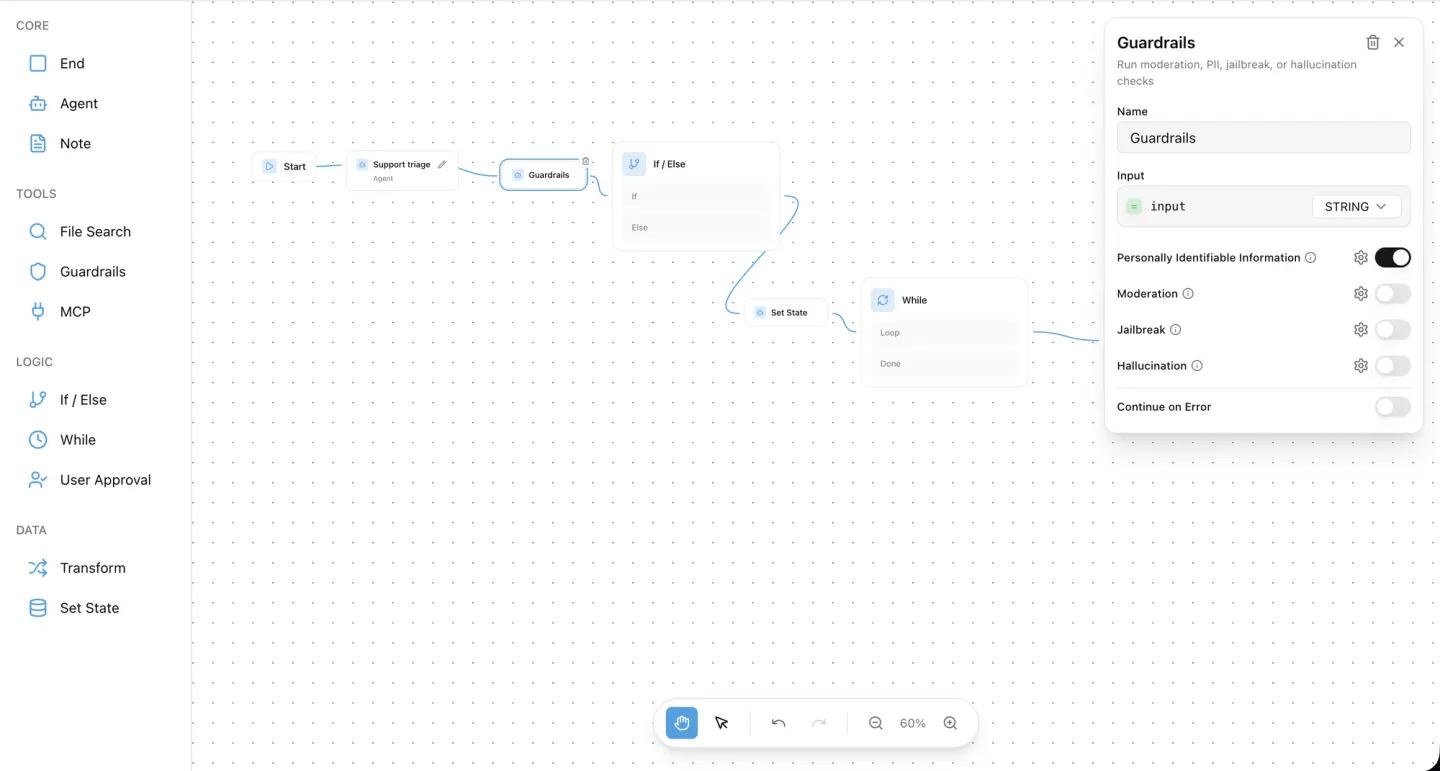
Six of the eleven palette steps run today: Agent, If/else, While, Transform, Set state and End. Four are on the palette but not yet executable: Guardrails (PII, moderation, jailbreak and hallucination checks), User approval (Approve and Reject branches), File search and MCP.
Note is an annotation and never connects.
The backend marks those four executable: false in its node-types endpoint. Validation does not flag them, and a run drops the step while keeping its connections, so a workflow that connects one of the four will not complete.
The toolkit's guidance: build with the six executable steps until that changes.
How do you put the ibl.ai workflow editor in your own app?
Two SDK components mount the whole feature from @iblai/iblai-js/web-containers/next. WorkflowsList shows the organization's workflows with search, status and Create Workflow; it is opened from an agent, whose id seeds the Agent step of every workflow created there.
WorkflowEditor is the editor itself.
Your app keeps two thin pages and a side-menu entry. The list page lives at app/(app)/workflows/[mentorId]/page.tsx and routes a card click to the editor.
The editor page lives at app/(app)/workflows/[mentorId]/[id]/page.tsx and passes, alongside its other props, the same three values the chat surface already uses: the chat token, the WebSocket origin and the auth redirect.
One store change is required. The workflow hooks live on their own workflowsApiSlice, which mentorReducer does not include, so you add two lines, its reducer and its middleware, to the starter's store/iblai-store.ts.
Without it every workflow hook returns undefined and both pages show their error state. The starter now pins @iblai/iblai-js 2.55.0, which carries the builder.
The full wiring, the prop tables for both components and the host config for the embedded agent-settings pickers are in the skill at iblai/vibe. Install the skills into your coding agent and it does the wiring from the description; see Agentic Vibe.
Why does it matter that the workflow builder ships as source?
Workflow builders are the part of an AI platform vendors keep closest, because the graphs you draw are your business logic.
On ibl.ai the editor and its data model ship as source in the SDK, and the runtime behind them comes as source under ibl.ai's Full Code License, so the workflows your team draws are definitions you can read back over the REST API and run on your own infrastructure.
The same code runs on our hosted cloud or on your servers, including air-gapped networks, and each agent step runs the model you chose for that agent, so a workflow is never tied to one vendor's models or pricing.
There is no per-seat pricing, so a workflow can serve every employee rather than the ones with a license. 1.6M+ users across 400+ organizations run the platform this way, including NVIDIA, MIT, and Syracuse University.
Want to see a workflow run against your own agents?
We will draw a triage workflow on one of your agents, branch it on a real condition and run the preview, in a 30-minute call. Book a 30-minute demo or talk to the ibl.ai team — ibl.ai is family-owned and operated from New York, NY.