ibl.ai agent workflows now include a Classifier step that sends each message to a decision model, follows the path for its answer to the agent built for that request, falls back when the model is unsure, and can be tried on a sample message before you publish, all inside an editor that mounts in your own app, and with ibl.ai you own all the code and the data.
The decision step reached the platform in the releases of November 6–13, 2026, and the toolkit's /iblai-vibe-workflow skill was rewritten for it in iblai/vibe v2.23.0 on November 13, with nine new captures from the vibe-starter app.
It builds on the visual editor described in Build Agent Workflows Visually, Inside Your Own App, which ships as two SDK components.
How does an AI agent workflow route a request to the right agent?
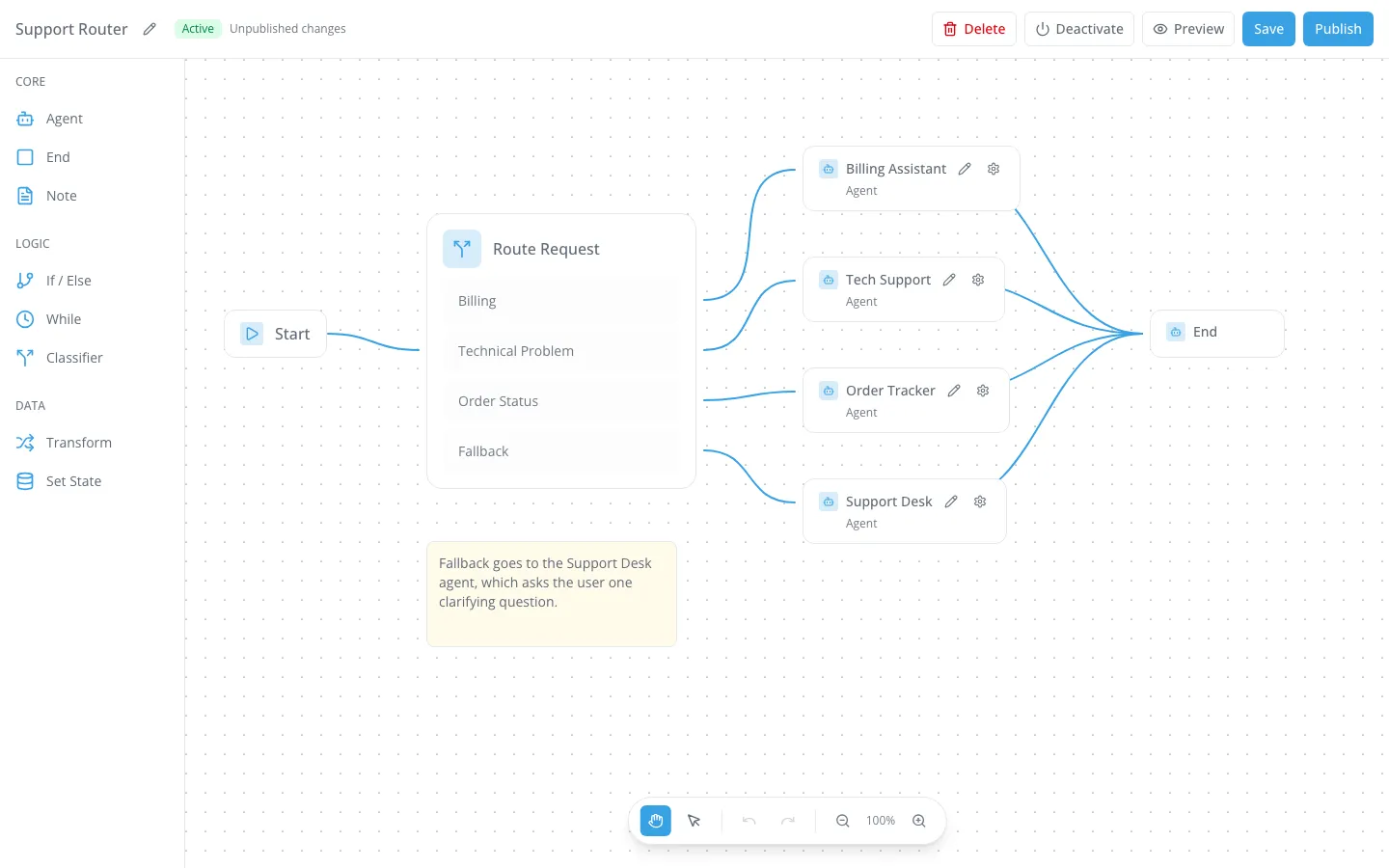
A Classifier step sends the message to a decision model, reads back an answer, and follows the path wired to that answer. The captured example is a support router with four destinations.
Billing questions go to a Billing Assistant agent, technical problems to Tech Support, order questions to an Order Tracker, and anything the model cannot place goes down Fallback to a Support Desk agent that asks the user one clarifying question.
Each destination is a full agent with its own prompt, model, tools and data, so a support team builds four focused agents instead of one prompt that tries to cover everything.
There are three answer types. Pick a Category takes 2 to 20 categories, each with its own path. Yes or No has Yes and No paths, with optional Yes Means and No Means notes.
Rate on a Scale takes 2 to 10 levels, lowest first, and always continues on one Next path; an If / Else after it branches on the level. Every type also has Fallback.
How do you tell the Classifier what each category means?
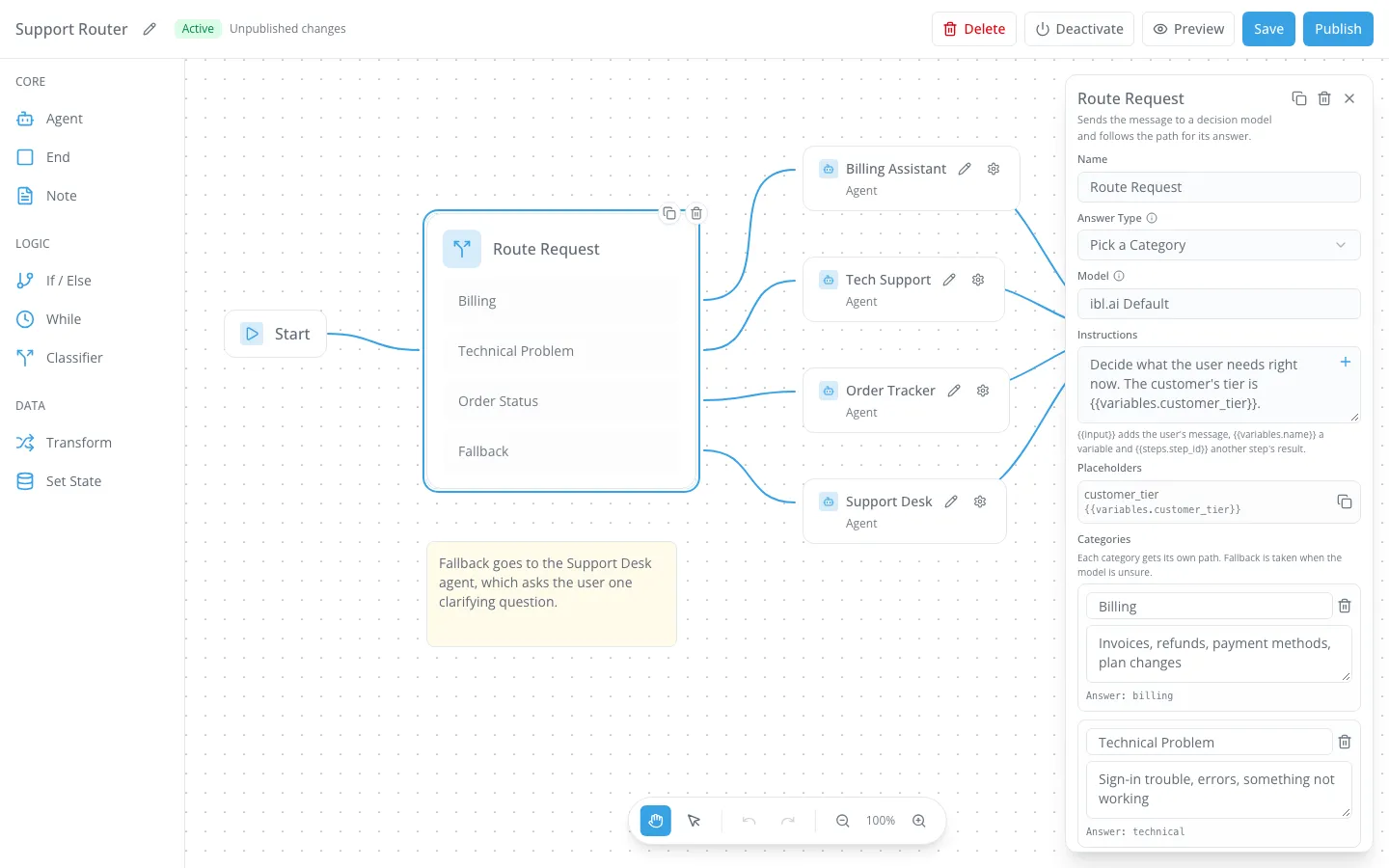
Each category is a label plus a sentence on when to pick it: Billing covers "invoices, refunds, payment methods, plan changes"; Technical Problem covers "sign-in trouble, errors, something not working". The answer id under each label is what the path connects to.
The Instructions field, required, tells the model what it is deciding and takes placeholders filled in before the step runs. In the capture it reads the customer's tier from a workflow variable, {{variables.customer_tier}}, so the same message can be judged in context.
A Try fills such variables with their Start defaults, so the rule is tested in context too.
The Model field offers ibl.ai Default, the decision model set up for the organization, plus any model the organization's step catalogue suggests. Renaming a category moves its connection with it; removing one drops it.
An Output Variable keeps the answer and how sure the model was, so a later step can read both. In the example it is called route.
What happens when the decision model is not sure?
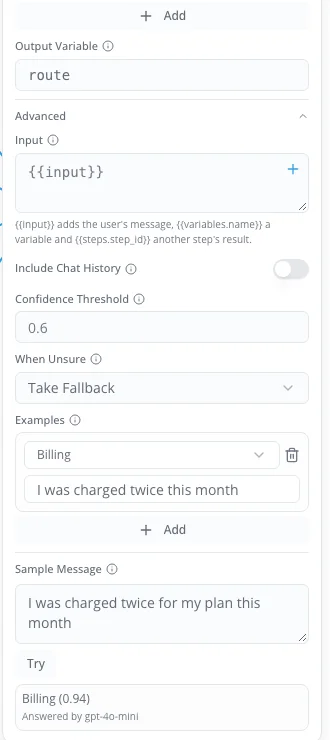
It takes the path you chose in advance. The Confidence Threshold, between 0 and 1, defaults to 0.6.
Below it, When Unsure either takes the Fallback path or keeps the model's best answer and marks it uncertain, so a borderline request never lands on a specialist agent by accident unless you allow it.
The editor also warns before a broken route goes live: a Classifier path that goes straight to End, or a decision model that is not switched on for the organization, each shows up in the Warnings and Errors banner.
The Advanced section sets what the model judges. Input defaults to the user's message and can point at a variable or an earlier step instead. Include Chat History adds 1 to 10 earlier exchanges, 3 by default, when the last message alone is ambiguous.
Examples pair a message with the answer you expect; the capture teaches "I was charged twice this month" as Billing.
Can you test a routing decision before you publish the workflow?
Yes. Type a Sample Message and press Try. The editor saves the workflow, then runs that one step alone and shows the answer, the confidence and the model that answered.
In the capture, "I was charged twice for my plan this month" came back Billing (0.94), answered by gpt-4o-mini, the model the demo organization's ibl.ai Default used.
Each try is a real, billed model call. Running out of credits, hitting a spend limit, a model that is switched off or failing, and a sample over 20,000 characters each get a plain message instead of a silent failure.
The same test is exposed over the platform's REST API at workflows/{id}/classifier-test/, which returns the answer, the confidence, the probabilities, the route taken and whether the answer was uncertain.
A team can send real messages one call at a time against the step's node_id and see from the uncertain flag which would take Fallback at its threshold before going live.
What else changed in the ibl.ai workflow editor?
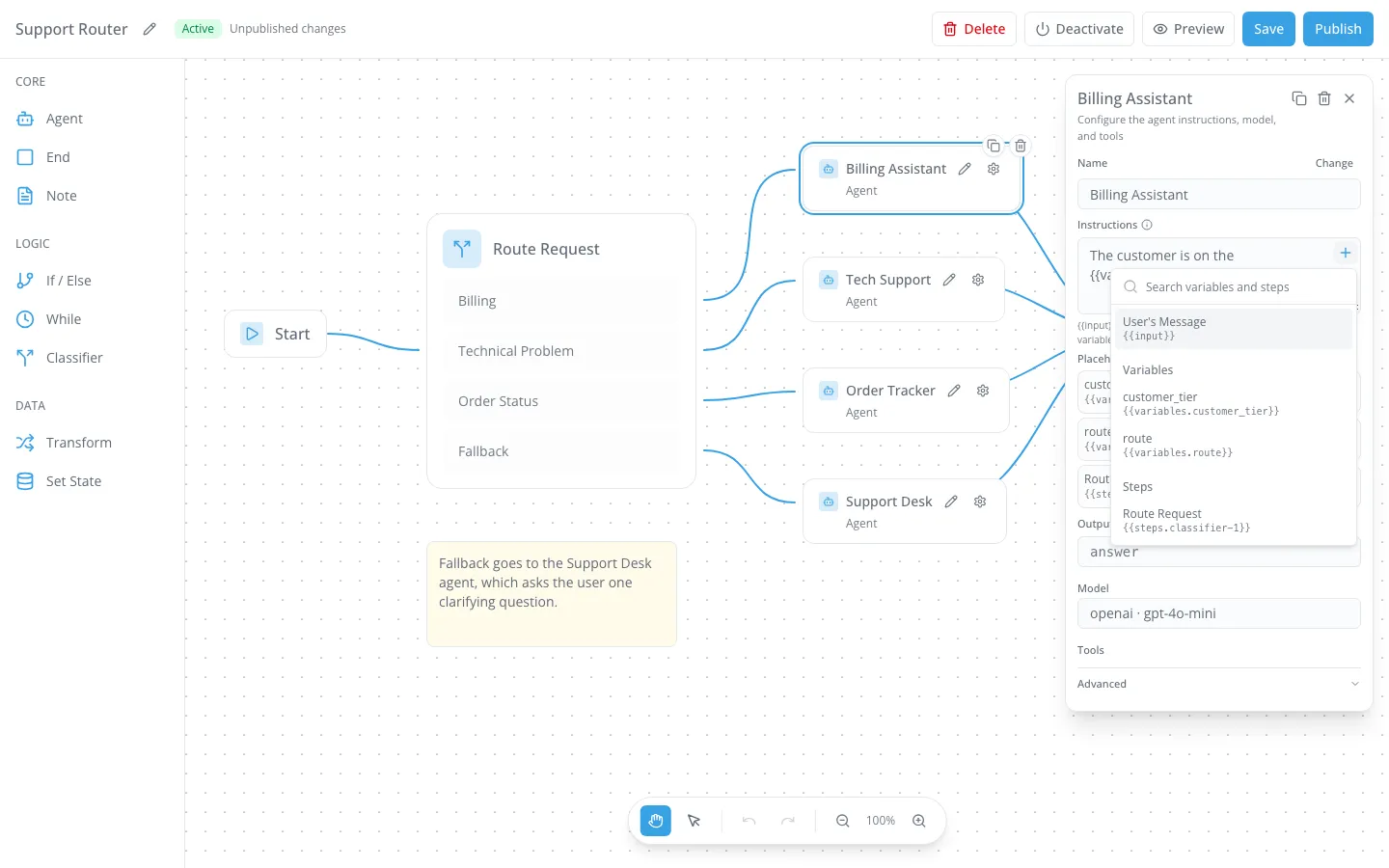
Agent steps take their own instructions. An Agent step now has Instructions added to the user's message for that step only, an Output Variable that keeps the reply for later steps, and an optional Output Schema that asks the agent to answer in a JSON shape.
Insert Variable or Step is a + in the corner of a field. It searches the user's message, the workflow's variables and the earlier steps, and inserts the right placeholder at the cursor. Publish refuses a placeholder that would always be empty.
Warnings open the step they are about. Each line in the Warnings and Errors banner that concerns one step is a link: it centres and selects that step, opens its settings and focuses the field at fault.
Keyboard shortcuts. ⌘S or Ctrl+S saves, ⌘Z undoes, ⇧⌘Z redoes, and ⌘C / ⌘V copies selected steps with the connections between them, each paste landing 40 px further down and right with new step ids.
Only steps that run. The sidebar now offers eight steps, Agent, End, Note, If / Else, While, Classifier, Transform and Set State. File Search, Guardrails, MCP and User Approval are marked planned and left out, and publish refuses a workflow that connects one.
Unpublished changes and phones. The header marks a published workflow whose saved edits are not live yet. On a phone the sidebar becomes an Add Step button and the settings panel takes the canvas's width.
How do you add the Classifier step to your own app?
It comes with the editor. WorkflowsList and WorkflowEditor mount from @iblai/iblai-js/web-containers/next on two thin pages, with one store slice, workflowsApiSlice, added to the app's store.
The Classifier step, the shortcuts and the linked warnings need @iblai/iblai-js 2.71.0 or later.
Warnings link to their step by id from 2.73.1, which vibe-starter now pins. The full wiring, every prop and the REST table are in the workflow skill on GitHub.
Install the skills into your coding agent and it does the wiring from a description; see Agentic Vibe.
Why does it matter who owns an AI routing layer?
Routing rules are business logic: which customer reaches which agent, with which data, at which confidence. On ibl.ai the editor and its data model ship as source in the SDK, and the workflow definitions are yours to read back over the REST API.
The runtime comes as source under ibl.ai's Full Code License and runs on our hosted cloud or on your servers.
The Classifier's decision models come from the organization's model registry, and each Agent step runs the model chosen for that agent, so a router is never tied to one vendor's models.
There is no per-seat pricing, so a support router can answer every customer rather than a licensed few. 1.6M+ users across 400+ organizations run the platform this way, including NVIDIA, MIT, and Syracuse University.
Want to see a router built on your own agents?
We will wire a Classifier to two or three of your agents, try it on messages your team actually receives, and show the Fallback path at work, in a 30-minute call. Book a 30-minute demo or talk to the ibl.ai team — ibl.ai is family-owned and operated from New York, NY.