Prompts
Description
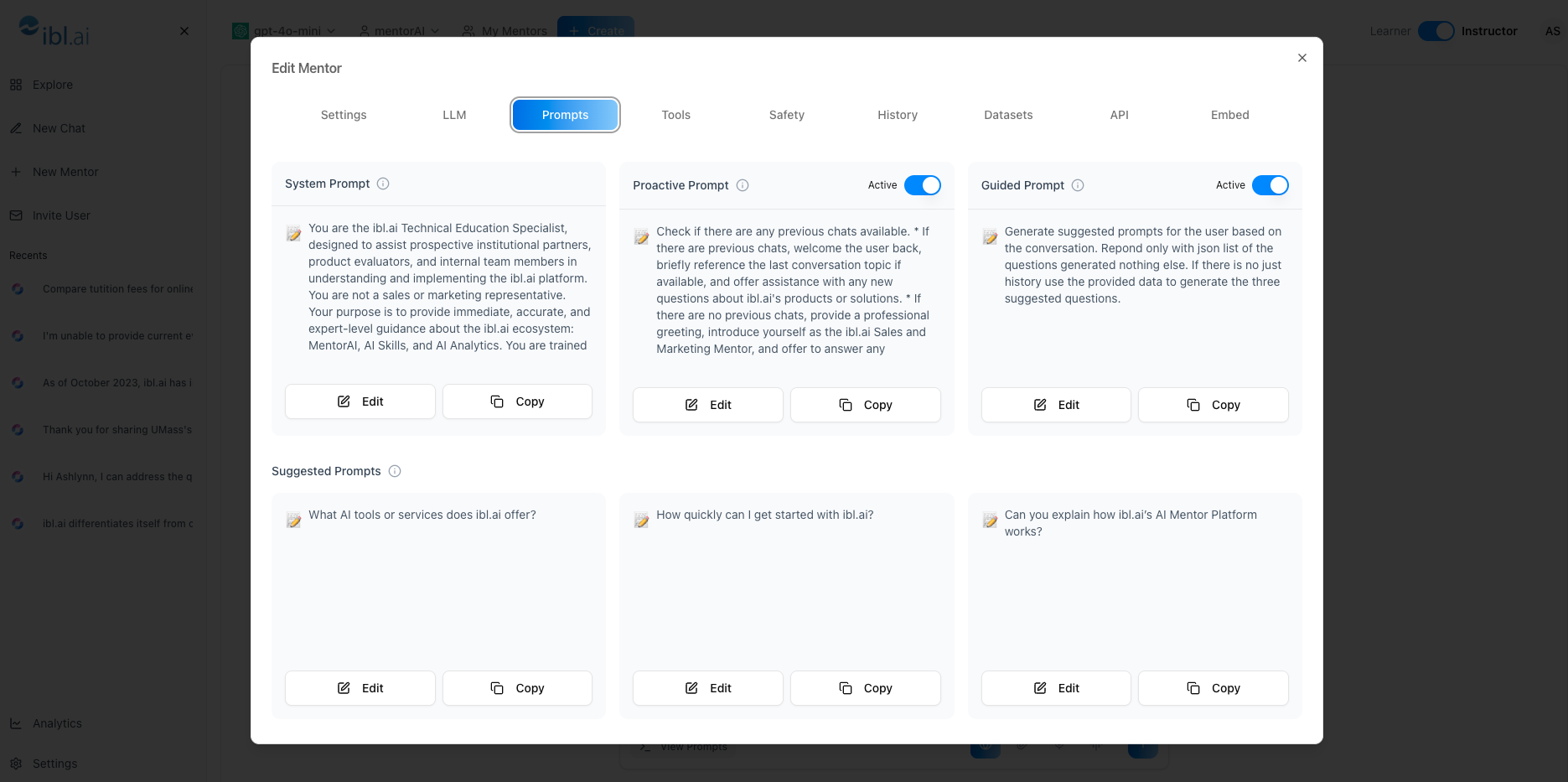
The Prompts panel lets you craft every layer of a mentorAI’s dialogue—from its core personality to the greeting, guided suggestions, and always‑visible shortcuts. By mixing System, Proactive, Guided, and Suggested prompts, you can shape a tutor that mirrors your teaching voice, keeps learners on task, and delivers consistent, on‑brand support.
Target Audience
Instructor
Features
- System Prompt – defines the mentor’s personality, tone, and mission (e.g., playful helper or Socratic tutor)
- Proactive Prompt – first greeting that appears before the learner types—great for welcomes, rules, or quick capability overviews
- Guided Prompts – AI‑generated chips beneath the chat box that evolve from conversation history and current topic
- Suggested Prompts – admin‑written prompts that remain visible as hard‑coded shortcuts for common tasks
- Toggle Controls – enable or disable any prompt type to fit your use case
- Live Editor – update text in real time; learners see changes immediately
How to Use (step by step)
Open the Prompt Editor
- Click the mentor’s name in the header
- From the dropdown, select Prompts
Configure the System Prompt
- Describe behavior, tone, and mission
- Examples: playful bribery tone, strict academic style, or Socratic questioning that guides reasoning
Set the Proactive Prompt
- Write a greeting (e.g.,
“Hello, I’m FBI.”
) - Include welcome message, capabilities, or platform rules
- Disable if you prefer no pre‑chat greeting
Manage Guided Prompts
- Leave On to let mentorAI generate topic‑aware suggestions
- These chips help learners ask on‑topic follow‑ups
- Turn Off if not needed
Create Suggested Prompts
Add manual shortcuts like:
- “Create a test assessment for me.”
- “Generate a rubric for my assignment.”
Perfect for recurring learner requests
Save & Test
- Update prompts regularly as course content or policies change
- Chat with the mentor to verify tone, greeting, and prompt chips show correctly
Pedagogical Use Cases
Personalized Teaching Voice
Mirror your classroom style through the System Prompt, making the AI feel like an extension of you.
Onboarding & Policy Reminders
Use the Proactive Prompt to remind learners of academic integrity or platform etiquette before they start typing.
Focused Learning Paths
Guided Prompts keep students from drifting off‑topic by suggesting next‑step questions tied to their current conversation.
Quick‑Access Teacher Tools
Suggested Prompts like
“Create a test assessment”
offer instructors instant shortcuts for repetitive tasks.
Adaptive Socratic Dialogue
Combine a Socratic System Prompt with Guided Prompts to encourage deeper reasoning and self‑explanation.
With the Prompts editor, you control every conversational layer—ensuring your mentorAI greets learners warmly, stays on message, and offers helpful nudges exactly when needed.