Guide: permissions
Mirrored from
iblai/ontology·docs/guides/permissions.md. This page is generated — edit it in the repository, not here.
There are three questions, each answered by one system:
| Question | Answered by | Where you set it |
|---|---|---|
| Who is calling, and what are they granted? | ibl.ai (SSO, RBAC roles and policies, groups, API keys) | Roles, Access, ibl.ai Management |
| What may that grant call? | the toolsets named in the grant, under /custom/ontology/toolsets/ | MCP Gateway → server builder, Issue Token, Attach |
| Which rows may a call see? | the certified SQL and, for OIDC callers, claims bound into parameters | Ontology (SQL attributes), server builder (auth services) |
Nothing on the ontology host stores a user, a role or a grant. The gateway asks ibl.ai on every call and keeps the answer for 60 seconds.
1. Policies and toolsets
A toolset is a named list of tools in a server's config. The console generates them from what
it can serve: one per connected system, one per engine tag, <system>-raw (ad-hoc SQL on one
database), <api>-reads and <api>-writes per HTTP API, semantic, and any toolsets in a
hand-written actions.yaml.
A caller reaches what ibl.ai RBAC grants them under /custom/ontology/:
| Grant on ibl.ai | Reaches |
|---|---|
/custom/ontology/toolsets/<toolset>/ | that toolset |
/custom/ontology/toolsets/ | every toolset that only reads |
/custom/ontology/console/ | the console |
/custom/ontology/ | every toolset that only reads, and the console |
| none, as a platform admin | every toolset that only reads, and the console |
A resource counts only when the role holds its verb (Ontology/Toolsets/action,
Ontology/Console/action). A toolset that writes (it holds a tool that changes data; the raw
toolsets count as writing) is reached only by a grant that names it. No broad grant and no admin
status lends it.
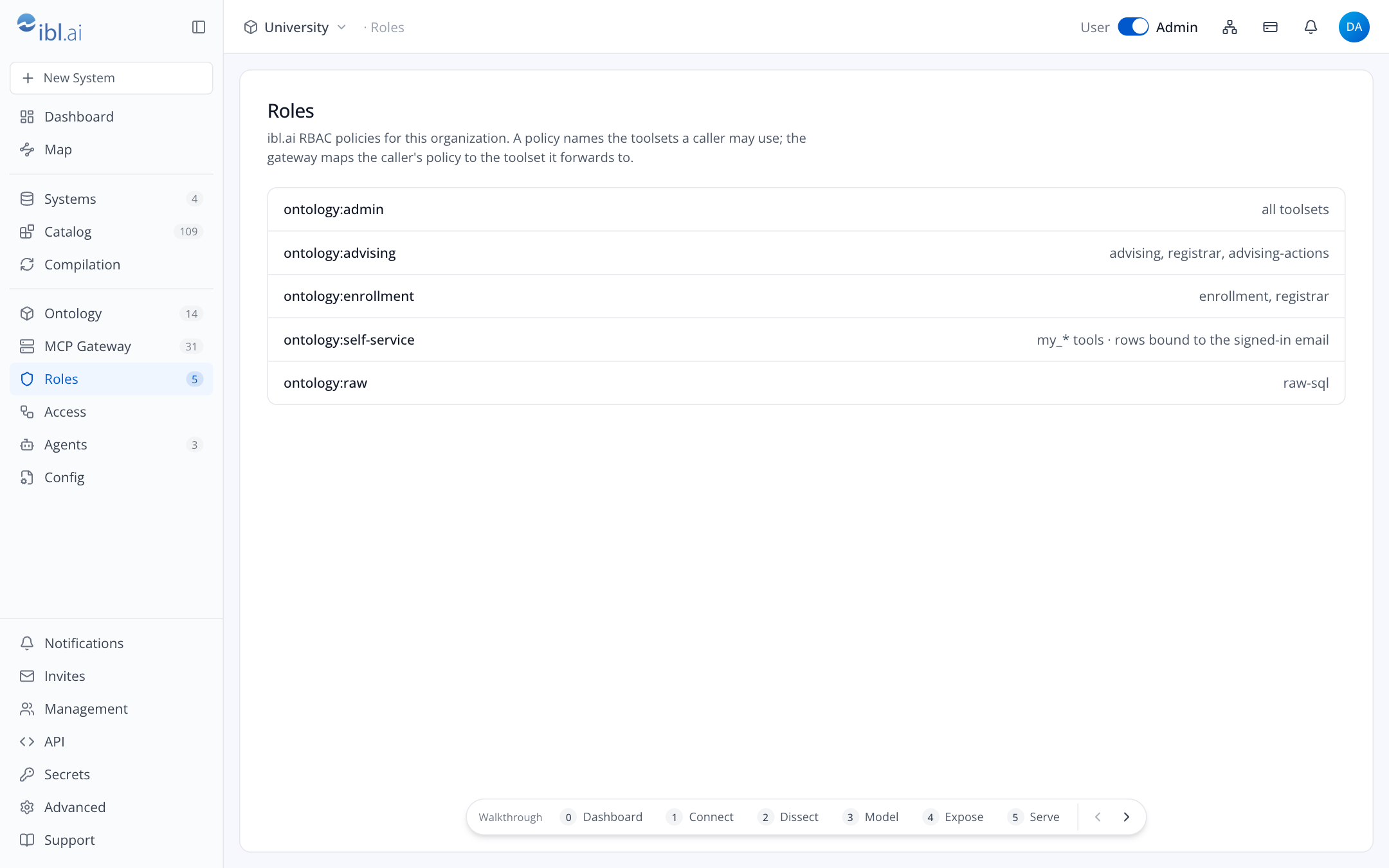
The console keeps one role and one policy per toolset on ibl.ai: a platform role named after the
toolset, holding Ontology/*, with one policy Ontology: <toolset> that grants
/custom/ontology/toolsets/<toolset>/. It creates them, when missing, as you issue a key or attach
an agent. A key or an agent limited to several toolsets carries several policies.
| Policy on ibl.ai | Grants | Who typically holds it |
|---|---|---|
| (none: platform admin) | every toolset that only reads | platform admins |
Ontology: advising | toolset advising | advisors group |
Ontology: enrollment | toolset enrollment | admissions and IR analysts |
Ontology: sis-raw | toolset sis-raw (writes: named only) | a few analysts, read-only login |
Ontology: slate-writes | toolset slate-writes | one service agent |
When a call arrives at /<platform>/<slug>/mcp, the gateway asks ibl.ai what the credential is
granted on that platform (ibl.ai refuses a credential of another platform) and lends the server's
toolsets that grant reaches. tools/list shows only their tools; a tools/call outside them is
refused. A caller that reaches nothing gets 403 before any tool is listed.
To give a group a toolset, add the group to that toolset's policy on ibl.ai (Management →
Policies). Roles in this console lists the Ontology: policies, read only.
2. How callers sign in
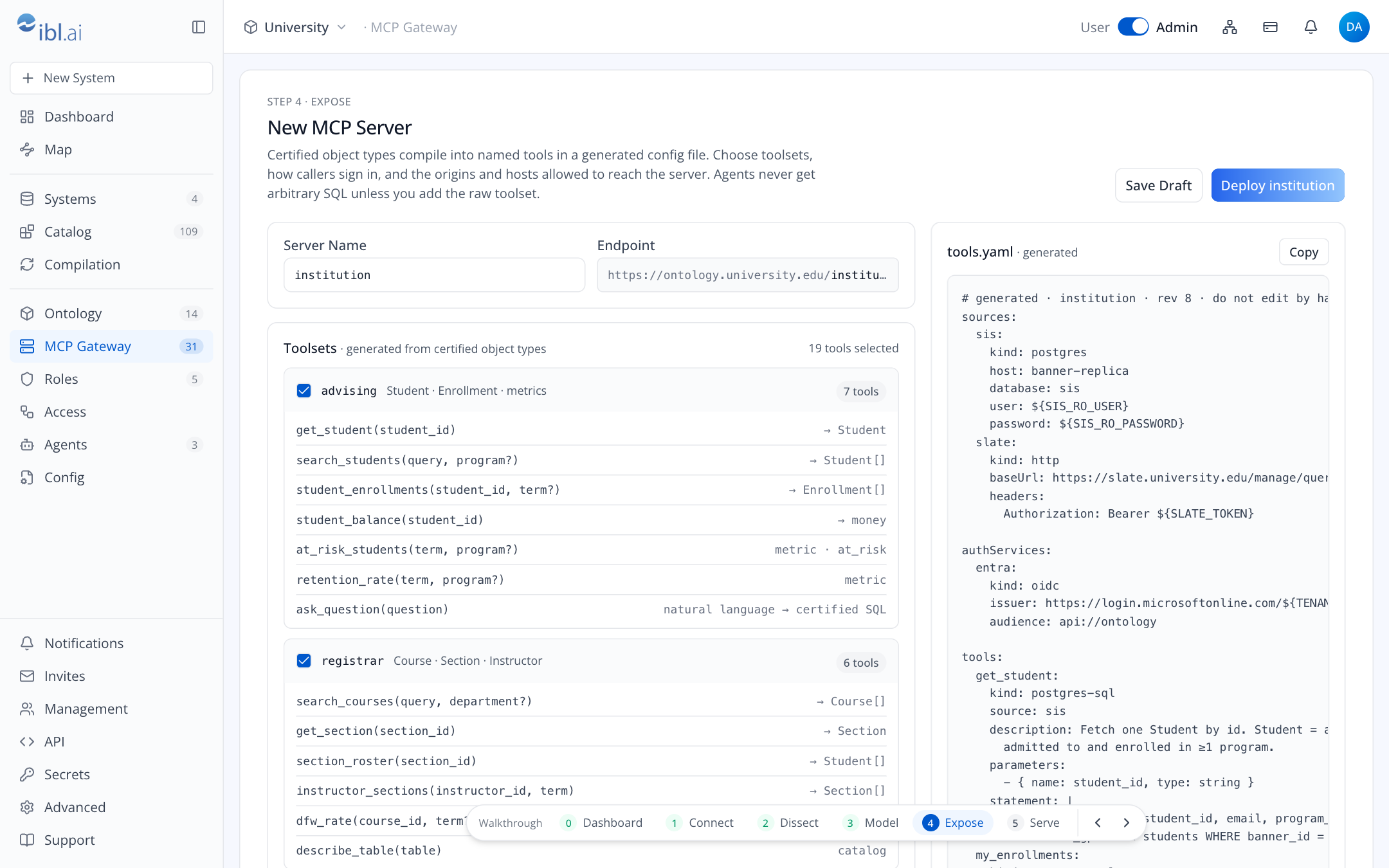
Set per server, under Authentication:
- ibl.ai credentials. An API key as
Authorization: Api-Token …, a session asAuthorization: Token …, or either one asBearer. Issue Token creates an API key limited to the toolsets you tick and shows the secret once. Used by people with Claude, Codex or Cursor. - Microsoft Entra ID / Google / custom OIDC. Declared as an auth service in the server config and verified by the runtime itself (signature, audience, issuer, expiry). The caller still presents an ibl.ai credential to the gateway; the ID token rides along so rows can be bound to the person (next section).
Attach gives an ibl.ai agent its own API key, limited to the toolsets you choose, and registers the server on ibl.ai for that agent alone. The agent calls with that key. Other sign-in scopes ibl.ai offers (one credential for the whole platform, each person's own credential in chat) are not set up by the console.
3. Row-level restriction
Three mechanisms, from coarse to fine:
Toolset choice. A grant that never names a toolset with
section_rostercannot read rosters. This is the first and strongest line.Certified SQL. A tool's statement is fixed.
search_studentsmay filter toprogram_code = $1; it can never be widened by the caller. Write the restriction into the SQL attribute and certify it in Ontology.Claim binding (OIDC callers). A parameter can be taken from the verified token instead of the caller's input:
my_enrollments:
  kind: postgres-sql
  source: sis
  authRequired: [entra]
  parameters:
    - name: email
      type: string
      authServices:
        - { name: entra, field: email }
  statement: SELECT … FROM enrollments e JOIN students s … WHERE s.email = $1
The student cannot supply another email. Put such tools in their own toolset.
For ibl.ai credentials the gateway maps grants to toolsets only; it does not rewrite parameters. An agent attached by the console calls with its own key, not as the person chatting. If rows must be bound to a person, give the server an OIDC auth service.
4. PII
Columns the engine tags pii are visible in Ontology with a red PII flag. Decide per toolset
whether tools that return them belong there. A good default: advising returns names and emails,
enrollment returns counts and aggregates only, a self-service toolset returns only the caller's
own row.
5. Writes
Read-only is the default: every database login the engine and the runtime use should be a
read-only role. Writes happen only through Actions, tools you add deliberately in
$ONTOLOGY_HOME/platforms/<platform>/actions.yaml:
- a separate database login with the exact grant (
INSERT ON advising_notes), stored as its own entry in$ONTOLOGY_HOME/platforms/<platform>/env, - a separate toolset (
advising-actions), shown with a writes badge in the builder, - a separate policy (
Ontology: advising-actions). A toolset that writes is reached only by a policy that names it.
6. Origins and hosts
- Allowed Origins: browsers and browser-based agents (os.ibl.ai, claude.ai, your own apps) must
send one of these
Originvalues. The gateway checks them before it checks the credential; they are also passed to the runtime. Native clients (Claude Desktop, Codex CLI) send noOriginand are unaffected. The console's own origin is there from the start, for the Playground. - Allowed Hosts: the DNS names the server answers to: the platform's server's host name
(
ontology.university.edu), or*.university.edufor every name under one, or*for any. Checked by the gateway; the exact names are also passed to the runtime. Blocks DNS rebinding. A refused host is written to the server's Runtime Log.
7. Who may do what in the console
The console itself is an ibl.ai app. Its pages require the ibl.ai admin mode (the User/Admin
switch in the header). The host route handlers take a session only, from a platform admin or a
holder of the console grant (/custom/ontology/console/). Admins of another platform are refused.
A server with an engine of its own serves only the platform its ONTOLOGY_PLATFORM names, set by
the server's operator, and refuses every other (auth.md).
| Task | Needs |
|---|---|
| Add a system, run a compile, certify terms | platform admin or the console grant |
| Build and deploy a server | platform admin or the console grant |
| Issue a key, attach a server to an agent | the above, and ibl.ai must let your session create roles, policies and keys and edit that agent |
8. Audit
| What | Where |
|---|---|
| Every tool call through the gateway (time, tool, agent, result, duration) and every refusal | $ONTOLOGY_HOME/platforms/<platform>/servers/<slug>/gateway.log; shown under Activity and Runtime Log; ship to your SIEM |
| The runtime's own output | $ONTOLOGY_HOME/platforms/<platform>/servers/<slug>/toolbox.log |
| Who changed a term, when | engine term records (modified_by) |
| Which config revision was deployed | $ONTOLOGY_HOME/platforms/<platform>/servers/<slug>/revisions/ |
| Key creation and revocation, policy changes | ibl.ai audit logs |