/iblai-vibe-os-agent-code-mode
Mirrored from
iblai/base·skills/agents/iblai-vibe-os-agent-code-mode/SKILL.md. This page is generated — edit it in the repository, not here.
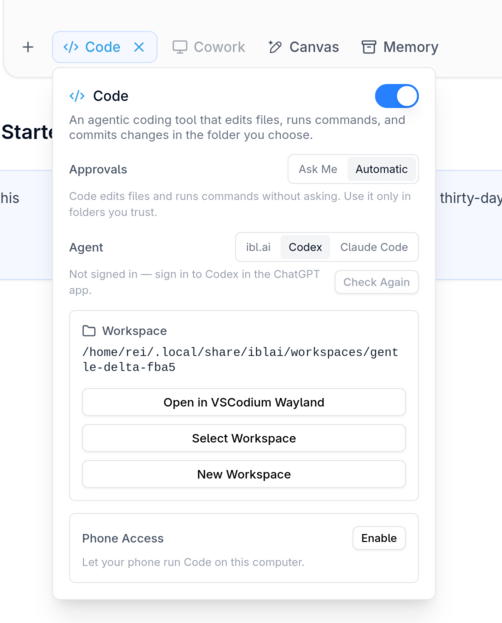
Code is the ibl.ai desktop app's coding helper. Turn it on under the message box and the agent stops only answering: it edits files, runs commands and saves its work in a folder on your computer. Approvals decides whether it asks you first. It can do the work itself, or hand it to Codex or Claude Code on your own ChatGPT or Claude plan, and with Cowork on it can use your screen too. The first half of this page is how to use it; the second half adds it to an app of your own.
Common setup (brand, conventions, env files, verification): see docs/skill-setup.md.
Using Code in the ibl.ai desktop app
1. Turn it on
Click Code under the message box: its panel opens, and the switch at the top turns Code on. On first use Code also asks you to choose a folder and downloads what it needs. The pill spins for a moment while it picks up the agent's skills.
Approvals decides whether Code asks before it acts. It is in the panel and, while Code is on, as a button beside Send (a hand for Ask Me, a lightning bolt for Automatic):
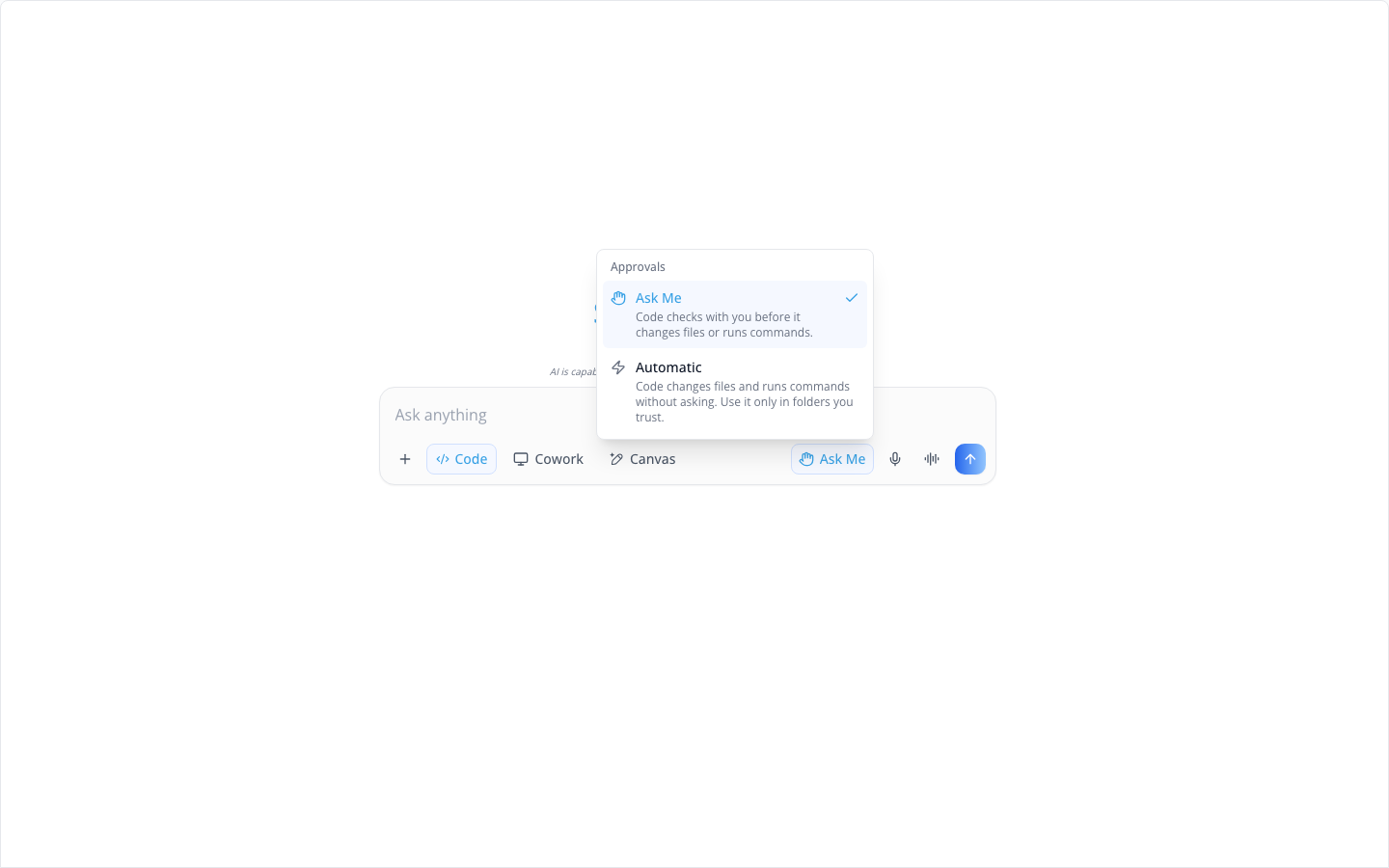
- Ask Me — every file change and every command shows up as a card in the reply that you allow or deny.
- Automatic — Code works without asking. Use it only in folders you trust. With Cowork on, it also acts on your screen without asking.
A computer where nobody has chosen yet runs Automatic. An Ask Me you chose on another computer is carried over to one that has no choice saved; an Automatic is not.
2. Choose who does the work
The Agent row picks who runs Code. The line under it tells you what is still missing before you can send.
| Agent | What you need | What it runs on |
|---|---|---|
| ibl.ai | Nothing to sign in to | Your organization's models and credits, or the model on this computer when Local Models is on, with the app's skills |
| Codex | A ChatGPT plan, or an OpenAI API key | OpenAI's Codex, on your plan |
| Claude Code | A Claude plan, or an Anthropic Console account | Anthropic's Claude Code, on your plan |
What the line under the row means:
- Not installed / Installing… — the app installs Codex and Claude Code by itself when it starts; if that failed, Install tries again.
- Not signed in — sign in, next step.
- A grey dot with your account (or Ready) — good to go.
- Not available on this computer — Windows, or the Mac App Store build; see When something's off below.
While Code runs on Codex or Claude Code, the picker at the top left shows that agent and its model ("Codex · GPT-6-Luna", "Claude Code · Default" in the pictures). Change the model there. The choice is saved on this computer only.
On this computer's model. With Local Models on
(/iblai-vibe-local-llm), the ibl.ai
agent runs Code on the model on this computer. The app runs a copy of it
sized to 32,768 tokens, so the model sees all its tools, and refuses a
model that cannot reach that size in plain words. The first reply in a chat
can take a few minutes; the line under the reply says so.
3. Sign in to Codex
Choose Codex. The line reads Not signed in — sign in to Codex in the ChatGPT app. with a Check Again button:
Open the ChatGPT app and go to Codex. No ChatGPT app yet? Download it from chatgpt.com — Codex is part of it; there is no separate app to install.
Sign in there with the account that has your plan:
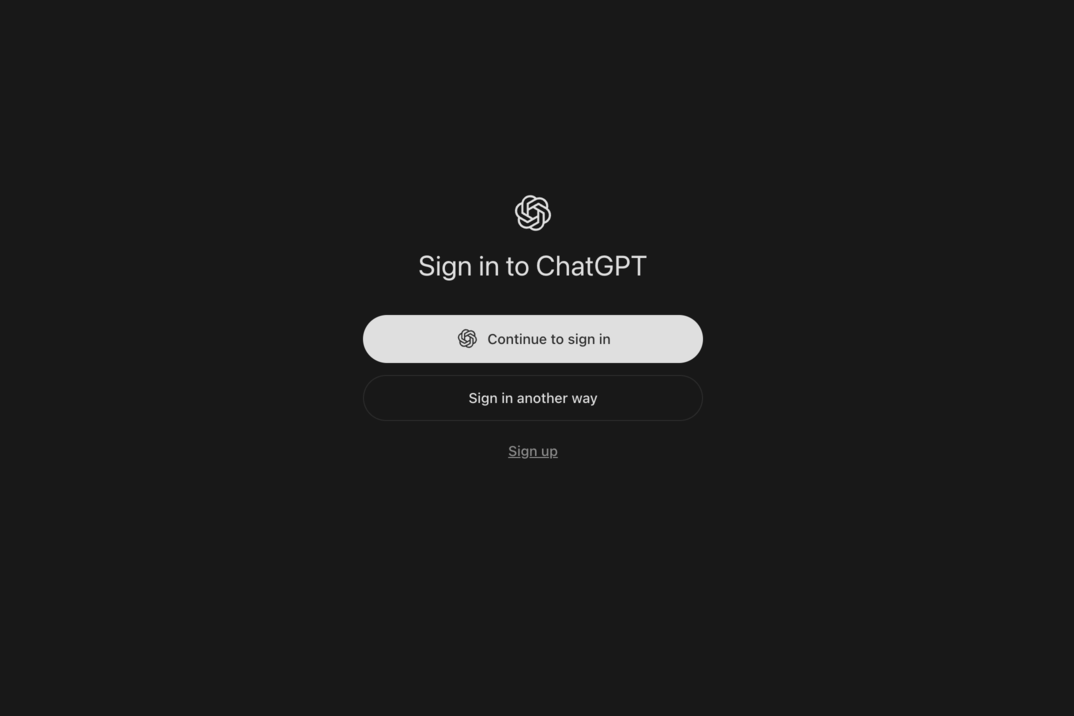
The ChatGPT app's Sign in to ChatGPT screen You are in when Codex asks What should we build?:
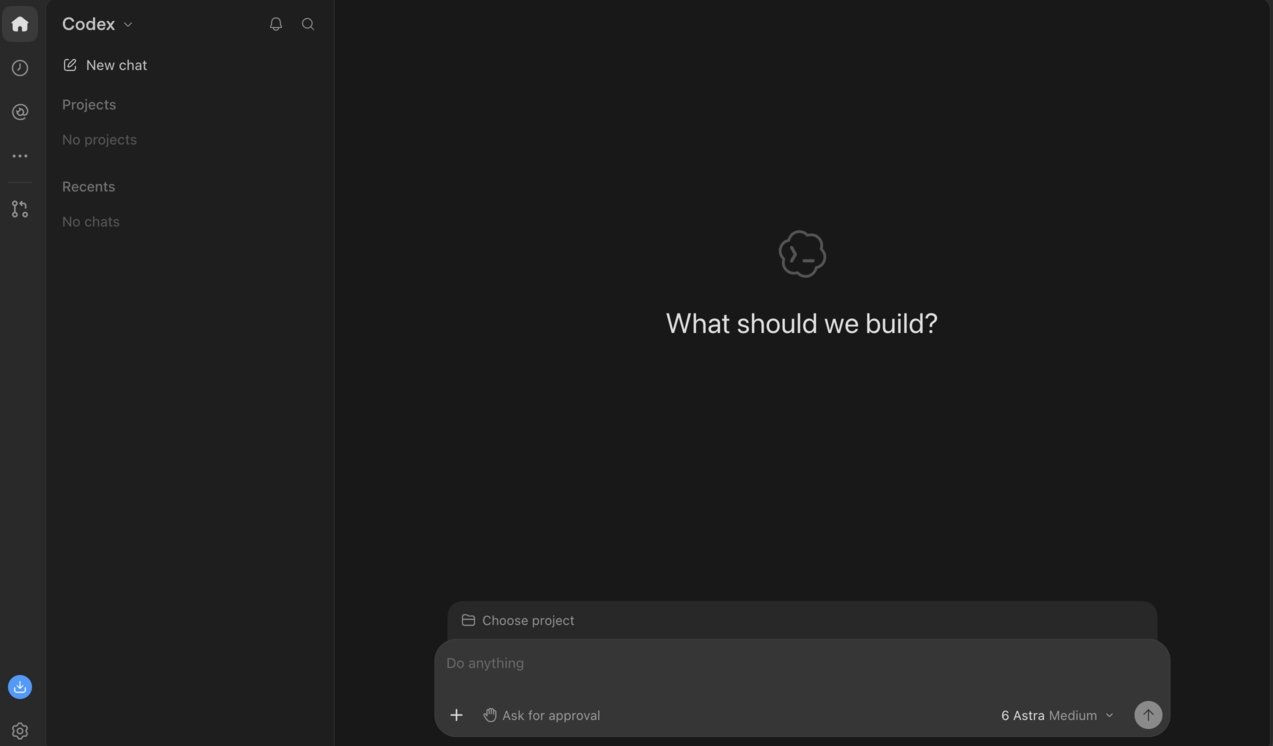
Codex in the ChatGPT app, signed in: What should we build? Back in the ibl.ai app, click Check Again. The line now shows how you are signed in:
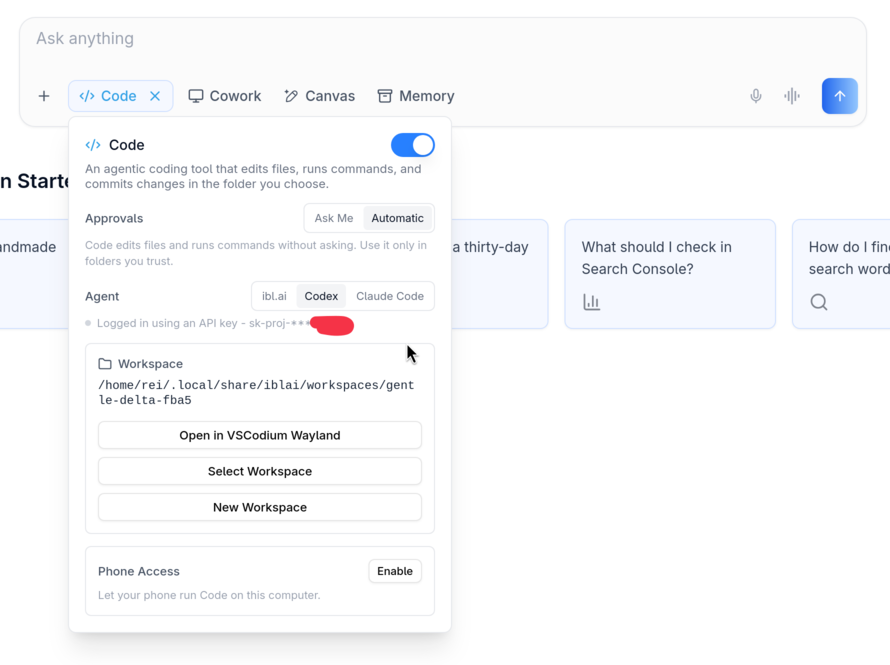
Agent set to Codex, signed in: the line reads "Logged in using an API key"
Prefer a terminal? Install the Codex command-line tool with OpenAI's
one-line installer, curl -fsSL https://chatgpt.com/codex/install.sh | sh,
then run codex and pick Sign in with ChatGPT, Sign in with Device
Code or Provide your own API key from its menu; the ibl.ai app picks
that sign-in up on Check Again too.
If you send a message before signing in, a small notice says Codex isn’t signed in and repeats the hint.
4. Sign in to Claude Code
Choose Claude Code. Claude Code signs in from a terminal, so the line
reads Not signed in — run claude in a terminal. with a Check Again
button:
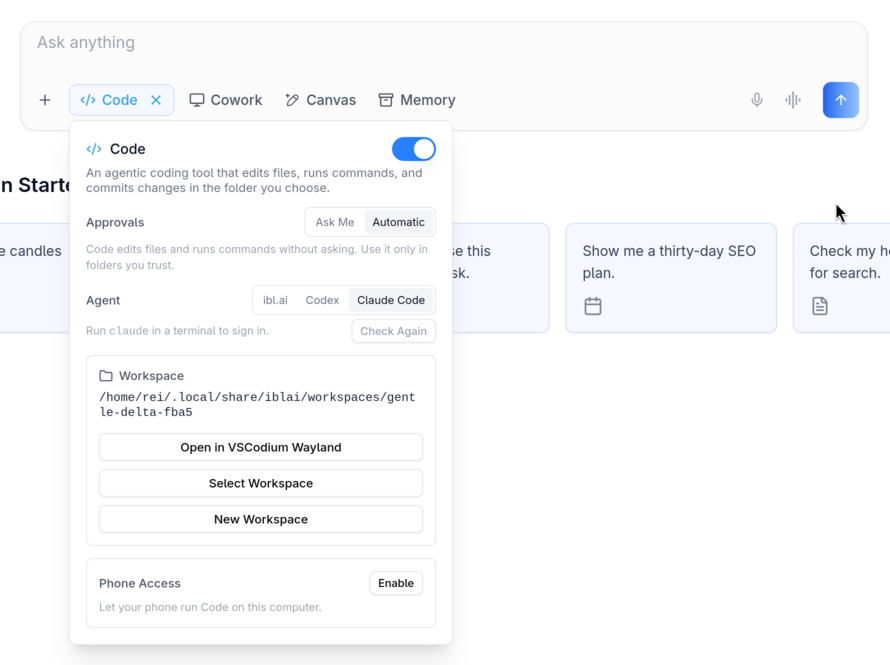
Open a terminal and run
claude. If the command is not found, install Claude Code first from claude.ai/code.Pick Claude account with subscription (or the Console account if you pay per use) and finish in the browser it opens:
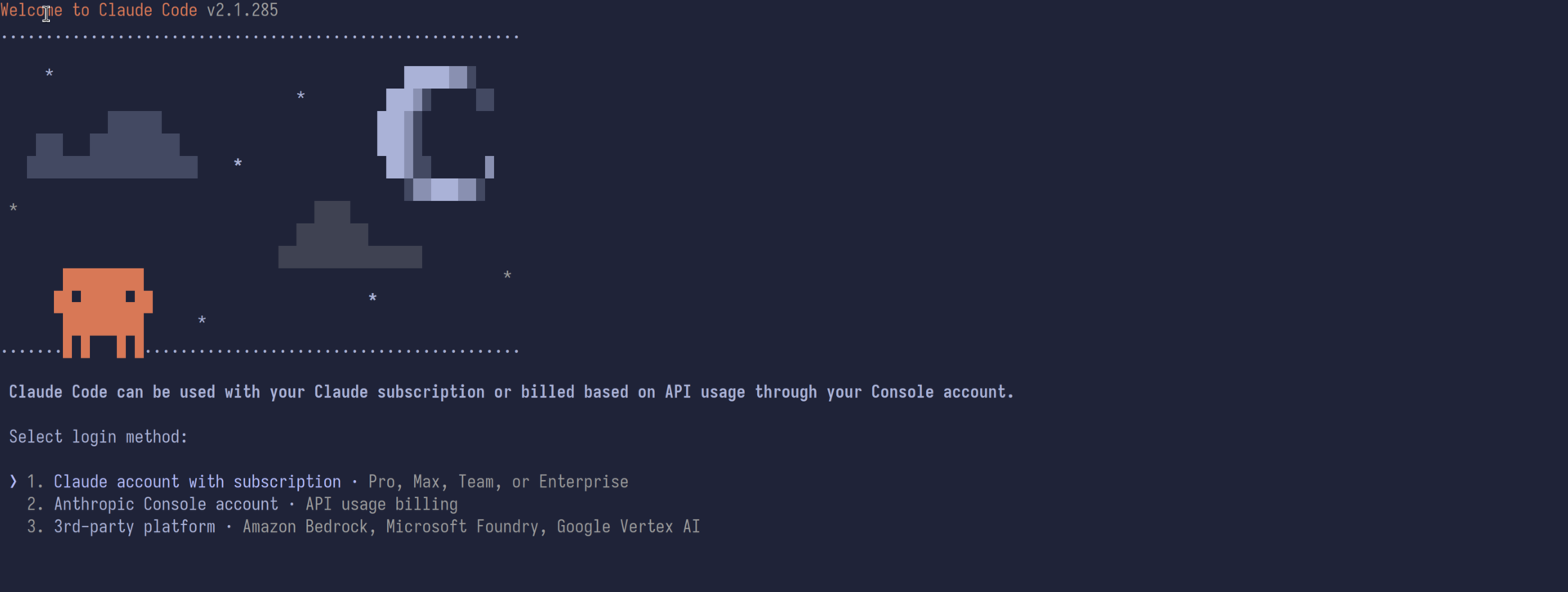
The Claude Code terminal welcome with "Select login method" Back in the app, click Check Again. The line shows your account:
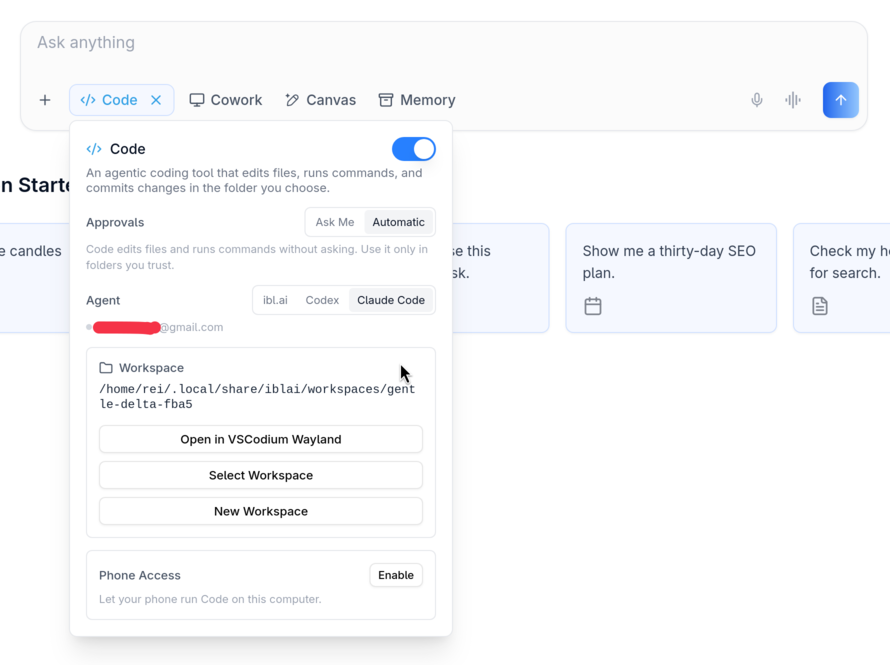
Agent set to Claude Code, signed in: a grey dot and the account's email
If you send a message first, the notice Claude Code isn’t signed in repeats the terminal hint.
5. Pick the workspace
The Workspace is the folder Code works in. The app makes one for you
under ~/.local/share/iblai/workspaces/ with a name like
gentle-delta-fba5; New Workspace makes another, Select Workspace
points Code at a folder of your own, and Open in Finder (or Open in
… with whatever opens folders on your computer) shows you what is in it.
Every change Code makes is saved there as a step you can go back to.
6. Approve what Code wants to do
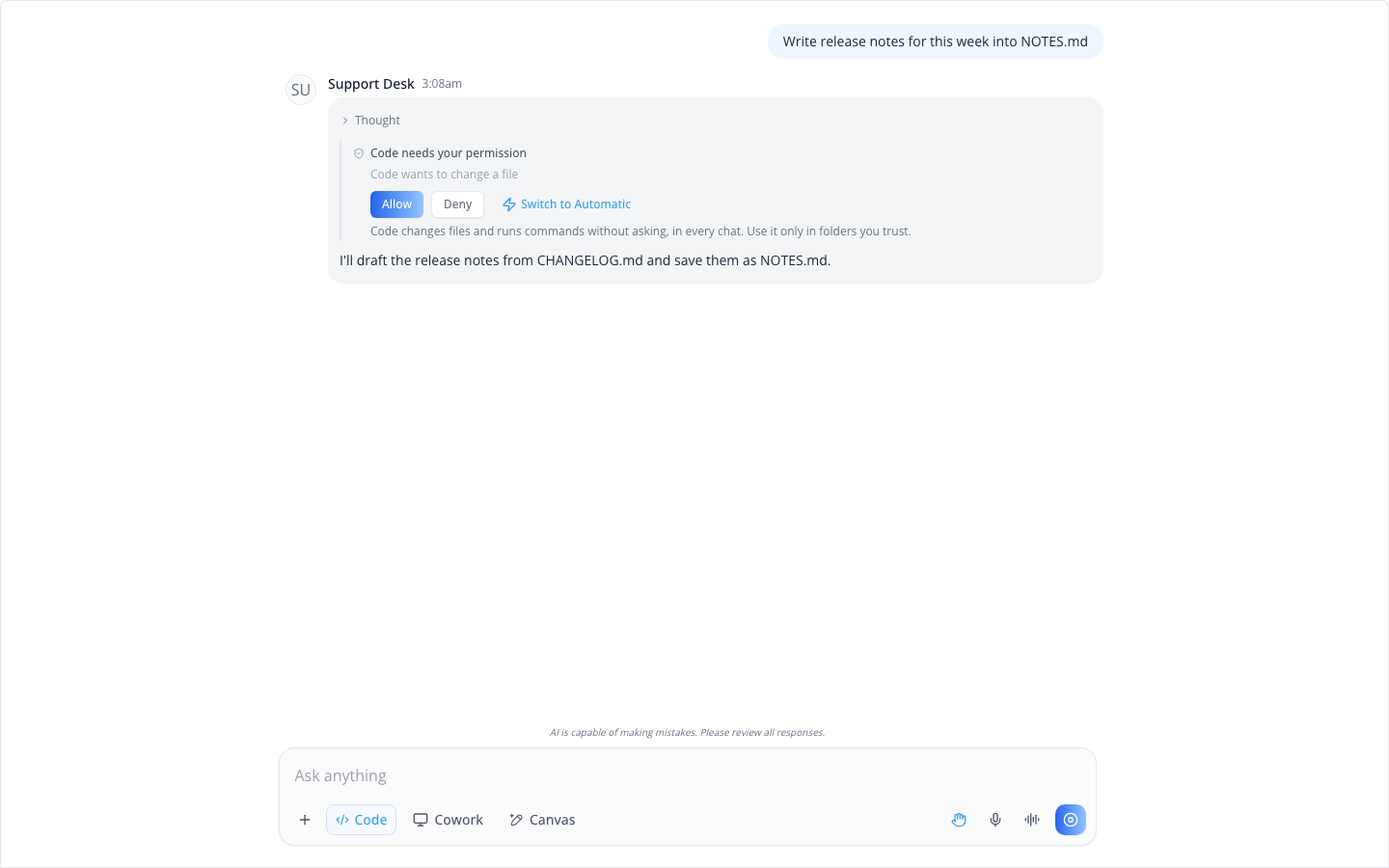
With Ask Me on, each thing Code wants to do appears in its reply as a card titled Code needs your permission, saying what it wants (change a file, run a command, use the screen…) with Allow and Deny. Switch to Automatic allows this step and stops the cards in every chat. A card left alone for three minutes counts as Deny. With Automatic on, no cards appear on any agent.
7. Code with Cowork
Turn Cowork on as well and Code keeps the turn, with the screen tools
added: one message can edit a file and then click through an app to check
it. Approvals covers the screen too; with Ask Me, every screen action gets
a card. Turning Cowork on or off mid-chat keeps the chat. Setting up Cowork
(the consent, the two macOS permissions) is in
/iblai-vibe-os-agent-cowork.
8. Code from your phone (paused)
For now the iPhone and Android apps show no Code pill: the way a phone connects to a computer's Code is not ready yet. A phone that paired with a computer earlier stops sending its messages to that computer's Code. The computer's panel still has Phone Access, but there is nothing on the phone to pair with it until this comes back.
When something's off
| The panel says | What to do |
|---|---|
| Not available on this computer | Code needs a Mac or Linux build from ibl.ai; Windows and the Mac App Store build cannot run it. |
| Code needs bubblewrap (bwrap) | Linux only. Install it with your package manager, then reopen the app. |
| Skills couldn’t be synced — Code will run without them | Code still works; it just does not know the ibl.ai skills this time. Check your connection and turn Code off and on. |
| Codex isn’t signed in / Claude Code isn’t signed in | Steps 3 and 4 above. |
| … isn’t available for Code — turns will fail | You are on an on-device model that cannot use tools. Pick another model at the top left; see /iblai-vibe-local-llm. |
Adding Code to your own app
The copies below are the OS app's own implementation of Code, with Codex
and Claude Code: the Rust modules in
assets/tauri/src-tauri/ (copy into your
src-tauri/, same layout as /iblai-vibe-ops-build's templates, nothing to
render) and the composer pieces in assets/nextjs/. The
mechanics, every command and event, and the wiring are in
references/.
How it works, in one paragraph: with the Code pill on, a chat turn no longer goes to the hosted agent. The Tauri backend spawns the chosen agent (opencode for ibl.ai, or Codex or Claude Code through their Agent Client Protocol adapters) as a per-chat subprocess and drives it over ACP. The ibl.ai agent's model calls go to ibl.ai's OpenAI-compatible API through a loopback proxy that injects the user's token. The agent edits files, runs commands and commits in a git-backed workspace. With Ask Me, every operation it wants surfaces as a permission card in the SDK chat; with Cowork on too, it also gets the screen tools.
Prerequisites
- Tauri shell via
/iblai-vibe-ops-build—src-tauri/with the templatelib.rs, plus the Rust toolchain. - Sign-in via
/iblai-vibe-auth— Code reads the org key and session token from the SDK's auth storage. @iblai/iblai-js@^3.1.0(resolves@iblai/web-containers2.1.0): the SDK<Chat>renders the permission cards, the thinking and the tool activity itself, and takes the Code pill and the Approvals button through itsslots.- Platform: a macOS or Linux desktop (Linux also needs
bwrap/bubblewrap on PATH for the sandbox; Codex and Claude Code need macOS 13.5 or later). Windows is not supported (install_opencodereturns an error and the pill hides). A Mac App Store build hides it too: under the App Sandbox the app can't spawn the downloaded binaries, so ship the Developer ID / notarized.dmgfrom/iblai-vibe-ops-build. Phones show no Code pill for now (use-code-shown-here.ts). - Ask the user for a real agent UUID for testing. Do NOT invent one.
Step 1: Rust — drop in the modules
mkdir -p src-tauri/permissions
cp -R <skill>/assets/tauri/src-tauri/src/*            src-tauri/src/
cp    <skill>/assets/tauri/src-tauri/permissions/code-mode.toml   src-tauri/permissions/
cp <skill>/assets/tauri/src-tauri/capabilities/mobile-pairing.json src-tauri/capabilities/| File | What it is |
|---|---|
opencode_acp.rs | The ACP transport: one agent child per chat (opencode, Codex or Claude Code), sandboxing (macOS sandbox-exec, Linux bwrap), the approval mode, permission requests, workspaces, per-agent skills, session reuse and reaping, the sized on-device model, and the screen tools when Cowork is on |
opencode_proxy.rs | Loopback token-injecting proxy the agent's model calls go through; mints the scoped IBLAI_API_KEY; composes AGENTS.md guidance |
opencode_installer.rs | Downloads the pinned opencode release (1.19.0), writes opencode.json, syncs the latest iblai/base release into the agent's skills |
code_agent_installer.rs | Installs and updates Codex and Claude Code (a pinned Node runtime plus their ACP adapters from npm), checks their sign-in |
code_agent_models.rs | The Codex and Claude Code model lists behind the top-left picker |
opencode_build_prompt.txt | System-prompt line compiled in via include_str! — keep the name |
remote_code.rs, remote_code_client.rs | The phone-access host and the phone client (paused in the OS for now; they still compile) |
permissions/code-mode.toml | One allow-* per command, grouped as the code-mode set |
capabilities/mobile-pairing.json | Camera permissions for scanning the pairing QR (iOS/Android only) |
Then wire them — module declarations with their cfg gates, the
emit_on_main helper, log_fe, plugins, setup hooks, the two
generate_handler! lists, and the exit and resume hooks — exactly as in
references/lib-rs-wiring.md. Add the
Cargo entries from references/cargo-deps.toml
and reference the code-mode set from capabilities/default.json per
references/capabilities.md.
Keep the shell's own commands allowed. Once src-tauri/permissions/
holds a file, Tauri refuses every app command no capability allows,
including the shell's open_external_url, allow_in_app_purchase and
get_locked_tenant. The build still passes and the SDK falls back
quietly, so nothing says why. A shell from /iblai-vibe-ops-build allows
them in permissions/shell.toml. If yours has no such file, copy
shell.toml
in and add its three allow-* entries to default.json.
Stubs. opencode_acp.rs reaches into the Cowork driver, the on-device
model manager and telemetry. Add the five small stub files in the wiring
reference (§4) for any of those you have not added; cloud Code never calls
them. /iblai-vibe-os-agent-cowork
replaces the two Cowork stubs with the real modules.
cd src-tauri && cargo check # must compile before touching the frontendStep 2: Frontend — the transport is already in the SDK
useChat (from @iblai/iblai-js/web-utils, used by the SDK <Chat>) routes a turn
to opencode_chat_stream whenever both hold:
isTauriCodeHost()— a Tauri desktop (a phone only when paired, which the OS has paused);localStorage.ibl_coding_mode_enabled === "true".
It reads ibl_coding_mode_model (provider/model) and
ibl_coding_mode_mentor (the active agent UUID, for that agent's synced
skills), calls the command with the session token, and adds cowork: true
when Cowork is on and this computer has the screen driver. It listens on
ollama:token / ollama:done / ollama:error / ollama:restart plus
opencode:reasoning / opencode:tool_call, and the chat's message bubble
listens on opencode:permission_request for the cards. Stop →
opencode_stop; chat closed → opencode_close. Nothing per-surface to wire
for the transport or the cards.
Step 3: Frontend — mount the Code pill and the Approvals button
Copy assets/nextjs/ into your app, adapt the @/…
imports, and pass the two controls to the SDK <Chat> through slots, as
the OS app's chat page does:
// app/(app)/page.tsx — the <Chat> props the Code pieces add
<Chat
  {...chatProps}
  config={{ ...chatConfig, onSwitchToAutomatic: () => chooseMode("auto", { quiet: true }) }}
  slots={{
    composerExtraControls: codeShown ? (
      <CodingModeButton sessionId={sessionId} skillSync={skillSync} approvalsSlot={null} />
    ) : undefined,
    composerActionControls:
      codeShown && approvalsOffered ? (
        <CodeApprovalsButton mode={approvalMode} onChange={(mode) => void chooseMode(mode)} />
      ) : undefined,
  }}
/>
where codeShown = useCodeShownHere(inTauri), { chooseMode } = useApprovalModeChoice(inTauri), approvalMode = useApprovalMode() and
approvalsOffered = useApprovalsOffered() (both from
code-approvals-button.tsx), and skillSync = useOpencodeSkillSync({ org, mentorUniqueId }). Call useOpencodeLearner() and useOpencodeAuthRequired()
once near the app root.
| Asset | Role |
|---|---|
components/chat-input-form/coding-mode-button.tsx | The Code pill + popover: the switch, Approvals (Ask Me / Automatic, with the screen line when Cowork is on), Agent (ibl.ai / Codex / Claude Code with install and sign-in status), the workspace (Select / New / open folder), skills status, desktop Phone Access. Writes the ibl_coding_mode_* flags |
components/chat-input-form/code-approvals-button.tsx | The SDK's ApprovalsModeButton with the app's strings, and the one shared approval-mode store (createApprovalModeStore) |
components/chat-input-form/use-approval-mode-choice.ts | Saves a choice on the computer (set_opencode_permission_mode) and to the user's platform metadata under code_mode |
components/chat-input-form/code-agents.ts | The three agents and their labels |
hooks/use-code-shown-here.ts | Shows the pill on a desktop app only (never on a phone, never during hydration) |
hooks/use-opencode-skill-sync.ts | Fetches the active agent's Agent Skills + resources and writes them to disk (begin_opencode_skills_sync + set_opencode_skills), with bounded retries |
hooks/use-opencode-learner.ts | On sign-in calls set_opencode_learner (who the agent acts as, DM base, platform domain, auth URL) |
hooks/use-opencode-auth-required.tsx | The Codex isn’t signed in / Claude Code isn’t signed in notice on opencode:auth_required |
lib/cowork-approvals.ts, lib/local-llm-flags.ts | Small storage readers the button uses (is Cowork on, is Local Models on) |
messages/code-mode.en.json | The next-intl strings (chatInputFormCodingModeButton, plus common.close) |
Adapt these imports (everything else is shadcn primitives + SDK):
| In the asset | In a vibe-starter app |
|---|---|
@/lib/config → { config, getEnv } | import config, { getEnv } from '@/lib/iblai/config' (config is the default export there); same config.dmUrl(), config.platformBaseDomain() |
@/lib/auth-storage | getAuthItem from @iblai/iblai-js/web-utils |
@/types/tauri → isTauriApp, isTauriMobile, isTauriPhone | /iblai-vibe-local-llm's types/tauri.ts has isTauriApp only. Add isTauriPhone() (platform() from @tauri-apps/plugin-os is ios or android, false when it throws) and isTauriMobile(), the same as a Promise |
@/hooks/use-mentors/use-mentor-settings → useMentorSettings().data with llmProvider, llmName | a hook over useGetMentorSettingsQuery({ mentor, org }) from @iblai/iblai-js/data-layer returning { data: { llmProvider: llm_provider, llmName: llm_name } } (only pre-selects the agent's model) |
@/hooks/use-tauri-offline → isTauriOfflineMode() | () => localStorage.getItem('ibl_local_llm_enabled') === 'true' if you have local models, else () => false |
@/lib/utils → getUserOS() | a getUserOS() returning "macOS", "Windows", … (the pill compares those): map platform() from @tauri-apps/plugin-os, or read navigator.userAgent as the OS does |
@/hooks/use-user, @/features/utils → useUsername, getUserEmail | both from @iblai/iblai-js/web-utils |
@/components/ui/{popover,switch,tooltip,button} | switch and button: the starter's. popover and tooltip must be shadcn's Radix ones: the pill uses asChild, PopoverAnchor and collisionPadding, which the starter's base-nova (Base UI) primitives lack. npx shadcn@latest add https://ui.shadcn.com/r/styles/new-york-v4/popover.json https://ui.shadcn.com/r/styles/new-york-v4/tooltip.json, then point the cn import it writes at @/lib/utils and pnpm remove cn (it installs an unrelated package by that name). Wrap the app in its TooltipProvider once (in app/layout.tsx), or the pill throws on mount |
next-intl useTranslations('…') | already installed: merge messages/code-mode.en.json into every messages/<locale>.json, or inline the strings |
Frontend deps:
pnpm add @tauri-apps/api @tauri-apps/plugin-dialog @tauri-apps/plugin-opener
pnpm add @tauri-apps/plugin-barcode-scanner   # the pill imports it; it runs on phones only
An app that ships Code but not Cowork should pass features: { cowork: false } in the chat's config; otherwise the desktop shows a disabled
Cowork pill (see /iblai-vibe-os-agent-cowork).
Step 4: Use MCP tools for the SDK side
get_hook_info("useChat")
get_component_info("Chat")
get_component_info("ApprovalsModeButton")
get_api_query_info("useGetAgentSkillsQuery")
Linked SDK exports
From @iblai/iblai-js/web-containers/next:
ApprovalsModeButton(+ApprovalsModeButtonProps,ApprovalsModeButtonLabels) — the composer's Approvals button and menu.createApprovalModeStore(+ApprovalModeStore) — one mode shared by every Code control on screen:useApprovalMode,setApprovalMode,applyApprovalMode,loadApprovalMode,seedApprovalMode,useOfferApprovals,useApprovalsOffered.PERMISSION_MODES,PERMISSION_MODE_ICONS,PermissionMode(manual|auto).Chatwithslots.composerExtraControls,slots.composerActionControlsandconfig.onSwitchToAutomatic(/iblai-vibe-agent-chat).
From @iblai/iblai-js/web-utils (the transport lives here):
useChat— routes turns to Code when the flags are set; fillsreasoningContent/toolCallson the streaming message.isTauriDesktop(),isTauriEmbeddedLLMHost()— the public platform predicates (isTauriCodeHostis internal to web-utils).
From @iblai/iblai-js/data-layer:
useLazyGetAgentSkillsQuery,useLazyGetMentorSkillAssignmentsQuery,useLazyGetAgentSkillResourcesQuery— the skills sync source (/iblai-vibe-agent-skills).useGetUserPlatformMetadataQuery,useUpdateUserPlatformMetadataMutation— thecode_mode.permission_modepreference that follows the user (/iblai-vibe-user-metadata).useGetMentorSettingsQuery— the agent's LLM provider/model, pre-selected as the Code model.
Security (read before shipping)
- Ask Me's cards are the boundary. The agent runs at the user's own privilege; the sandbox only hides secrets and confines writes. With Ask Me, nothing changes until the user answers a card, and a card left alone for three minutes is denied. Codex is pinned read-only under Ask Me.
- Automatic is the default. A computer with no saved choice runs
Automatic (
get_opencode_permission_modereturns"auto"), and an unreadable settings file reads as Ask Me. Show the Approvals button so people can see and change it; a profile's Ask Me is copied to a computer with nothing saved, an Automatic never is. - With Cowork on, Automatic includes the screen. Say so where people choose it (the shipped hint does).
- The session token never reaches the agent — the loopback proxy
injects it. The one credential handed over is a scoped, week-long,
revocable platform API key (
IBLAI_API_KEY), so the syncediblai-*skills can act on the platform; non-admins get none and turns continue. - Phone access binds
0.0.0.0with a fresh password per enable and is killed with the app. Show the QR only to the person at the desk.
Full rationale, on-disk layout, and the agent's environment:
references/architecture.md.
Verify
cd src-tauri && cargo check— zero errors.pnpm build— zero errors;pnpm testpasses.pnpm exec tauri dev(desktop): open a chat, click Code — the first click installs opencode (log lines onmodel:installation-log). Choose Ask Me with the Approvals button, ask the agent to "create hello.txt with one line"; a Code needs your permission card appears in the reply; Allow; the file exists under~/.local/share/iblai/workspaces/…. Switch to Automatic and repeat: no card.- Touch test
/in the browser as/iblai-vibe-ops-testsays: in a plain browser there is no Code pill (it is desktop-only).
Platform data
| Call | Purpose |
|---|---|
POST {asgi}/api/ai-mentor/orgs/{org}/v1/chat/completions | the ibl.ai agent's model calls, via the loopback proxy with the session token injected |
GET {dm}/api/ai-mentor/orgs/{org}/v1/models | the Code model picker |
GET …/orgs/{org}/agent-skills/, …/agents/{uuid}/skills/, …/agent-skill-resources/ | the agent's skills synced to disk — /iblai-api-agent-skill |
POST {dm}/api/core/platform/api-tokens/ (by platform_api_key) | the scoped IBLAI_API_KEY — /iblai-api-token |
GET/POST {dm}/api/core/users/platform-metadata/ (code_mode.permission_mode) | approval mode following the user — /iblai-api-profile-metadata |
https://github.com/iblai/base/releases/latest | the vibe skills the agent gets, resolved at every launch |
https://github.com/sst/opencode/releases, https://nodejs.org/dist/, the npm registry | opencode, and the Node runtime and ACP adapters for Codex and Claude Code |
Related skills
/iblai-vibe-ops-build— the Tauri shell this drops into./iblai-vibe-local-llm— on-device models Code can run against; also thetypes/tauri.tsprobes./iblai-vibe-agent-chat— the SDK chat surface whose transport carries Code turns./iblai-vibe-agent-skills— the Agent Skills the sync hook materialises for the agent./iblai-vibe-agent-sandbox— the platform-side sandbox types (Calculator / Ephemeral Virtual Machine / Permanent Virtual Machine); Code mode is the desktop-side runtime and is independent of them.