/iblai-vibe-agent-tool
Mirrored from
iblai/vibe·skills/agents/iblai-vibe-agent-tool/SKILL.md. This page is generated — edit it in the repository, not here.
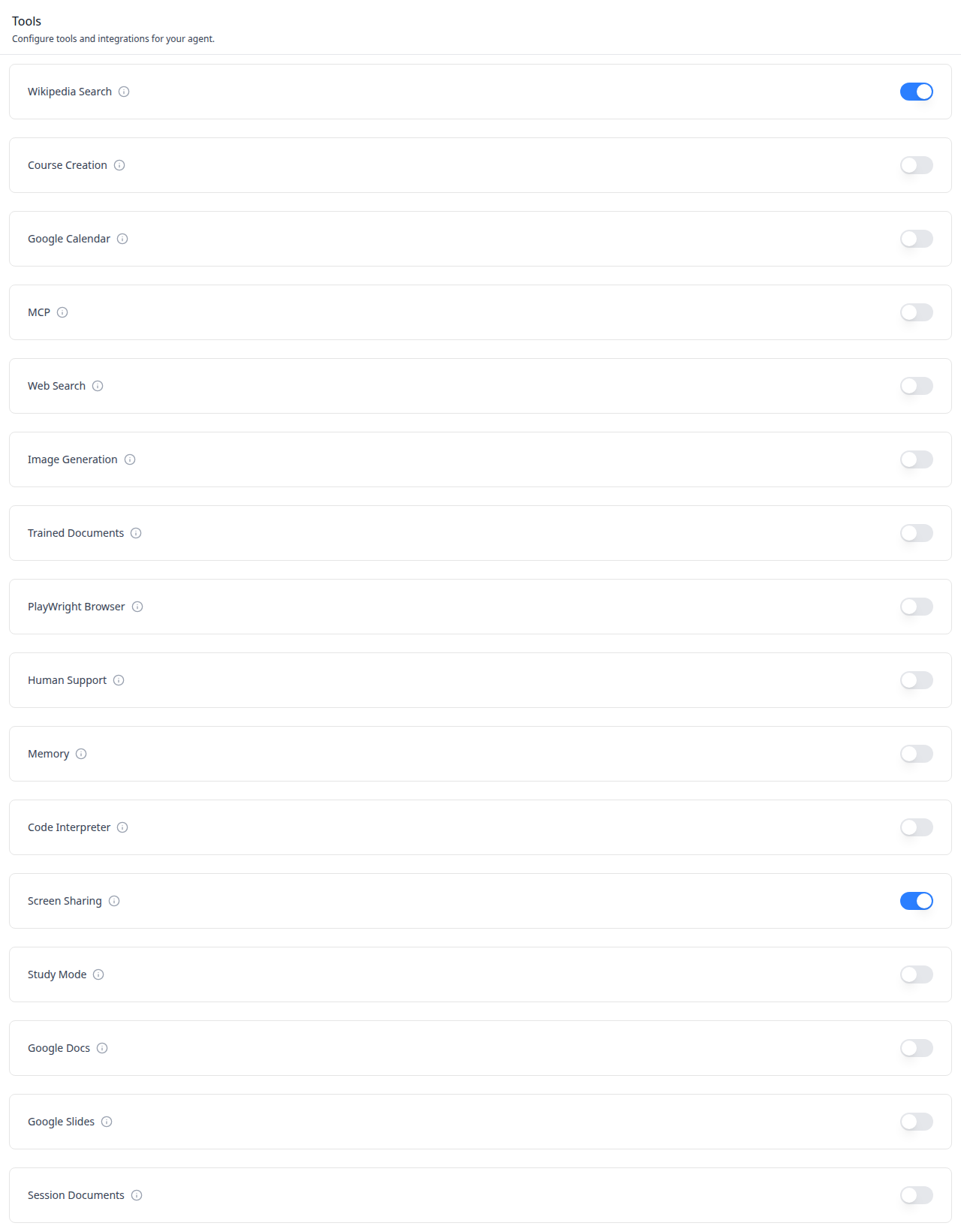
Add the agent Tools tab -- a toggleable list of agent tools with
display names, descriptions in tooltips, and switches for enabling or
disabling each tool. This is one tab in the wider agent-settings family.
All tabs share the same AgentSettingsProvider wrapper.
Common setup (brand, conventions, env files, verification): see docs/skill-setup.md.
Prerequisites
- Auth must be set up first (
/iblai-vibe-auth) - MCP server + skills configured (
@iblai/mcpin.mcp.json) AgentSettingsProvidermust wrap the route (see/iblai-vibe-agent-settingStep 2 if not already set up)- Ask the user for a real
mentorId(agent UUID). Do NOT invent one.
Step 1: Check Environment
Before proceeding, check for an iblai.env in the project root. Look for
PLATFORM, DOMAIN, and TOKEN variables. If the file does not exist or
is missing these variables, tell the user:
"You need an iblai.env with your platform configuration. Download the
template and fill in your values:
curl -o iblai.env https://raw.githubusercontent.com/iblai/vibe/refs/heads/main/iblai.env"
Step 2: Mount AgentToolsTab
// app/(app)/agents/[mentorId]/tools/page.tsx
"use client";

import { AgentToolsTab } from "@iblai/iblai-js/web-containers/next";

export default function AgentToolsPage() {
  return (
    <div className="flex h-full flex-col bg-white">
      <AgentToolsTab />
    </div>
  );
}
Step 3: Customize Labels (Optional)
import { AgentToolsTab } from "@iblai/iblai-js/web-containers/next";

<AgentToolsTab
  labels={{
    header: { title: "Mentor tools" },
  }}
/>;
Step 4: Use MCP Tools for Customization
get_component_info("AgentToolsTab")
get_component_info("AgentSettingsProvider")
<AgentToolsTab> Props
Import from @iblai/iblai-js/web-containers/next.
| Prop | Type | Required | Description |
|---|---|---|---|
labels | DeepPartial<ToolsTabLabels> | No | Override user-visible strings |
Related Exports
From @iblai/iblai-js/web-containers/next:
AGENT_TOOLS_TAB_LABELS-- the default agent-facing label bundle.ToolsTabLabels-- type for the full label bundle.
Step 5: Verify
Run /iblai-vibe-ops-test before telling the user the work is ready:
pnpm build-- must pass with zero errorspnpm test-- vitest must pass- Touch test
/agents/<id>/toolin the browser as/iblai-vibe-ops-testsays: open it, use every control this skill added, read the console, check the phone width.
Important Notes
- Redux store: Must include
mentorReducerandmentorMiddleware initializeDataLayer(): 5 args (v1.2+)@reduxjs/toolkit: Deduplicated via webpack aliases innext.config.ts- Peer deps:
sonnerand@iblai/iblai-web-mentormust be installed (pnpm add sonner @iblai/iblai-web-mentor) - Shared provider:
AgentSettingsProvidermust wrap the route at a layout level. See/iblai-vibe-agent-settingStep 2 for the full snippet. - Brand guidelines: BRAND.md
MCP Servers REST API
For custom UI beyond <AgentToolsTab> — register external MCP servers and
bind them to agents. All endpoints are prefixed with
${dmUrl}/api/ai-mentor/orgs/{org}/users/{user_id}/ where dmUrl is
NEXT_PUBLIC_API_BASE_URL. Organization admins only.
Workflow
- Enable the MCP tool on the agent (so the runtime will use MCP servers).
- Register an MCP server record (URL, transport, auth_type).
- Create a connection binding credentials to a scope (
platform,user, ormentor). - Assign servers to the agent via the agent settings endpoint.
1. Enable MCP tool on the agent
| Method | Path | Body |
|---|---|---|
| PUT | mentors/{mentor_id}/settings/ | { "tools": ["mcp-tool", ...] } |
The tools array replaces the existing list. Pass null to leave
unchanged; [] clears all tools.
2. MCP Servers
| Method | Path | Purpose |
|---|---|---|
| GET | mcp-servers/ | List organization servers |
| POST | mcp-servers/ | Register a new server |
| PATCH/PUT | mcp-servers/{id}/ | Update |
| DELETE | mcp-servers/{id}/ | Delete |
| GET | mcp-servers/oauth-find/ | Find a server by OAuth provider/service |
Create body:
{
  "name": "Google Drive MCP",
  "description": "Search and index Drive documents",
  "url": "https://drive-mcp.example.com",
  "transport": "sse",
  "auth_type": "oauth2",
  "is_featured": false,
  "is_enabled": true
}transport:sse|websocket|streamable_httpauth_type:none|token|oauth2— how credentials are presentedauth_scope:platform(default) |mentor|user— whose credentials are used.auth_type=oauth2+auth_scope=usertriggers the in-chat OAuth handshake (see In-Chat MCP Events below).- For
auth_type=token, setcredentialsto the full header value (e.g."Bearer abc123").
3. MCP Server Connections
| Method | Path | Purpose |
|---|---|---|
| GET | mcp-server-connections/ | List connections |
| POST | mcp-server-connections/ | Create a connection |
| PATCH/PUT | mcp-server-connections/{id}/ | Update / toggle is_active |
| DELETE | mcp-server-connections/{id}/ | Delete |
Token (platform scope):
{
  "server": 9,
  "scope": "platform",
  "auth_type": "token",
  "credentials": "Token super-secret",
  "authorization_scheme": "Token",
  "extra_headers": { "x-mcp-client": "mentor-ui" }
}
OAuth (user scope) — requires an existing ConnectedService (see the
OAuth connectors flow):
{
  "server": 9,
  "scope": "user",
  "auth_type": "oauth2",
  "user": "alice",
  "connected_service": 77
}
Agent scope — bind credentials to a single agent while keeping the server reusable:
{
  "server": 9,
  "scope": "mentor",
  "auth_type": "token",
  "mentor": 123,
  "credentials": "Token scoped-to-mentor",
  "authorization_scheme": "Token"
}
Returned credentials are masked (e.g. "******90"); only send a new
value when the user intentionally rotates the secret.
4. Assign servers to an agent
| Method | Path | Body |
|---|---|---|
| PUT | mentors/{mentor}/settings/ | { "mcp_servers": [1, 2] } |
The mcp_servers array replaces the agent's current list. Pass null to
leave unchanged; [] clears all servers.
Resolution order at runtime
- User-scoped connection (matching invoking user)
- Agent-scoped connection (matching active agent)
- Platform-scoped connection
- Featured server fallback (
is_featured=trueglobal platform)
Common errors
400 Selected MCP server is not available to the current tenant.— the server belongs to another organization and is notis_featured=true.400 OAuth2 connections require a connected service.— create the OAuth connector first and passconnected_service.
UI hints by auth_type
none: informational only.token: inputs forcredentials,authorization_scheme, optional header key–value pairs.oauth2:ConnectedServicepicker filtered by provider/service. Hide the Connect action until OAuth is completed, otherwise the API returns400.
OAuth Connectors REST API
For OAuth-backed MCP servers (auth_type=oauth2), each user must grant
permission once per provider/service before a connection can reference a
ConnectedService. All endpoints are under ${dmUrl}/api/accounts/. Auth:
Authorization: Token {token}.
Endpoints
| Method | Path | Purpose |
|---|---|---|
| GET | orgs/{org}/oauth-services/ | List enabled services across all providers |
| GET | orgs/{org}/oauth-services/{service_name}/scopes/ | Per-service scope breakdown |
| GET | connected-services/orgs/{org}/users/{user_id}/{provider}/{service}/ | Start flow — returns { auth_url } |
| GET | connected-services/callback/?code=...&state=... | Handle vendor redirect; persists ConnectedService |
| GET | connected-services/orgs/{org}/users/{user_id}/ | List the user's connected services |
| DELETE | connected-services/orgs/{org}/users/{user_id}/{id}/ | Revoke a connection |
Flow
- List services → discover what's available.
- Start flow → open returned
auth_urlin a new window/tab. - Vendor redirects to the configured
redirect_uri; relaycode+stateto the callback endpoint without modification. - Callback returns the persisted
ConnectedService(id, provider, service,expires_at,scope). Tokens auto-refresh server-side.
Prereqs (admin)
Organization admin must store auth_{provider} credentials with client_id,
client_secret, and redirect_uri in the credential store. A start
endpoint returning 400 "No credentials found" means this is missing.
Common errors
400 "No credentials found"— admin must configureauth_{provider}.Invalid state— start and callback ran in different browser contexts or state expired (>60 min).Could not exchange auth token— provider rejected the code; verifyredirect_urimatches.
In-Chat MCP Events (WebSocket / SSE)
When auth_type=oauth2 + auth_scope=user and no user-scoped
MCPServerConnection exists, the chat consumer pauses the active session
and emits events on the existing chat socket. Parse JSON, switch on
type.
oauth_required
Backend is about to call an MCP server with no user connection. Show
auth_url to the user; the backend now polls every 10s.
{
  "type": "oauth_required",
  "server_name": "Google Drive MCP",
  "server_id": 42,
  "auth_url": "https://accounts.google.com/o/oauth2/v2/auth?...",
  "message": "Authentication required for MCP server '...'."
}
UI: open auth_url in a popup/new tab (providers block framing). Show a
"waiting" indicator. Do NOT close the chat socket — resolution arrives on
the same connection.
oauth_connection_resolved
Polling detected the new connection; chat resumes automatically.
{ "type": "oauth_connection_resolved", "server_name": "...", "server_id": 42, "message": "..." }UI: dismiss the prompt. Optionally toast success.
mcp_tools_retrieved
A tool fetch failed but a retry succeeded (up to 3 retries with 1s/2s/4s backoff). Informational only.
{ "type": "mcp_tools_retrieved", "session_id": "...", "mentor_id": "..." }warning
Non-OAuth MCP failure (server unreachable, bad config, retries exhausted). Chat continues without MCP tools.
{ "type": "warning", "message": "...", "developer_error": "...", "code": 503 }UI: non-blocking banner using message. Log developer_error (do NOT
show to end users).
error (ChatValidationError)
Terminates the turn. Three MCP-related cases:
- OAuth timeout (no completion within
MCP_OAUTH_MAX_WAIT_SECONDS= 300s). - OAuth URL build failure (missing credentials, unknown provider).
- Missing connected service (oauth2 connection record without linked
ConnectedService).
{ "error": "Timed out waiting for OAuth authentication...", "status_code": 400 }UI: display error (already user-safe). Offer Retry. WebSocket transports
close after this; if the user finishes OAuth after the timeout, their next
message will succeed because the connection is now in place.
Timing constants
| Constant | Value |
|---|---|
MCP_OAUTH_MAX_WAIT_SECONDS | 300 (5 min) |
MCP_OAUTH_POLL_INTERVAL_SECONDS | 10 |