/iblai-vibe-agent-disclaimer
Mirrored from
iblai/vibe·skills/agents/iblai-vibe-agent-disclaimer/SKILL.md. This page is generated — edit it in the repository, not here.
Add the agent Disclaimers tab -- the notices users see when they chat
with the agent. Scope: per agent. Two cards sit side by side: the User
Agreement (text users must accept, with an Active switch) and the
Advisory (a short note shown in the chat, such as "AI can make
mistakes"). This is one tab in the agent-settings family indexed by
/iblai-vibe-agent; it shares the AgentSettingsProvider wrapper with every
other tab.
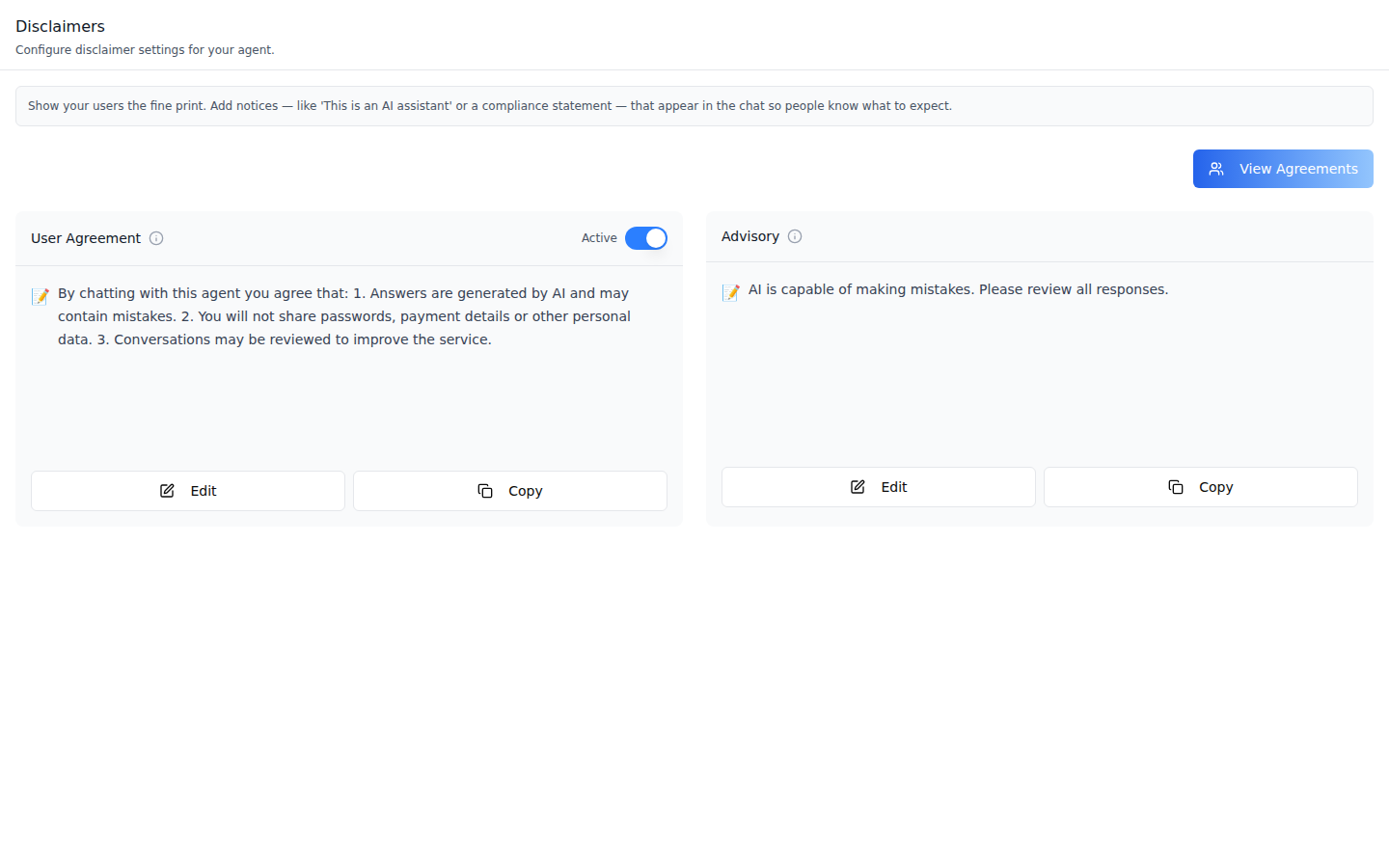
Disclaimers -- both cards with Edit and Copy. The User Agreement
card and View Agreements need the agent's #view_disclaimers grant
(Step 2). View Agreements shows only once the agreement is Active.
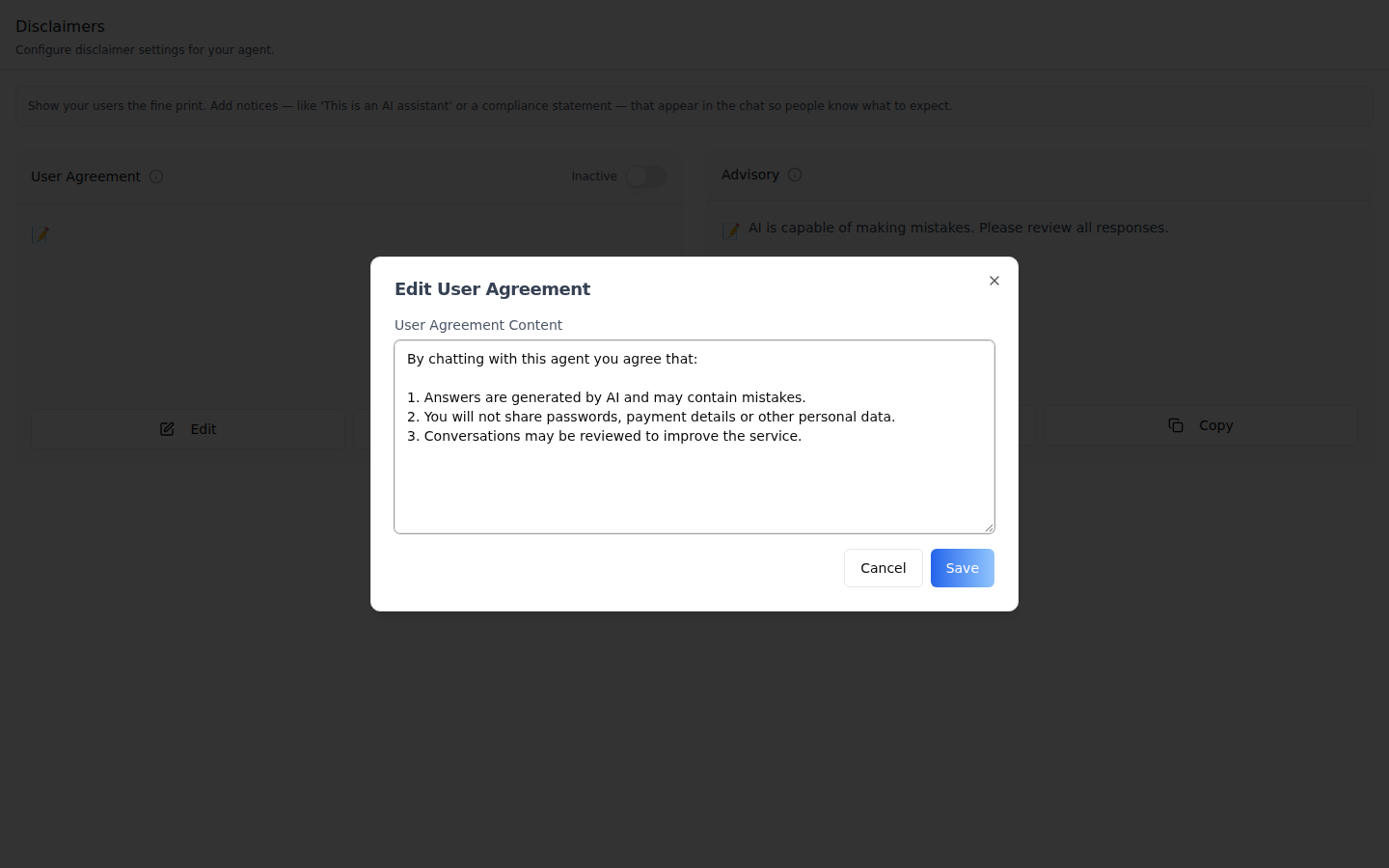
Edit User Agreement -- the first save creates the agreement; later saves update it. Save stays disabled while the text is blank.
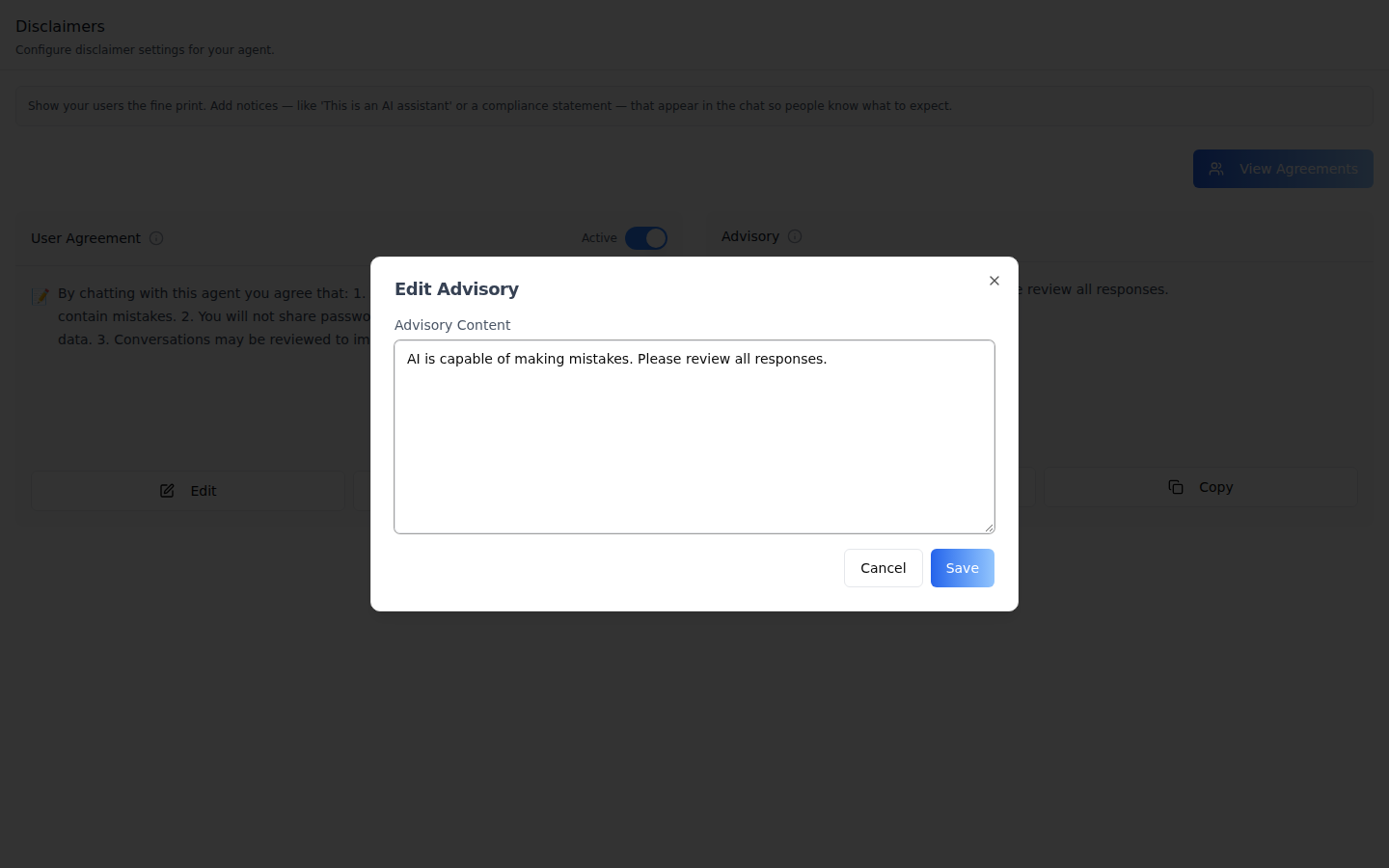
Edit Advisory -- the Advisory is one field on the agent's settings. It cannot be saved blank, so it cannot be cleared from this tab.
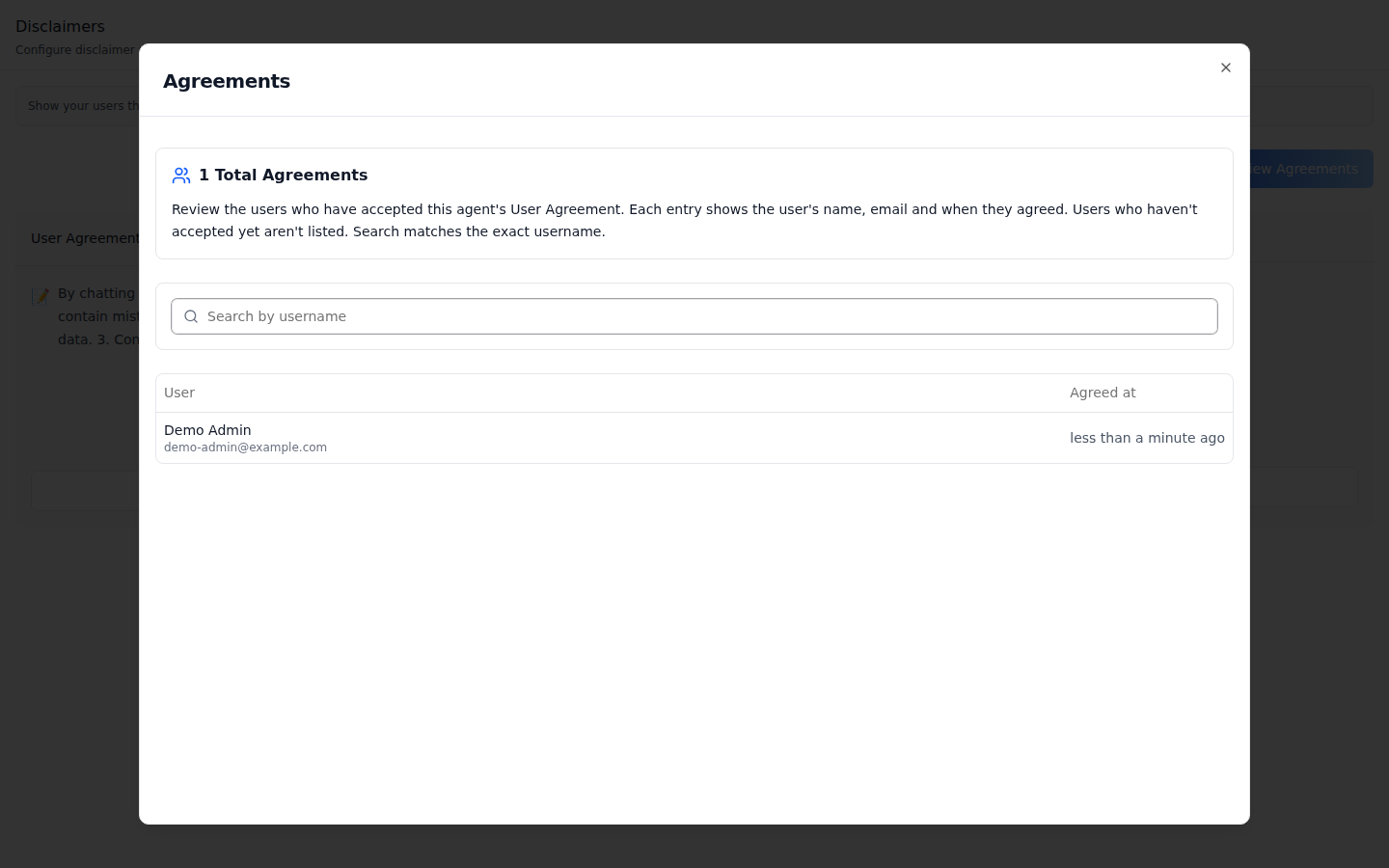
Agreements -- who accepted the User Agreement and when, 20 per page. Search matches the exact username.
Common setup (brand, conventions, env files, verification): see docs/skill-setup.md.
Prerequisites
- Auth set up (
/iblai-vibe-auth, or vibe-starter). AgentSettingsProviderwraps the route (/iblai-vibe-agent§1).@iblai/iblai-js@^2.62.1(resolves@iblai/web-containers1.62.1). Check withpnpm why @iblai/web-containers.- A real agent UUID. Ask the user; never invent one.
- The signed-in user needs the agent's
#view_disclaimersgrant (org admins have it) to see the User Agreement.
Step 1: Check Environment
Look for iblai.env in the project root with PLATFORM, DOMAIN, and
TOKEN. If it is missing, tell the user:
"You need an iblai.env with your platform configuration. Download the
template and fill in your values:
curl -o iblai.env https://raw.githubusercontent.com/iblai/vibe/refs/heads/main/iblai.env"
Step 2: Mount AgentDisclaimersTab
The User Agreement card and View Agreements are gated on the RBAC grant
/mentors/<agent db id>/#view_disclaimers, read from the provider's
rbacPermissions -- even with enableRBAC={false}. Without it only the
Advisory card renders. Load the grants for the agent and pass them to a
nested provider:
// app/(app)/agents/[mentorId]/disclaimers/page.tsx
"use client";

import { useEffect, useState } from "react";
import {
  AgentDisclaimersTab,
  AgentSettingsProvider,
  useAgentSettings,
} from "@iblai/iblai-js/web-containers/next";
import {
  useGetMentorSettingsQuery,
  useGetRbacPermissionsMutation,
} from "@iblai/iblai-js/data-layer";

export default function AgentDisclaimersPage() {
  const settings = useAgentSettings();
  const { tenantKey, mentorId, username } = settings;
  const [grants, setGrants] = useState<object>({});
  const [getRbacPermissions] = useGetRbacPermissionsMutation();
  const { data } = useGetMentorSettingsQuery({
    mentor: mentorId,
    org: tenantKey,
    // @ts-expect-error userId is accepted at runtime
    userId: username,
  });
  const mentorDbId = (data as { mentor_id?: number } | undefined)?.mentor_id;

  useEffect(() => {
    if (!mentorDbId) return;
    getRbacPermissions({
      requestBody: {
        platform_key: tenantKey,
        resources: [`/mentors/${mentorDbId}/`],
      },
    })
      .unwrap()
      .then((permissions) => setGrants({ ...permissions }))
      .catch(() => {});
  }, [mentorDbId, tenantKey, getRbacPermissions]);

  return (
    <div className="flex h-full flex-col bg-white">
      <AgentSettingsProvider {...settings} rbacPermissions={grants}>
        <AgentDisclaimersTab />
      </AgentSettingsProvider>
    </div>
  );
}
The grant path uses the agent's numeric mentor_id from its settings, not
the UUID. If your layout already loads the agent's grants into the provider,
mount <AgentDisclaimersTab /> directly.
Markdown and a starting text (optional)
Both cards render plain text by default, so line breaks collapse. Pass
renderContent to render Markdown, and defaultDisclaimerContent to
prefill the User Agreement before one exists:
import ReactMarkdown from "react-markdown";
import { AgentDisclaimersTab } from "@iblai/iblai-js/web-containers/next";

<AgentDisclaimersTab
  defaultDisclaimerContent="By chatting with this agent you agree to our terms."
  renderContent={(content) => <ReactMarkdown>{content}</ReactMarkdown>}
/>;
Step 3: Customize Labels (Optional)
The tab renders with the default agent-facing copy
(AGENT_DISCLAIMERS_TAB_LABELS, localized through the SDK's i18n). Pass a
partial labels object to change any string:
import { AgentDisclaimersTab } from "@iblai/iblai-js/web-containers/next";

<AgentDisclaimersTab
  labels={{
    header: { title: "Notices" },
    userAgreement: { title: "Terms of use" },
  }}
/>;
Label groups (DisclaimersTabLabels): header (title, description),
infoBox, userAgreement (title, tooltip, active, inactive, and the
edit dialog's editTitle, editLabel, editPlaceholder), advisory
(title, tooltip, editTitle, editLabel, editPlaceholder), actions
(edit, save, saving, cancel, viewAgreements), toasts (success and
error for each save and toggle), and agreements (the Agreements dialog:
title, totalAgreements(count), summaryDescription, search, column and
empty-state copy).
Step 4: Use MCP Tools for Customization
get_component_info("AgentDisclaimersTab")
get_component_info("AgentSettingsProvider")
<AgentDisclaimersTab> Props
Import from @iblai/iblai-js/web-containers/next.
| Prop | Type | Required | Description |
|---|---|---|---|
labels | DeepPartial<DisclaimersTabLabels> | No | Override user-visible strings |
defaultDisclaimerContent | string | No | User Agreement text shown before one exists. Defaults to '' |
renderContent | (content: string) => ReactNode | No | Render both cards' text as rich content (e.g. Markdown). Defaults to plain text |
Identity and grants come from AgentSettingsProvider (tenantKey,
mentorId, username, rbacPermissions, enableRBAC).
Related Exports
From @iblai/iblai-js/web-containers/next:
AGENT_DISCLAIMERS_TAB_LABELS-- the default label bundle.AgentDisclaimersTabProps,DisclaimersTabLabels-- types.
How it saves
| Action | Request |
|---|---|
| Load | GET …/disclaimers/?mentor_id=<uuid>&scope=mentor (the first result is the User Agreement) and the agent's settings (disclaimer, mentor_id) |
| Save the User Agreement | First time: POST …/disclaimers/ with content, mentors: [uuid], scope: "mentor" (created active). Then: PATCH …/disclaimers/{id}/ with content |
| Active switch | PATCH …/disclaimers/{id}/ with active; with no agreement yet it creates one from defaultDisclaimerContent, and the default '' gets a 400 |
| Save the Advisory | PUT mentors/{uuid}/settings/ with disclaimer |
| View Agreements | GET …/disclaimer-agreements/?disclaimer={id}&mentor_id=<uuid>&page_size=20 (plus username when searching) |
The tab has no delete. The API cannot delete a User Agreement either, and will not detach its last agent: turn it off with the switch.
Platform data
| Hook | Purpose |
|---|---|
useGetDisclaimersQuery | The agent's User Agreement |
useCreateDisclaimerMutation / useUpdateDisclaimerMutation | Create it, edit its text, switch it on or off |
useGetDisclaimerAgreementsQuery | Who accepted it |
useGetMentorSettingsQuery / useEditMentorMutation | Read and save the Advisory |
useGetRbacPermissionsMutation | Load the #view_disclaimers grant (Step 2) |
REST twin: /iblai-api-agent-disclaimer.
Step 5: Verify
Run /iblai-vibe-ops-test before telling the user the work is ready, and give
every page, control and state this skill added its own checkpoint — one Playwright
test titled <ID> · … in e2e/journeys/, listed in e2e/coverage.json;
pnpm e2e:coverage must pass:
pnpm build-- must pass with zero errors.pnpm test-- vitest must pass.- Touch test
/agents/<uuid>/disclaimersin the browser as/iblai-vibe-ops-testsays, signed in as an org admin: both cards render; Edit the User Agreement and Save -- it is created Active and View Agreements appears (on a fresh agent the switch alone shows "Failed to update user agreement"); read the console; check the phone width.
Important Notes
- Per agent: both notices apply to everyone who chats with this agent.
- Saving creates it live: the first User Agreement save creates it already Active, so users must accept it on their next chat. Switch it off if the text is still a draft.
- No undo: a User Agreement cannot be deleted, only switched off. Try it on a test agent.
- Shared provider: mount
AgentSettingsProvideronce at the layout level (/iblai-vibe-agent§1); do not wrap each tab. - Peer deps:
sonnerand@iblai/iblai-web-mentor(pnpm add sonner @iblai/iblai-web-mentor). - Brand guidelines: BRAND.md