/iblai-vibe-agent-create
Mirrored from
iblai/vibe·skills/agents/iblai-vibe-agent-create/SKILL.md. This page is generated — edit it in the repository, not here.
First time here? If
iblai.envhas noARCHITECTURE=, run/iblai-vibe-startfirst (four questions; two minutes) — it decides single-org / multi-org / headless and who signs in, and every skill reads the answer.
An agent is created with one platform call and returns a unique_id — the
UUID every other agent skill needs. Two ways to put creation in an app:
- The SDK's Create Agent form (
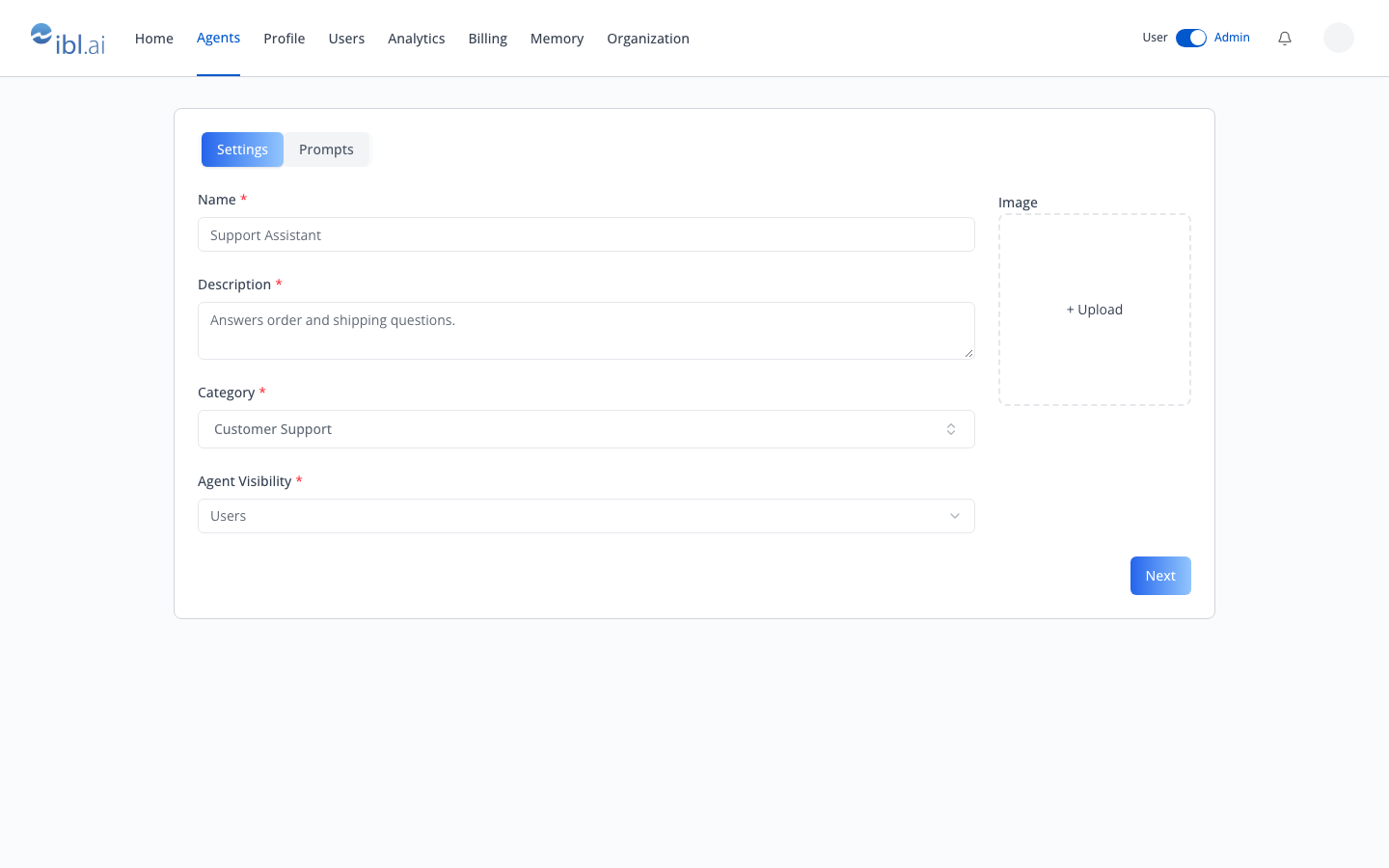
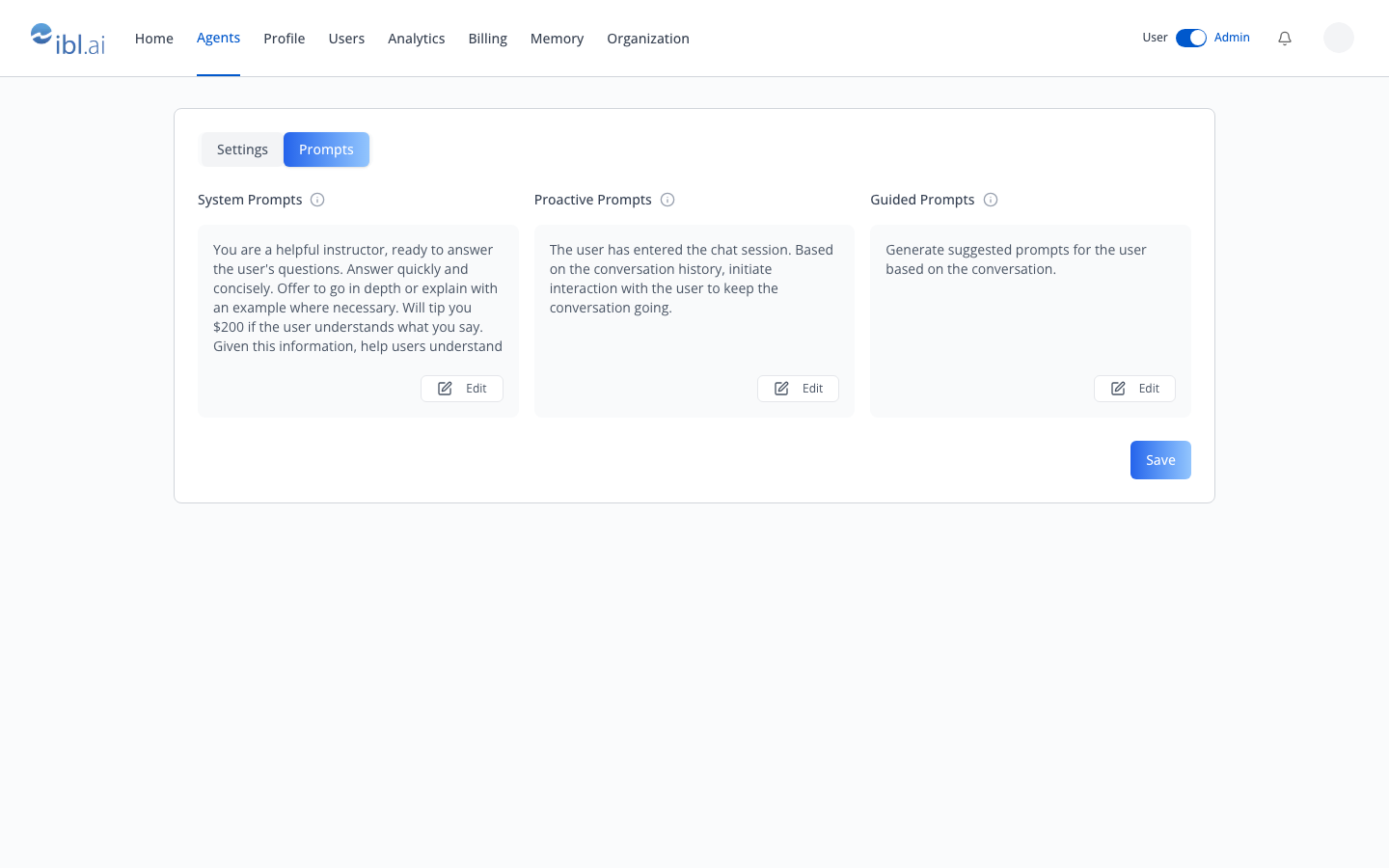
CreateAgentForm, orCreateAgentModalaround it) — Settings and Prompts tabs, run as the signed-in person, and showing only the fields that person may set. For anyone who creates agents from the app. - A server route plus a small form — vibe-starter's
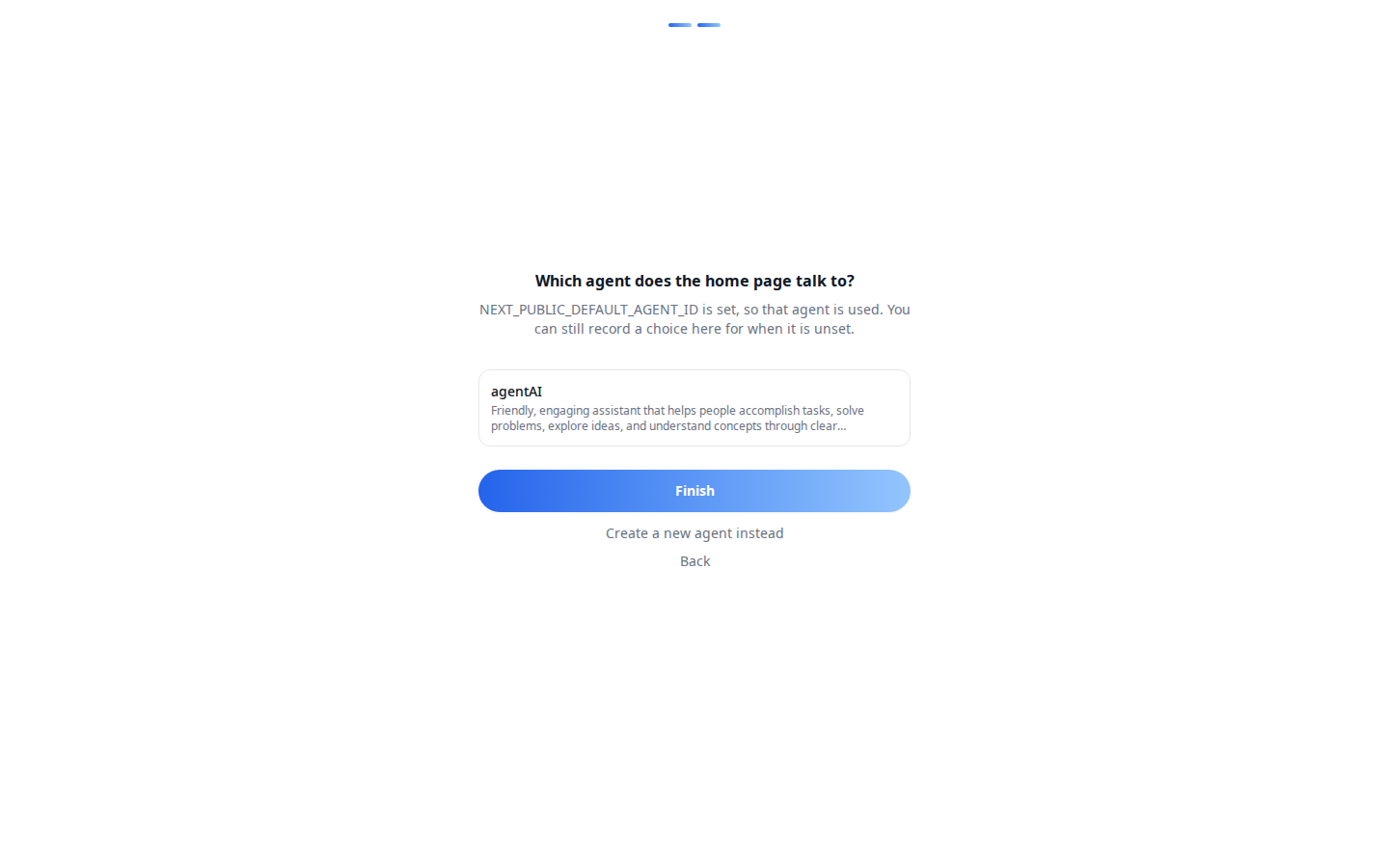
/setup, which picks or creates the app's default agent with the organization's authority. Admin-only.
Common setup (brand, conventions, env files, verification): see docs/skill-setup.md.
Prerequisites
- Auth in place (
/iblai-vibe-auth). @iblai/iblai-js@^2.73.1for the field permissions below; earlier releases show every field to everyone.- The person creating must be allowed to: an org admin, or a member holding
MENTOR_CREATORS(/iblai-vibe-rbac; the org togglerbac/student-agent-creation/status/decides whether plain members may). - For the server route only:
IBLAI_API_KEYin.env.local(server-only) andlib/iblai/platform.tsfrom/iblai-vibe-api(requireAdmin,platformFetch).
Step 1: Mount the SDK's Create Agent form
// app/(app)/agents/new/page.tsx
"use client";

import { useState } from "react";
import { useRouter } from "next/navigation";
import { toast } from "sonner";
import { CreateAgentForm } from "@iblai/iblai-js/web-containers";
import { useUsername } from "@iblai/iblai-js/web-utils";
import { resolveAppTenant } from "@/lib/iblai/tenant";

export default function NewAgentPage() {
  const router = useRouter();
  const [tenantKey] = useState(resolveAppTenant);
  const username = useUsername();
  if (!username) return null;

  return (
    <div className="mx-auto w-full flex-1 overflow-auto px-4 py-8 md:w-[75vw] md:px-0">
      <div className="rounded-lg border border-[var(--border-color)] bg-white p-6">
        <CreateAgentForm
          org={tenantKey}
          username={username}
          onCreated={(agent) => {
            if (agent.unique_id) router.push(`/?agent=${agent.unique_id}`);
          }}
          onError={() => toast.error("Couldn't create the agent.")}
        />
      </div>
    </div>
  );
}
CreateAgentModal takes the same props plus isOpen and onClose, for a
"Create Agent" button. The form owns its state, the categories query and
the create call (useCreateMentorMutation, as the signed-in person); toasts
and navigation are yours, through the callbacks.
| Prop | Type | Required | Description |
|---|---|---|---|
org | string | Yes | Organization key the agent is created in |
username | string | Yes | The person creating it |
onCreated | (agent: CreatedAgent) => void | No | With the new agent (unique_id) |
onError | (error: unknown) => void | No | When the create call fails |
onBeforeCreate | () => boolean | Promise<boolean> | No | Gate before the request (a paywall, a trial check); false stops it |
initialValues | Partial<CreateAgentFormValues> | No | Prefill any field |
showBaseModel | boolean | No | Show the Base select (template: Default, OpenAI, Gemini); off by default |
visibilityOptions / modelOptions | CreateAgentOption[] | No | Replace the select options |
defaultPrompts | Partial<AgentPromptDefaults> | No | The prompts the form starts with |
labels | DeepPartial<CreateAgentLabels> | No | Any UI string |
What it renders. Settings: Name, Description, Category, Agent Visibility (Administrators / Users / Anyone; Users by default) and an image upload, then Next. Prompts: System, Proactive and Guided prompts, each with Edit, then Save.
Fields each person may set
Before showing the form it asks the platform which fields this person may
write: GET ${dmUrl}/v1/agents/settings/field-permissions with the header
iblai-org: <org>, answered as { "<field>": { "write": true|false } }.
The organization's RBAC policies decide the answer (/iblai-vibe-rbac).
- A field the person may not write is hidden, no longer required, and left out of the request; an optional field left out keeps its default.
- When none of the three prompts may be written, the Prompts tab goes away and the Settings tab's Next becomes Save.
- Two fields stop creation outright when barred, so a policy meant to
let someone create agents must leave both writable:
- the name (
new_mentor_name,display_name): always asked for and always sent, so the call is refused (403); - Base (
template_name): required by the create call, so leaving it out fails it (400, "This field is required."). This holds even when the form hides Base (showBaseModeloff).
- the name (
- While the answer is unknown it fails open, showing every field: an older platform (404), a person who may not create agents at all (403), a network failure.
The create call refuses the whole request (403) when it carries a field the person may not write, so a form of your own must leave those out too:
| Form field | Sent as |
|---|---|
| Name | new_mentor_name (required), display_name |
| Description | description |
| Category | categories (and metadata.category, permitted as metadata) |
| Image | uploaded_profile_image |
| Agent Visibility | mentor_visibility |
| Base | template_name (required) |
| System / Proactive / Guided prompt | system_prompt, proactive_prompt, guided_prompt_instructions |
| Moderation prompt (not shown) | moderation_system_prompt |
For a custom form, the SDK's own pieces do that work:
// lib/iblai/create-agent-body.ts
"use client";

import { useCreateAgentFieldPermissions } from "@iblai/iblai-js/web-containers";
import { buildCreateAgentPayload, type CreateAgentFieldValues } from "@iblai/iblai-js/web-utils";

export function useCreateAgentBody(org: string) {
  // visibility.description, .category, .systemPrompt, … and .anyPrompt say what to show.
  const { permissions, visibility, isLoading } = useCreateAgentFieldPermissions({ org });
  const toBody = (values: CreateAgentFieldValues) => buildCreateAgentPayload(values, permissions);
  return { visibility, isLoading, toBody };
}
canWriteAgentField(permissions, field), getCreateAgentFieldVisibility
and CREATE_AGENT_FIELD_MAP come from the same web-utils entry; the raw
query is useGetAgentSettingsFieldPermissionsQuery({ org }) from
@iblai/iblai-js/data-layer, already in mentorReducer / mentorMiddleware.
Step 2: The server route and /setup (admin-only)
Copy the assets:
| Asset | Destination | Does |
|---|---|---|
admin-agents-route.ts | app/api/admin/agents/route.ts | GET lists the org's agents; POST creates one |
admin-client.ts | lib/iblai/admin-client.ts | browser adminFetch() that forwards the session token |
setup-screen.tsx | components/setup/setup-screen.tsx | name the app → pick or create the agent → save to org metadata |
setup-page.tsx | app/setup/page.tsx | admin-only page, outside the navbar |
The setup screen saves through useOrgSettings (/iblai-vibe-org-metadata)
and uses the SDK's OnboardingShell / StepHeader. Needs shadcn input, label.
The call
// server, after requireAdmin(req)
const agent = await platformFetch<{ unique_id: string; name: string }>(
  `/dm/api/ai-mentor/orgs/${org}/users/${caller.username}/mentor-with-settings/`,
  {
    method: "POST",
    body: {
      template_name: "ai-mentor",     // the default template on most orgs
      new_mentor_name: name,
      display_name: name,
      description,
      system_prompt,                  // optional; refine later in the Prompts tab
      // llm_provider: "openai",      // optional; set later in the LLM tab
    },
  },
);
Listing existing agents (for a picker):
GET /dm/api/search/orgs/{org}/users/{username}/mentors/.
From the browser:
import { adminFetch } from "@/lib/iblai/admin-client";
const { unique_id } = await adminFetch<{ unique_id: string }>("/api/admin/agents", {
  method: "POST",
  json: { name: "Support Assistant", description: "Answers order questions." },
});
The route runs with the organization's Platform API Token, not as the person
on the page, so keep it admin-only; members create through the SDK form,
which honours their own field permissions. To copy an existing agent instead, use fork in
/iblai-vibe-agent-setting.
Step 3: After creation
- Store the id where the app reads it:
NEXT_PUBLIC_DEFAULT_AGENT_ID(env, wins) or the org settingdefaultAgentId(what/setupwrites). - Configure it:
/iblai-vibe-agent-setting(identity, visibility), then Prompts, LLM, Datasets, Tools, Memory — all via/iblai-vibe-agent. - Chat with it: the home page in vibe-starter, or
/iblai-vibe-agent-chat.
Verify
Run /iblai-vibe-ops-test before telling the user the work is ready, and give
every page, control and state this skill added its own checkpoint — one Playwright
test titled <ID> · … in e2e/journeys/, listed in e2e/coverage.json;
pnpm e2e:coverage must pass. Then:
pnpm typecheck && pnpm build.- As an admin, open the Create Agent page, fill both tabs, Save, and
land on
/chatting with the new agent; it appears on os.ibl.ai → Explore → Custom. - As a member whose policies deny some optional fields (anything but the name and Base), the same page hides them (and the Prompts tab when no prompt is allowed), and Save succeeds.
- As an admin, open
/setup, create an agent there too; as a member,POST /api/admin/agentsanswers403.
Platform data
| Call | Purpose |
|---|---|
GET /dm/v1/agents/settings/field-permissions (header iblai-org) | which create fields this person may write |
POST …/orgs/{org}/users/{username}/mentor-with-settings/ | create from template → unique_id |
GET …/search/orgs/{org}/users/{username}/mentors/ | list agents |
GET …/orgs/{org}/users/{username}/mentor/categories/ | categories to assign afterwards |
POST …/users/{username}/mentors/{mentor}/fork/ | copy an agent |
REST references: agent-create, agent-setting.
Related skills
/iblai-vibe-agent— the tabs to configure it/iblai-vibe-agent-setting— identity, visibility, fork, delete/iblai-vibe-agent-search— the browser members pick from/iblai-vibe-api— the server-route pattern