/iblai-vibe-agent-skills
Mirrored from
iblai/base·skills/agents/iblai-vibe-agent-skills/SKILL.md. This page is generated — edit it in the repository, not here.
Add the agent Skills tab (AgentSkillsTab) -- reusable playbooks a Base
Agent can discover and follow. An Agent Skill is a written instruction bundle
(plus optional reference files) for one job, like summarizing a meeting or
searching the web. The agent reads a skill only when it is relevant, so it can
carry many without bloating every conversation. Scope: skills are defined
per organization (or private to one agent); the tab manages which of them
are attached to this agent. It opens with a gray info box
(skills-info-box), then two sub-tabs, Agent Skills and Available
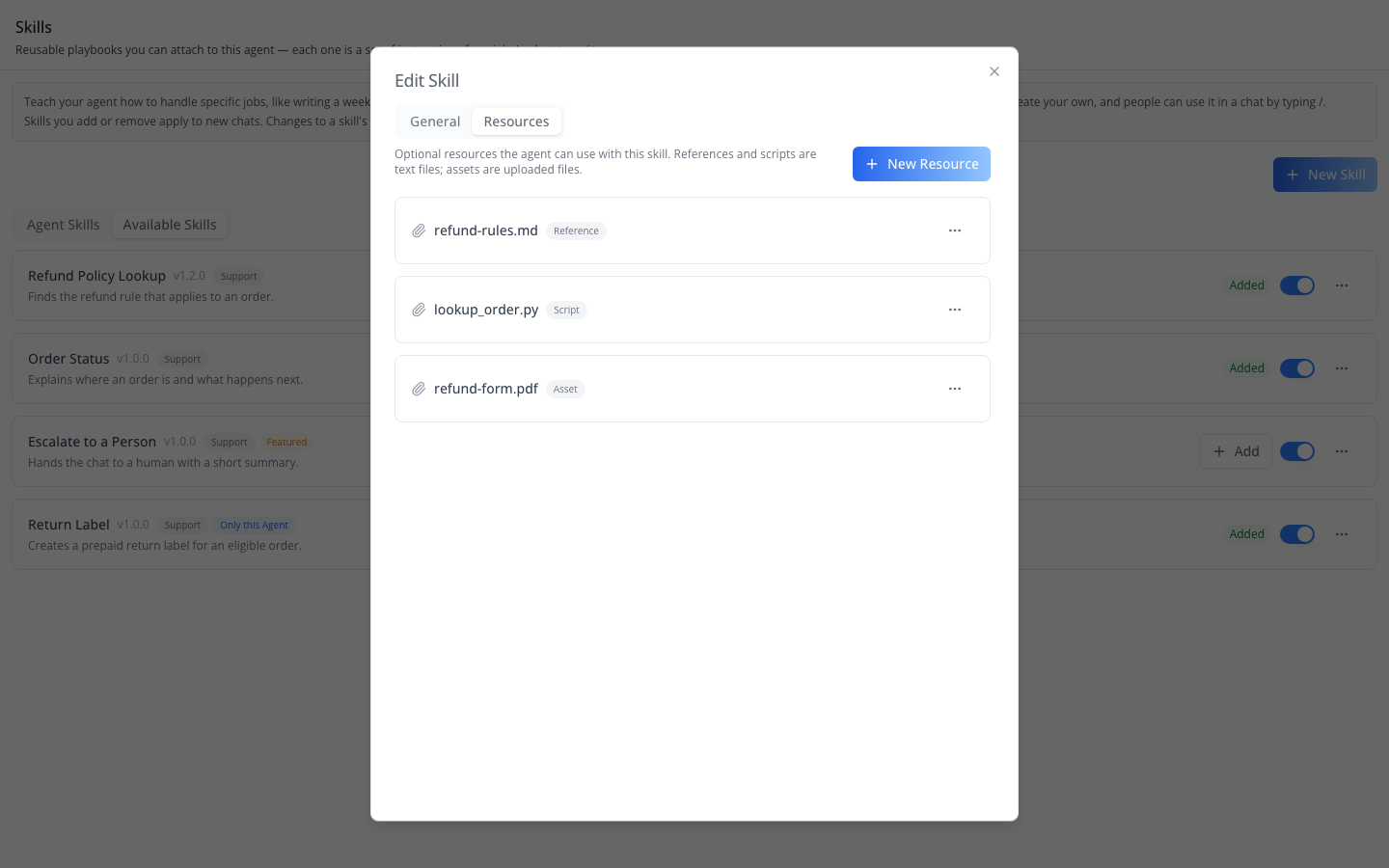
Skills, a New Skill button, and Edit dialogs with a Resources file
manager. Users invoke a skill from the chat composer with / (Step 4).
Skills need no sandbox.
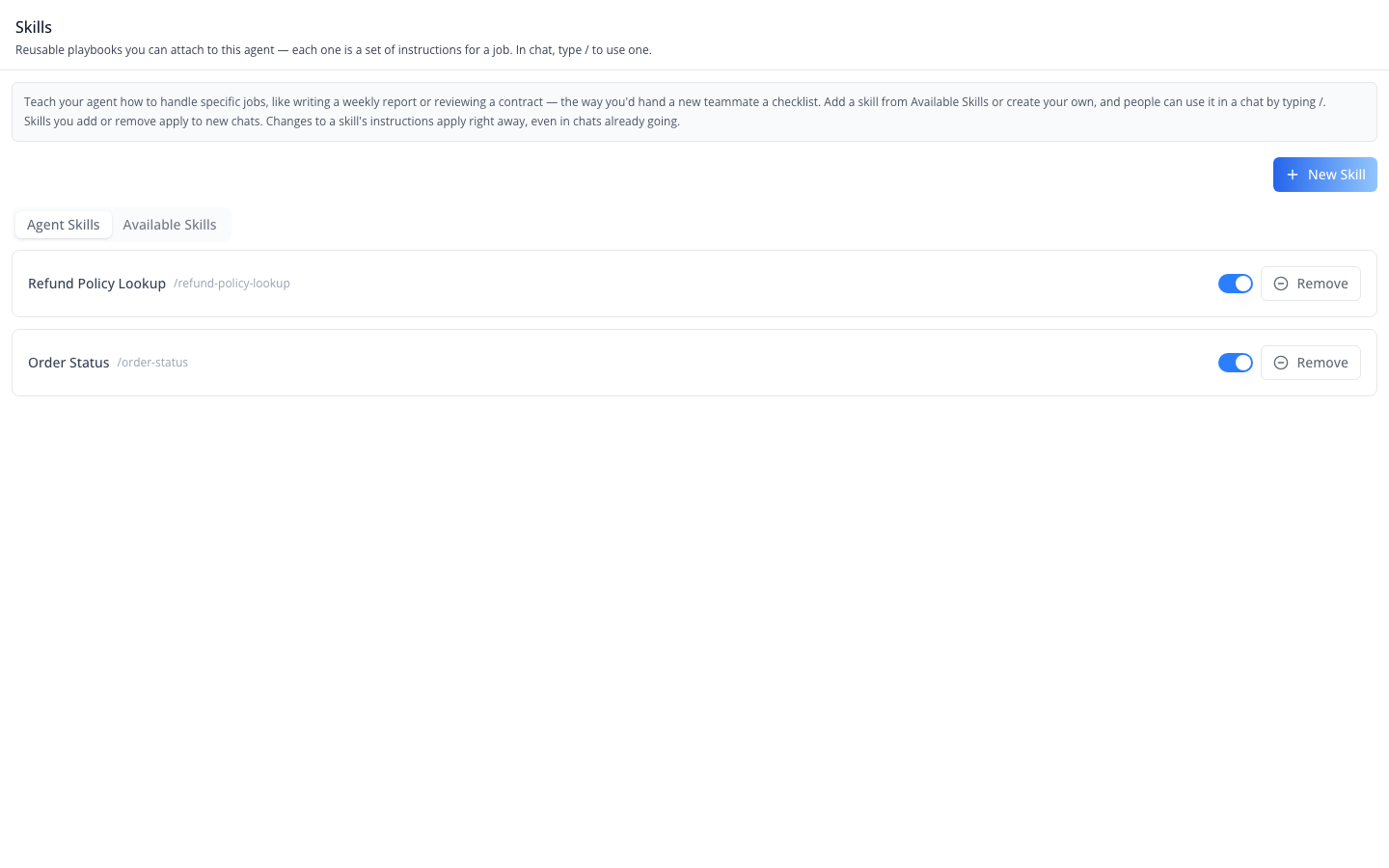
Agent Skills -- the skills attached to this agent, each with its /slug,
an on/off switch (the assignment's enabled), and Remove.
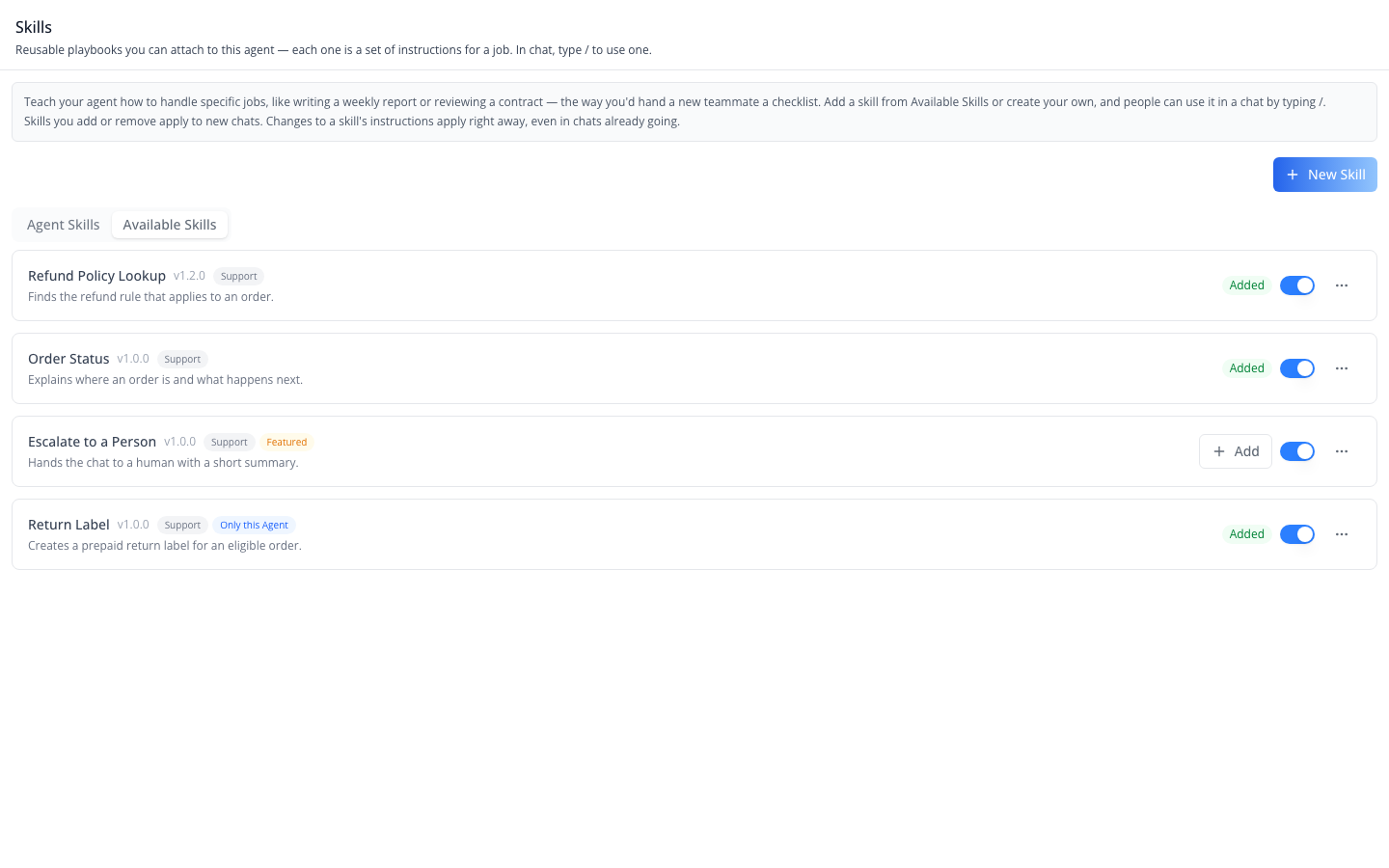
Available Skills -- the organization's catalog, paged 10 at a time: name, version, category, Featured and Only this Agent badges, description, and Add (or a green Added chip on a skill already attached or private to this agent).
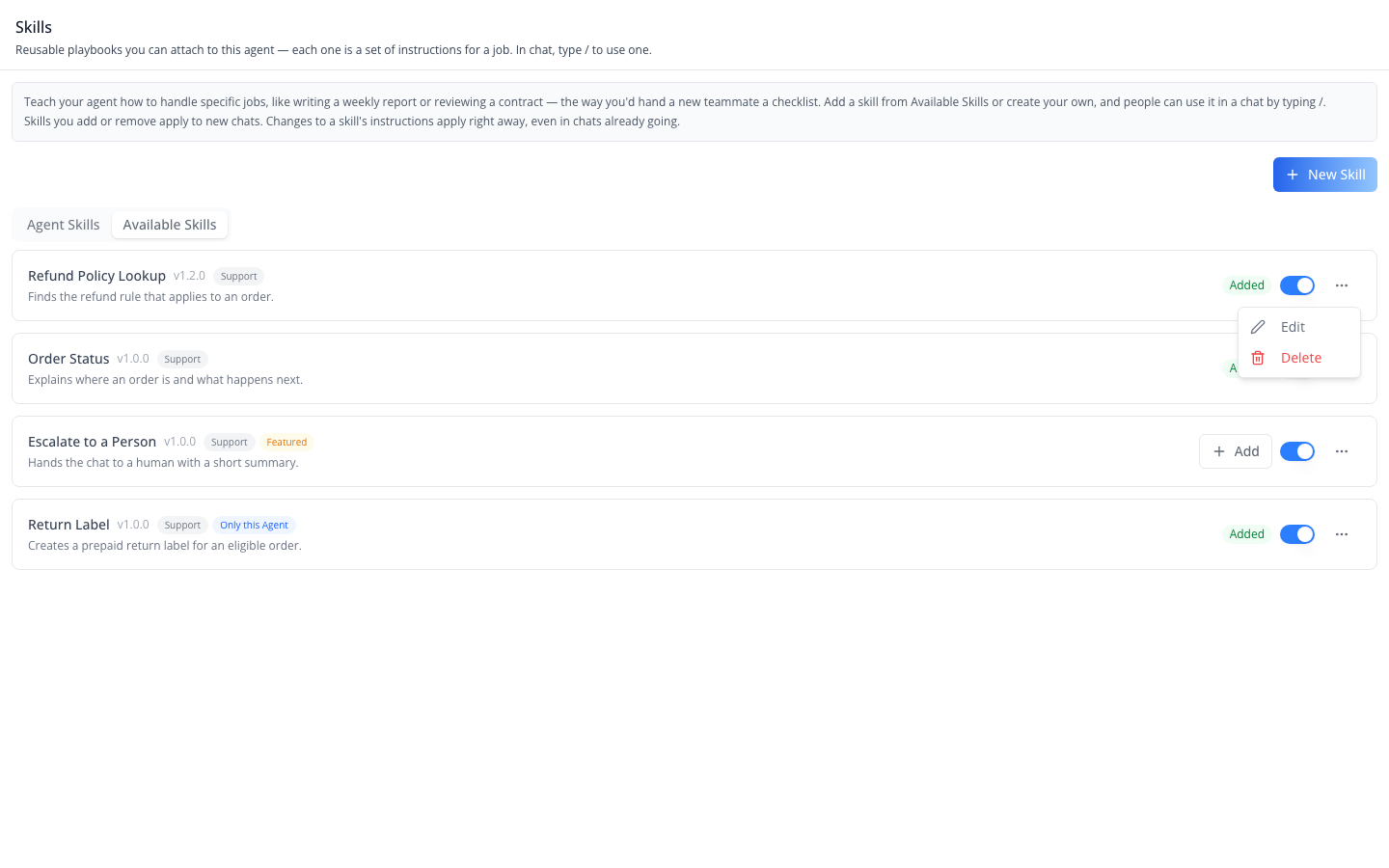
Row actions -- a skill the organization owns has a switch (the skill's
own enabled) and a menu with Edit and Delete. Both follow
ownership, not the Featured badge: a featured skill from the main
organization shows neither.
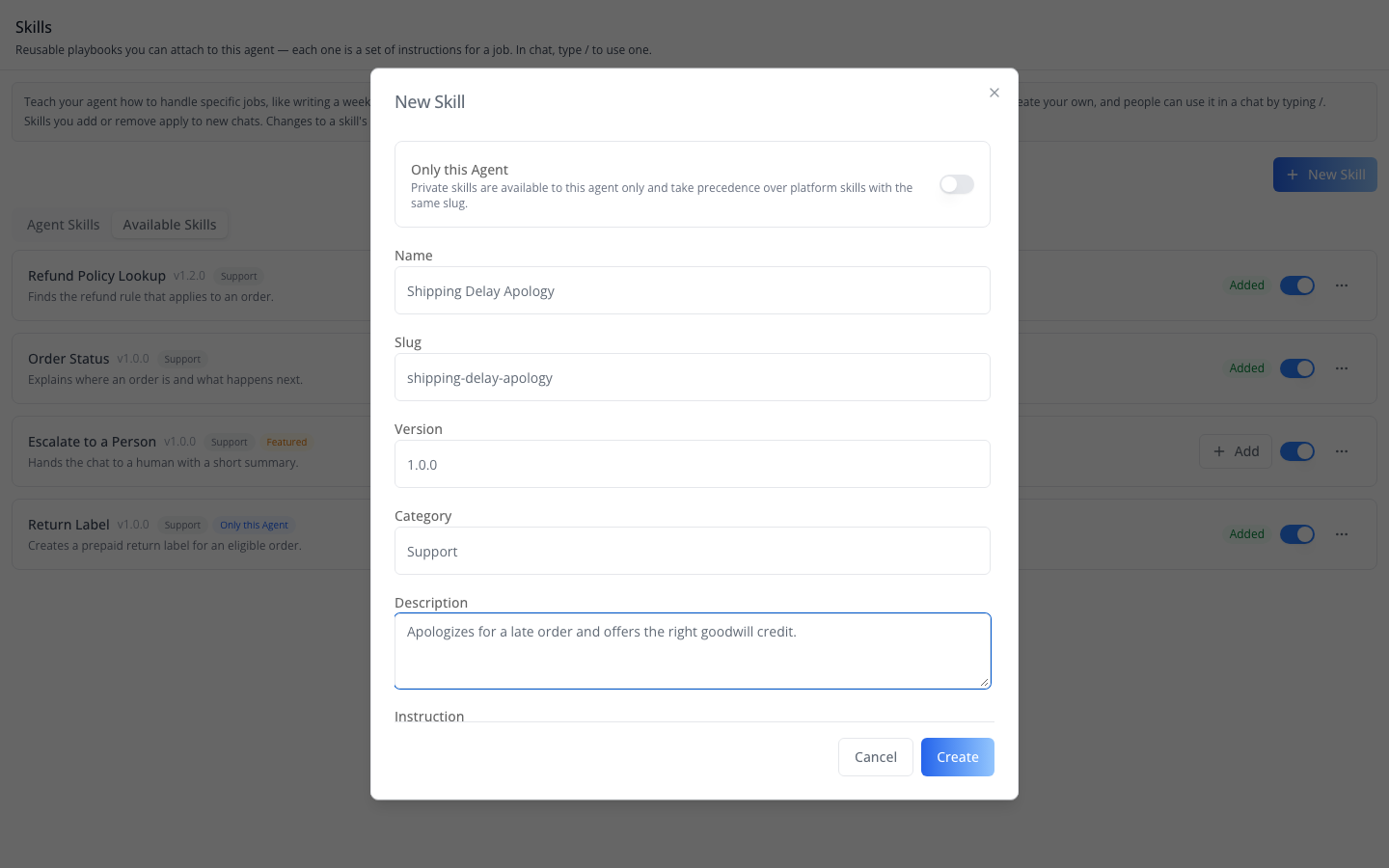
New Skill -- Only this Agent, Name, Slug, Version, Category, Description, and Instruction (a rich-text playbook).
Edit Skill -> Resources -- files the agent can use with the skill:
reference and script (text) or asset (upload), each with a menu.
Common setup (brand, conventions, env files, verification): see docs/skill-setup.md.
Prerequisites
- Auth set up (
/iblai-vibe-auth, or vibe-starter). AgentSettingsProviderwraps the route (/iblai-vibe-agent§1).@iblai/iblai-js@^3.1.0(resolves@iblai/web-containers2.1.0).- A real agent UUID. Ask the user; never invent one.
- The signed-in user is an organization admin (or holds the agent's
skill-assignment roles). The tab renders nothing for
userIsStudent. - Agent Skills apply to Base Agent agents only (template slug
base-agent, or the legacyai-mentor/ai-agent). For another agent type the tab shows "Skills are only available to Base Agents."
Step 1: Check Environment
Look for iblai.env in the project root with PLATFORM, DOMAIN, and
TOKEN. If it is missing, tell the user:
"You need an iblai.env with your platform configuration. Download the
template and fill in your values:
curl -o iblai.env https://raw.githubusercontent.com/iblai/base/refs/heads/main/iblai.env"
Step 2: Mount AgentSkillsTab and load its permissions
AgentSkillsTab resolves the agent from AgentSettingsProvider, then gates
every read and write on the agent's RBAC grants in the Redux store
(state.rbac, key /mentors/{mentorDbId}/): view_skill_assignments
(the list), create_skill_assignment (Available Skills, Add, New Skill),
write_skill_assignment (the switch), delete_skill_assignment
(Remove). Nothing fills that store for you -- without the grants the tab
shows only "No skills enabled for this agent yet." The chat / picker
(Step 4) reads the same grant, so put the loader in a hook:
// lib/iblai/use-agent-grants.ts
"use client";

import { useEffect } from "react";
import { useDispatch } from "react-redux";
import {
  useGetMentorSettingsQuery,
  useGetRbacPermissionsMutation,
} from "@iblai/iblai-js/data-layer";
import { updateRbacPermissions } from "@iblai/iblai-js/web-utils";

/** Loads the agent's `/mentors/{dbId}/` grants into `state.rbac`. */
export function useAgentGrants(tenantKey: string, mentorId: string) {
  const dispatch = useDispatch();
  const [getRbacPermissions] = useGetRbacPermissionsMutation();
  const { data: settings } = useGetMentorSettingsQuery(
    { mentor: mentorId, org: tenantKey },
    { skip: !tenantKey || !mentorId },
  );
  const mentorDbId = settings?.mentor_id;

  useEffect(() => {
    if (!mentorDbId) return;
    getRbacPermissions({
      requestBody: { platform_key: tenantKey, resources: [`/mentors/${mentorDbId}/`] },
    })
      .unwrap()
      .then((permissions) => dispatch(updateRbacPermissions(permissions)))
      .catch((error) => console.error("Could not load the agent's permissions", error));
  }, [mentorDbId, tenantKey, getRbacPermissions, dispatch]);
}
// app/(app)/agents/[mentorId]/skills/page.tsx
"use client";
import { AgentSkillsTab, useAgentSettings } from "@iblai/iblai-js/web-containers/next";
import { useAgentGrants } from "@/lib/iblai/use-agent-grants";
export default function AgentSkillsPage() {
const { tenantKey, mentorId } = useAgentSettings();
useAgentGrants(tenantKey, mentorId);
return (
<div className="flex h-full flex-col bg-white">
<AgentSkillsTab />
</div>
);
}The settings query has the same arguments as the tab's, so it is a cache
read. The store must include the rbac reducer (vibe-starter's
store/iblai-store.ts does).
Lower level: AgentSkills
AgentSkillsTab wraps AgentSkills (still exported from
@iblai/iblai-js/web-containers) with the header, the info box, the Base
Agent check, and the userIsStudent guard. Mount AgentSkills directly only for a custom shell. It
takes platformKey, mentorUniqueId, and optional mentorDbId; with
mentorDbId it applies the same RBAC gating, without it nothing is gated.
import { AgentSkills } from "@iblai/iblai-js/web-containers";

<AgentSkills platformKey="acme-demo" mentorUniqueId="<agent-uuid>" />;
Step 3: Customize Labels (Optional)
import { AgentSkillsTab } from "@iblai/iblai-js/web-containers/next";

<AgentSkillsTab labels={{ header: { title: "Playbooks" } }} />;
Label groups (SkillsTabLabels): header (title, description),
infoBox and infoBoxNote (the two lines of the info box), notBaseAgent,
and loading. The rows, dialogs, and toasts inside come from the SDK's i18n
and are not part of the bundle.
Step 4: Enable the chat / skill picker
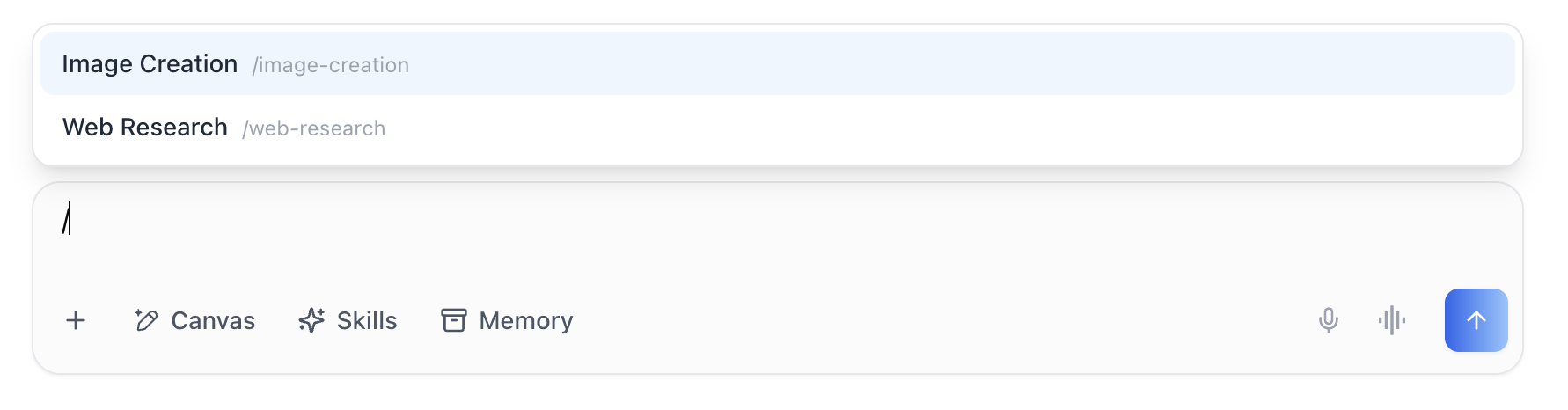
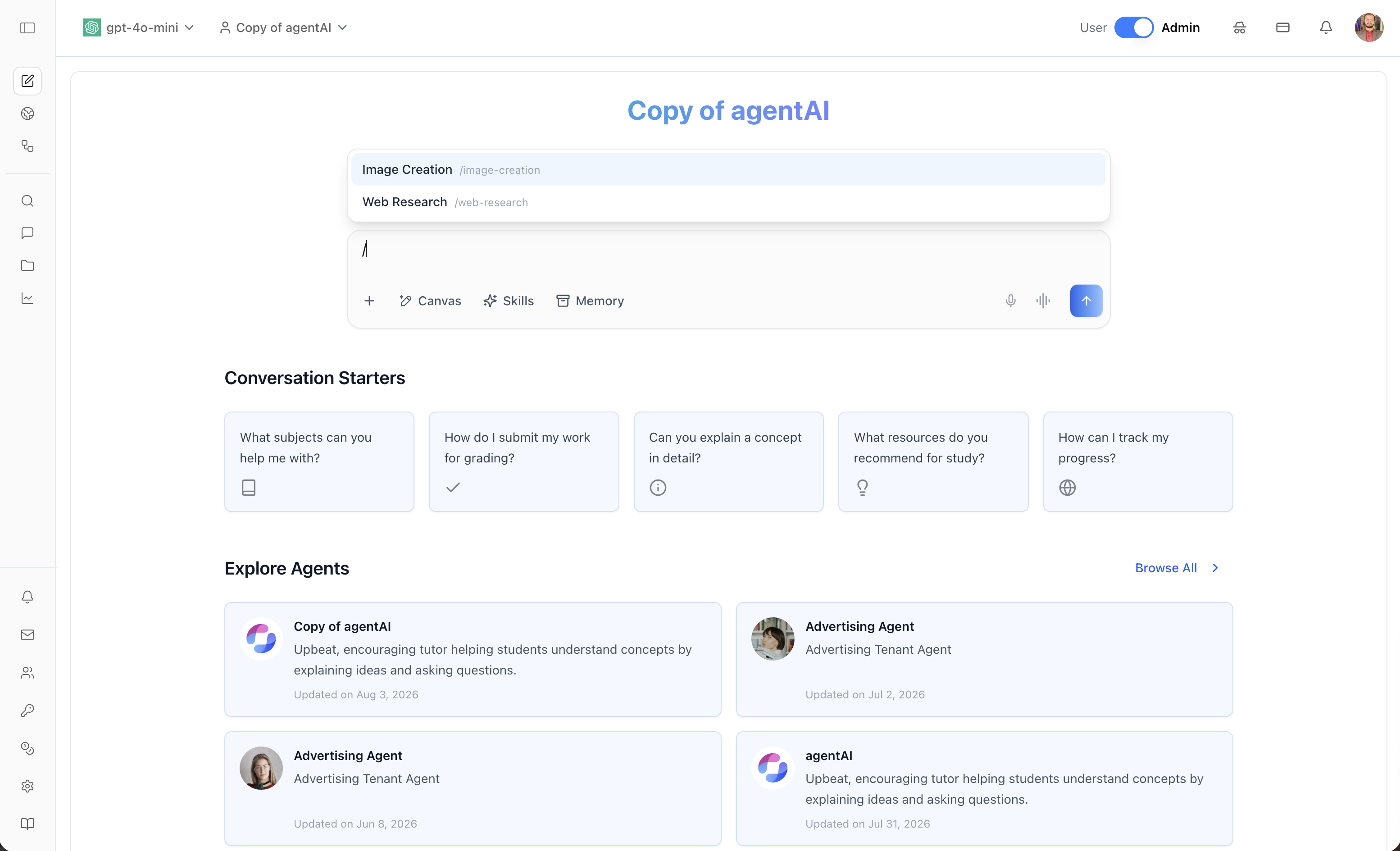
The chat composer ships a / skill combobox: typing / as the first word
opens a popup listing the agent's skills (name + /slug, arrow keys +
Enter/Tab to select, Esc to dismiss). Selecting inserts /slug into the
composer. It is off by default. Opt in with slashSkillsEnabled on
<Chat> (from /iblai-vibe-agent-chat) and load the agent's grants on
the chat page: the composer fetches the agent's skills only when state.rbac
holds /mentors/{dbId}/#view_skill_assignments for that agent, and with no
grant data it skips the fetch, so the picker never opens. vibe-starter loads
only organization-level grants, so call the Step 2 hook in app/(app)/page.tsx:
import { Chat } from "@iblai/iblai-js/web-containers/next";
import { useAgentGrants } from "@/lib/iblai/use-agent-grants";

// inside AgentChat, which already has mentorId:
useAgentGrants(resolveAppTenant(), mentorId);

<Chat
  // ...existing chat config...
  slashSkillsEnabled
/>;
With the grant loaded, the composer lazily fetches the agent's skills on the
first / keystroke (20 per page, loading more as the list scrolls; errors
degrade to an inactive picker). Users without the grant (usually non-admin
members) get no picker. To supply the list yourself, pass
slashSkills (an EffectiveAgentSkill[]) and slashSkillsLoading while
resolving it; that skips the internal fetch and its grant check. The same three props exist on ChatInputForm. For a fully
custom composer use useSlashSkills, useSlashSkillPicker,
SlashSkillPicker, and isSlashCommandToken.
Step 5: Use MCP Tools for Customization
get_component_info("AgentSkillsTab")
get_component_info("AgentSkills")
get_component_info("Chat")
Component Props
<AgentSkillsTab> (from @iblai/iblai-js/web-containers/next)
| Prop | Type | Required | Description |
|---|---|---|---|
labels | DeepPartial<SkillsTabLabels> | No | Override the header, info box, Base Agent note, and loading copy |
tenantKey | string | No | Identity override. Falls back to AgentSettingsProvider |
mentorId | string | No | Identity override (agent UUID). Falls back to AgentSettingsProvider |
username | string | No | Identity override. Falls back to AgentSettingsProvider |
userIsStudent | boolean | No | true renders nothing (skills are admin-only). Falls back to AgentSettingsProvider |
<AgentSkills> (from @iblai/iblai-js/web-containers)
| Prop | Type | Required | Description |
|---|---|---|---|
platformKey | string | Yes | Org key |
mentorUniqueId | string | Yes | Agent UUID |
mentorDbId | number | string | No | Agent DB id; turns on RBAC gating against /mentors/{id}/ |
<Chat> / <ChatInputForm> slash-picker props
| Prop | Type | Required | Description |
|---|---|---|---|
slashSkillsEnabled | boolean | No | Turns the / picker on (default false) |
slashSkills | EffectiveAgentSkill[] | No | Host-supplied list; skips the internal fetch |
slashSkillsLoading | boolean | No | Shows a loading row while the host resolves slashSkills |
What the tab does
- Info box (
skills-info-box) -- "Teach your agent how to handle specific jobs, like writing a weekly report or reviewing a contract — the way you'd hand a new teammate a checklist. Add a skill from Available Skills or create your own, and people can use it in a chat by typing /." Under it, when changes take effect: "Skills you add or remove apply to new chats. Changes to a skill's instructions apply right away, even in chats already going." It shows above the Base Agent check, so every agent type sees it. - New Skill -- right-aligned above the sub-tabs, shown to a user who may browse the catalog.
- Agent Skills lists the agent's skill assignments, paged 10 per
page. The switch PATCHes the assignment's
enabled; Remove deletes the assignment (the skill itself stays in the catalog). - Available Skills lists the whole catalog, paged 10, including disabled
skills so they can be re-enabled. Add creates an enabled assignment;
rows already assigned, and this agent's private skills, show Added; a
skill private to another agent shows a disabled Add. The switch
PATCHes the skill. The switch and Edit / Delete appear only for
skills the organization owns; featured skills from the
mainorganization are read-only. - New / Edit Skill --
Only this Agentsetsmentorto this agent's UUID (private; takes precedence over a featuredmainskill with the same slug). Creating a skill never attaches it: Add an organization-wide skill from Available Skills; a private one is the agent's without an assignment (see Important Notes). Edit adds the General / Resources sub-tabs; a skill private to another agent keeps its owner (the toggle is locked). - Resources --
referenceandscriptare text (filename + content);assetis a multipart upload. Row menu: Download (assets), Edit (text), Delete (with confirmation). Paged 20 per page.
Related Exports
From @iblai/iblai-js/web-containers/next:
AgentSkillsTab— the tab (header, info box, Base Agent check,userIsStudentguard).AGENT_SKILLS_TAB_LABELS,SkillsTabLabels,AgentSkillsTabProps.
From @iblai/iblai-js/web-containers:
AgentSkills— the manager inside the tab.SlashSkillPicker,SlashSkillPickerProps— the/popup listbox.useSlashSkillPicker,isSlashCommandToken— composer keyboard / open-state machine.useSlashSkills— lazy paged fetch of the agent's skills for the picker.
From @iblai/iblai-js/data-layer:
useGetAgentSkillsQuery,useGetAgentSkillQuery,useCreateAgentSkillMutation,useUpdateAgentSkillMutation,useDeleteAgentSkillMutation— skill catalog CRUD.useGetAgentSkillResourcesQuery,useCreateAgentSkillResourceMutation,useUpdateAgentSkillResourceMutation,useUploadAgentSkillResourceAssetMutation,useDeleteAgentSkillResourceMutation— skill file resources.useGetMentorSkillAssignmentsQuery,useGetMentorSkillAssignmentsInfiniteQuery(one growing cache entry per agent — powers the/picker's lazy list),useCreateMentorSkillAssignmentMutation,useUpdateMentorSkillAssignmentMutation,useDeleteMentorSkillAssignmentMutation— per-agent assignments.resolveEffectiveAgentSkills— client-side join of catalog + assignments into the agent's effective set (private > organization > global/featured, deduped by slug).filterSlashSkills— enabled-only name/slug filter used by the picker.isBaseAgentMentor,BASE_AGENT_TEMPLATE_SLUGS— Base Agent gate.useGetRbacPermissionsMutation— loads the grants the tab gates on (dispatch the result withupdateRbacPermissionsfrom@iblai/iblai-js/web-utils).MENTOR_SKILL_ASSIGNMENTS_PAGE_SIZE— the picker's page size (20).AgentSkill,AgentSkillResource,MentorSkillAssignment,EffectiveAgentSkill— payload types.
Platform data
| Hook | Purpose |
|---|---|
useGetMentorSkillAssignmentsQuery + create/update/delete mutations | The agent's assignments (Agent Skills sub-tab) |
useGetAgentSkillsQuery + create/update/delete mutations | The organization catalog (Available Skills, New/Edit) |
useGetAgentSkillResourcesQuery + resource mutations | Skill files (Resources) |
useGetRbacPermissionsMutation | The agent's skill-assignment grants |
REST twin: /iblai-api-agent-skill;
the endpoint summary is also at the end of this page.
Step 6: Verify
Run /iblai-vibe-ops-test before telling the user the work is ready, and give
every page, control and state this skill added its own checkpoint — one Playwright
test titled <ID> · … in e2e/journeys/, listed in e2e/coverage.json;
pnpm e2e:coverage must pass:
pnpm build-- must pass with zero errors.pnpm test-- vitest must pass.- Touch test
/agents/<uuid>/skillsin the browser as/iblai-vibe-ops-testsays, signed in as an organization admin: Agent Skills and Available Skills both show and New Skill is visible. If only "No skills enabled for this agent yet" renders with no Available Skills sub-tab, the RBAC grants were not loaded (Step 2). - Add a skill from Available Skills; it appears under Agent
Skills with its
/slug. - If you enabled the picker, open
/, type/in the composer: the popup lists that skill. No popup means the chat page did not load the agent's grants (Step 4). - Read the console and check the phone width.
Important Notes
- Redux store: Must include
mentorReducerandmentorMiddleware initializeDataLayer(): 5 args (v1.2+)@reduxjs/toolkit: Deduplicated via webpack aliases innext.config.ts- Peer deps:
sonnerand@iblai/iblai-web-mentormust be installed (pnpm add sonner @iblai/iblai-web-mentor) - Base Agent only:
AgentSkillsTabshows a note for other agent types; hide the tab yourself withisBaseAgentMentor({ mentorSlug, templateMentorSlug })when you can. - Private skills are not assigned: the backend applies a skill created
with Only this Agent to its agent directly and, by design, rejects
assigning it (400 "Object with unique_id=… does not exist"). The tab never
tries: Available Skills shows the skill with the Only this Agent badge
and Added. What is lost is visibility: the skill is not listed under
Agent Skills, and the
/picker (which lists assignments) does not offer it. - RBAC grants in the store: see Step 2. A missing grant hides the matching control rather than showing an error.
- Session behaviour: adding/removing a skill applies to new chats
only; editing a skill's instructions applies right away, including to
chats already going.
AgentSkillsTabsays so in its info box (infoBoxNote);AgentSkillson its own no longer shows the note, so a custom shell around it should. - Skill UUID, not pk:
MentorSkillAssignment.skillis the skill'sunique_id, not the integer id. Custom UI joining skills to assignments must key onskill.unique_id. (Skill resources key on the integerskill.idinstead.) - Private-skill precedence: slugs are unique per organization, so
only a featured skill from
maincan share a private skill's slug; the private one shadows it for that agent (resolveEffectiveAgentSkillsranks private > organization > featured). - Featured skills are read-only: featured skills come from the
mainorganization; the API 404s organization writes against them, so the component hides their switch and Edit/Delete actions (it compares the skill'splatform_keywith the organization's key). Mirror that in custom UI. - Enabled is an AND: an effective skill is enabled only when the
catalog skill AND its assignment are both enabled; the
/picker offers enabled skills only. - Brand guidelines: BRAND.md
Agent Skills REST API
For custom UI beyond the component. All endpoints are prefixed with
${dmUrl}/api/ai-mentor/orgs/{org}/ where dmUrl is
${NEXT_PUBLIC_API_BASE_URL}/dm (vibe-starter's config.dmUrl()). Auth: Authorization: Token <token>.
Skill catalog (platform-level)
| Method | Path | Purpose |
|---|---|---|
| GET | agent-skills/ | List skills — filters: enabled, search (name/slug), limit, offset |
| POST | agent-skills/ | Create — { name, slug, version, category, description, instruction, mentor, enabled } |
| GET | agent-skills/{id}/ | Retrieve |
| PATCH | agent-skills/{id}/ | Update |
| DELETE | agent-skills/{id}/ | Delete |
mentor (agent UUID) makes the skill private to that agent; null
makes it organization-wide. Featured skills (is_featured) are served
read-only to organizations.
Skill resources (files)
| Method | Path | Purpose |
|---|---|---|
| GET | agent-skill-resources/ | List — filters: skill (integer pk), file_type, limit, offset |
| POST | agent-skill-resources/ | Create — { skill, file_type, filename, content } for text; multipart with file for asset |
| PATCH | agent-skill-resources/{id}/ | Update filename/content |
| DELETE | agent-skill-resources/{id}/ | Delete |
file_type is reference, script (text — send content), or
asset (binary — send multipart file; the response carries a
download URL in file).
Per-agent assignments
| Method | Path | Purpose |
|---|---|---|
| GET | agents/{mentor_unique_id}/skills/ | Skills bound to this agent |
| POST | agents/{mentor_unique_id}/skills/ | Bind — { "skill": "<skill-uuid>", "enabled": true } |
| PATCH | agents/{mentor_unique_id}/skills/{id}/ | Toggle enabled |
| DELETE | agents/{mentor_unique_id}/skills/{id}/ | Unbind |
Uses the canonical agents/ spelling — the mentors/ route is a
deprecated alias slated for removal. The skill field is the UUID
(unique_id), not the integer primary key — keying assignments by
unique_id keeps the binding stable across skill edits.