/iblai-vibe-agent-voice
Mirrored from
iblai/vibe·skills/agents/iblai-vibe-agent-voice/SKILL.md. This page is generated — edit it in the repository, not here.
Add the agent Voice tab (AgentVoiceTab) -- how the agent sounds and
listens. Scope: per agent; every user of the agent gets the same voice
and call settings. A voice calls switch sits at the top (it also sits
in Settings -> Capabilities); below it, three sub-tabs: Voice (the voice
that reads chat replies), Voice Call (how live calls behave), and
Settings (dictation, the speech-to-text side). This is one tab in the
agent-settings family indexed by /iblai-vibe-agent; it shares the
AgentSettingsProvider wrapper with every other tab.
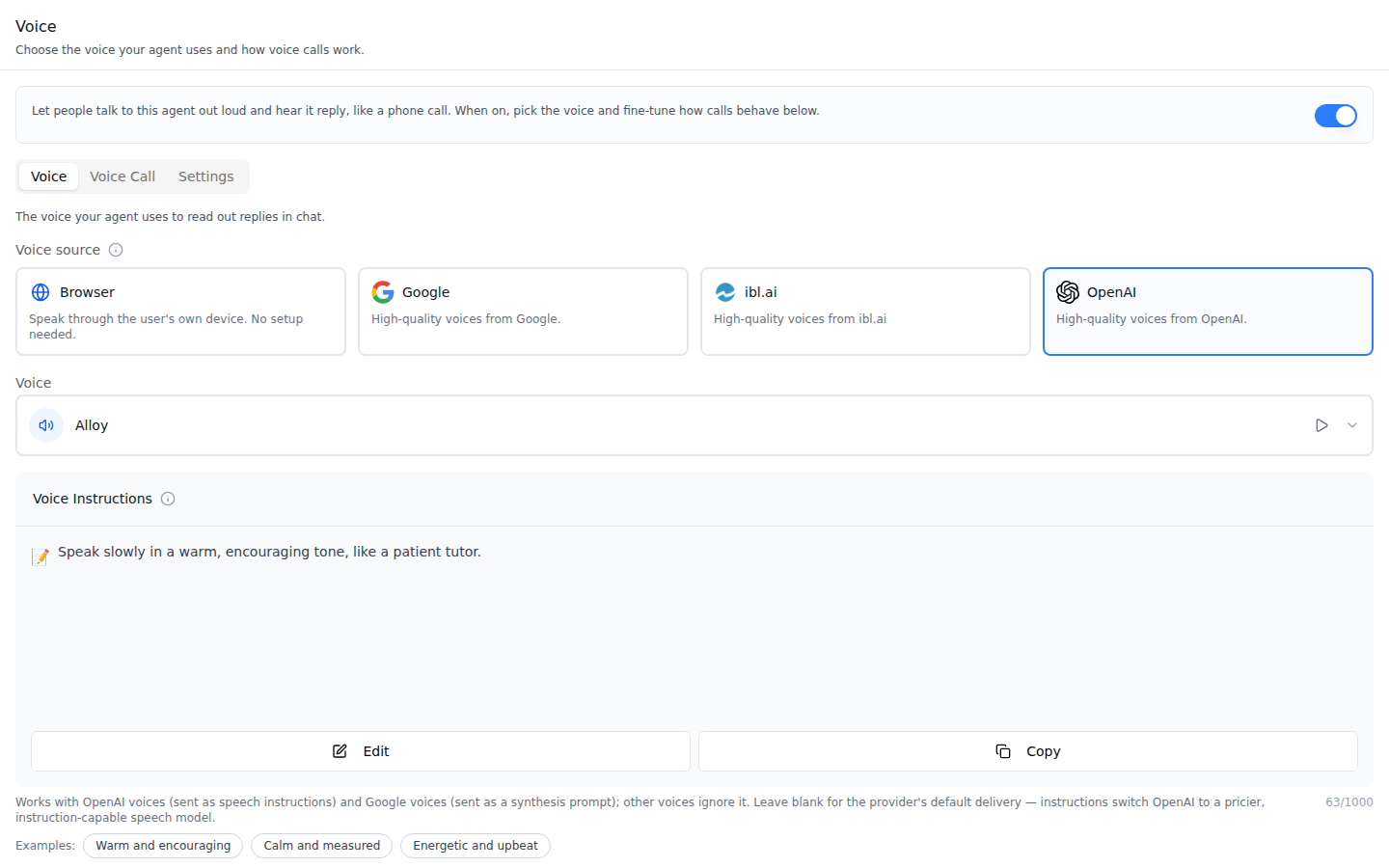
Voice -- the voice-calls switch, then the voice source (Browser, Google, ibl.ai, OpenAI), the voice, and for OpenAI and Google the Voice Instructions card (here filled from the "Warm and encouraging" example). Save voice sits below the examples.
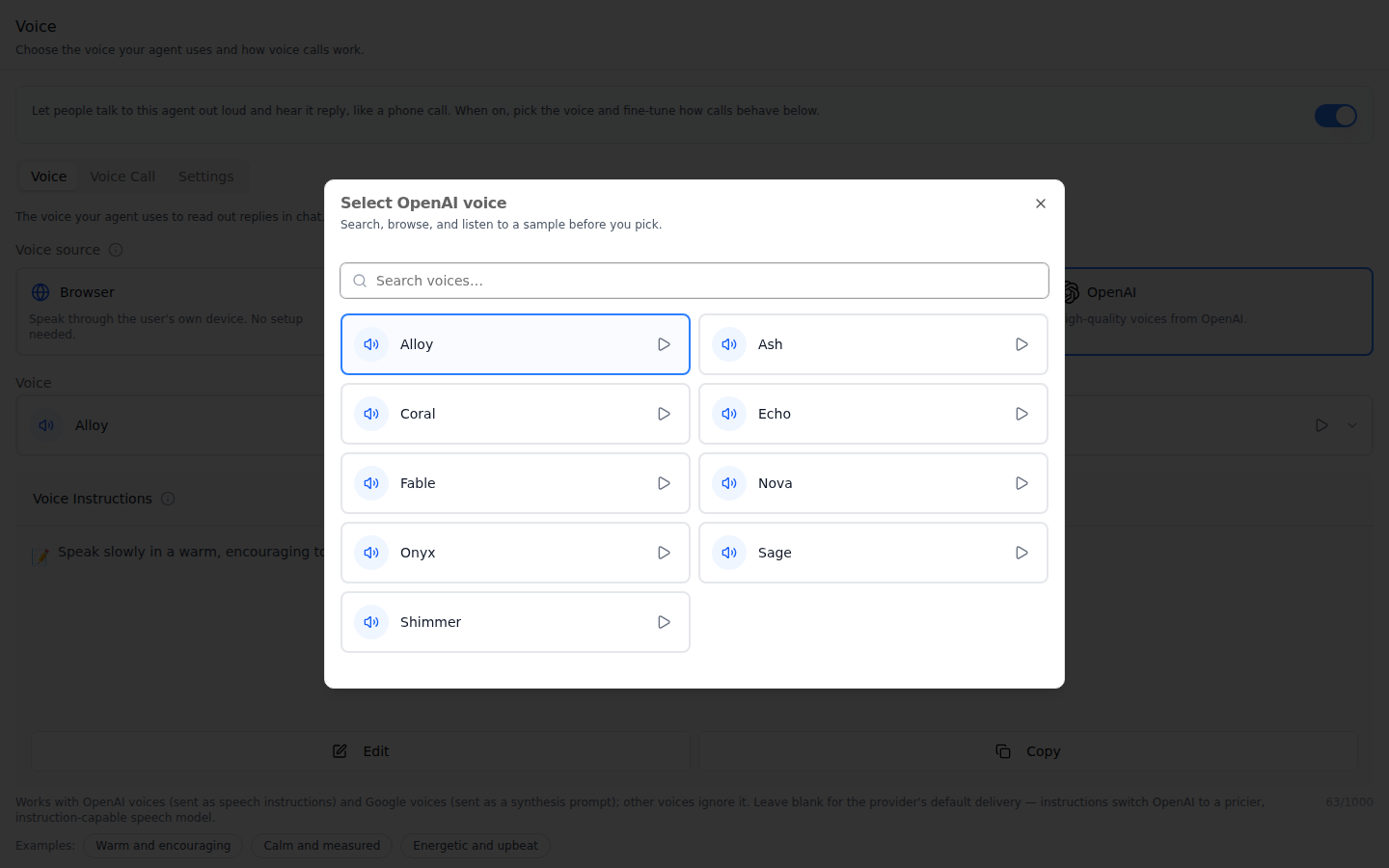
Voice picker -- the voice trigger opens a searchable list of the provider's voices, each with a play button for a sample.
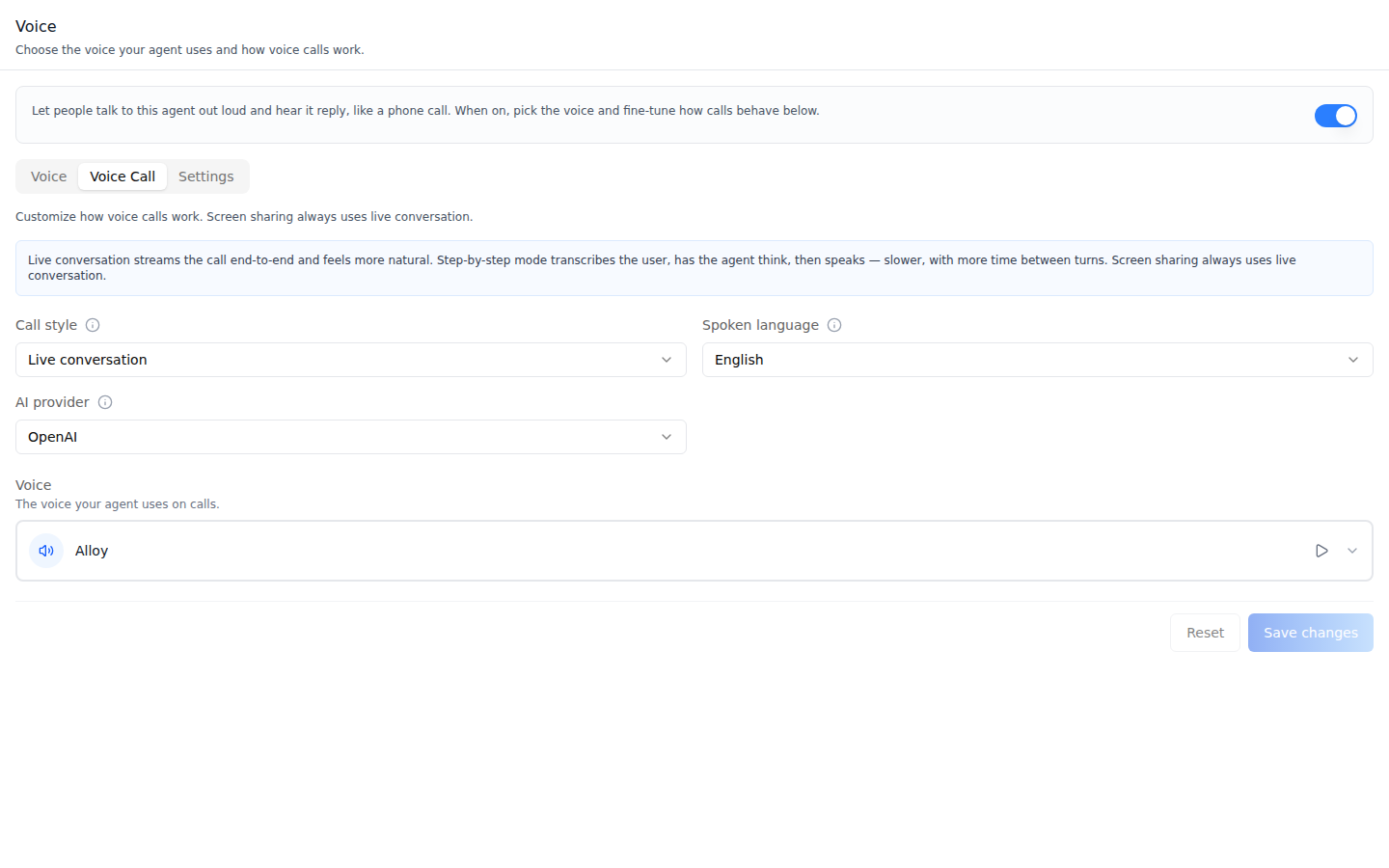
Voice Call -- call style (Live conversation / Step-by-step), spoken language, AI provider, and the voice used on calls, with Reset and Save changes.
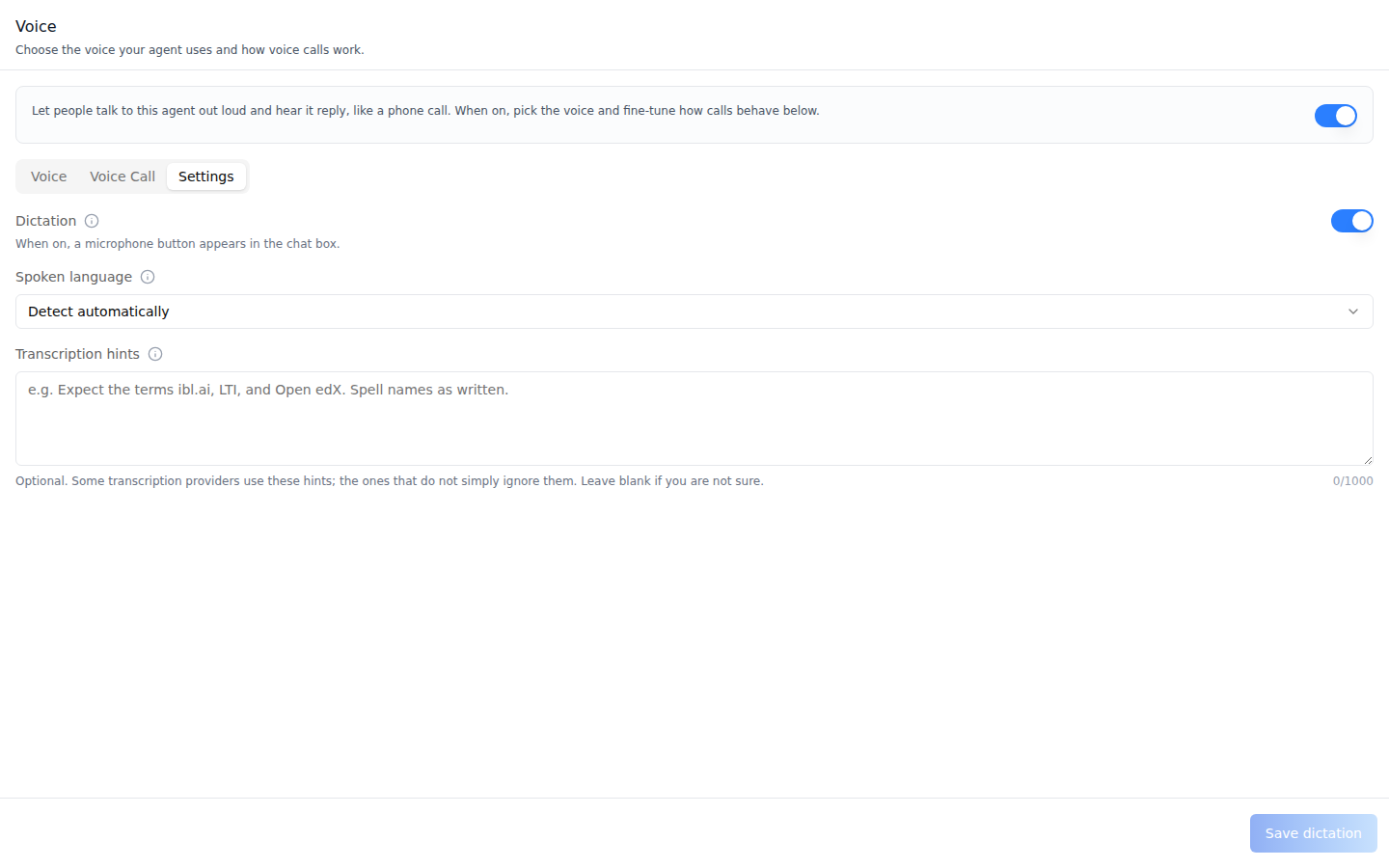
Settings -- Dictation (the chat-box microphone), the spoken language for transcription (unset = detect automatically), and transcription hints, with a pinned Save dictation.
Common setup (brand, conventions, env files, verification): see docs/skill-setup.md.
Prerequisites
- Auth set up (
/iblai-vibe-auth, or vibe-starter). AgentSettingsProviderwraps the route (/iblai-vibe-agent§1).@iblai/iblai-js@^2.62.1(resolves@iblai/web-containers1.62.1, which has the in-tab switch, the ibl.ai source, and the Settings sub-tab).- A real agent UUID. Ask the user; never invent one.
Step 1: Check Environment
Look for iblai.env in the project root with PLATFORM, DOMAIN, and
TOKEN. If it is missing, tell the user:
"You need an iblai.env with your platform configuration. Download the
template and fill in your values:
curl -o iblai.env https://raw.githubusercontent.com/iblai/vibe/refs/heads/main/iblai.env"
Step 2: Copy the provider logos
The Google, ibl.ai, and OpenAI cards load their logos from your app's
public/ root, and the SDK ships them in its own public/. Copy them once
(pnpm layout shown; with npm the folder is
node_modules/@iblai/web-containers/public):
cp node_modules/.pnpm/@iblai+web-containers@*/node_modules/@iblai/web-containers/public/llm-* public/Expect public/llm-google-provider.svg, public/llm-iblai-provider.png, and
public/llm-openai-provider-2.svg. Without them the cards show broken images.
Step 3: Mount AgentVoiceTab
// app/(app)/agents/[mentorId]/voice/page.tsx
"use client";

import { AgentVoiceTab } from "@iblai/iblai-js/web-containers/next";

export default function AgentVoicePage() {
  return (
    <div className="flex h-full flex-col bg-white">
      <AgentVoiceTab />
    </div>
  );
}
The tab reads tenantKey, mentorId, username, and enableRBAC from
AgentSettingsProvider and does its own fetching and saving. No props are
required. To land on another sub-tab (for example from a URL), pass
defaultSubTab:
import { AgentVoiceTab } from "@iblai/iblai-js/web-containers/next";

<AgentVoiceTab defaultSubTab="callConfig" />;
Step 4: Customize Labels (Optional)
The tab renders with the default agent-facing copy (AGENT_VOICE_TAB_LABELS,
localized through the SDK's i18n). Pass a partial labels object to change
any string:
import { AgentVoiceTab } from "@iblai/iblai-js/web-containers/next";

<AgentVoiceTab
  labels={{
    header: { description: "Pick the voice your agent speaks with." },
    subTabs: { callConfig: "Calls", settings: "Dictation" },
  }}
/>;
Label groups (VoiceTabLabels):
| Group | Covers |
|---|---|
header | title, description |
capability | the voice-calls switch: title (accessible name), description, offHint |
subTabs | voice, callConfig, settings |
mentorVoice | Voice sub-tab: description, providerLabel, providerTooltip, providerOptions.{browser,google,iblai,openai}, voicePickerLabel, picker strings (searchPlaceholder, emptyState, errorState, previewAria), saveButton, savingButton, instructions (label, tooltip, placeholder, helpText, presetsLabel, presets.{warm,calm,energetic}) |
callConfig | Voice Call sub-tab: description, info, fields.{mode,language,llmProvider,ttsProvider,sttProvider,useFunctionCalling,enableVideo}, resetButton, saveCreate, saveUpdate, savingButton |
transcription | Settings sub-tab: toggle, language, instructions, saveButton, savingButton |
toasts | voiceSaved, voiceError, callConfigSaved, callConfigError, transcriptionSaved, transcriptionError |
Step 5: Use MCP Tools for Customization
get_component_info("AgentVoiceTab")
get_component_info("AgentSettingsProvider")
<AgentVoiceTab> Props
Import from @iblai/iblai-js/web-containers/next.
| Prop | Type | Required | Description |
|---|---|---|---|
labels | DeepPartial<VoiceTabLabels> | No | Override user-visible strings |
defaultSubTab | 'voice' | 'callConfig' | 'settings' | No | Sub-tab to open on. Defaults to 'voice' |
renderPromptContent | (content: string) => ReactNode | No | Renders the Voice Instructions card (e.g. as Markdown); plain text otherwise |
tenantKey | string | No | Identity override. Falls back to AgentSettingsProvider |
mentorId | string | No | Identity override (agent UUID). Falls back to AgentSettingsProvider |
username | string | No | Identity override. Falls back to AgentSettingsProvider |
enableRBAC | boolean | No | Field-level permission gating. Falls back to AgentSettingsProvider |
Related Exports
From @iblai/iblai-js/web-containers/next:
AGENT_VOICE_TAB_LABELS-- the default label bundle.VoiceTabLabels,AgentVoiceTabProps-- types.
How it saves
| Control | Saves | When |
|---|---|---|
| Voice-calls switch | show_voice_call on the agent's settings | Immediately (rolls back on error) |
| Save voice | voice_provider, the picked *_voice, voice_instructions | On click; a voice is sent only when picked this session, instructions only when changed |
| Save changes (Voice Call) | The agent's call configuration (mode, language, llm_provider, call voice) | On click; creates the row if missing; needs an org admin |
| Dictation switch | show_voice_record | Immediately |
| Save dictation | transcription_language, transcription_instructions | On click; blocked over 1000 characters |
Clearing instructions or hints sends ""; an absent field means "no change".
Platform data
| Hook | Purpose |
|---|---|
useGetMentorSettingsQuery | Voice fields plus the embedded call_configuration |
useEditMentorMutation | Voice, dictation, and switch saves on the agent's settings |
useCreateCallConfigurationMutation, useUpdateCallConfigurationMutation | Voice Call sub-tab |
REST twin: /iblai-api-agent-voice
(settings voice fields, call configurations, and the voice catalog).
Step 6: Verify
Run /iblai-vibe-ops-test before telling the user the work is ready, and give
every page, control and state this skill added its own checkpoint — one Playwright
test titled <ID> · … in e2e/journeys/, listed in e2e/coverage.json;
pnpm e2e:coverage must pass:
pnpm build-- must pass with zero errors.pnpm test-- vitest must pass.- Touch test
/agents/<uuid>/voicein the browser as/iblai-vibe-ops-testsays: the switch and the three sub-tabs render, the four source cards show their logos, and the voice picker lists voices with working previews; read the console; check the phone width.
Important Notes
- Two switches, two directions: voice calls (
show_voice_call) is the agent speaking on a call; dictation (show_voice_record) is the user speaking into the chat box. The Settings sub-tab sits inside the voice-calls gate, so with voice calls off, change dictation in Settings -> Capabilities. Both count as on for older agents that lack the field. - Voice sources: Browser speaks on the listener's device (no voice to pick). ibl.ai falls back to the organization's default voice. OpenAI and Google need a voice and accept Voice Instructions.
- Voice instructions cost more on OpenAI: any instructions switch OpenAI to an instruction-capable speech model; the help text says so. The 1000-character cap is a UI guardrail.
- Screen sharing lives on its own tab (
/iblai-vibe-agent-screenshare) and always uses Live conversation. - Shared provider: mount
AgentSettingsProvideronce at the layout level (/iblai-vibe-agent§1); do not wrap each tab. - Peer deps:
sonnerand@iblai/iblai-web-mentor(pnpm add sonner @iblai/iblai-web-mentor). - Brand guidelines: BRAND.md