/iblai-vibe-billing
Mirrored from
iblai/vibe·skills/billing/iblai-vibe-billing/SKILL.md. This page is generated — edit it in the repository, not here.
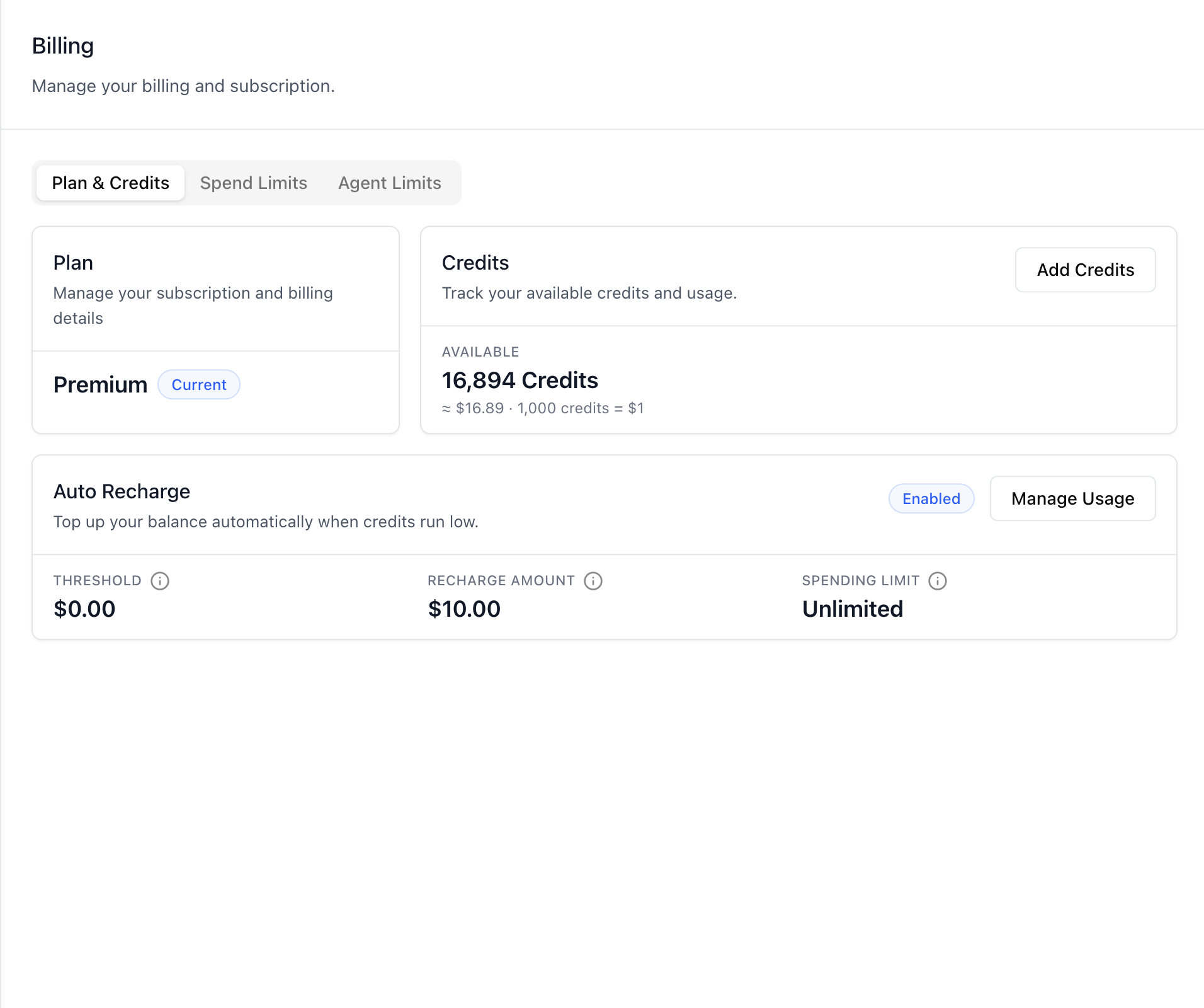
Add the organization-wide Billing surface -- "Manage your billing and
subscription" for the whole workspace, in four tabs: Plan &
Credits (current plan with Stripe upgrade, credit balance with its
USD equivalent, Add Credits, and Auto Recharge with threshold /
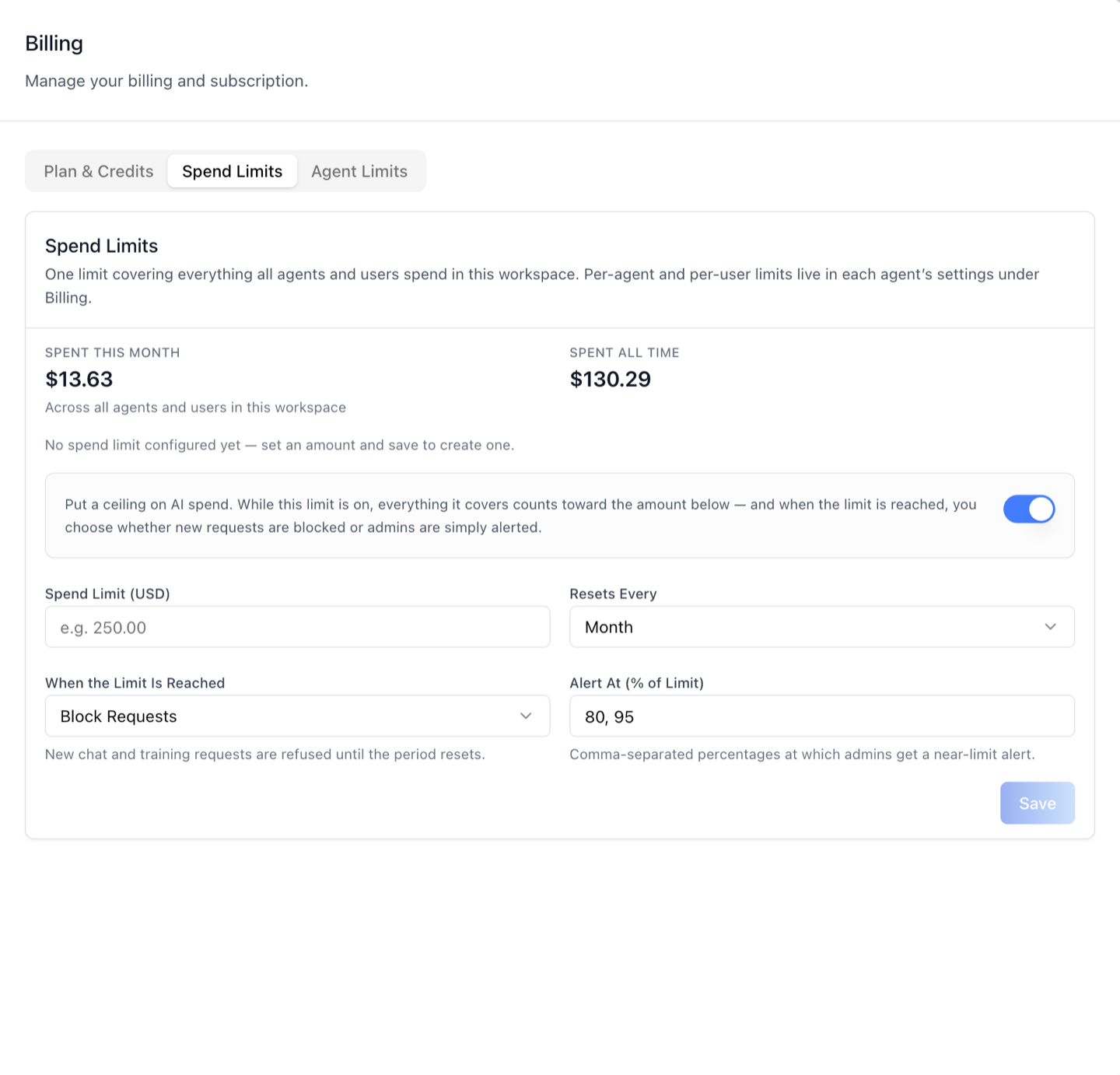
recharge amount / spending limit), Spend Limits (the single
workspace-wide LLM spend limit covering everything all agents and
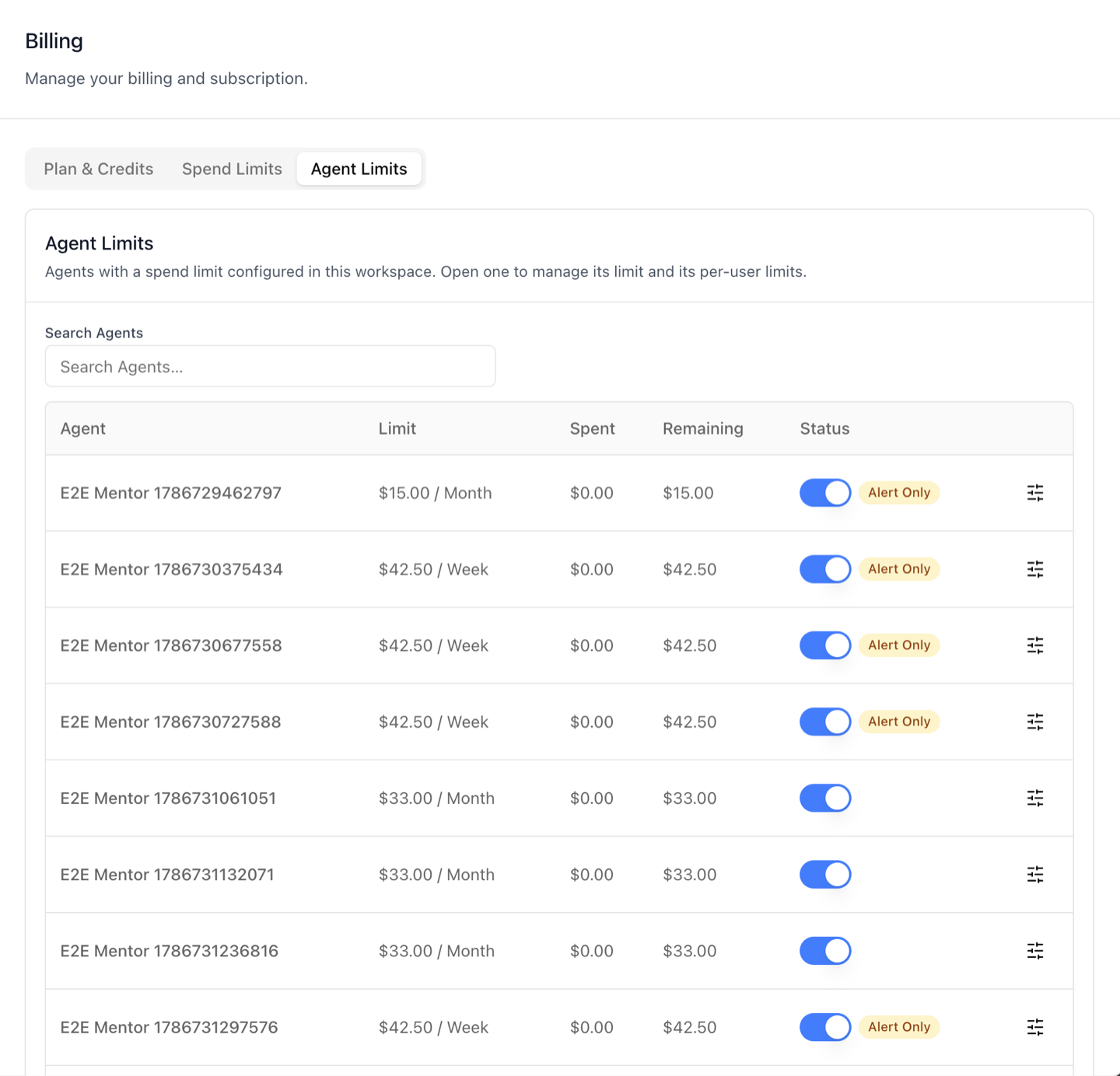
users spend), Agent Limits (every agent spend cap in the
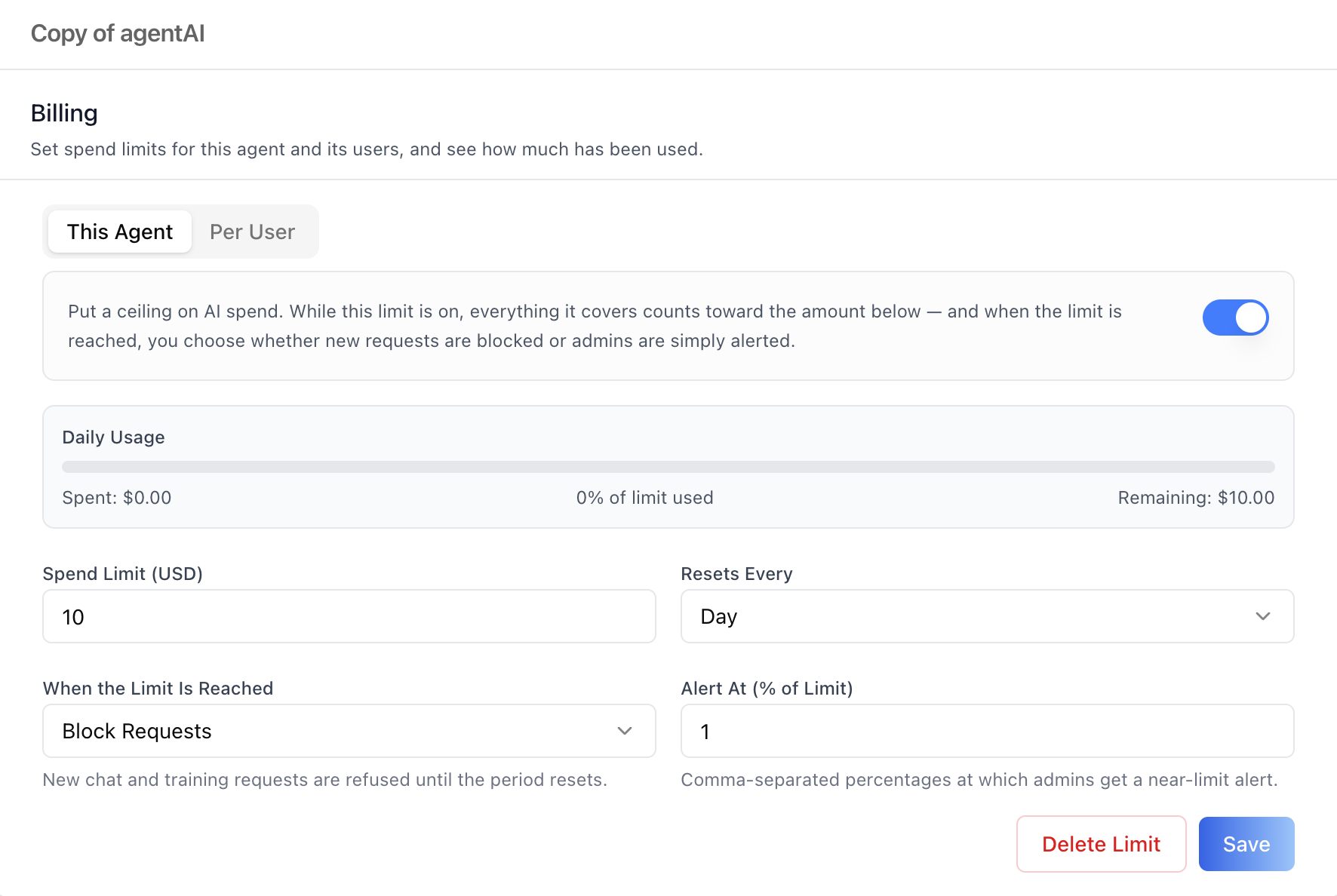
workspace in one searchable table — each row opens the same per-agent
Billing editor documented in /iblai-vibe-agent-billing), and User
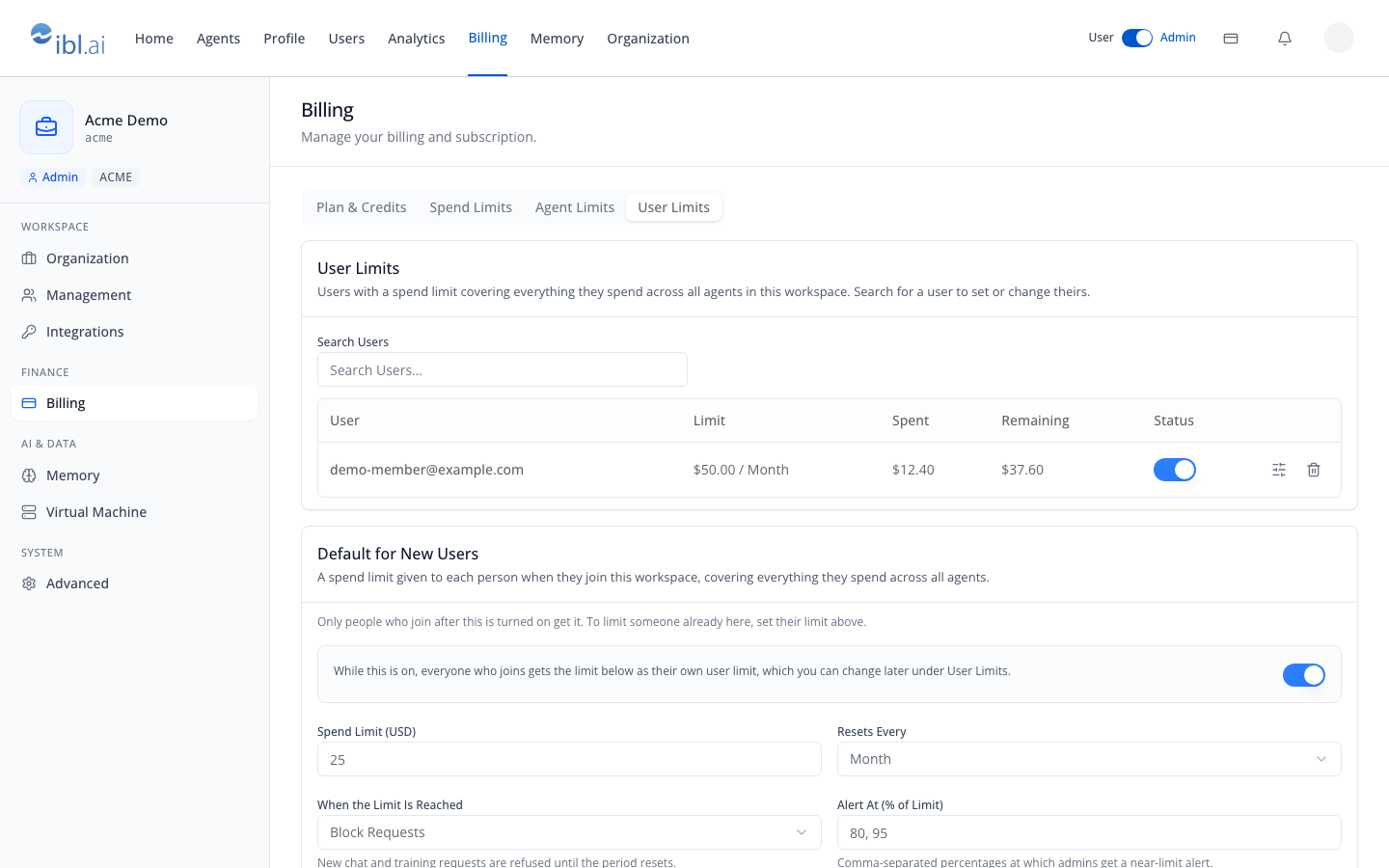
Limits (a spend limit per user covering everything they spend across
all agents, plus the Default for New Users each member who joins
later gets).
This is the org-wide counterpart of the per-agent Billing tab:
per-agent and per-user limits live in each agent's settings
(/iblai-vibe-agent-billing); this surface holds the plan/credits
management, the workspace-wide cap, and the cross-agent overview.
Common setup (brand, conventions, env files, verification): see docs/skill-setup.md.
Already have Billing?
Two sibling surfaces overlap with this one — check before mounting:
/iblai-vibe-account— the<Account>settings page already hosts this exact component as its Billing tab (shown whenbillingURLortopUpURLis set). If your app uses the Account page, you likely don't need a standalone mount — deep-link withtargetTab: "billing"instead./iblai-vibe-credit— the compact<CreditBalance>navbar widget (plan badge, credits, add-credits/upgrade dropdown). It is a top-nav companion to this page, not a replacement.
Prerequisites
- Auth must be set up first (
/iblai-vibe-auth) - MCP server + skills configured (
@iblai/mcpin.mcp.json) @iblai/iblai-js@^2.73.1: the User Limits tab is not in releases before 2.62.3- Plan upgrades, Add Credits, and Auto Recharge run through Stripe on the ibl.ai backend — nothing to configure client-side, but the flows redirect to Stripe-hosted pages and return to your app.
- The Spend Limits / Agent Limits / User Limits tabs hit RBAC-gated admin endpoints — a user without access sees a friendly denied panel per section.
Step 1: Check Environment
Before proceeding, check for an iblai.env in the project root. Look for
PLATFORM, DOMAIN, and TOKEN variables. If the file does not exist or
is missing these variables, tell the user:
"You need an iblai.env with your platform configuration. Download the
template and fill in your values:
curl -o iblai.env https://raw.githubusercontent.com/iblai/vibe/refs/heads/main/iblai.env"
Step 2: Mount BillingTab
BillingTab imports from @iblai/iblai-js/web-containers (the base
bundle, not /next). It takes the org key plus the acting user's
identity — the agent search and the Stripe flows need them.
// app/(app)/settings/billing/page.tsx
"use client";

import { useEffect, useState } from "react";
import { BillingTab } from "@iblai/iblai-js/web-containers";

export default function BillingPage() {
  const [tenant, setTenant] = useState("");
  const [username, setUsername] = useState("");
  const [email, setEmail] = useState("");

  useEffect(() => {
    try {
      const raw = localStorage.getItem("userData");
      if (raw) {
        const parsed = JSON.parse(raw);
        setUsername(parsed.user_nicename ?? parsed.username ?? "");
        setEmail(parsed.user_email ?? "");
      }
      setTenant(
        localStorage.getItem("app_tenant") ??
          localStorage.getItem("tenant") ??
          "",
      );
    } catch {}
  }, []);

  if (!tenant || !username) return null;

  return (
    <div className="flex h-full flex-col bg-white p-6">
      <BillingTab
        tenant={tenant}
        username={username}
        currentUserEmail={email}
        mainPlatformKey={process.env.NEXT_PUBLIC_MAIN_TENANT_KEY ?? ""}
      />
    </div>
  );
}
Step 3: Use MCP Tools for Customization
get_component_info("BillingTab")
get_component_info("AgentSpendCapsTab")
<BillingTab> Props
Import from @iblai/iblai-js/web-containers.
| Prop | Type | Required | Description |
|---|---|---|---|
tenant | string | Yes | Org key this Billing page manages |
username | string | Yes | Acting admin's username (Stripe portal + agent search) |
mainPlatformKey | string | Yes | The main org key (NEXT_PUBLIC_MAIN_TENANT_KEY) — used to classify Free/Trial/Premium |
currentUserEmail | string | Yes | Acting user's email, passed to the Stripe upgrade flow |
userActiveApp | UserApp | null | No | Active subscription record (from @iblai/iblai-api) — enables renewal-date / trial-days copy on the Plan card |
redirectUrl | string | No | Stripe checkout return URL; defaults to the current page |
What each tab renders
Plan & Credits
- Plan card — Free / Trial / Premium label with a "Current"
badge; trial end date or renewal date when
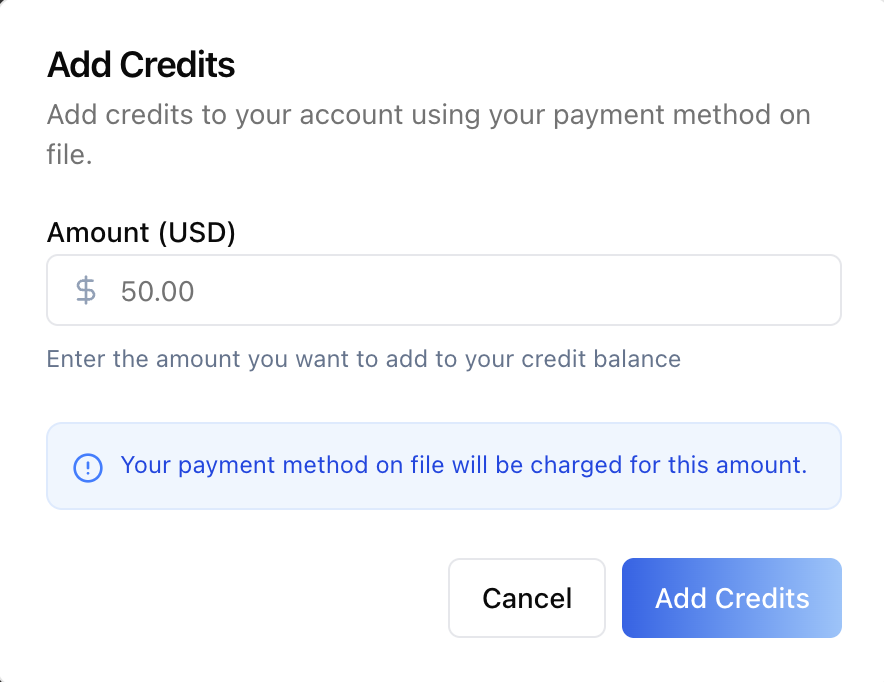
userActiveAppcarries a subscription. Free and Trial plans get a gradient Upgrade button (Stripe checkout viauseStripeUpgrade). - Credits card — Available credits with the USD equivalent and the environment's conversion rate (e.g. "≈ $16.89 · 1,000 credits = $1" — resolved from account fields, falling back to the newest top-up transaction; never hardcoded), plus Consumed and Resets-on stats when the API provides them. Add Credits opens a modal that charges the payment method on file for a dollar amount; with no payment method, the button becomes Manage Billing and opens the Stripe customer portal to add one.
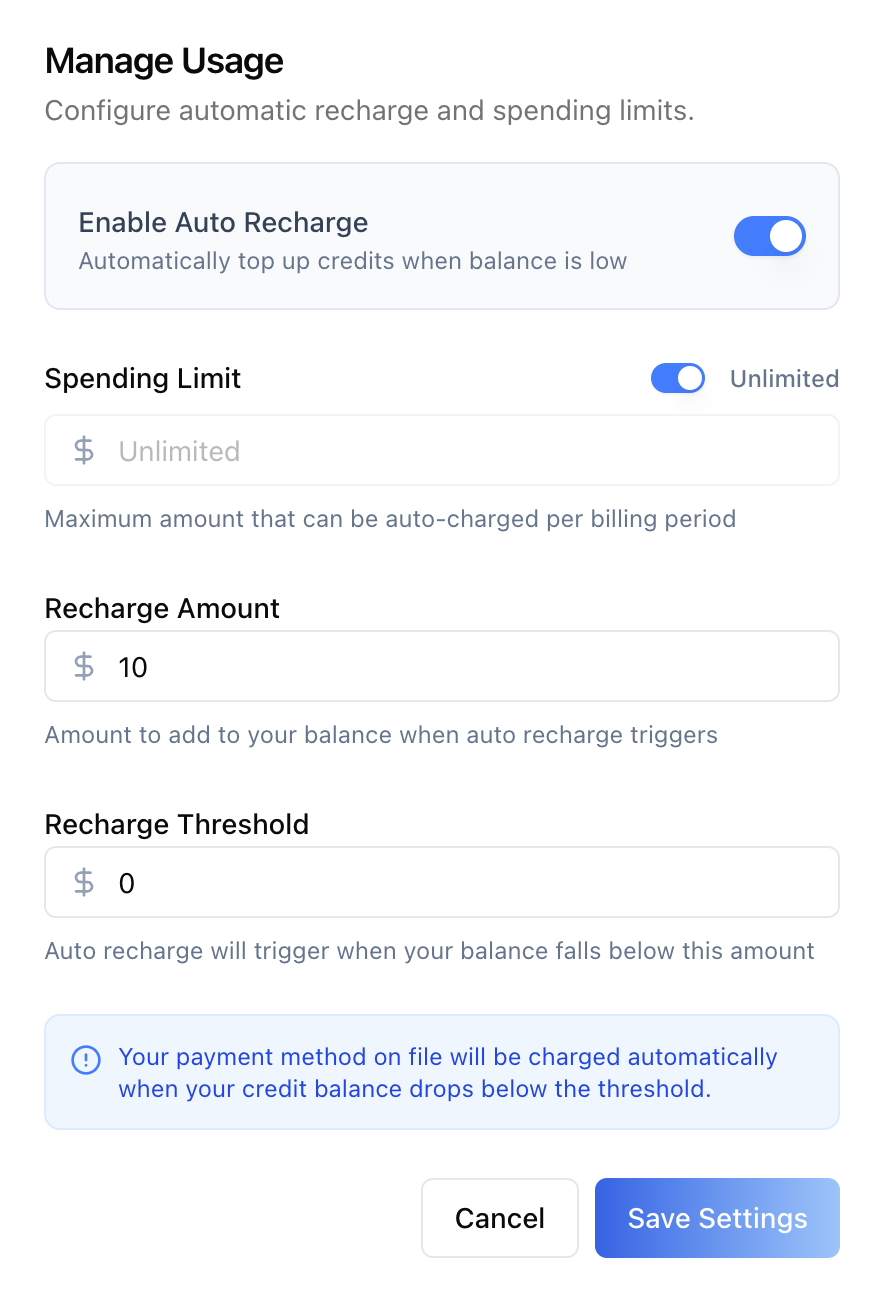
- Auto Recharge section (paid plans with a payment method) — Enabled/Disabled badge, Threshold / Recharge Amount / Spending Limit stats, and a Manage Usage modal: enable toggle, spending limit (with an Unlimited toggle — the max auto-charged per billing period), recharge amount, and recharge threshold (top up when the balance falls below it).
Spend Limits (workspace-wide)
One limit covering everything all agents and users spend in this
workspace — the org-wide scope of the same spend-cap editor documented
in /iblai-vibe-agent-billing (enable toggle, usage bar, Spend Limit,
Resets Every, Block Requests / Alert Only, Alert At thresholds,
Delete Limit / Save). Before a cap exists, the section shows the
workspace's actual spend (this month + all time, from the
financial analytics endpoint) so an admin can pick a sensible number.
Agent Limits
Every configured agent spend cap in the org, from the org-wide list endpoint (no per-agent fan-out):
- Search Agents — debounced autocomplete filter (min 2 chars); filtering by an agent with no cap yet shows a Set a limit button for it.
- Table — Agent, Limit (
$10.00 / Day), Spent, Remaining, Status (direct toggle that saves immediately, with Exceeded / Alert-only badges). - Manage (slider icon) — opens that agent's full Billing editor
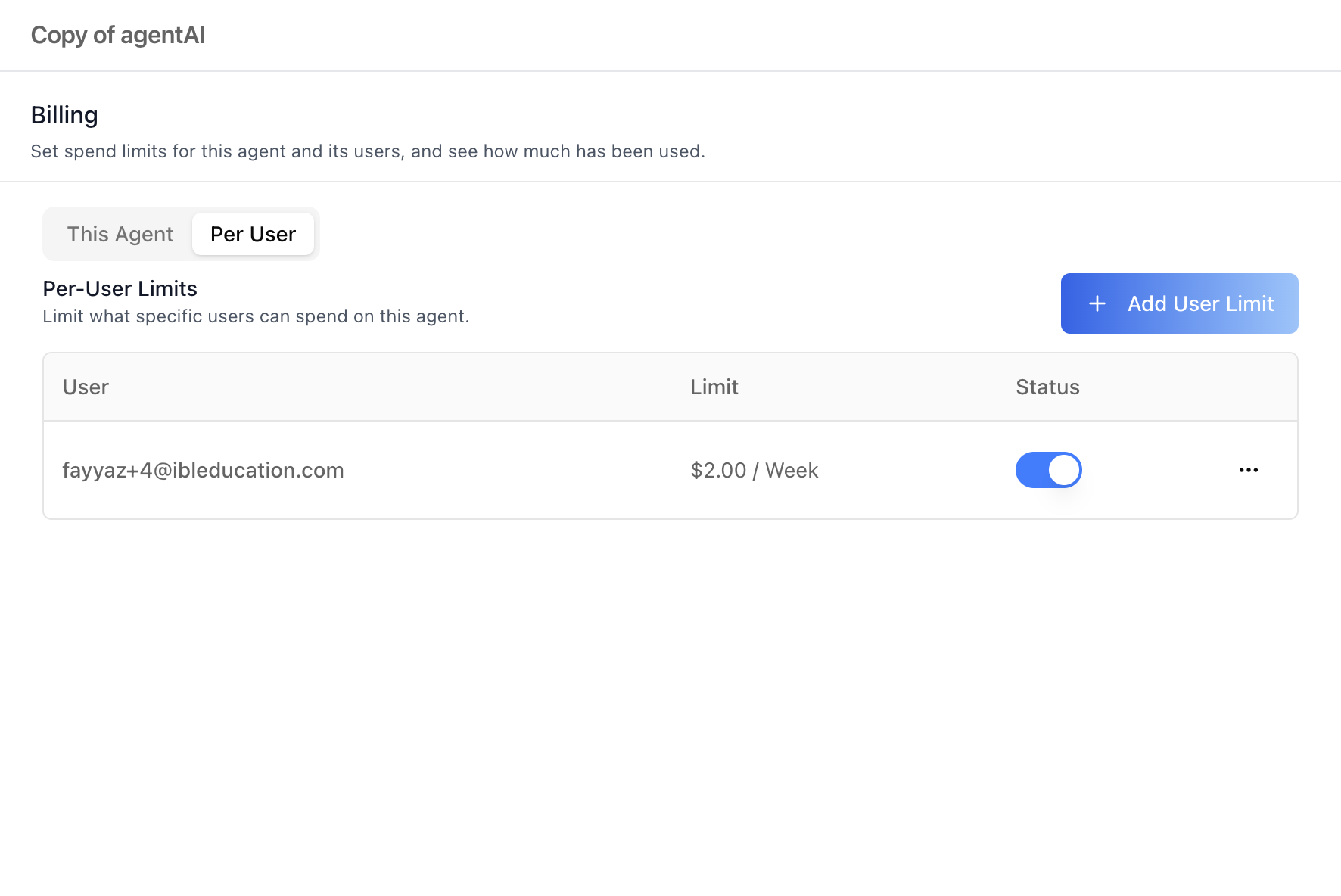
(
AgentSpendCapsTab: This Agent + Per User sub-tabs) in a popup titled with the agent's name, exactly as in/iblai-vibe-agent-billing.
User Limits
User Limits — one user's spend across every agent in the workspace
(the user scope, beside the per-agent user limits in
/iblai-vibe-agent-billing):
- Search Users — autocomplete over the organization's users (at least 2 characters); it filters the table, and a user with no limit yet gets a Set Spend Limit button.
- Table — User (opens their profile), Limit, Spent, Remaining, Status: a toggle that saves at once, with Exceeded / Alert Only badges, then Edit (sliders icon) and Delete (trash icon, with a confirmation).
- Set / Edit opens the same popup as the per-agent user limits: Spend
Limit (USD), Resets Every (Day / Week / Month / Year), When the Limit Is
Reached (Block Requests / Alert Only), Alert At (% of Limit, e.g.
80, 95).
Default for New Users — the limit each person gets when they join the workspace as a member, as their own user limit:
- A switch (off by default) and the same four fields, then Save.
- Only members who join after it is turned on get it; someone who joins as an admin does not. To limit someone already here, or an admin, set their limit above. The rows it creates appear in the User Limits table and can be changed there.
- Editing the default never changes limits it already created. Turning the switch off keeps the values for later; there is no Delete.
What users see in the chat
Chat (/iblai-vibe-agent-chat) reads each user's own limits, as zones
and percentages, never dollars: a banner above the composer when a limit
is near ("Usage is nearing its limit."), and once a Block Requests
limit is exceeded a red banner with Send disabled until the period
resets. A refused send tells a member to contact their administrator and
gives an admin an Open Billing button, which calls the chat config's
navigateToAdminBilling (vibe-starter sends it to /admin/billing).
Related Exports
From @iblai/iblai-js/web-containers:
BillingTab— this surface. (The Spend Limits / Agent Limits sections and the credits modals are internal to it.)
From @iblai/iblai-js/web-containers/next (see
/iblai-vibe-agent-billing):
AgentSpendCapsTab— the per-agent editor the Agent Limits popup hosts.
From @iblai/iblai-js/data-layer:
- Billing/credits:
useGetAccountBillingInfoQuery,useGetCreditTransactionsQuery,useUpdateAutoRechargeInfoMutation,useTriggerAutoRechargeMutation,useCreateStripeCustomerPortalMutation,useRenewSubscriptionMutation - Workspace cap:
useGetTenantSpendCapQuery,useUpsertTenantSpendCapMutation,useDeleteTenantSpendCapMutation - Agent-caps list:
useListAgentSpendCapsQuery(optionalmentorfilter) - User limits:
useListTenantUserSpendCapsQuery(username/emailfilters),useGetTenantUserSpendCapQuery,useUpsertTenantUserSpendCapMutation,useDeleteTenantUserSpendCapMutation - Default for new users:
useGetNewUserSpendCapDefaultQuery,useUpsertNewUserSpendCapDefaultMutation,useDeleteNewUserSpendCapDefaultMutation - Actual-spend stats:
useGetFinancialStatsQuery
From @iblai/iblai-js/web-utils:
useStripeUpgrade— the plan-upgrade checkout flow.openExternalUrl— opens Stripe-hosted pages (portal/checkout).
Step 4: Verify
Run /iblai-vibe-ops-test before telling the user the work is ready, and give
every page, control and state this skill added its own checkpoint — one Playwright
test titled <ID> · … in e2e/journeys/, listed in e2e/coverage.json;
pnpm e2e:coverage must pass:
pnpm build-- must pass with zero errorspnpm test-- vitest must pass- Touch test
/settings/billingin the browser as/iblai-vibe-ops-testsays: open it, use every control this skill added (User Limits: search, set, toggle, edit, delete; Default for New Users: switch, Save), read the console, check the phone width.
Important Notes
- Redux store: Must include
mentorReducerandmentorMiddleware initializeDataLayer(): 5 args (v1.2+)@reduxjs/toolkit: Deduplicated via webpack aliases innext.config.ts- Peer deps:
sonnerand@iblai/iblai-web-mentormust be installed (pnpm add sonner @iblai/iblai-web-mentor) - Import path:
BillingTabcomes from@iblai/iblai-js/web-containers(base bundle) — unlike the agent settings tabs, which come from/next. - Plan gating: Free/Trial plans see the Upgrade button and no Add Credits / Auto Recharge; a paid plan without a payment method sees Manage Billing (Stripe portal) instead of Add Credits, and the Auto Recharge section stays hidden until a payment method exists.
- Conversion rate is per-environment: the credits↔USD rate is resolved from the account fields or the latest top-up transaction — custom UI must not hardcode it.
- Workspace cap semantics: same contract as the agent scope —
first-run GET 404s until a cap is saved, the PUT is an upsert,
counters are read-only, and a hard-block cap refuses requests with
the
spend_cap_exceeded429. Full spend-caps REST tables live in/iblai-vibe-agent-billing; the org-scoped endpoints arespend-caps/tenant/(GET/PUT/DELETE),spend-caps/agents/(org-wide list,?mentor=<uuid>filter),spend-caps/users/andspend-caps/users/{username}/(user limits), andspend-caps/users/default/(the default for new users; a full-replace PUT whoseenabled: falsemeans off). REST:/iblai-api-spend-caps. - Per-scope RBAC: each section 403s independently — Spend Limits, Agent Limits and User Limits render their own denied panels without hiding the Plan & Credits tab.
- Brand guidelines: BRAND.md