/iblai-vibe-agent-evals
Mirrored from
iblai/vibe·skills/agents/iblai-vibe-agent-evals/SKILL.md. This page is generated — edit it in the repository, not here.
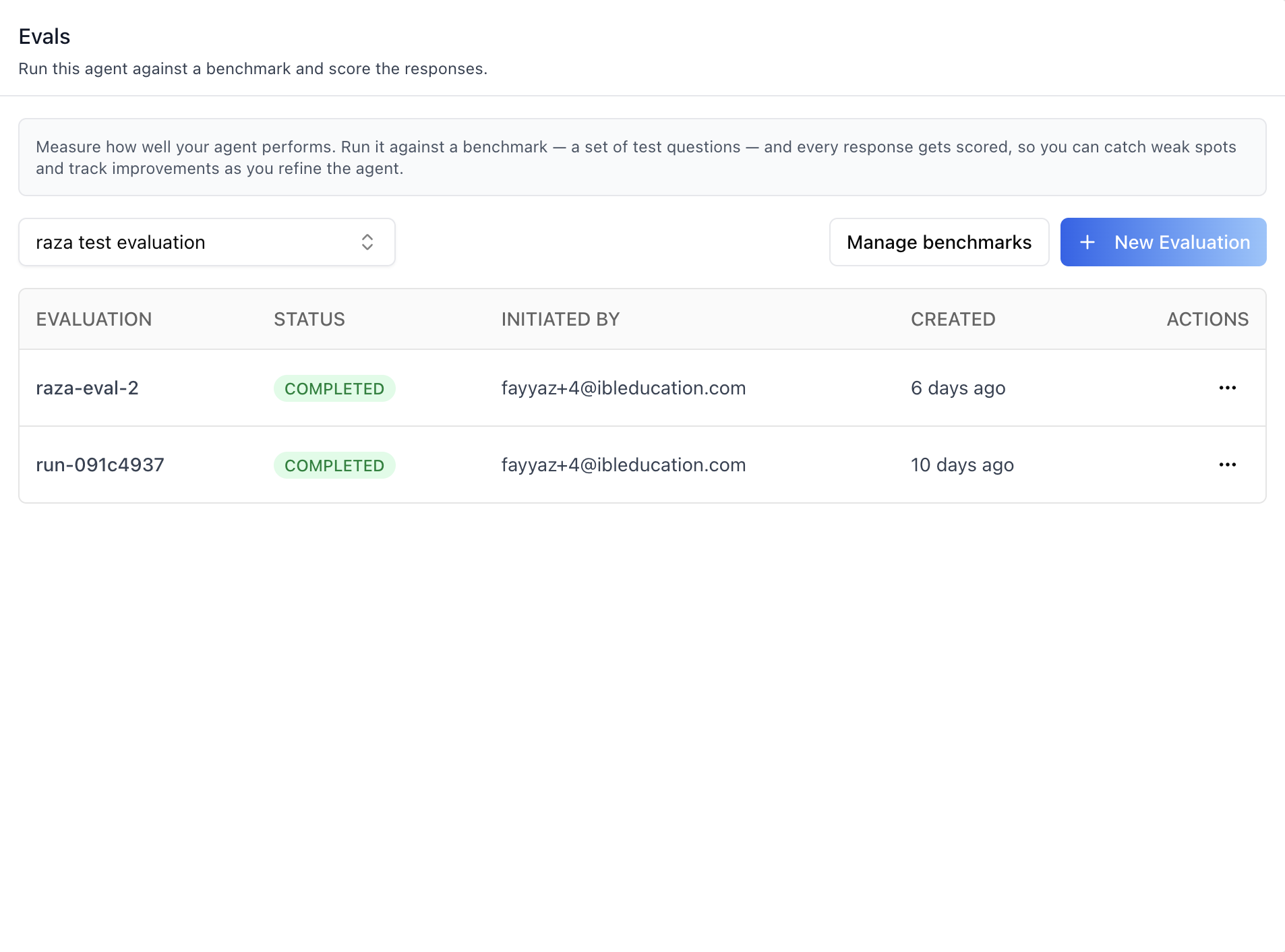
Add the agent Evals tab -- run your agent against a benchmark (a set
of test questions) and score every response, so you can catch weak spots
and track improvements as you refine the agent. The tab bundles several
surfaces into one component: a benchmark picker, an evaluations table
with status badges and a per-row actions menu (View results / New review /
Check status / Export CSV / Delete), a New Evaluation dialog, an
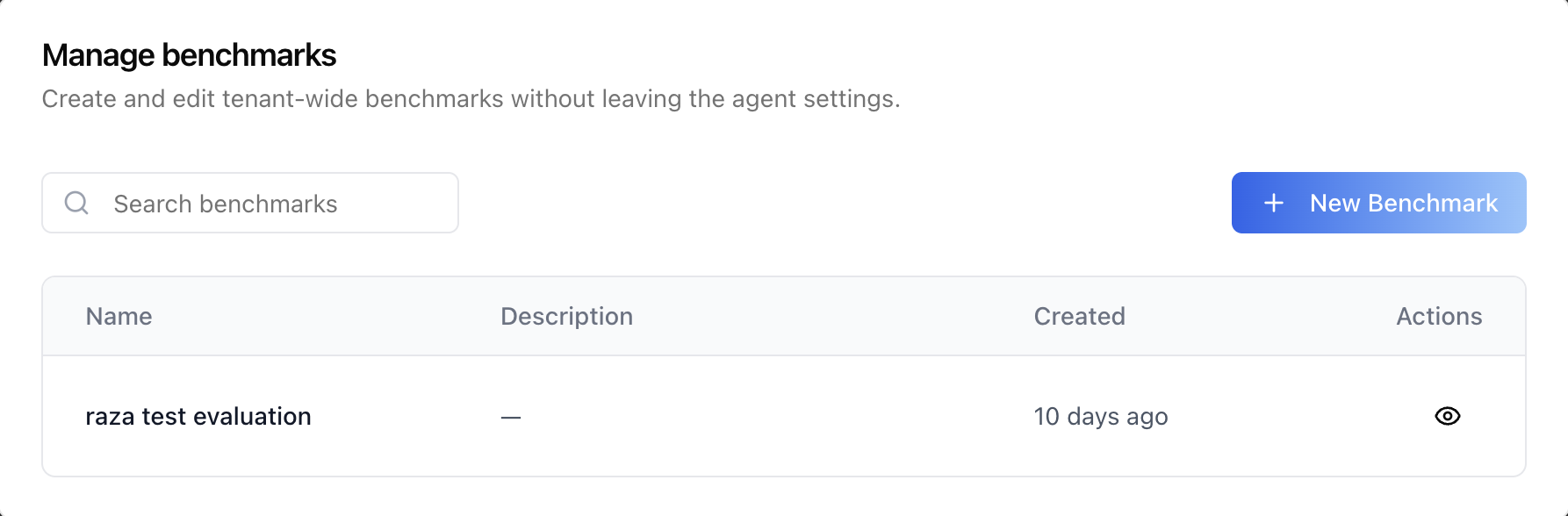
embedded Manage benchmarks dialog (create benchmarks, add Q&A pairs
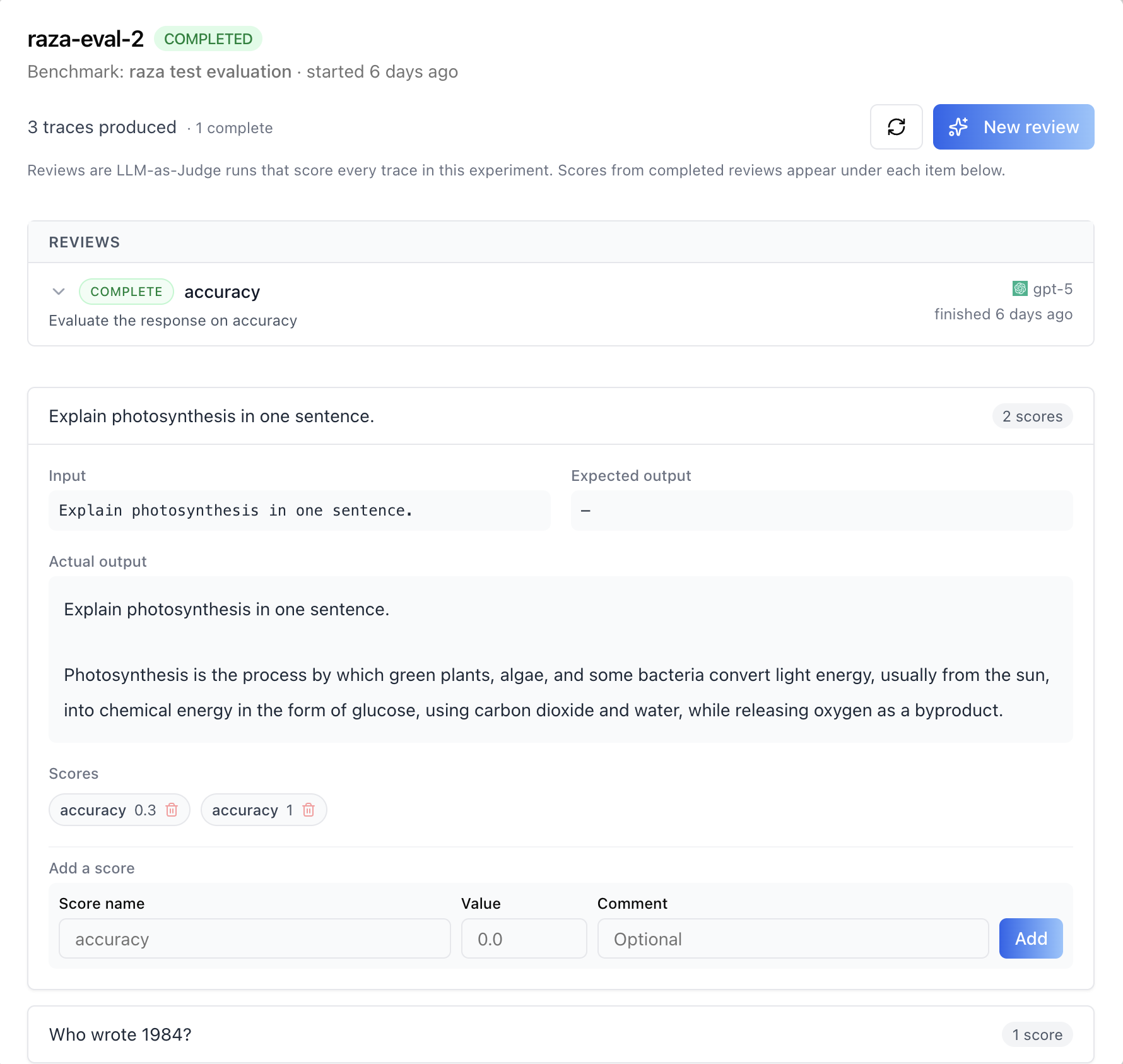
manually or via CSV upload), a results modal showing every trace with its
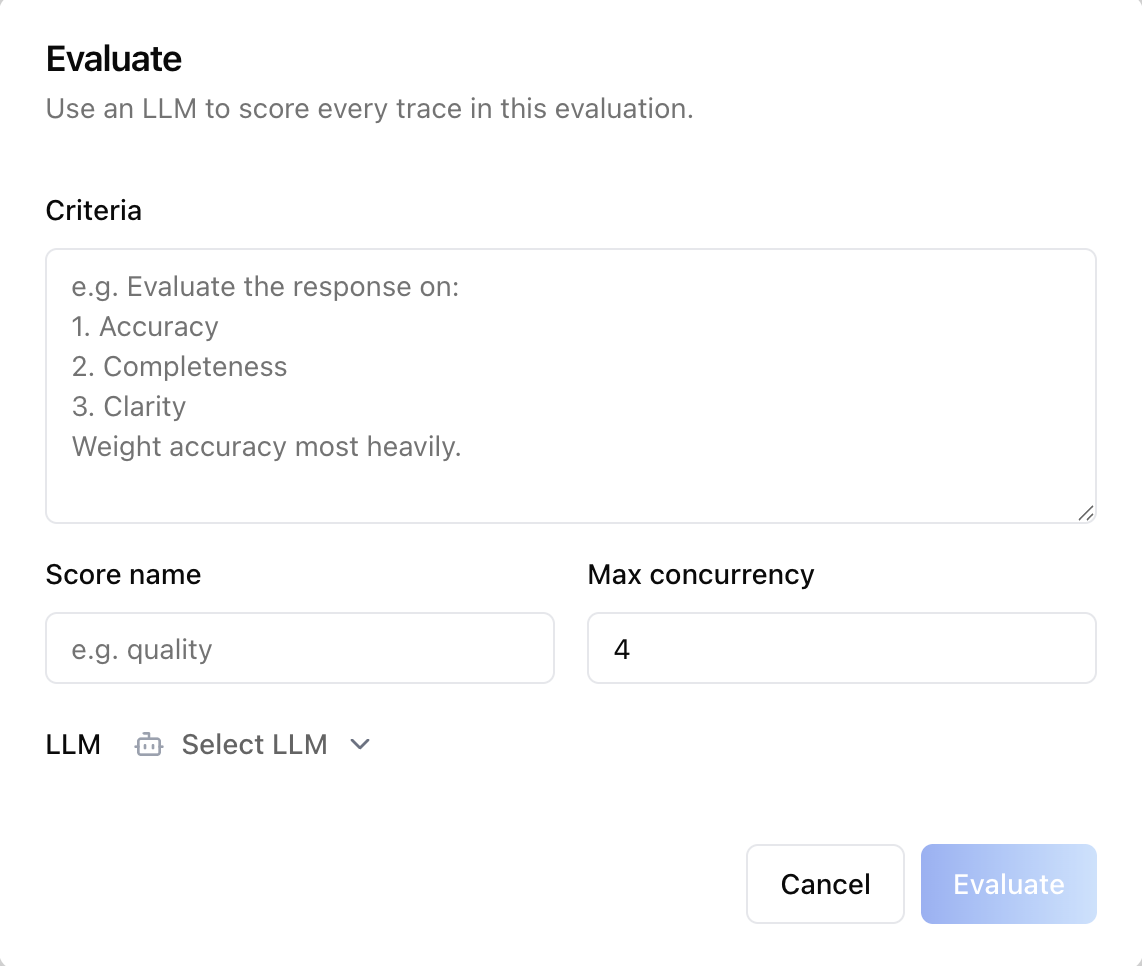
scores and LLM-as-Judge reviews, and an Evaluate (new review) modal
with an LLM provider/model picker. This is one tab in the wider
agent-settings family (access, api, datasets, disclaimers,
embed, evals, history, llm, memory, prompts, safety,
settings, tasks, tools). Each tab is a separate skill. All tabs
share the same AgentSettingsProvider wrapper -- set it up once and mount
as many tabs as you need.
Common setup (brand, conventions, env files, verification): see docs/skill-setup.md.
Prerequisites
- Auth must be set up first (
/iblai-vibe-auth) - MCP server + skills configured (
@iblai/mcpin.mcp.json) AgentSettingsProvidermust wrap the route (see/iblai-vibe-agent-settingStep 2 if not already set up)- Ask the user for a real
mentorId(agent UUID). Do NOT invent one.
Step 1: Check Environment
Before proceeding, check for an iblai.env in the project root. Look for
PLATFORM, DOMAIN, and TOKEN variables. If the file does not exist or
is missing these variables, tell the user:
"You need an iblai.env with your platform configuration. Download the
template and fill in your values:
curl -o iblai.env https://raw.githubusercontent.com/iblai/vibe/refs/heads/main/iblai.env"
Step 2: Mount AgentEvaluationTab
AgentEvaluationTab has no required props. The LLM picker inside the
Evaluate (new review) modal reads provider names and logos from the
backend's model catalogue, the same source as the LLM tab
(/iblai-vibe-agent-llm). Older SDK releases took a required
getLLMProviderDetails prop here; it no longer exists.
// app/(app)/agents/[mentorId]/evals/page.tsx
"use client";

import { AgentEvaluationTab } from "@iblai/iblai-js/web-containers/next";

export default function AgentEvalsPage() {
  return (
    <div className="flex h-full flex-col bg-white">
      <AgentEvaluationTab />
    </div>
  );
}
AgentEvaluationTab reads tenantKey, mentorId, username and
userIsStudent from AgentSettingsProvider (via useAgentSettings())
and handles all of its own data fetching and mutations (benchmarks, runs,
reviews, scores, export, delete). Evaluations are admin-only: for a
learner (userIsStudent, from the provider or the prop) the tab renders
nothing, even when deep-linked.
With custom pagination
The evaluations table paginates (10 per page). Without a
PaginationComponent the built-in web-containers AdvancedPagination is
used. Inject your own to match the host app's pagination UI:
<AgentEvaluationTab
  PaginationComponent={({ currentPage, totalPages, onPageChange, disabled }) => (
    <MyPagination
      page={currentPage}
      total={totalPages}
      onChange={onPageChange}
      disabled={disabled}
    />
  )}
/>;
Step 3: Customize Labels (Optional)
AgentEvaluationTab renders with the default agent-facing copy
(AGENT_EVALUATION_TAB_LABELS). Override any string via the labels
prop. Pass a full EvaluationTabLabels bundle (for a full re-skin) or a
partial object (for one-off edits).
import {
  AgentEvaluationTab,
  type EvaluationTabLabels,
  AGENT_EVALUATION_TAB_LABELS,
} from "@iblai/iblai-js/web-containers/next";

<AgentEvaluationTab
  labels={{
    header: {
      title: "Benchmarks",
      description: "Score this agent against your test sets.",
    },
    actions: { newExperiment: "Run benchmark" },
  }}
/>;
The label bundle is grouped by surface: header, benchmarkPicker,
actions, checkStatusToast, table, startExperimentModal,
manageBenchmarksModal, detailModal, evaluateModal, and
deleteModal. Override only the keys you need.
Step 4: Use MCP Tools for Customization
get_component_info("AgentEvaluationTab")
get_component_info("AgentSettingsProvider")
Tab surfaces
AgentEvaluationTab is a single mounted component, but it renders several
distinct surfaces. The corresponding web-containers source (under
web-containers/.../edit-mentor-modal/tabs/evaluation-tab) is listed for
reference -- these pieces are internal to AgentEvaluationTab and are not
mounted separately.
| Surface | Screenshot | Source component | What it shows |
|---|---|---|---|
| Evaluations list | list / actions | index (tab root) / benchmark-combobox | Info box, benchmark combobox, Manage benchmarks + New Evaluation buttons, and a table of runs (Evaluation / Status / Initiated by / Created) with a per-row menu: View results, New review, Check status, Export CSV, Delete |
| New Evaluation dialog | -- | start-experiment-modal | Benchmark (read-only) + optional evaluation name (auto-generated if blank); starts a background run of the agent over every benchmark item |
| Manage benchmarks dialog | benchmarks / new | profile/benchmarks (embedded BenchmarksTab) | Organization-wide benchmark list with search, a New Benchmark dialog (name + description), and per-benchmark view |
| Benchmark Q&A items | items / manual / csv | profile/benchmarks/benchmark-items-modal | Question/answer pairs used to evaluate agents; Add Q&A supports manual rows or CSV upload (required input column, optional expected_output, max 10 MB / 10,000 rows) |
| Results modal | results / review details | experiment-detail-modal | Trace count, a Reviews section (LLM-as-Judge runs with status pill, criteria, and scores produced), and every trace with Input / Expected output / Actual output, its score chips (removable), and an Add-a-score form (name, 0-1 value, comment) |
| Evaluate modal (new review) | evaluate / llm picker | llm-judge-modal / evaluate-llm-picker | Criteria textarea, score name, max concurrency, and a provider-then-model LLM picker; kicks off an LLM-as-Judge run that scores every trace |
| Delete confirmation | delete | delete-experiment-modal | Confirm-then-delete for an evaluation run; cannot be undone |
Evaluations run in the background: the table shows a status badge (COMPLETED green / FAILED red / anything else blue) and Check status refetches a single run and pushes the fresh status into the table. View results, New review, and Export CSV are disabled until the run completes.
<AgentEvaluationTab> Props
Import from @iblai/iblai-js/web-containers/next.
| Prop | Type | Required | Description |
|---|---|---|---|
labels | DeepPartial<EvaluationTabLabels> | No | Override user-visible strings |
PaginationComponent | ComponentType<{ currentPage, totalPages, onPageChange, disabled }> | No | Custom pagination for the evaluations table. Defaults to the web-containers AdvancedPagination |
userIsStudent | boolean | No | true for a learner: the tab renders nothing (evaluations are admin-only). Overrides the value from AgentSettingsProvider |
Related Exports
From @iblai/iblai-js/web-containers/next:
AGENT_EVALUATION_TAB_LABELS-- the default agent-facing label bundle.EvaluationTabLabels-- type for the full label bundle.AgentEvaluationTabProps-- props type for the tab.
From @iblai/iblai-js/web-containers: useLlmProviderCatalogue and
LlmProviderDetails -- a provider name + logo resolver over the same
mentor-llms rows the Evaluate picker reads directly, for custom UI
(see /iblai-vibe-agent-llm).
From @iblai/data-layer (the same RTK Query hooks the tab uses, for
custom UI): useListEvalDatasetsQuery, useListEvalRunsQuery,
useStartEvalRunMutation, useGetEvalRunQuery,
useEvaluateEvalRunMutation, useListEvalRunJudgesQuery,
useCreateEvalScoreMutation, useDeleteEvalScoreMutation,
useExportEvalRunMutation, useDeleteEvalRunMutation, plus the
EvalDataset, EvalDatasetRun, EvalDatasetRunDetail, EvalJudgeTask,
EvalScore payload types.
Step 5: Verify
Run /iblai-vibe-ops-test before telling the user the work is ready:
pnpm build-- must pass with zero errorspnpm test-- vitest must pass- Touch test
/agents/<id>/evalsin the browser as/iblai-vibe-ops-testsays: open it, use every control this skill added, read the console, check the phone width.
Important Notes
- Redux store: Must include
mentorReducerandmentorMiddleware-- the evaluations API slice (datasets / runs / judges / scores) ships inside those bundles. initializeDataLayer(): 5 args (v1.2+)@reduxjs/toolkit: Deduplicated via webpack aliases innext.config.ts- Peer deps:
sonnerand@iblai/iblai-web-mentormust be installed (pnpm add sonner @iblai/iblai-web-mentor) - Shared provider:
AgentSettingsProvidermust wrap the route at a layout level. See/iblai-vibe-agent-settingStep 2 for the full snippet. - Benchmarks are organization-wide, runs are agent-scoped: a benchmark can
be evaluated against multiple agents. The tab filters runs client-side
to the current agent via
metadata.mentor_unique_id; pending runs without populated metadata are kept only when the current user initiated them (their freshly-started evaluation). - Manual scores are 0-1: the Add-a-score form requires a numeric value between 0 and 1. Score writes are ingested asynchronously by the eval store -- the modal patches its cache optimistically and the real record appears on the next refresh.
- CSV format (benchmark Q&A upload): UTF-8, required
inputcolumn, optionalexpected_outputcolumn, max 10 MB / 10,000 rows; rows with a blank question are skipped. - First benchmark auto-selected: the combobox picks the first benchmark automatically; New Evaluation stays disabled until a benchmark exists (use Manage benchmarks to create one).
- Brand guidelines: BRAND.md
Evaluations REST API
For custom UI beyond <AgentEvaluationTab>. All endpoints are prefixed
with ${dmUrl}/api/ai-mentor/orgs/{org}/users/{user_id}/evaluations
where dmUrl is NEXT_PUBLIC_API_BASE_URL.
Benchmarks (datasets)
| Method | Path | Purpose |
|---|---|---|
| GET | datasets/ | List benchmarks (params: page, limit, name, user_email) |
| POST | datasets/ | Create a benchmark ({ "name", "description" }) |
| GET | datasets/{name}/ | Get one benchmark |
| GET | datasets/{name}/items/ | List Q&A items (params: page, limit, include_trace) |
| POST | datasets/{name}/items/ | Add Q&A items |
| POST | datasets/{name}/items/upload/ | Upload items CSV (multipart) |
| PUT | datasets/{name}/items/{item_id}/ | Update an item |
| DELETE | datasets/{name}/items/{item_id}/ | Delete an item |
Evaluation runs
| Method | Path | Purpose |
|---|---|---|
| GET | datasets/{name}/runs/ | List runs for a benchmark |
| POST | datasets/{name}/runs/ | Start a run |
| GET | datasets/{name}/runs/{run}/ | Run detail (traces + scores) |
| DELETE | datasets/{name}/runs/{run}/ | Delete a run |
| GET | datasets/{name}/runs/{run}/export/ | Export results as CSV (text response) |
Start-run body (bind the run to the agent being evaluated):
{
  "mentor_unique_id": "agent-uuid",
  "run_name": "qa-eval-v1"
}
run_name is optional -- the backend auto-generates one (e.g.
run-091c4937) when omitted.
LLM-as-Judge reviews
| Method | Path | Purpose |
|---|---|---|
| POST | datasets/{name}/runs/{run}/evaluate/ | Start a review (LLM scores every trace) |
| GET | datasets/{name}/runs/{run}/evaluate/ | List reviews for a run (params: page, limit, status) |
| GET | judges/ | List reviews across runs (params: dataset_name, status) |
Review body:
{
  "criteria": "Evaluate the response on accuracy",
  "score_name": "accuracy",
  "llm_provider": "openai",
  "llm_name": "gpt-5",
  "max_concurrency": 4
}
Scores
| Method | Path | Purpose |
|---|---|---|
| GET | scores/ | List scores (params: dataset_run_id, trace_id, name) |
| POST | scores/ | Add a manual score ({ "trace_id", "name", "value", "comment"?, "dataset_run_id"? }, value 0-1) |
| DELETE | scores/{score_id}/ | Remove a score |
| GET | score-configs/ | List score configs |
| POST | score-configs/ | Create a score config |
Task status polling (used by Check status) goes through
/api/ai-mentor/orgs/{org}/users/{user_id}/tasks/{task_id}.