/iblai-vibe-workflow
Mirrored from
iblai/vibe·skills/agents/iblai-vibe-workflow/SKILL.md. This page is generated — edit it in the repository, not here.
Add agent workflows -- multi-step flows that start from one agent and branch, loop, call tools and set state. Two SDK components mount the whole feature:
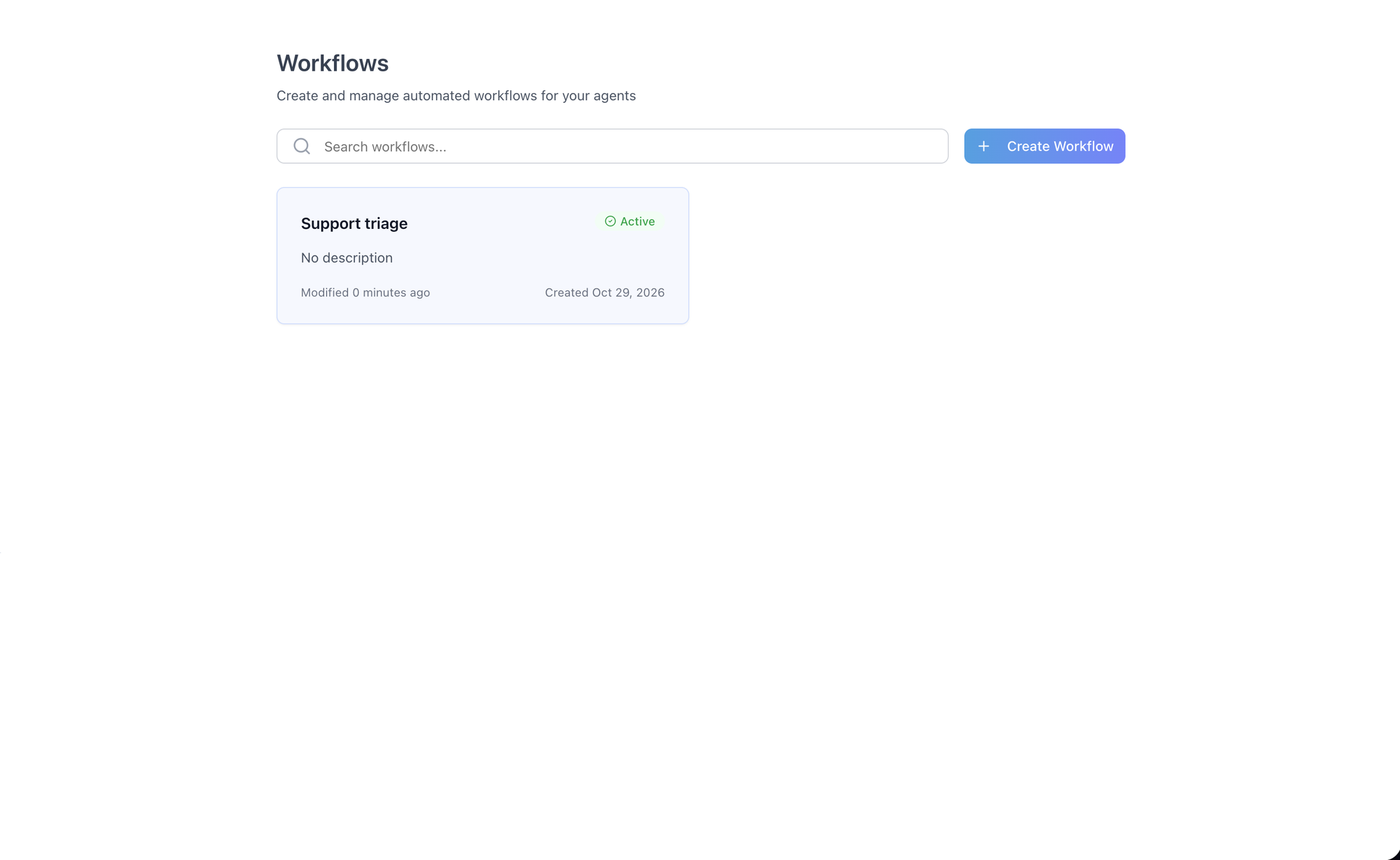
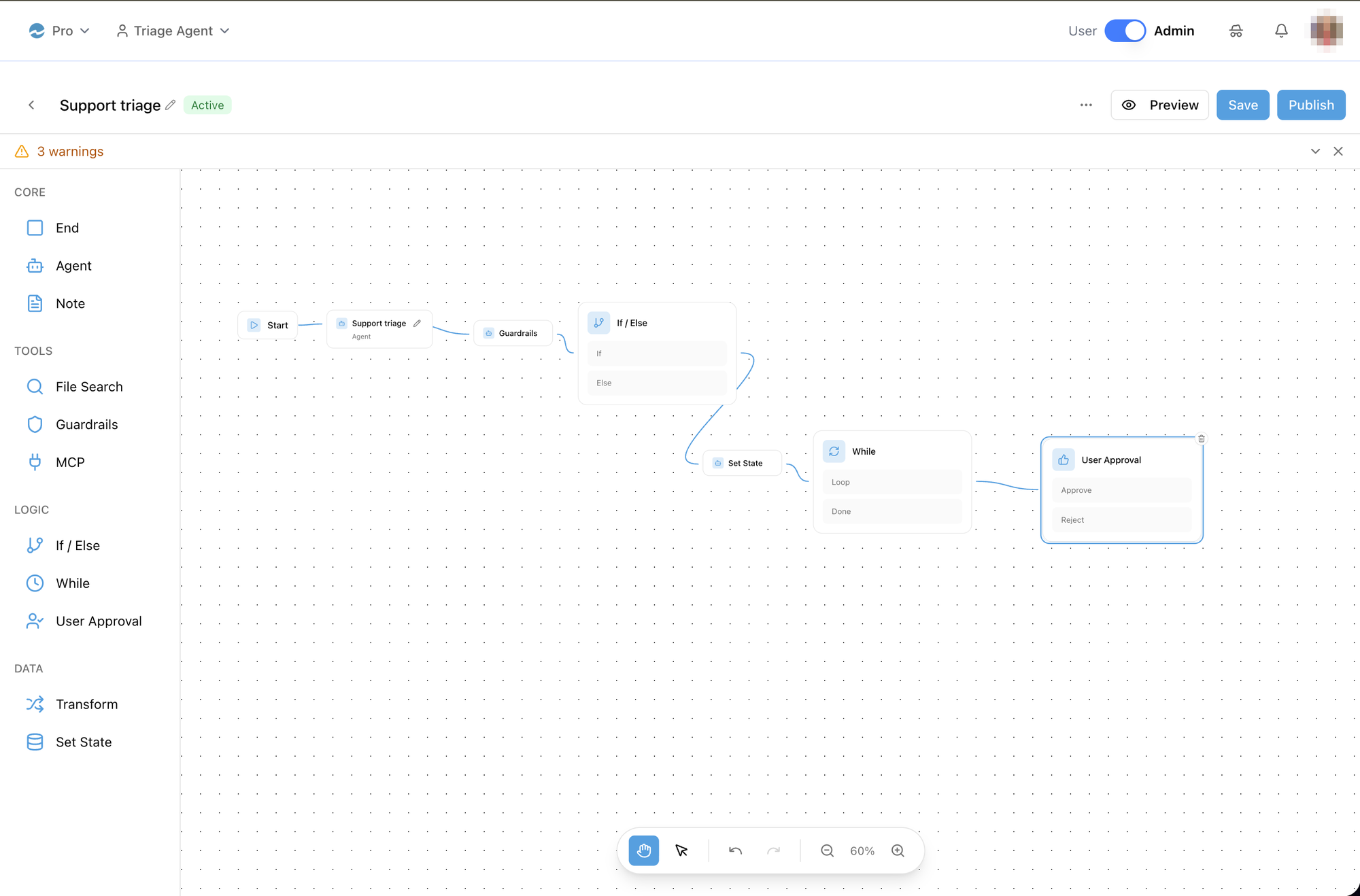
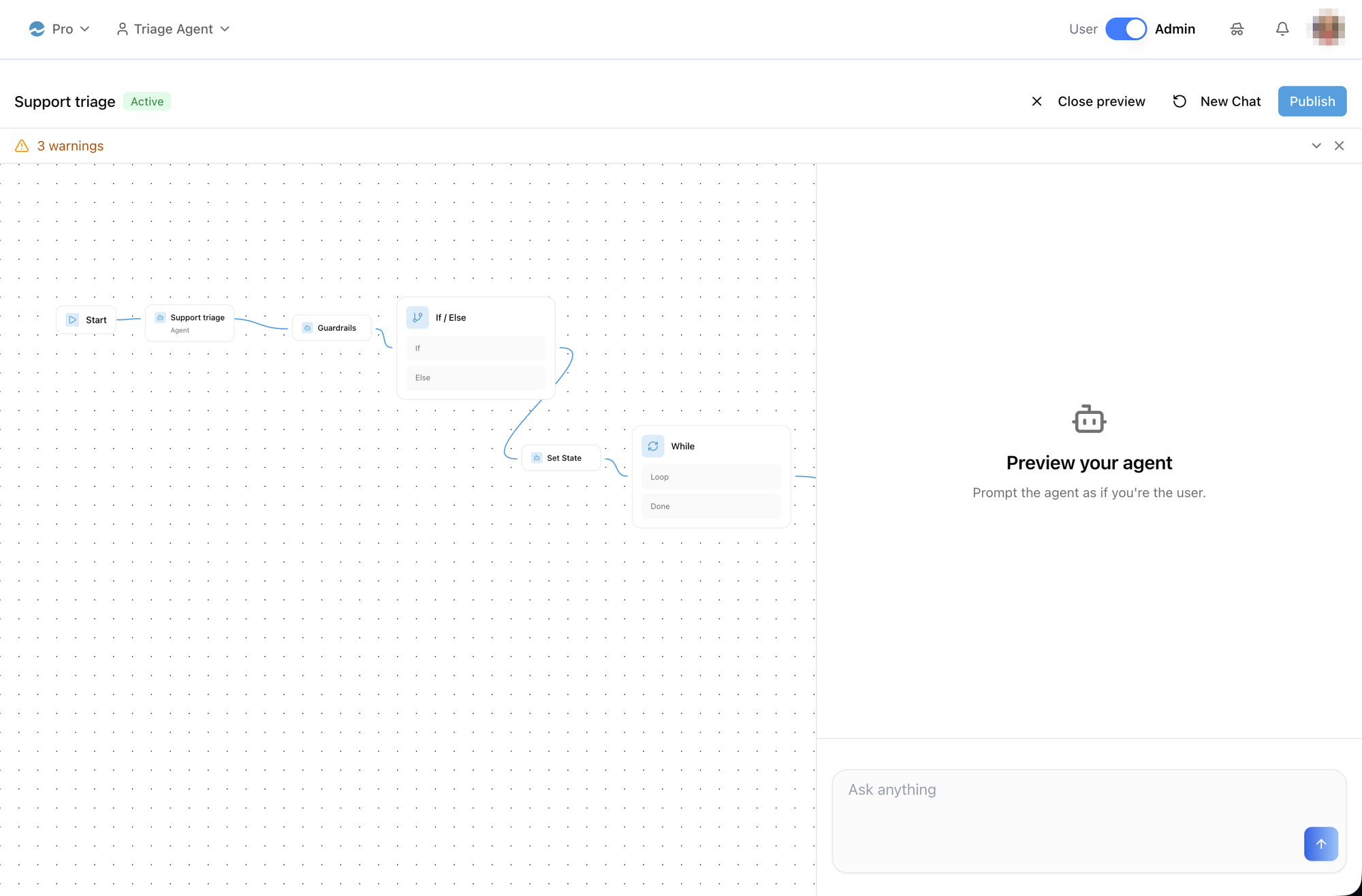
WorkflowsList— the organization's workflows: search, status (Active / Draft), Create Workflow. It is opened from an agent, whose id seeds the Agent step of every workflow created there — the list itself is the same for every agent.WorkflowEditor— the editor: a step sidebar (Core / Tools / Logic / Data), the canvas, the step config panel, workflow variables, validation, inline rename, Save, Publish, Activate / Deactivate / Delete, and a Preview chat that runs the workflow.
Four steps the sidebar offers — User approval, File search,
Guardrails and MCP — are not executable yet: the backend marks them
executable: false in node-types/, validation skips them, and a run drops
the step but keeps its connections, so a workflow that connects one fails
on every run. Build with Agent, If / else, While, Transform, Set state and
End until that changes.
The canvas, the config panel, the preview chat and the node data model used
to live in the host app; they are now in @iblai/iblai-js/web-containers/next
and the host keeps only two thin pages plus a side-menu entry.
Common setup (brand, conventions, env files, verification): see docs/skill-setup.md.
Related surfaces
/iblai-vibe-agent-chat— the chat transport (axdToken,baseWsUrl,redirectToAuthSpa) the editor's Preview reuses; take the same values./iblai-vibe-agent-setting— an Agent step's gear opens that agent's settings; wireonOpenAgentSettingsto your settings route./iblai-vibe-agent-dataset,/iblai-vibe-agent-mcp— what the File search and MCP steps pick from (the agent's datasets and connectors)./iblai-vibe-navbar— where the side-menu entry goes.
Prerequisites
- Auth must be set up first (
/iblai-vibe-auth) - MCP server + skills configured (
@iblai/mcpin.mcp.json) - An agent to open the list from (
mentorId): every new workflow begins with a Start → Agent pair bound to it. The list itself shows the whole organization's workflows. - A signed-in user: the editor loads each Agent step's settings by
usernameand stays on its spinner without one. workflowsApiSliceregistered in the Redux store (Step 3) — it is not part ofmentorReducer.
Step 1: Check Environment
Before proceeding, check for an iblai.env in the project root. Look for
PLATFORM, DOMAIN, and TOKEN variables. If the file does not exist or
is missing these variables, tell the user:
"You need an iblai.env with your platform configuration. Download the
template and fill in your values:
curl -o iblai.env https://raw.githubusercontent.com/iblai/vibe/refs/heads/main/iblai.env"
Step 2: Two pages
The list — app/(app)/workflows/[mentorId]/page.tsx
// app/(app)/workflows/[mentorId]/page.tsx
"use client";

import { useState } from "react";
import { useParams, useRouter } from "next/navigation";
import { WorkflowsList } from "@iblai/iblai-js/web-containers/next";
import { resolveAppTenant } from "@/lib/iblai/tenant";

export default function WorkflowsPage() {
  const router = useRouter();
  const { mentorId } = useParams<{ mentorId: string }>();
  const [tenantKey] = useState(resolveAppTenant);

  return (
    <WorkflowsList
      tenantKey={tenantKey}
      mentorId={mentorId}
      onOpenWorkflow={(workflow) =>
        router.push(
          `/workflows/${workflow.entry_mentor_id}/${workflow.unique_id}?listMentorId=${mentorId}`,
        )
      }
    />
  );
}
A Next.js page receives only params and searchParams, so resolve the
organization inside the page (the starter's resolveAppTenant), never as a
prop. onOpenWorkflow receives the full Workflow; route on its
entry_mentor_id (the workflow's own run agent — see Important Notes) and
keep the list's agent in a query parameter so Back / Delete can
return to the right list.
The editor — app/(app)/workflows/[mentorId]/[id]/page.tsx
// app/(app)/workflows/[mentorId]/[id]/page.tsx
"use client";

import { useState } from "react";
import { useParams, useRouter, useSearchParams } from "next/navigation";
import { WorkflowEditor } from "@iblai/iblai-js/web-containers/next";
import { useAxdToken, useUsername } from "@iblai/iblai-js/web-utils";
import { redirectToAuthSpa } from "@/lib/iblai/auth-utils";
import config from "@/lib/iblai/config";
import { resolveAppTenant } from "@/lib/iblai/tenant";

export default function WorkflowEditorPage() {
  const router = useRouter();
  const { mentorId, id } = useParams<{ mentorId: string; id: string }>();
  const listMentorId = useSearchParams().get("listMentorId") ?? mentorId;
  const [tenantKey] = useState(resolveAppTenant);
  const username = useUsername();
  const axdToken = useAxdToken();

  return (
    <WorkflowEditor
      tenantKey={tenantKey}
      workflowId={id}
      username={username ?? ""}
      axdToken={axdToken ?? ""}
      baseWsUrl={config.baseWsUrl()}
      redirectToAuthSpa={(to, key, logout) => void redirectToAuthSpa(to, key, logout)}
      onBack={() => router.back()}
      onDeleted={() => router.push(`/workflows/${listMentorId}`)}
      onOpenAgentSettings={(agentId) => router.push(`/agents/${agentId}/settings`)}
    />
  );
}axdToken, baseWsUrl and redirectToAuthSpa are the same three values
the chat surface takes — the same useAxdToken(), config.baseWsUrl() and
lib/iblai/auth-utils that /iblai-vibe-agent-chat wires. Resolve all of
them inside the page, as the starter's home page does; a page component gets
no other props from Next.js.
Side-menu entry
Workflows hang off an agent, so put Workflows in the sidebar next to the
agent's other sections rather than in the top nav. The SDK's own app renders
a collapsible Workflows section with New Workflow and My
Workflows, both routing to /workflows/<current agent>; it shows only
for admins (and free-trial / anonymous admin previews), and with no agent
selected it opens a "pick an agent" prompt instead of navigating.
Step 3: Register workflowsApiSlice in the store
The workflow hooks live on their own slice that mentorReducer does not
include. Add its reducer and middleware to the starter's
store/iblai-store.ts (two lines — the rest is the file vibe-starter
already ships):
// store/iblai-store.ts
import { configureStore } from "@reduxjs/toolkit";
import {
  coreApiSlice,
  mentorReducer,
  mentorMiddleware,
  workflowsApiSlice,
} from "@iblai/iblai-js/data-layer";
import {
  hostChatReducer,
  chatInputSliceReducer,
  chatSliceReducerShared,
  filesReducer,
  rbacReducer,
  subscriptionReducer,
  topBannerReducer,
} from "@iblai/iblai-js/web-utils";

export const iblaiStore = configureStore({
  reducer: {
    [coreApiSlice.reducerPath]: coreApiSlice.reducer,
    [workflowsApiSlice.reducerPath]: workflowsApiSlice.reducer, // + workflows
    ...mentorReducer,
    chat: hostChatReducer,
    chatInput: chatInputSliceReducer,
    chatSliceShared: chatSliceReducerShared,
    files: filesReducer,
    rbac: rbacReducer,
    subscription: subscriptionReducer,
    topBanner: topBannerReducer,
  },
  middleware: (getDefaultMiddleware) =>
    getDefaultMiddleware({ serializableCheck: false })
      .concat(coreApiSlice.middleware)
      .concat(workflowsApiSlice.middleware) // + workflows
      .concat(...mentorMiddleware),
});

export type IblaiRootState = ReturnType<typeof iblaiStore.getState>;
export type IblaiAppDispatch = typeof iblaiStore.dispatch;
Without it every workflow hook returns undefined and both pages render
their error state.
Step 4: Use MCP Tools for Customization
get_component_info("WorkflowEditor")
get_component_info("WorkflowsList")
Component Props
Both import from @iblai/iblai-js/web-containers/next.
<WorkflowsList>
| Prop | Type | Required | Description |
|---|---|---|---|
tenantKey | string | Yes | Organization key |
mentorId | string | Yes | The agent the list was opened from — it seeds the Agent step of workflows created here; the list itself is organization-wide |
onOpenWorkflow | (workflow: Workflow) => void | Yes | Called with the full record on card click and right after Create |
<WorkflowEditor>
| Prop | Type | Required | Description |
|---|---|---|---|
tenantKey | string | Yes | Organization key |
workflowId | string | Yes | The workflow's unique_id |
username | string | Yes | Signed-in user — loads each Agent step's settings and tools; with an empty username the editor never leaves its spinner |
axdToken | string | Yes | Chat token for the preview chat |
baseWsUrl | string | Yes | WebSocket origin for the preview chat (${baseWsUrl}/ws/langflow/) |
redirectToAuthSpa | (redirectTo?, platformKey?, logout?) => void | Yes | Host auth redirect (wrap an async helper to => void) |
onBack | () => void | Yes | Header back button, and Go Back when the workflow fails to load |
onDeleted | () => void | Yes | After a successful delete — go back to your list |
onOpenAgentSettings | (mentorId?: string) => void | No | Clicking an Agent step's settings; nothing opens when omitted |
agentSettings | WorkflowAgentSettingsConfig | No | RBAC, paywall gate and dataset-upload config for the pieces the editor embeds (below) |
WorkflowAgentSettingsConfig (from @iblai/iblai-js/web-containers)
The Agent step's Tools switches and the File search / MCP pickers are the agent-settings tabs embedded in the editor, so they take the same host config:
| Field | Description |
|---|---|
enableRBAC, rbacPermissions | Forwarded to the pickers' AgentSettingsProvider and field-level permission checks |
executeGatedAction | Paywall / trial gate around the pickers' writes; called directly when omitted |
datasetResourceConfig | Add Resource options for the File search step's dataset picker (disabledResourceTypes, maxUploadSizeMb) |
dmUrl | Base the dataset picker resolves root-relative media paths against |
What the editor renders
Header
Back · inline-editable name (pencil; saves on blur / Enter) · status pill Active / Draft · Unsaved while the canvas differs from the server · Preview (becomes Close preview + New Chat) · Save · Publish · a more-options menu with Activate / Deactivate and Delete (confirm dialog).
Step sidebar
Sections come from the organization's node-types endpoint (falling back
to the built-in set): Core — Agent, End, Note · Tools — File search,
Guardrails, MCP · Logic — If / else, While, User approval · Data —
Transform, Set state. Drag a step onto the canvas, or click it to drop it
next to the selected step. Each entry in node-types carries executable;
File search, Guardrails, MCP and User approval are false today.
Canvas
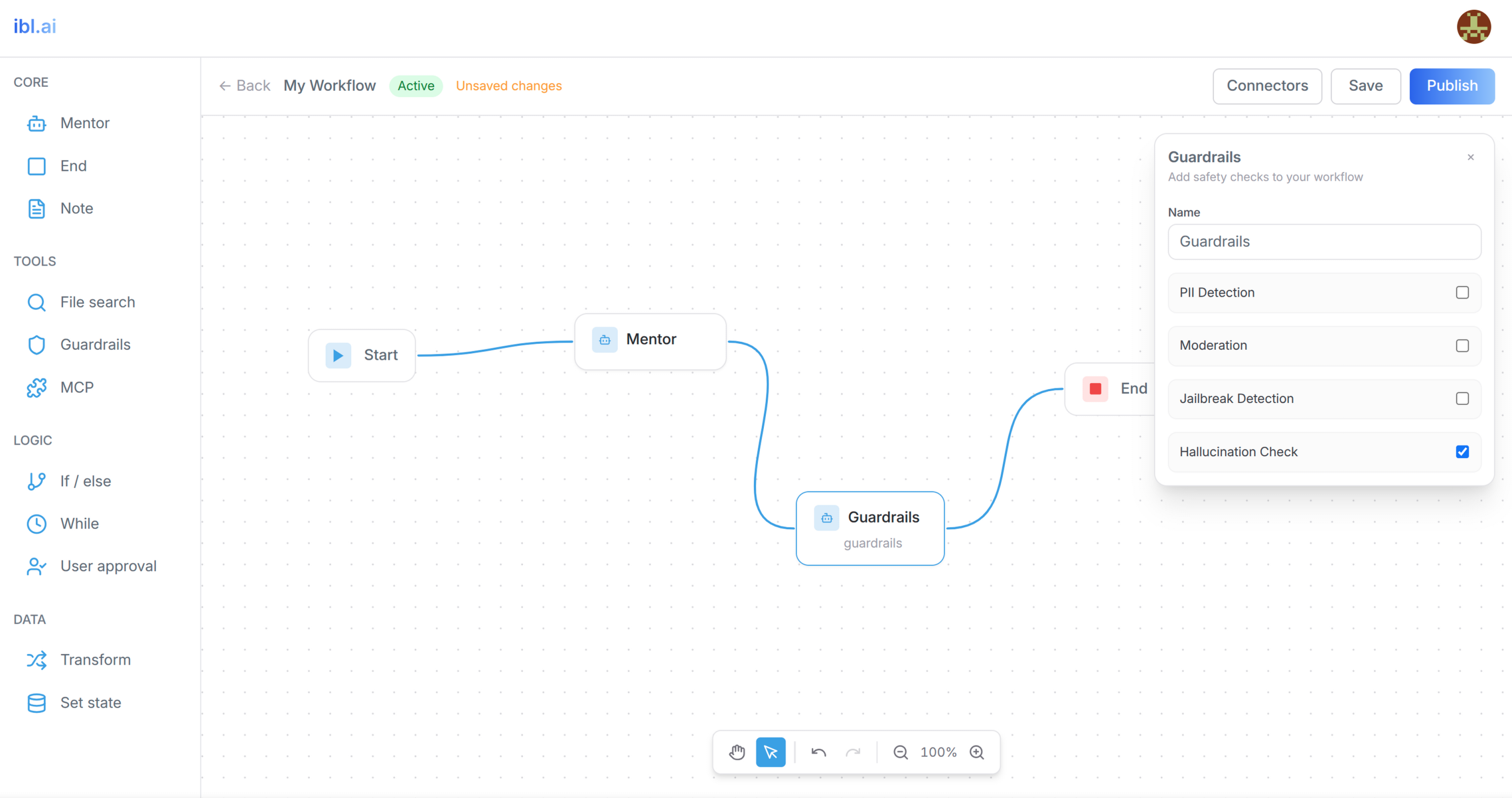
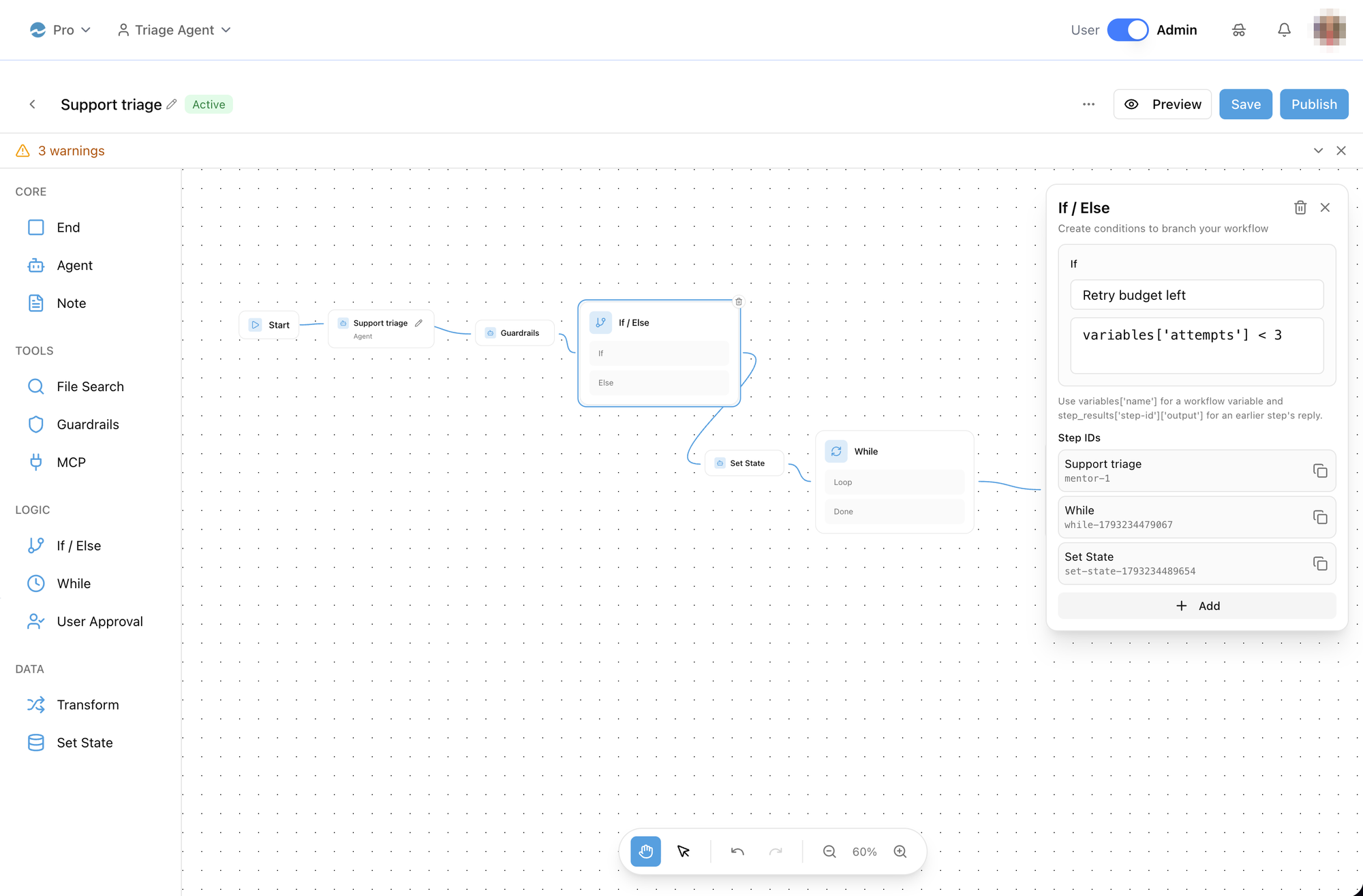
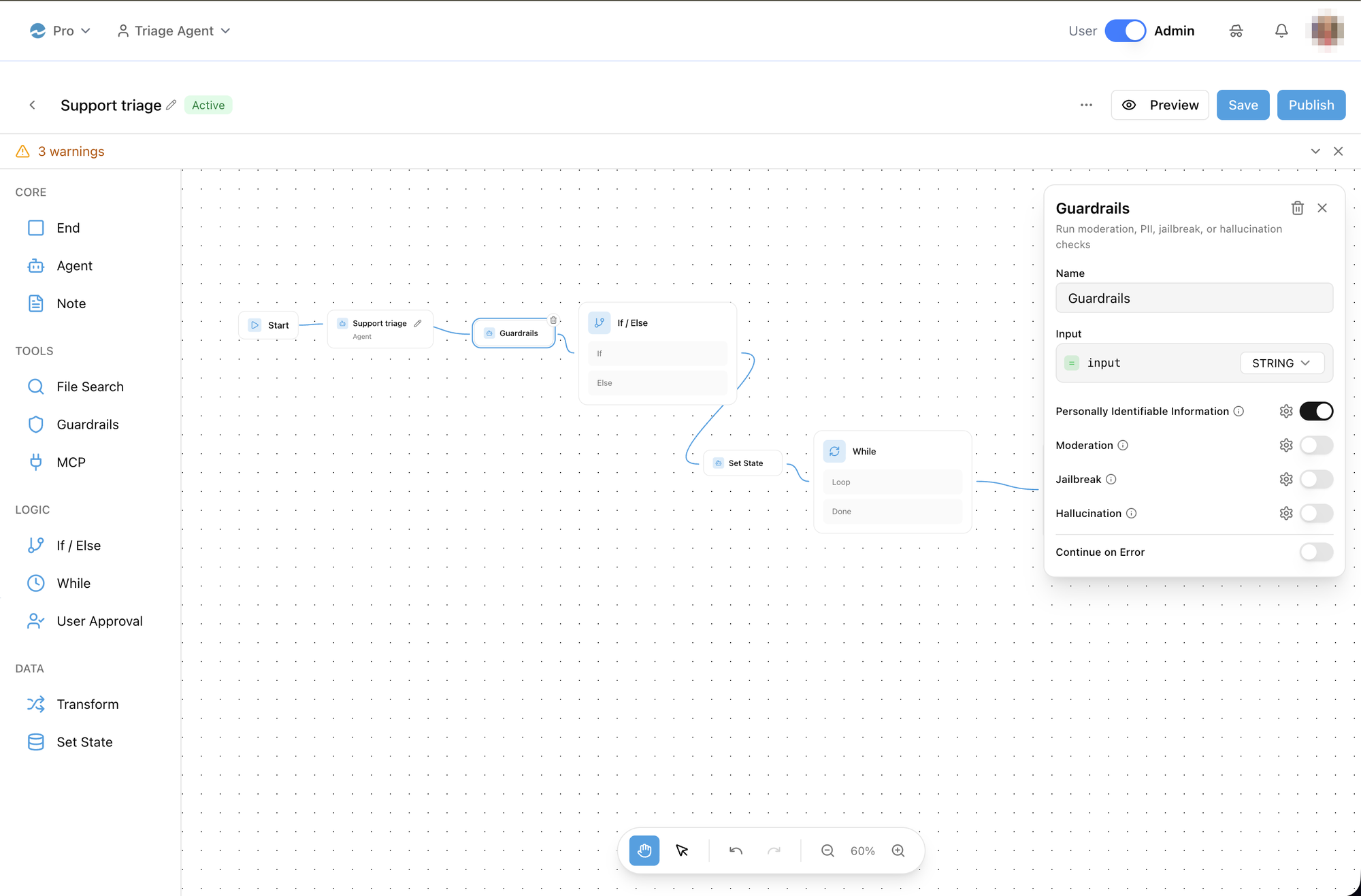
Steps connect left-to-right. If / else cards have one row per condition plus Else; While has Loop and Done; User approval has Approve and Reject. Start accepts no incoming connection and Notes are never connected. Right-click a step for Change Agent / Delete, a connection for Delete Connection. The floating toolbar has Pan / Select, Undo / Redo and Zoom.
Step config panel
Opens on click (not on drag). What each step edits:
| Step | Fields |
|---|---|
| Start | State Variables — name, type, optional default (validated per type) |
| Agent | runs the chosen agent as configured: Change picks it, Model is read-only, the Tools switches edit that agent's own settings (tool_slugs, can_use_tools — every chat with it, not just this workflow), Instructions is stored on the step but the run reads only mentor_id, and the editor shows the agent's prompt again on reopen |
| File search (not executable yet) | Dataset, Max Results, Query (variables in {{ double curly braces }}) |
| MCP (not executable yet) | Connected Tools — the agent's MCP connectors |
| Guardrails (not executable yet) | PII · Moderation · Jailbreak · Hallucination checks; Continue on Error |
| If / else | If + Else If n rows: case name (optional) + expression |
| While | Condition, Max Iterations (default 10) |
| User approval (not executable yet) | Message shown to the person |
| Transform | Key / Value expressions |
| Set state | Assign Value → To Variable rows; New creates a variable |
| End | finishes with the last step's reply |
Variables and expressions
- Variable names start with a letter and use letters, digits and underscores; a name that fails this is skipped at run time.
- Expressions use subscript access only —
variables['score'] > 5,variables['counter'] + 1,step_results['mentor-1']['output'].variables.scorefails validation. Copy Reference to {step} on a step puts itsstep_results[...]key on the clipboard. - The Set state picker lists every variable the workflow defines (Start's State Variables plus names other Set state steps assign).
- Deleting a Start variable that a step still reads or assigns is refused — Variable In Use names the steps.
- Untouched rows saved by older builds with the prototype expression
input.foo + 1are dropped on open; old field names (whileExpression,transformExpressions,setStateAssignments, …) are converted to the current ones and the workflow shows Unsaved until you save.
Saving, validating, publishing
- Auto-save: 1 s after the last change the definition is
PATCHed and then validated; errors and warnings appear in a collapsible banner. Merely opening a workflow never saves it. - Save patches now. Publish saves, validates and makes the workflow
Active in one call — it is not a draft save; a
400withis_valid: falsefills the banner instead. A new workflow is created Active. - Activate saves first, then activates; Deactivate (
unpublish/is an alias) and Delete act directly. Preview also saves first so the run matches the canvas — and it runs only while the workflow is Active: after Deactivate the preview chat refuses with "Workflow is not active". - Connectivity warnings about Notes are filtered out (the backend's check does not know Notes are decorative).
Lower-level pieces
Also exported, for a host that composes its own editor:
- From
/next:WorkflowCanvas(initialNodes/initialEdges/onStateChange,onDraggedItem/onClickedItemfrom the sidebar,previewMode,org/defaultMentorId/username,onOpenAgentSettings,agentSettings),NodeConfigPanel(nodeId,nodeType,nodeData,onUpdateNode,onDeleteNode,workflowVariables,stepReferences,variableUsages, …),WorkflowPreviewChat, and their*Propstypes. - From
@iblai/iblai-js/web-containers:WorkflowSidebar(onDragStart,onItemClick,nodeTypes?: NodeTypeSection[]),CreateWorkflowModal(open,onOpenChange,onCreateWorkflow,isCreating),DeleteWorkflowModal(isOpen,onClose,onConfirm,isDeleting,workflowName),ConnectorManagementDialog(open,onClose),ToolDialogs, and the definition helpers:NodeConfig,Variable,Condition,TransformExpression,SetStateAssignment,collectWorkflowVariables,collectVariableUsages,migrateWorkflowDefinition,isValidVariableName,parseVariableDefault,EXPRESSION_EXAMPLES,WHILE_DEFAULT_MAX_ITERATIONS.
The node data model (every NodeConfig field per step, the handles, the
migrations) is in references/node-data-model.md.
Related Exports
From @iblai/iblai-js/data-layer (workflowsApiSlice):
useGetWorkflowsQuery/useLazyGetWorkflowsQuery—{ org, params?: { search, is_active, is_template, created_by, sort, limit, offset } }→PaginatedWorkflowListuseGetWorkflowQuery,useCreateWorkflowMutation({ org, data: { name, description?, definition? } }),usePatchWorkflowMutation({ org, uniqueId, data: { name?, description?, definition?, chat_name?, chat_proactive_response? } }),useUpdateWorkflowMutation,useDeleteWorkflowMutationuseValidateWorkflowMutation,usePublishWorkflowMutation({ org, uniqueId, data?: { definition? } }),useUnpublishWorkflowMutation,useActivateWorkflowMutation,useDeactivateWorkflowMutation— the last three and validate answerWorkflowValidationResponse{ is_valid, errors, warnings, workflow? }useChatWithWorkflowMutation({ org, uniqueId, message }→{ response, workflow_id, session_id }),useGetNodeTypesQuery→{ node_types: Record<id, NodeTypeInfo>, categories }- Types:
Workflow(unique_id,name,definition,is_active,entry_mentor_id,node_count,edge_count,created_by_username,updated_at, …),WorkflowDefinition,PaginatedWorkflowList,NodeTypeInfo,NodeTypesResponse.
Step 5: Verify
Run /iblai-vibe-ops-test before telling the user the work is ready, and give
every page, control and state this skill added its own checkpoint — one Playwright
test titled <ID> · … in e2e/journeys/, listed in e2e/coverage.json;
pnpm e2e:coverage must pass:
pnpm build-- must pass with zero errorspnpm test-- vitest must pass- Touch test in the browser, signed in, as
/iblai-vibe-ops-testsays: open/workflows/<agentId>— the list renders with the organization's workflows (not "No workflows found"); Create Workflow opens the new workflow's editor; the editor shows the canvas, not "Failed to load workflow"; the console is clean.
Stable selectors: the editor's step panel is workflow-node-panel; the
list and dialogs expose their buttons by accessible name (Create
Workflow, Publish, More workflow options).
Important Notes
- Redux store: Must include
mentorReducer,mentorMiddlewareandworkflowsApiSlice(reducer + middleware) initializeDataLayer(): 5 args (v1.2+)@reduxjs/toolkit: Deduplicated via webpack aliases innext.config.ts- Peer deps:
sonnerand@iblai/iblai-web-mentormust be installed (pnpm add sonner @iblai/iblai-web-mentor) - Import paths:
WorkflowsList,WorkflowEditor,WorkflowCanvas,NodeConfigPanel,WorkflowPreviewChatcome from@iblai/iblai-js/web-containers/next(they usenext/dynamicandnext/navigation); the sidebar, dialogs and definition helpers from@iblai/iblai-js/web-containers. - Two agent ids:
mentorIdis the agent the list was opened from — it only seeds new workflows.entry_mentor_idis a dedicated agent the backend creates for every workflow, named after it and deleted with it: chatting with that agent runs the workflow, and it is what Preview talks to. The Agent step's own agent isdefinition.nodes[].data.mentor_id. Route the editor onentry_mentor_idand carry the list's id along (?listMentorId=). That run agent, andPOST …/chat/, refuse an inactive workflow. - A new workflow is Start → Agent, both selectable and connectable, with the Agent step bound to the list's agent.
- Agent steps are checked at run time: the editor loads each Agent step's settings before rendering and says so when one has no agent.
- Definition is opaque to the API:
definition.nodes/edgesareunknown[]; the editor owns the shapes (see the reference). A misnamed field is ignored by the backend and silently turns a step into a no-op. - Brand guidelines: BRAND.md
Workflows REST API
All endpoints are under ${dmUrl}/api/ai-mentor/orgs/{org}/workflows/
where dmUrl is ${NEXT_PUBLIC_API_BASE_URL}/dm (the starter's
config.dmUrl()) — without the /dm prefix every path answers 404.
| Method | Path | Purpose |
|---|---|---|
| GET | workflows/ | List. Params search, is_active, is_template, created_by, sort, limit, offset |
| POST | workflows/ | Create { name, description?, definition? } |
| GET / PUT / PATCH / DELETE | workflows/{unique_id}/ | One workflow; PATCH any of name, description, definition, chat_name, chat_proactive_response |
| POST | workflows/{unique_id}/validate/ | { is_valid, errors[], warnings[] } |
| POST | workflows/{unique_id}/publish/ · unpublish/ | Publish saves (optional { definition }), validates and makes the workflow Active; a failed validation is a 400 with the same shape. unpublish/ is an alias of deactivate/ |
| POST | workflows/{unique_id}/activate/ · deactivate/ | Activate validates and answers the validation shape |
| POST | workflows/{unique_id}/chat/ | { message } → { response, workflow_id, session_id }; 400 {"detail": "Workflow is not active"} unless the workflow is Active |
| GET | workflows/node-types/ | The step catalogue: { node_types: { [id]: { label, category, executable, description, required_fields, optional_fields } }, categories } |