/iblai-vibe-course-create
Mirrored from
iblai/vibe·skills/content/iblai-vibe-course-create/SKILL.md. This page is generated — edit it in the repository, not here.
Overview
This skill drives the IBL.AI Course Creation API to programmatically produce courses on an OpenEdX deployment. The API combines AI-generated structure (sections → subsections → units → components) with direct EdX writes, so EdX is the single source of truth for every structural operation. There are no intermediate database models for sections, subsections, units, or components — the API proxies every read/write to EdX.
Two workflow styles are supported:
- Stepwise (recommended for agents) — create the task, create the empty course on EdX, generate the outline, review, edit structure if needed, draft unit content, verify, publish.
- Automated pipeline — one call (
/start/) runs the entire pipeline as a background Celery task; the agent polls for completion.
Prefer stepwise when the agent (or a user) wants to review or modify intermediate output. Prefer the pipeline when the brief is tight and no human-in-the-loop review is expected.
Configuration
All endpoints are rooted at:
{base_url}/api/ai-mentor/orgs/{org}/users/{user_id}/| Variable | Purpose | Env var |
|---|---|---|
base_url | Server URL (default https://api.$DOMAIN/dm, DOMAIN from iblai.env) | IBLAI_BASE_URL |
org | Platform / organization key | IBLAI_ORG |
user_id | Authenticated user's username | IBLAI_USER_ID |
api_key | Platform API key used as Authorization: Api-Token <api_key> | IBLAI_API_KEY |
mentor_id | (Optional) Agent UUID for memory-aware generation | IBLAI_MENTOR_ID |
Every request MUST include:
Authorization: Api-Token {api_key}
Content-Type: application/json   (for JSON bodies)
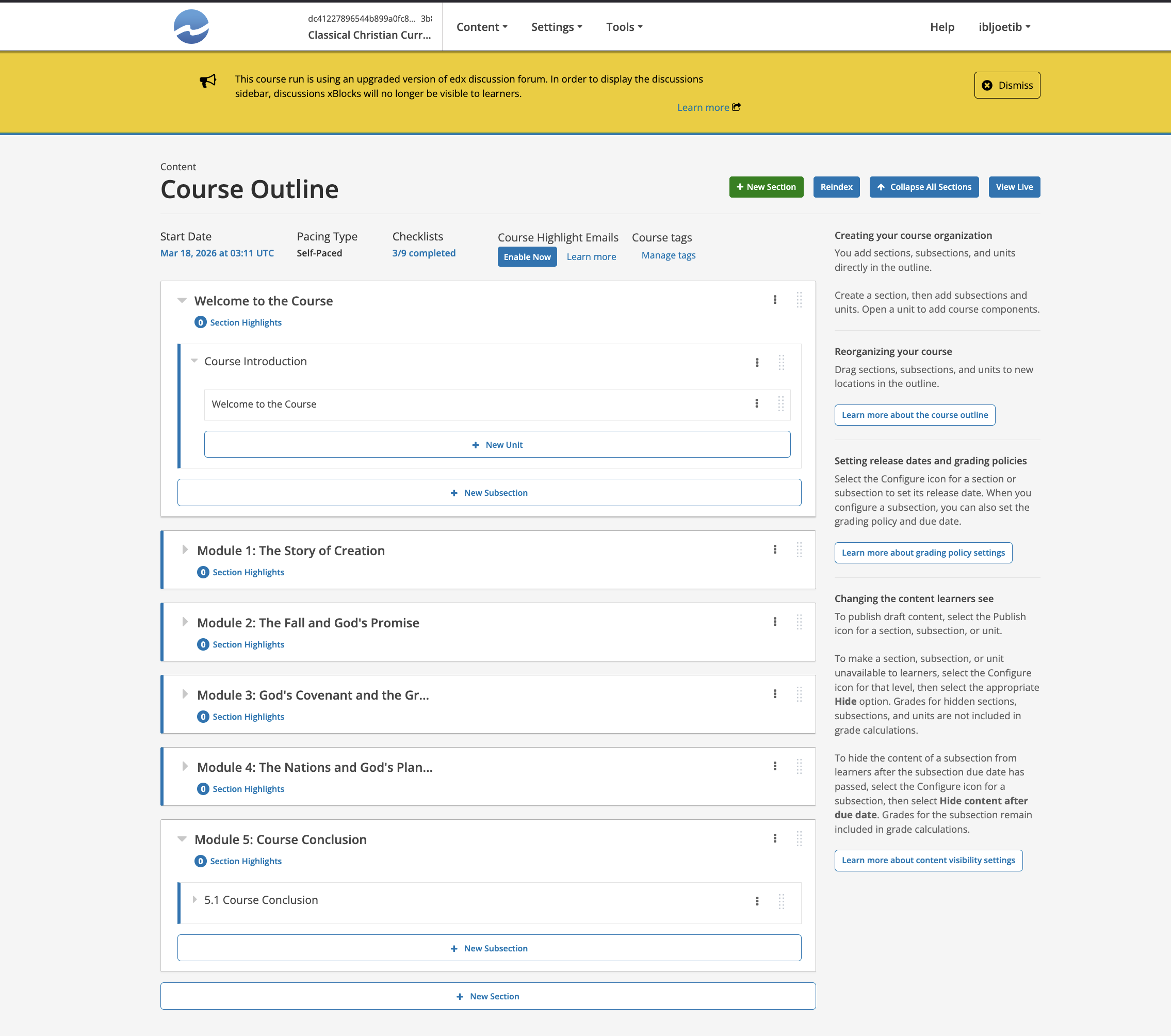
EdX Block Hierarchy (critical)
Course
└── Section       (chapter)
    └── Subsection    (sequential)
        └── Unit          (vertical)
            └── Component   (html | problem | video)
Each block has an xblock_id EdX locator:
block-v1:{org}+{course}+{run}+type@{type}+block@{slug}The segment type@<type> identifies the block kind: course, chapter, sequential, vertical, html, problem, video. Parent/child relationships are enforced by the API:
| Child | Valid parent |
|---|---|
| section | course |
| subsection | section |
| unit | subsection |
| html | unit |
| problem | unit |
| video | unit |
Violating hierarchy returns 400.
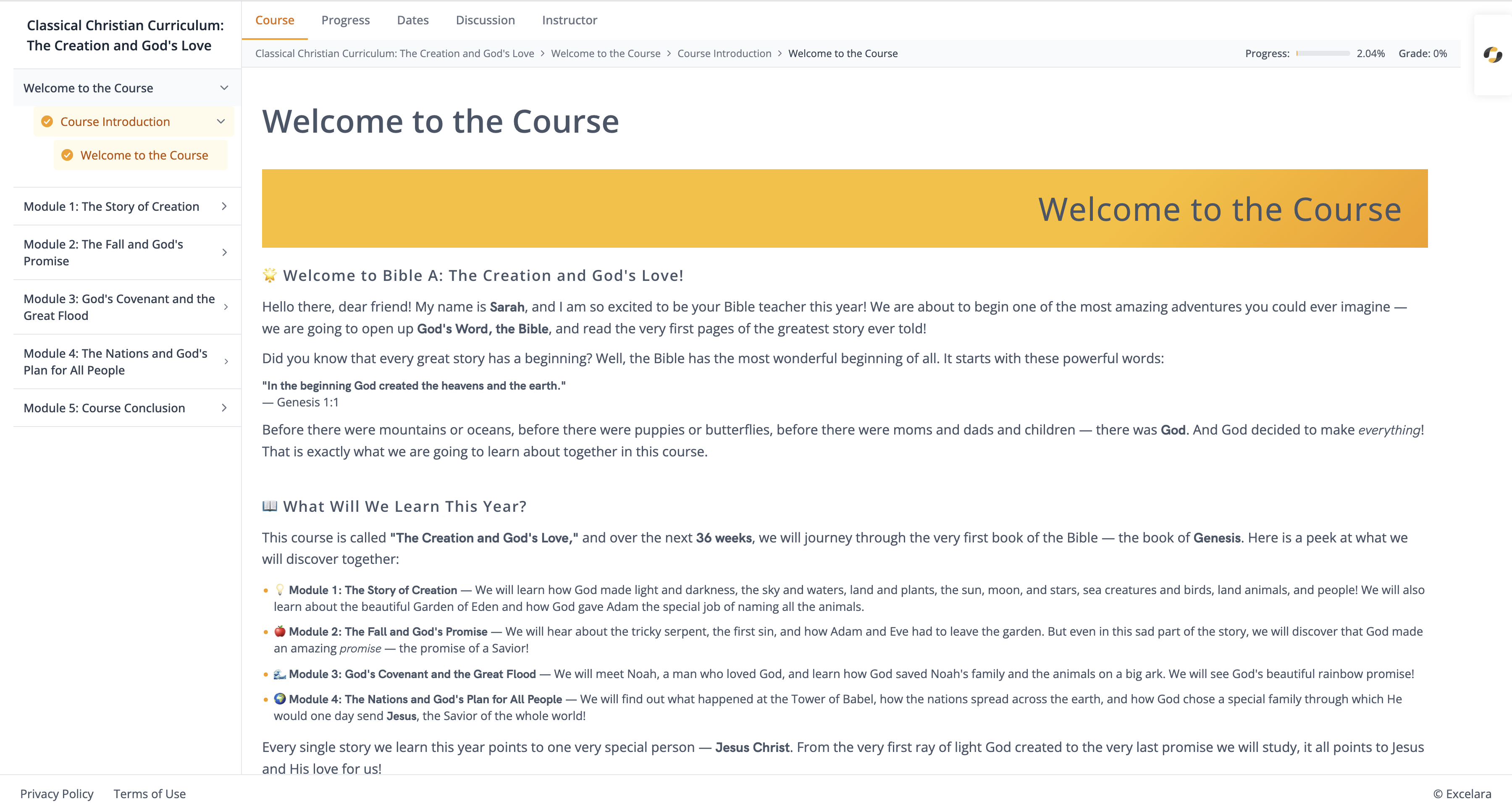
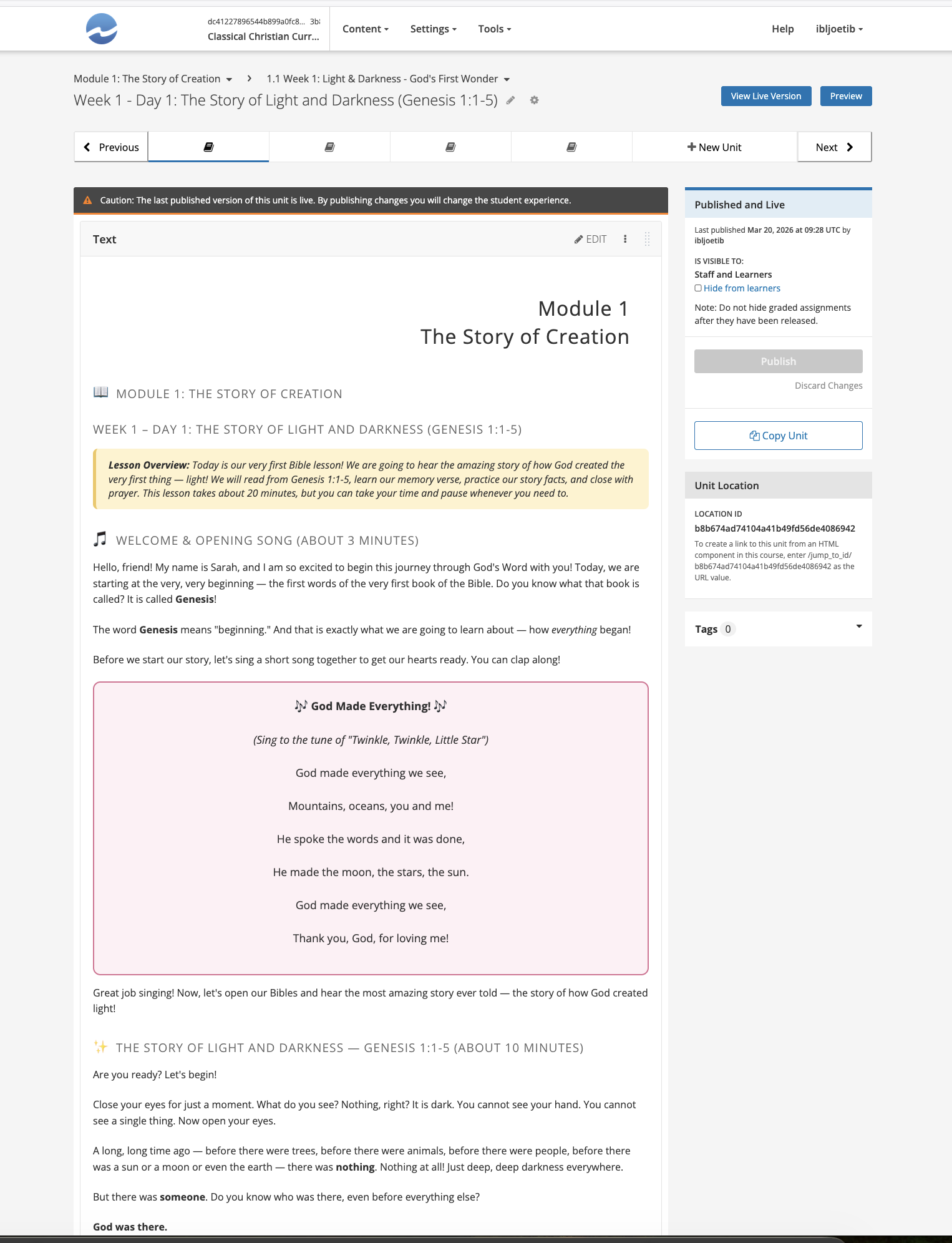
What the generated course looks like in edX Studio (course outline and a single unit with components):
Task Lifecycle
A CourseCreationTask stores the generation brief and tracks progress. Its status transitions:
Pending → Scheduled → In Progress → Success | Failed | CancelledPendingafterPOST /tasks/ScheduledafterGET /tasks/{id}/start/In Progresswhile the Celery worker runsSuccessonce the outline + content + publish have all completedFailedon any unrecoverable error (check task detail forerror/reason)
Primary Endpoints
All paths below are appended to the base root {base_url}/api/ai-mentor/orgs/{org}/users/{user_id}/.
Task endpoints
| Action | Method | Path |
|---|---|---|
| Create task | POST | course-creation/tasks/ |
| List tasks | GET | course-creation/tasks/ |
| Task detail / status | GET | course-creation/tasks/{task_id}/ |
| Delete task | DELETE | course-creation/tasks/{task_id}/ |
| Create course on EdX | POST | course-creation/tasks/{task_id}/create-course/ |
| Generate outline (AI) | POST | course-creation/tasks/{task_id}/create-course-outline/ |
| Start full pipeline | GET | course-creation/tasks/{task_id}/start/ |
| Cancel pipeline | GET | course-creation/tasks/{task_id}/cancel/ |
Course endpoints
| Action | Method | Path |
|---|---|---|
| List courses | GET | course-creation/course/ |
| Course by task | GET | course-creation/course/?task={task_id} |
| Course detail | GET | course-creation/course/{course_id}/ |
| Delete course record | DELETE | course-creation/course/{course_id}/ |
| Outline (no component content) | GET | course-creation/course/{course_id}/outline/ |
| Full structure | GET | course-creation/course/{course_id}/full-structure/ |
| Full structure + HTML | GET | course-creation/course/{course_id}/full-structure/?include_content=true |
| Draft content for all units | GET | course-creation/course/{course_id}/draft-content-for-all-units/ |
| Draft content for one unit | POST | course-creation/course/{course_id}/draft-content-for-unit/ |
| Create xblock | POST | course-creation/course/{course_id}/create-xblock/ |
| Update xblock | POST | course-creation/course/{course_id}/update-xblock/ |
| Delete xblock | POST | course-creation/course/{course_id}/delete-xblock/ |
| Reorder children | POST | course-creation/course/{course_id}/reorder-children/ |
| Publish to EdX | POST | course-creation/course/{course_id}/sync-to-edx/ |
| Student progress | GET | course-creation/course/{course_id}/student-progress/?target_username={username} |
File endpoints
| Action | Method | Path |
|---|---|---|
| Upload file | POST | course-creation/files/ (multipart) |
| List files | GET | course-creation/files/ |
| Delete file | DELETE | course-creation/files/{id}/ |
Request Payloads
Create task (POST /course-creation/tasks/)
{
  "name": "Introduction to Python Programming",
  "description": "A beginner-friendly course covering Python fundamentals: variables, primitive data types, control flow (if/else, for, while), functions, error handling, and basic data structures (lists, tuples, dicts, sets). Emphasize hands-on coding with small, runnable exercises. Avoid object-oriented programming — that belongs in a follow-up course.",
  "target_audience": "First-year undergraduates with no prior programming experience. English is a second language for ~40% of the cohort.",
  "publish_course": true,
  "provider": "openai",
  "model": "gpt-4o-mini",
  "desired_number_of_sections": 4
}| Field | Required | Default | Notes |
|---|---|---|---|
name | Yes | — | Course display name |
description | Yes | — | Detailed scope — see Writing the description below |
target_audience | Yes | — | User profile |
publish_course | No | true | Auto-publish on sync |
provider | No | "openai" | LLM provider |
model | No | "gpt-4o-mini" | Larger models give better structure; gpt-4o or gpt-4.1 for complex courses |
desired_number_of_sections | No | 4 | 3–6 is typical; higher values produce thinner sections |
Create xblock (POST /course-creation/course/{course_id}/create-xblock/)
{
  "parent_xblock_id": "<parent locator>",
  "xblock_type": "section | subsection | unit | html | problem | video",
  "display_name": "Readable title",
  "content": "<optional, only for html/problem/video>",
  "position": "last"
}
html content is HTML. problem content is EdX OLX problem XML. video accepts HTML wrapping a video embed.
Update xblock
{
  "xblock_id": "<locator>",
  "display_name": "Optional new title",
  "content": "<optional, only for html/problem>"
}
Omit either field to leave it unchanged. Sending neither returns 400.
Delete xblock
{ "xblock_id": "<locator>" }Deletions cascade (section → subsections → units → components) and are irreversible.
Reorder children
{
  "xblock_id": "<parent locator>",
  "children": ["<child locator 1>", "<child locator 2>", "..."]
}
You must list every current child. To move a block to a different parent, include it in the new parent's children array — EdX will detach it from its former parent automatically.
Recommended Workflow (Stepwise)
1. POST   /course-creation/tasks/                                      → task_id
2. POST   /course-creation/tasks/{task_id}/create-course/              → course_id, course xblock_id
3. POST   /course-creation/tasks/{task_id}/create-course-outline/      → sections/subsections/units on EdX
4. GET    /course-creation/course/{course_id}/full-structure/          → review generated structure
5. (Optional) create/update/delete/reorder xblocks to fix the outline
6. GET    /course-creation/course/{course_id}/draft-content-for-all-units/  → background content drafting
7. Poll /full-structure/?include_content=true until every unit has components
8. (Optional) update individual components via /update-xblock/
9. POST   /course-creation/course/{course_id}/sync-to-edx/             → publish
Polling for content completion
/draft-content-for-all-units/ is asynchronous. Poll either the task status (GET /tasks/{task_id}/) or re-fetch /full-structure/?include_content=true and check that every unit's components array is non-empty. A typical course (3–5 sections, ~15 units) takes 1–3 minutes.
Back-off pattern: start at 20s, double up to 120s, cap at 5 minutes total wait before surfacing a timeout to the user.
Alternative: Fully Automated Pipeline
1. POST /course-creation/tasks/                → task_id
2. GET  /course-creation/tasks/{task_id}/start/
3. Poll /course-creation/tasks/{task_id}/      → wait for status == "Success"
4. GET  /course-creation/course/?task={task_id}→ resolve course_id
Use this only when the user explicitly asks for a "one-shot" course and does not want to approve the outline.
File Attachments (reference material)
Upload up to 4 files, 20 MB each, via multipart to /course-creation/files/:
POST /course-creation/files/
Content-Type: multipart/form-data

course_creation_task=<task_id>
file=<binary>
Supported content: PDFs, Word docs, Markdown, plain text, slide decks. The AI uses these as reference when generating outline and unit content. Upload files before calling create-course-outline or start — files attached later are ignored.
Best Practices for Writing the Course Brief
The quality of description and target_audience dominates output quality. Before calling POST /tasks/, draft the brief following the template below. If the user's brief is vague, ask clarifying questions first — do not send an underspecified task, because outline regeneration is wasteful.
The 5-field brief template
- Subject & scope — what is in, and (explicitly) what is out.
- Learning outcomes — 3–7 verbs-as-outcomes ("by the end, users can build, diagnose, compare…").
- Target audience — prior knowledge, language level, motivation, typical study time/week.
- Pedagogy — tutorial vs. project-based vs. assessment-heavy; how much theory vs. practice.
- Format constraints — number of sections, approximate length, any required topics.
Good vs. weak briefs
Weak (produces generic, thin course):
description: "A course on Python."target_audience: "Beginners."
Strong (produces coherent, teachable course):
description: "A project-based introduction to Python 3.11 focused on data-wrangling for non-engineers. Cover variables, control flow, functions, file I/O, and the csv + json modules. Every section ends with a mini-project using a realistic dataset (airline delays, climate records). Exclude object-oriented programming, decorators, async, and type hints — a follow-up course covers those. Use an encouraging, low-jargon tone."target_audience: "Working analysts (marketing, ops, journalism) with spreadsheet fluency but no programming background. ~4 hours/week, 6 weeks total."
Refinement rules (apply before submitting the task)
- State exclusions explicitly. LLMs over-include. Saying "do not cover OOP" is more effective than listing only what to include.
- Convert vague adjectives into measurable ones. "Beginner" → "assumes high-school algebra, no coding"; "advanced" → "assumes 2+ years professional experience with X".
- Name the artefact type. "Tutorial course with hands-on exercises", "exam-prep course with graded quizzes after every subsection", "capstone course culminating in a single graded project".
- Right-size
desired_number_of_sections. 3 = short workshop, 4–5 = term course, 6–8 = bootcamp. Going above 8 usually produces weak sections. - Pick the model to match complexity.
gpt-4o-miniis fine for most intro courses; usegpt-4o/gpt-4.1when the description mentions formal reasoning, technical depth (graduate-level math, law, medicine), or multiple cross-referenced modules. - Attach reference files for domain specificity. If the course must align with a textbook, syllabus, curriculum standard, or style guide, upload it. One good PDF outperforms several paragraphs of description.
Clarifying-question checklist
If any of these is unknown after the user's initial brief, ask before creating the task:
- Who is the user? (background + motivation)
- What should they be able to do by the end?
- How long is the course? (weeks, sections, hours)
- Tutorial, assessment-heavy, or project-based?
- Any topics to exclude or must-cover topics?
- Reference material to upload?
- Publish immediately or keep in draft?
Reviewing AI Output
After the outline (step 3) and again after content drafting (step 6), always pull /full-structure/?include_content=true and verify:
- Every unit has ≥1 component. Empty units are a drafting failure — re-run
draft-content-for-unitfor that locator. - Section/subsection titles are non-redundant. LLMs sometimes produce "Introduction" as both section 1 and section 1's first subsection — rename via
update-xblock. - Assessment problems have valid OLX. Open the
contentfield; it must contain a<problem>…</problem>wrapper with at least one response input. Malformed OLX silently fails on publish. - HTML components don't leak prompts. Look for telltale phrases ("As an AI…", "Here is the lesson…"). If found, re-draft that unit.
- Total length is coherent. A course targeted at 4 hours/week for 6 weeks should have roughly 24 units of substantive content; adjust by adding/removing sections.
Curl Recipes
# IBLAI_BASE_URL overrides; else compose from iblai.env's DOMAIN (default iblai.app).
DOMAIN=$(grep -m1 '^DOMAIN=' iblai.env 2>/dev/null | cut -d= -f2-)
export BASE="${IBLAI_BASE_URL:-https://api.${DOMAIN:-iblai.app}/dm}/api/ai-mentor/orgs/$IBLAI_ORG/users/$IBLAI_USER_ID"
export AUTH="Authorization: Api-Token $IBLAI_API_KEY"

# 1. Create task
TASK_ID=$(curl -s -X POST "$BASE/course-creation/tasks/" \
  -H "$AUTH" -H "Content-Type: application/json" \
  -d '{
    "name": "Intro to Python for Analysts",
    "description": "Project-based intro ... (full brief)",
    "target_audience": "Working analysts ...",
    "desired_number_of_sections": 5,
    "provider": "openai",
    "model": "gpt-4o"
  }' | jq -r .id)

# 2. Create blank course on EdX
RESP=$(curl -s -X POST "$BASE/course-creation/tasks/$TASK_ID/create-course/" -H "$AUTH")
COURSE_ID=$(echo "$RESP" | jq -r .course_id)
COURSE_XBLOCK=$(echo "$RESP" | jq -r .xblock_id)

# 3. Generate outline (synchronous)
curl -s -X POST "$BASE/course-creation/tasks/$TASK_ID/create-course-outline/" -H "$AUTH"

# 4. Review outline
curl -s "$BASE/course-creation/course/$COURSE_ID/full-structure/" -H "$AUTH" | jq

# 5. Edit: add a bonus section
curl -s -X POST "$BASE/course-creation/course/$COURSE_ID/create-xblock/" \
  -H "$AUTH" -H "Content-Type: application/json" \
  -d "{\"parent_xblock_id\":\"$COURSE_XBLOCK\",\"xblock_type\":\"section\",\"display_name\":\"Bonus: Working with APIs\"}"

# 6. Draft all unit content (async)
curl -s "$BASE/course-creation/course/$COURSE_ID/draft-content-for-all-units/" -H "$AUTH"

# 7. Poll until content appears
until [ "$(curl -s "$BASE/course-creation/course/$COURSE_ID/full-structure/?include_content=true" \
       -H "$AUTH" | jq '[.. | .components? // empty | length] | min')" != "0" ]; do
  sleep 30
done

# 8. Publish
curl -s -X POST "$BASE/course-creation/course/$COURSE_ID/sync-to-edx/" -H "$AUTH"
Error Handling
| Symptom | Likely cause | Remedy |
|---|---|---|
create-course returns 200 (not 201) | Course already exists for this task | Re-use returned course_id; a settings re-apply has been scheduled. |
create-course-outline returns 400 | Outline LLM call failed (rate limit, bad brief) | Check detail; refine description and retry, or switch to bigger model. |
create-xblock returns 400 "invalid parent" | Hierarchy violation | Confirm the parent type@ segment matches required parent type. |
sync-to-edx returns 400 "no task associated" | Course record lost its task link | Recreate via the task's create-course endpoint. |
Task stuck in In Progress for > 15 min | Celery worker stalled or LLM timeout | GET .../cancel/, then restart with GET .../start/. |
draft-content-for-unit succeeds but content looks empty | Component created without body | Re-draft; if persistent, update component manually via update-xblock. |
Guardrails
- Never publish without review. Always fetch
/full-structure/?include_content=trueand confirm with the user before callingsync-to-edx— published EdX courses are visible to enrolled students and costly to retract. - Don't mass-delete.
delete-xblockon a section is irreversible and cascades. Confirm target before calling. - Respect file limits. Max 4 files per task, 20 MB each. Over-limit uploads are rejected with 400.
- Tenant isolation.
organduser_idmust match the authenticated user's platform and username — cross-organization requests return 403. Do not attempt to create courses in an organization different from the caller's. - Do not leak the API key. Treat
api_keyas a bearer secret; never echo it in responses, logs, or committed files. - Background tasks can fail silently to the caller. After
/start/or/draft-content-for-all-units/, always verify downstream (status polling, full-structure fetch) rather than trusting the 202/200 response. - Ask before picking a larger/more expensive model.
gpt-4o/gpt-4.1cost materially more thangpt-4o-mini. Confirm with the user when complexity warrants it; otherwise default togpt-4o-mini.