/iblai-vibe-agent-support
Mirrored from
iblai/vibe·skills/agents/iblai-vibe-agent-support/SKILL.md. This page is generated — edit it in the repository, not here.
Add the agent Support tab -- a human-support inbox for one agent. When
a user asks the agent for a person, the agent files a ticket; admins
review, reply to and resolve it here. Scope: per agent. The switch turns
the hand-over on for this agent, and the inbox lists only this agent's
tickets. This is one tab in the agent-settings family indexed by
/iblai-vibe-agent; it shares the AgentSettingsProvider wrapper with every
other tab.
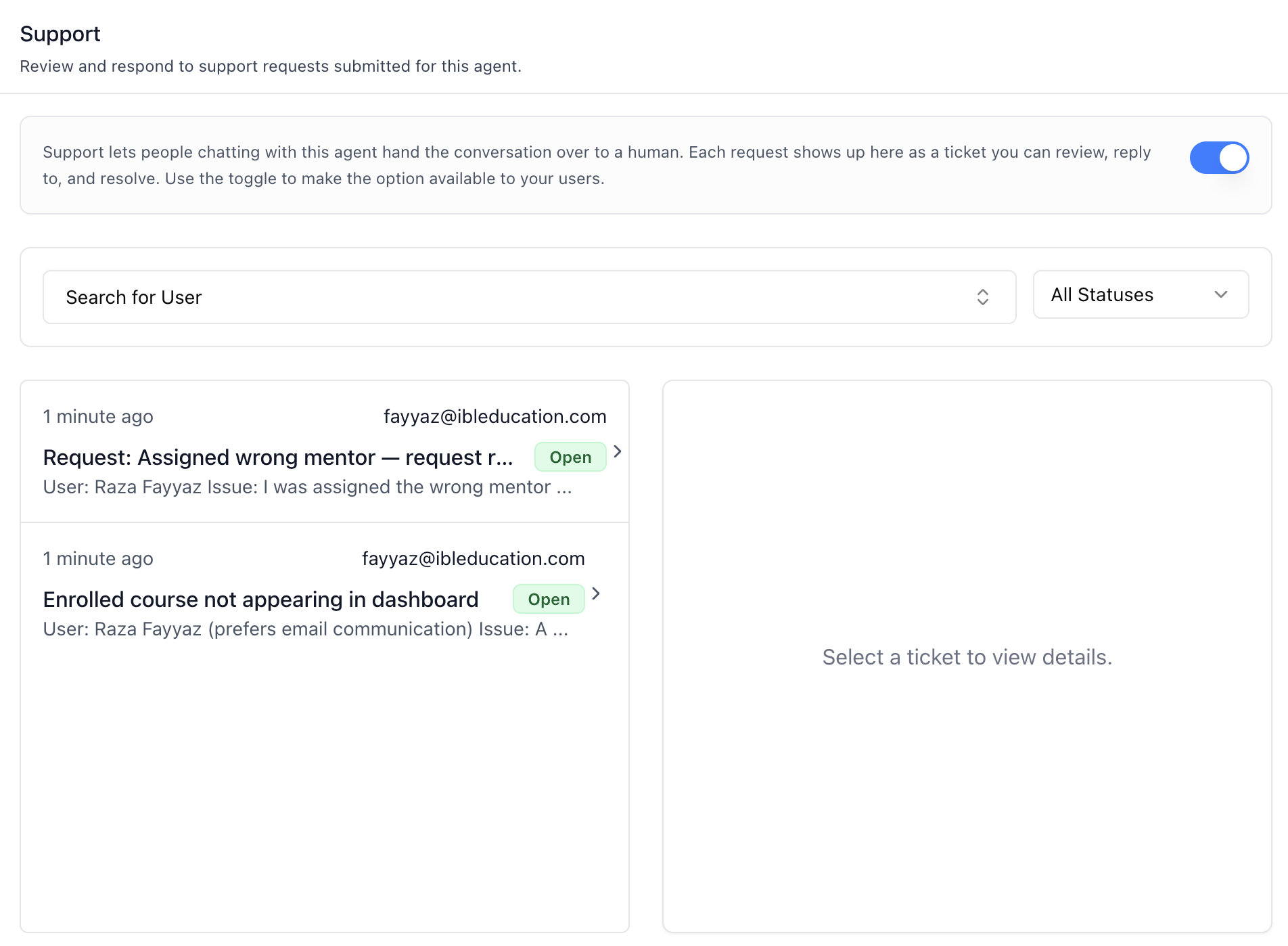
Tickets -- the switch (the agent's human support tool, the same one as in the Tools tab), a user filter (search the organization's users), a status filter (All / Open / In Progress / Closed), and the inbox: when, requester email, subject, a status badge (Open green, In Progress amber, Closed gray) and a preview, 10 per page.
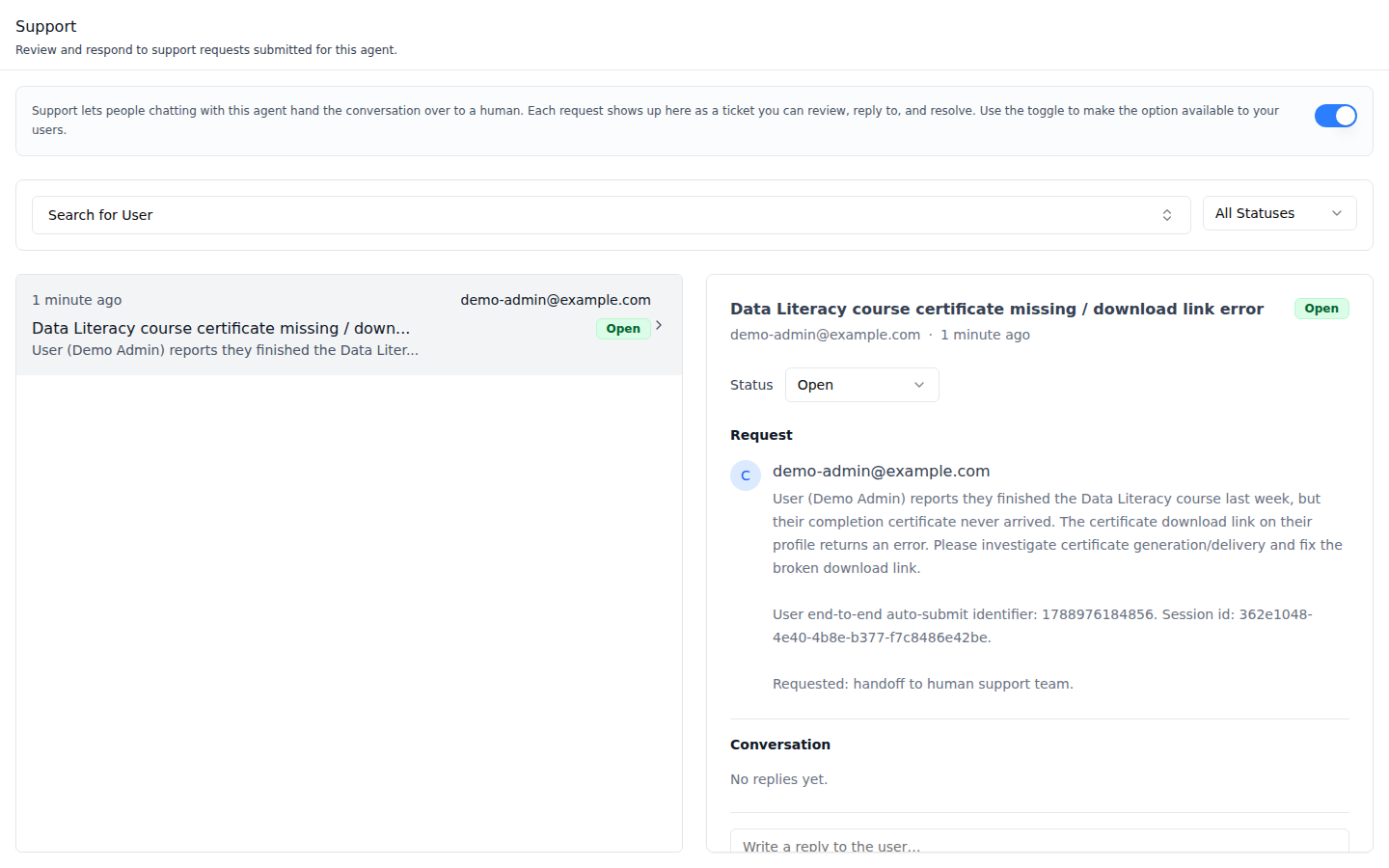
A ticket -- subject, requester, status, the Request the agent wrote
(HTML and Markdown render sanitized), the Conversation, and a reply box.
Below the md breakpoint the ticket opens in a dialog instead.
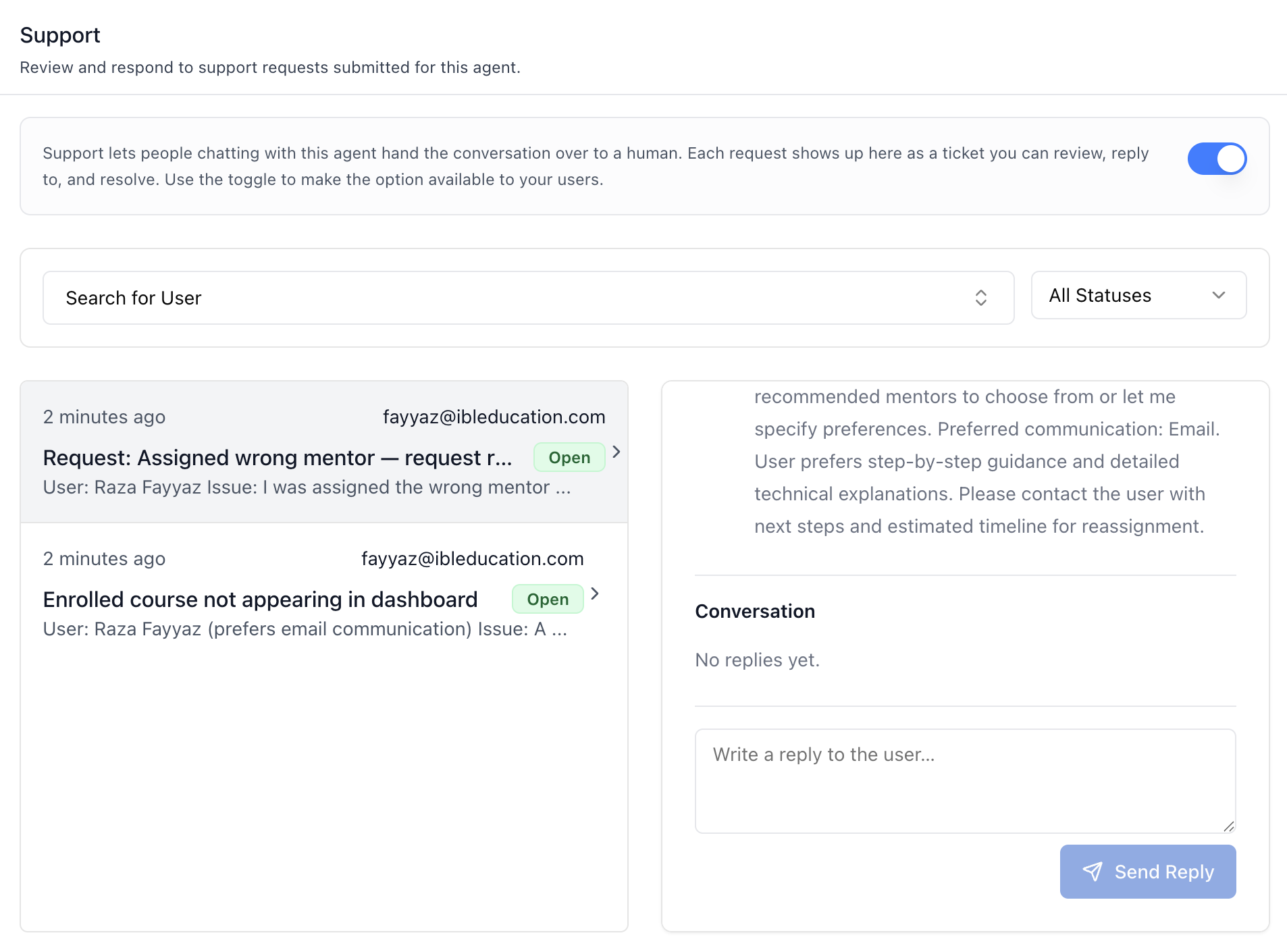
Reply -- Send Reply adds the message to the conversation, oldest first. (In this shot the admin is also the requester, so both lines show the same email.)
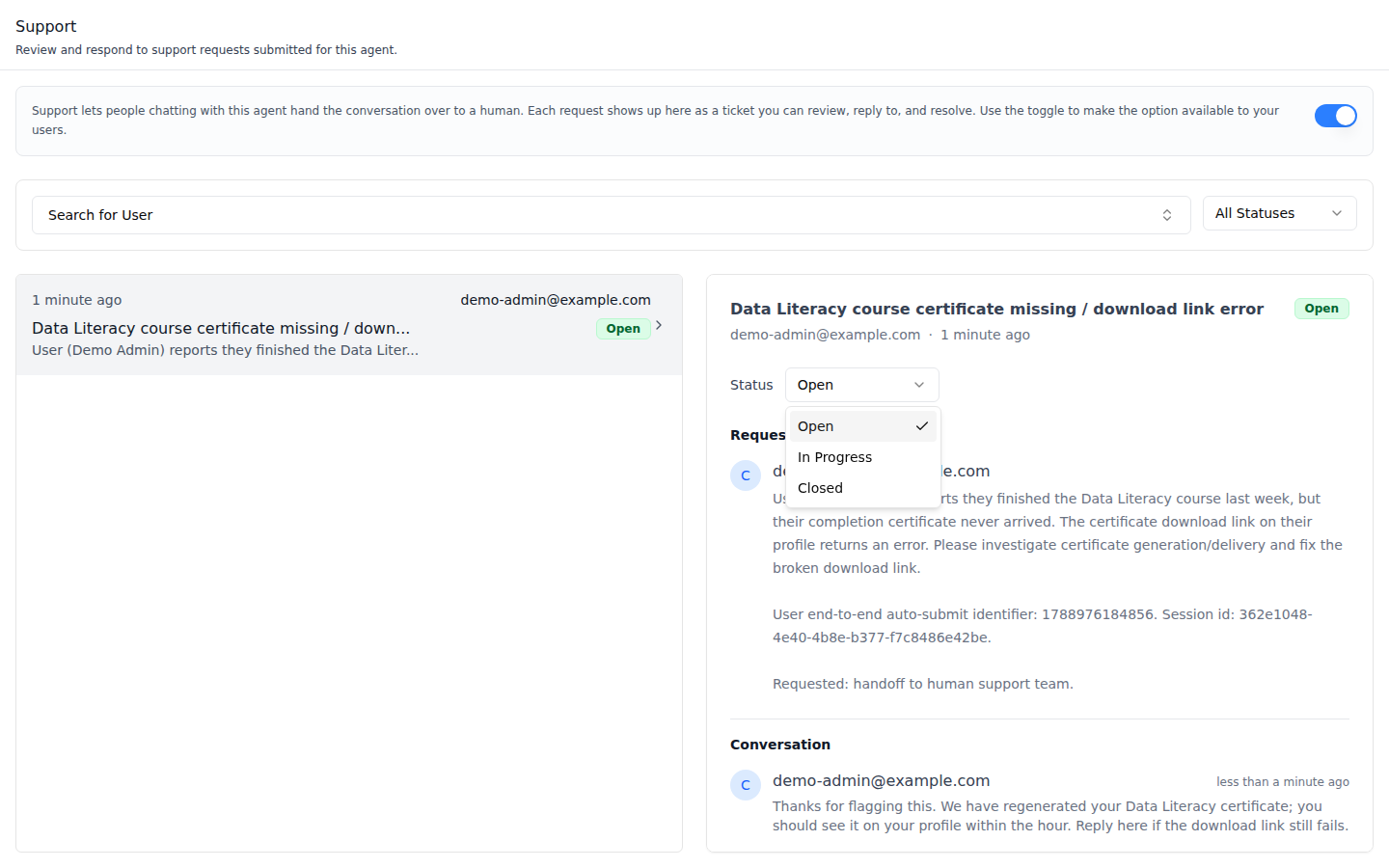
Status -- Open, In Progress or Closed. A closed ticket replaces the reply box with "This ticket is closed. Set it back to Open or In Progress to reply."
Common setup (brand, conventions, env files, verification): see docs/skill-setup.md.
Prerequisites
- Auth set up (
/iblai-vibe-auth, or vibe-starter). AgentSettingsProviderwraps the route (/iblai-vibe-agent§1). The tab throws without it: it has no identity props.@iblai/iblai-js@^2.62.1(resolves@iblai/web-containers1.62.1). Check withpnpm why @iblai/web-containers.- A real agent UUID. Ask the user; never invent one.
- The organization's tool catalogue needs the human support tool, or the switch is hidden (the inbox still works).
Step 1: Check Environment
Look for iblai.env in the project root with PLATFORM, DOMAIN, and
TOKEN. If it is missing, tell the user:
"You need an iblai.env with your platform configuration. Download the
template and fill in your values:
curl -o iblai.env https://raw.githubusercontent.com/iblai/vibe/refs/heads/main/iblai.env"
Step 2: Mount AgentHumanSupportTab
// app/(app)/agents/[mentorId]/support/page.tsx
"use client";

import { AgentHumanSupportTab } from "@iblai/iblai-js/web-containers/next";

export default function AgentSupportPage() {
  return (
    <div className="flex h-full flex-col bg-white">
      <AgentHumanSupportTab />
    </div>
  );
}
The tab reads tenantKey, mentorId, and username from
AgentSettingsProvider and does its own fetching and saving. No props are
required. To use your own pagination under the inbox, pass
PaginationComponent (it gets currentPage, totalPages, onPageChange,
disabled, disableNumberedButtons; the default is the SDK's
IblPagination).
Step 3: Customize Labels (Optional)
The tab renders with the default agent-facing copy
(AGENT_HUMAN_SUPPORT_TAB_LABELS, localized through the SDK's i18n). Pass a
partial labels object to change any string:
import { AgentHumanSupportTab } from "@iblai/iblai-js/web-containers/next";

<AgentHumanSupportTab
  labels={{
    header: { title: "Help desk" },
    detail: { sendReply: "Reply" },
  }}
/>;
Label groups (HumanSupportTabLabels): header (title, description,
infoBox), toggle (enable, updated, error), filters (searchUser,
allUsers, allStatuses), status (open, inProgress, closed), list
(noTickets, untitled), detail (selectPrompt, statusLabel,
requestSection, conversationSection, supportTeam, noMessages,
replyPlaceholder, sendReply, sending, closedNotice), and toasts
(replySent, replyError, statusUpdated, statusError).
Step 4: Use MCP Tools for Customization
get_component_info("AgentHumanSupportTab")
get_component_info("AgentSettingsProvider")
<AgentHumanSupportTab> Props
Import from @iblai/iblai-js/web-containers/next.
| Prop | Type | Required | Description |
|---|---|---|---|
labels | DeepPartial<HumanSupportTabLabels> | No | Override user-visible strings |
PaginationComponent | ComponentType<{ currentPage, totalPages, onPageChange, disabled, disableNumberedButtons }> | No | Pagination under the inbox. Defaults to the SDK's IblPagination |
Related Exports
From @iblai/iblai-js/web-containers/next:
AGENT_HUMAN_SUPPORT_TAB_LABELS-- the default label bundle.AgentHumanSupportTabProps,HumanSupportTabLabels,SupportTicketsFilter(the status and requester filter state) -- types.
How it saves
Paths are under /api/ai-mentor/orgs/{org}/users/{username}/.
| Action | Request |
|---|---|
| Load | GET support-tickets/?mentor_id=<uuid>&page=&page_size=10 (plus status and username from the filters) |
| Open a ticket | GET support-ticket-messages/?ticket={id} |
| Send Reply | POST support-ticket-messages/ with the ticket and the message |
| Status Open / In Progress | PATCH support-tickets/{id}/ with status |
| Status Closed | POST support-tickets/{id}/close/ |
| The switch | PUT mentors/{uuid}/settings/ with the agent's tool_slugs (the human support tool added or removed) and can_use_tools |
There is no create here: the agent files tickets during chats. The tab has no delete either; the REST twin has one.
Platform data
| Hook | Purpose |
|---|---|
useGetSupportTicketsQuery | The inbox (paged) |
useGetSupportTicketMessagesQuery / useCreateSupportTicketMessageMutation | The conversation and replies |
usePatchSupportTicketMutation / useCloseSupportTicketMutation | Status changes |
usePlatformUsersQuery | The user filter |
All from @iblai/iblai-js/data-layer, with the SupportTicket,
SupportTicketMessage and SupportTicketStatus types. REST twin:
/iblai-api-agent-support.
Step 5: Verify
Run /iblai-vibe-ops-test before telling the user the work is ready, and give
every page, control and state this skill added its own checkpoint — one Playwright
test titled <ID> · … in e2e/journeys/, listed in e2e/coverage.json;
pnpm e2e:coverage must pass:
pnpm build-- must pass with zero errors.pnpm test-- vitest must pass.- Touch test
/agents/<uuid>/supportin the browser as/iblai-vibe-ops-testsays, signed in as an org admin: the switch and filters render; turn the switch on, ask the agent in chat to hand you to a human -- a ticket appears in the inbox; read the console; check the phone width.
Important Notes
- The switch is a tool: it edits the agent's tools, the same list as
the Tools tab (
/iblai-vibe-agent-tool). Turning it off hides the hand-over from users; existing tickets stay workable. - Admins see everything: org admins see every ticket for the agent; other users see only their own.
- Shared provider: mount
AgentSettingsProvideronce at the layout level (/iblai-vibe-agent§1); do not wrap each tab. - Peer deps:
sonnerand@iblai/iblai-web-mentor(pnpm add sonner @iblai/iblai-web-mentor). - Brand guidelines: BRAND.md