/iblai-vibe-agent-dataset
Mirrored from
iblai/vibe·skills/agents/iblai-vibe-agent-dataset/SKILL.md. This page is generated — edit it in the repository, not here.
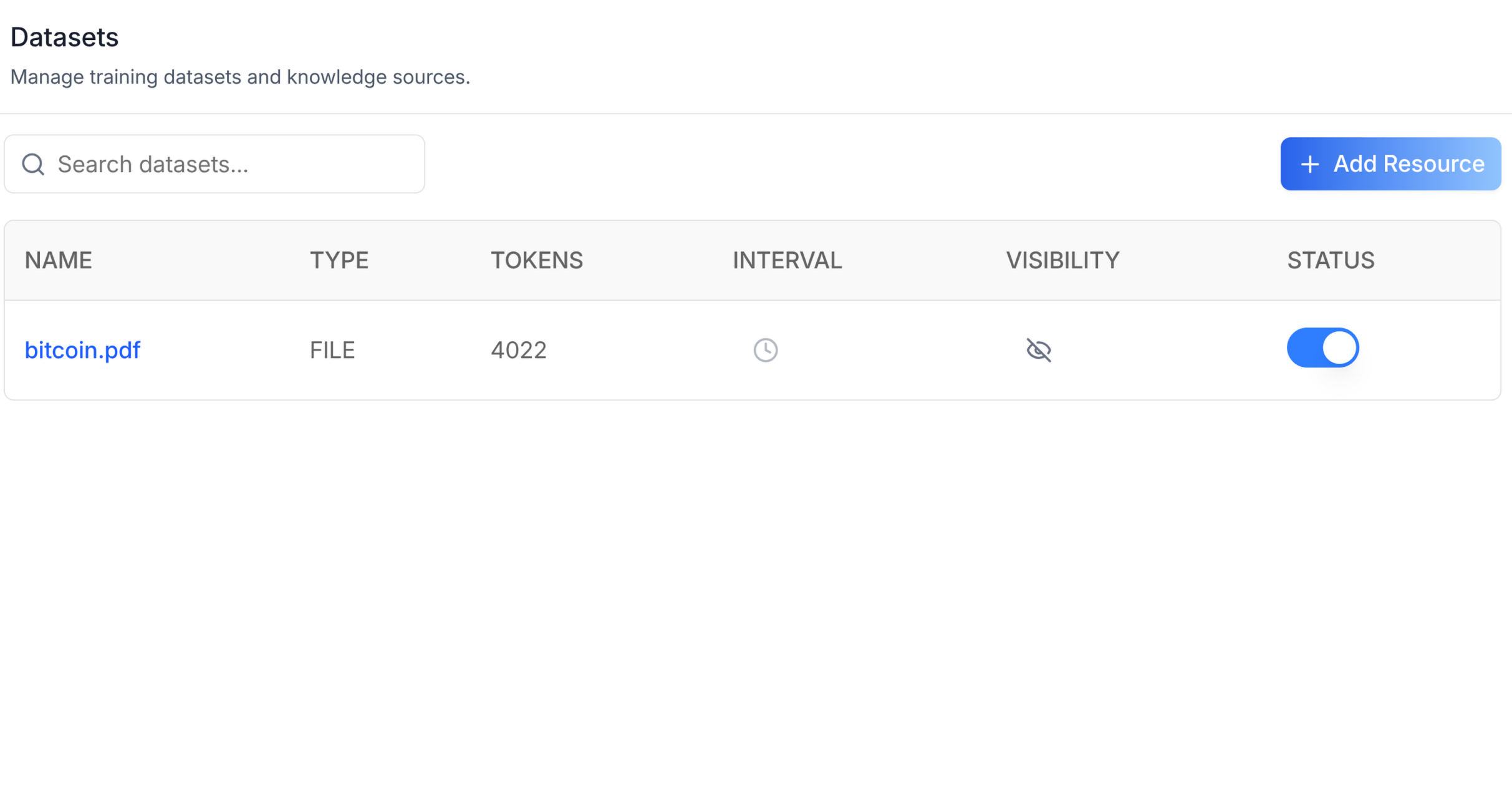
Add the agent Datasets tab -- a searchable, paginated table of datasets
with columns for name, type, tokens, interval, visibility, and status.
Includes an "Add Resource" slot for file uploads and a delete action per
row. This is one tab in the wider agent-settings family. All tabs share
the same AgentSettingsProvider wrapper.
Common setup (brand, conventions, env files, verification): see docs/skill-setup.md.
Prerequisites
- Auth must be set up first (
/iblai-vibe-auth) - MCP server + skills configured (
@iblai/mcpin.mcp.json) AgentSettingsProvidermust wrap the route (see/iblai-vibe-agent-settingStep 2 if not already set up)- Ask the user for a real
mentorId(agent UUID). Do NOT invent one.
Step 1: Check Environment
Before proceeding, check for an iblai.env in the project root. Look for
PLATFORM, DOMAIN, and TOKEN variables. If the file does not exist or
is missing these variables, tell the user:
"You need an iblai.env with your platform configuration. Download the
template and fill in your values:
curl -o iblai.env https://raw.githubusercontent.com/iblai/vibe/refs/heads/main/iblai.env"
Step 2: Mount AgentDatasetsTab
// app/(app)/agents/[mentorId]/datasets/page.tsx
"use client";

import { AgentDatasetsTab } from "@iblai/iblai-js/web-containers/next";

export default function AgentDatasetsPage() {
  return (
    <div className="flex h-full flex-col bg-white">
      <AgentDatasetsTab />
    </div>
  );
}
With custom Add Resource modal
The AddResourceModal prop is a render slot for file upload UI. When
omitted, the "Add Resource" button is shown but no modal opens. Inject
your own implementation:
<AgentDatasetsTab
  AddResourceModal={({ isOpen, onClose }) => (
    <MyUploadModal open={isOpen} onClose={onClose} />
  )}
/>
With pagination
Inject a pagination component via the PaginationComponent prop:
<AgentDatasetsTab
  PaginationComponent={({ currentPage, totalPages, onPageChange, disabled }) => (
    <MyPagination
      page={currentPage}
      total={totalPages}
      onChange={onPageChange}
      disabled={disabled}
    />
  )}
/>
Step 3: Customize Labels (Optional)
import { AgentDatasetsTab } from "@iblai/iblai-js/web-containers/next";

<AgentDatasetsTab
  labels={{
    header: { title: "Training data" },
  }}
/>;
Step 4: Use MCP Tools for Customization
get_component_info("AgentDatasetsTab")
get_component_info("AgentSettingsProvider")
<AgentDatasetsTab> Props
Import from @iblai/iblai-js/web-containers/next.
| Prop | Type | Required | Description |
|---|---|---|---|
labels | DeepPartial<DatasetsTabLabels> | No | Override user-visible strings |
onSelect | (dataset: Dataset) => void | No | Called when a dataset row is selected |
selectedDatasetId | string | No | Highlight the row matching this ID |
AddResourceModal | ComponentType<{ isOpen, onClose, keepParentOpen? }> | No | Custom upload modal. Without it the button shows but no modal opens |
PaginationComponent | ComponentType<{ currentPage, totalPages, onPageChange, disabled }> | No | Custom pagination. Without it no pagination UI renders |
Related Exports
From @iblai/iblai-js/web-containers/next:
DatasetsTabLabels-- type for the full label bundle.Dataset-- type for a single dataset row.
Step 5: Verify
Run /iblai-vibe-ops-test before telling the user the work is ready:
pnpm build-- must pass with zero errorspnpm test-- vitest must pass- Touch test
/agents/<id>/datasetin the browser as/iblai-vibe-ops-testsays: open it, use every control this skill added, read the console, check the phone width.
Important Notes
- Redux store: Must include
mentorReducerandmentorMiddleware initializeDataLayer(): 5 args (v1.2+)@reduxjs/toolkit: Deduplicated via webpack aliases innext.config.ts- Peer deps:
sonnerand@iblai/iblai-web-mentormust be installed (pnpm add sonner @iblai/iblai-web-mentor) - Shared provider:
AgentSettingsProvidermust wrap the route at a layout level. See/iblai-vibe-agent-settingStep 2 for the full snippet. - AddResourceModal: The standalone app uses Dropbox/Google Drive/OneDrive pickers with deep dependencies. Consumers inject their own implementation to avoid pulling in those deps.
- Brand guidelines: BRAND.md