/iblai-vibe-invite
Mirrored from
iblai/base·skills/users/iblai-vibe-invite/SKILL.md. This page is generated — edit it in the repository, not here.
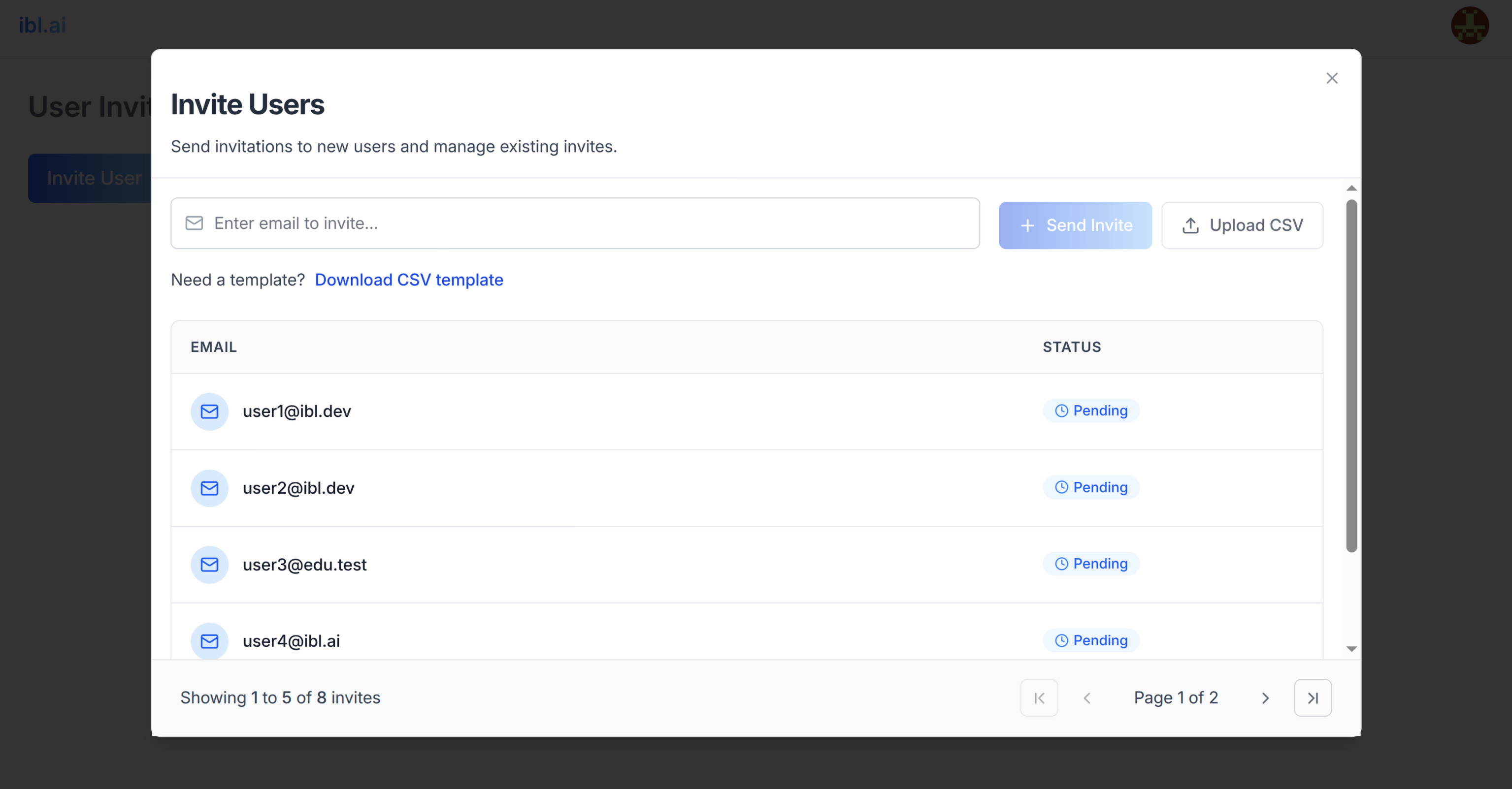
Add user invitation features -- a dialog to invite new users to an
organization by email (one at a time or from a CSV), and a dialog listing
invited users by email. The same invite flow also comes inline
(InviteUserContent) and as the Invites tab of the organization settings,
which needs no dialog of your own (see "The Invites tab instead of a dialog").
Common setup (brand, conventions, env files, verification): see docs/skill-setup.md.
Prerequisites
- Auth must be set up first (
/iblai-vibe-auth) - MCP server + skills configured (
@iblai/mcpin.mcp.json) - The user sending invitations is an organization admin (under RBAC, the
Invites tab also opens to a user who holds
/platforms/<org>/#can_invite)
Step 1: Check Environment
Before proceeding, check for a iblai.env
in the project root. Look for PLATFORM, DOMAIN, and TOKEN variables.
If the file does not exist or is missing these variables, tell the user:
"You need an iblai.env with your platform configuration. Download the
template and fill in your values:
curl -o iblai.env https://raw.githubusercontent.com/iblai/base/refs/heads/main/iblai.env"
Step 2: Add the Components
There is no dedicated CLI generator for invite dialogs. Import the components directly from the SDK:
import { InviteUserDialog, InvitedUsersDialog } from "@iblai/iblai-js/web-containers";Step 3: Use MCP Tools for Customization
get_component_info("InviteUserDialog")
get_component_info("InvitedUsersDialog")
<InviteUserDialog> Props
Dialog to invite users to the organization by email, one at a time or from a CSV.
| Prop | Type | Description |
|---|---|---|
isOpen | boolean | Whether the dialog is visible |
onClose | () => void | Close callback |
tenant | string | Organization key |
enableCatalogInvite | boolean | Adds the Courses and Programs invite tabs (default false) |
hasManageUsersPermission | boolean | Whether the user may manage all of the organization's users (default false) |
<InvitedUsersDialog> Props
Dialog listing the emails on the first page of the organization's invitations,
with no status column and no pager (the invitation list in InviteUserDialog
and in the Invites tab shows Pending, Accepted or Expired). Render it
only while it should show: it has no isOpen.
| Prop | Type | Description |
|---|---|---|
onClose | () => void | Close callback |
tenant | string | Organization key |
Example Usage
Add invite buttons to an admin settings page or account page:
"use client";
import { useState } from "react";
import { InviteUserDialog, InvitedUsersDialog } from "@iblai/iblai-js/web-containers";
import { Button } from "@/components/ui/button";
import { resolveAppTenant } from "@/lib/iblai/tenant";

export function InviteSection() {
  const [showInvite, setShowInvite] = useState(false);
  const [showInvited, setShowInvited] = useState(false);
  const tenant = resolveAppTenant();

  return (
    <div className="flex gap-2">
      <Button onClick={() => setShowInvite(true)}>Invite User</Button>
      <Button variant="outline" onClick={() => setShowInvited(true)}>
        Invited Users
      </Button>
      <InviteUserDialog
        isOpen={showInvite}
        onClose={() => setShowInvite(false)}
        tenant={tenant}
      />
      {showInvited && (
        <InvitedUsersDialog
          onClose={() => setShowInvited(false)}
          tenant={tenant}
        />
      )}
    </div>
  );
}
The Invites tab instead of a dialog
The organization settings (Account, see /iblai-vibe-account) have an
Invites tab, in the Workspace group right below Management, with the
same form and invitation list as InviteUserDialog. Use it when the app
already shows those settings:
Account targetTab="invites",PlatformAccountSheet tab="invites"andUserProfileModal targetTab="invites"open on it.enableCatalogInviteon any of them adds the Courses and Programs tabs.- It shows for an admin who holds
/platforms/<org>/#can_invite(with RBAC off that check passes), or, with RBAC on, for any user who holds it. Anyone else who asks for it lands on their first visible tab. - Inside Management, the Invite buttons on Users and Teams open this
tab, so no second dialog opens over the settings.
onInviteClickis called only for a user who is not shown the tab.
On a page of your own, InviteUserContent is the same flow with no dialog.
It takes tenant, enableCatalogInvite, hasManageUsersPermission,
className, onInviteSuccess (called after an invitation goes out) and
renderHeader, which draws the title and description in your own header
style, or nothing when it returns null:
"use client";
import { InviteUserContent } from "@iblai/iblai-js/web-containers";

export function InvitePage({ tenant }: { tenant: string }) {
  return (
    <InviteUserContent
      tenant={tenant}
      renderHeader={({ title, description }) => (
        <header className="mb-4">
          <h1 className="text-lg font-semibold">{title}</h1>
          <p className="text-sm text-muted-foreground">{description}</p>
        </header>
      )}
    />
  );
}
Step 4: Verify
Run /iblai-vibe-ops-test before telling the user the work is ready, and give
every page, control and state this skill added its own checkpoint — one Playwright
test titled <ID> · … in e2e/journeys/, listed in e2e/coverage.json;
pnpm e2e:coverage must pass:
pnpm build-- must pass with zero errors- Touch test the invite dialogs (or the Invites tab) in the browser as
/iblai-vibe-ops-testsays: each opens, validates and closes — send no real invite.
Important Notes
- Import:
@iblai/iblai-js/web-containers-- framework-agnostic - Admin only: inviting is an organization admin's job; the Invites tab
also follows the
can_invitegrant when RBAC is on - Redux store: Must include
mentorReducerandmentorMiddleware initializeDataLayer(): 5 args (v1.2+)@reduxjs/toolkit: Deduplicated via webpack aliases innext.config.ts- Brand guidelines: BRAND.md