Guide: connecting agents and clients
Mirrored from
iblai/ontology·docs/guides/connect-agents.md. This page is generated — edit it in the repository, not here.
Every server has one endpoint on the platform's ontology server,
https://<host>/<platform>/<slug>/mcp, speaking MCP over streamable HTTP. A console hosted
elsewhere (the pages-only build) shows the server's second address,
https://<host>/iblai/<platform>/<slug>/mcp, which answers the same.
The examples below use the host ontology.university.edu, the platform acme and the server
institution. Anything that speaks MCP can use it, provided it can reach the host and presents a
credential of that platform that the server accepts (permissions.md).
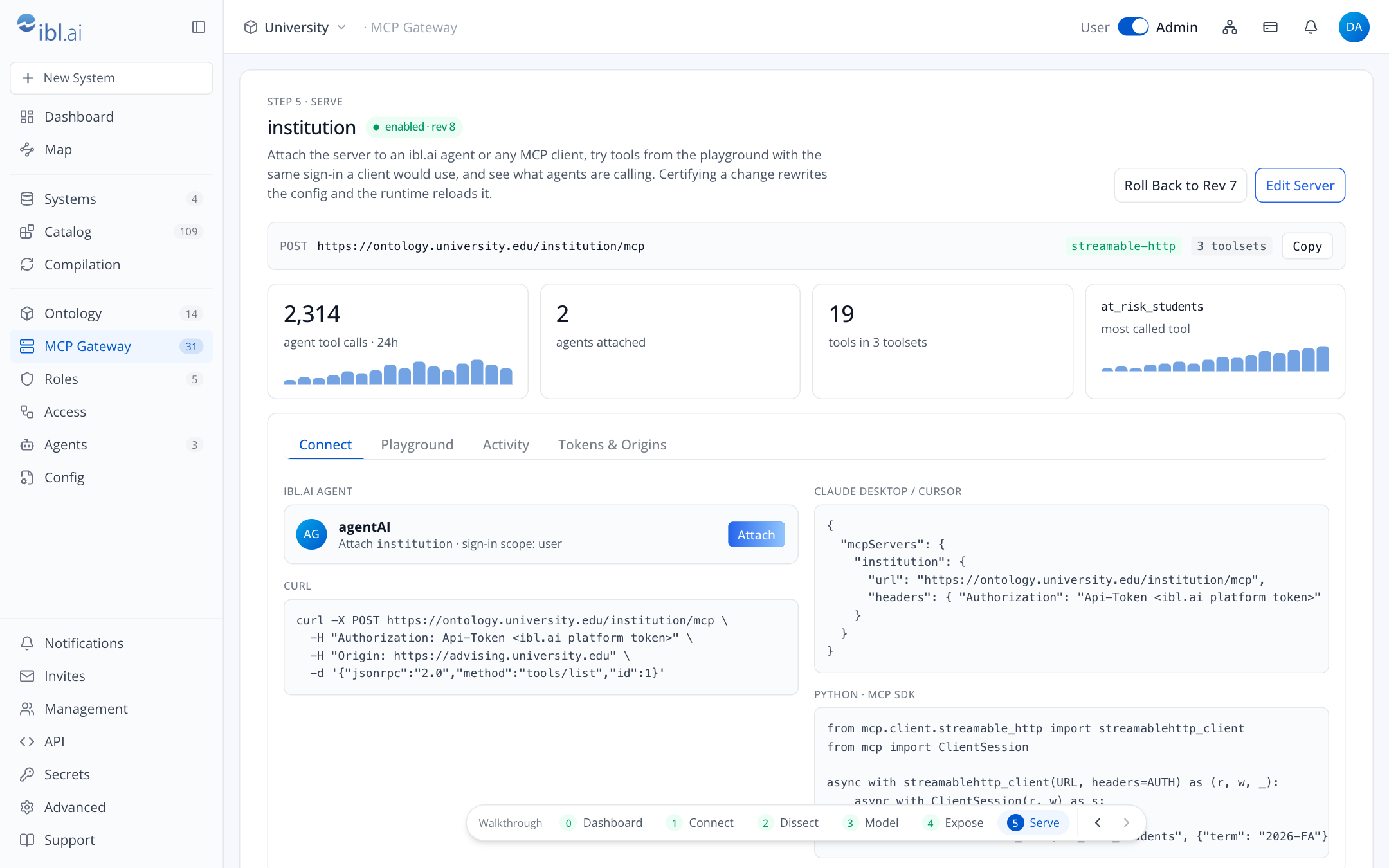
ibl.ai OS agents
Deploying a server writes its config and starts it on the platform's server. It registers nothing on ibl.ai. An agent gets the server when you attach it:
Open the server in the console and press Attach under Connect, or press Attach a Server to an Agent on Agents.
Pick the agent and the toolsets it may use. The console then, with your ibl.ai session:
- makes sure each toolset has its role and its
Ontology: <toolset>policy, - creates an API key limited to those policies,
- registers the server on ibl.ai for that agent alone, with the key as
Api-Token, - turns on the agent's MCP tool with that server.
If a step fails, the steps before it are undone and the message says what was undone.
- makes sure each toolset has its role and its
Verify from the agent: ask "what tools do you have from institution?" and then a real question. The call appears under the server's Activity tab.
The agent only ever talks to ibl.ai; ibl.ai calls https://<host>/<platform>/<slug>/mcp on your
server, which must be reachable on 443 from ibl.ai's egress (network.md).
Claude Desktop and Claude Code
Both read a mcpServers map. The person must reach the host (on the VPN, if it sits behind one)
and hold an API key that reaches the
server's toolsets: MCP Gateway → New MCP Server (or Edit Server) → Authentication → Issue
Token creates one limited to the ticked toolsets and shows it once.
Claude Desktop (claude_desktop_config.json):
{
  "mcpServers": {
    "institution": {
      "url": "https://ontology.university.edu/acme/institution/mcp",
      "headers": { "Authorization": "Api-Token <token>" }
    }
  }
}
Claude Code:
claude mcp add --transport http institution https://ontology.university.edu/acme/institution/mcp \
  --header "Authorization: Api-Token <token>"
With an Entra auth service on the server, the client also sends the person's ID token in the header
the runtime expects (entra_token for a service named entra); the runtime verifies it itself.
Codex CLI
~/.codex/config.toml:
[mcp_servers.institution]
url = "https://ontology.university.edu/acme/institution/mcp"
http_headers = { Authorization = "Api-Token <token>" }
Keep the token out of the file if you can: put it in an environment variable and reference it the
way your Codex version supports (bearer_token_env_var on recent releases, which sends
Authorization: Bearer; the gateway accepts it).
Cursor, Windsurf, other editors
Same shape as Claude Desktop: a url plus an Authorization header. Editors that only support
stdio can bridge with mcp-remote:
{
  "mcpServers": {
    "institution": {
      "command": "npx",
      "args": [
        "mcp-remote",
        "https://ontology.university.edu/acme/institution/mcp",
        "--header",
        "Authorization: Api-Token <token>"
      ]
    }
  }
}
Your own code
Python, official MCP SDK:
from mcp import ClientSession
from mcp.client.streamable_http import streamablehttp_client

URL = "https://ontology.university.edu/acme/institution/mcp"
AUTH = {"Authorization": "Api-Token " + os.environ["ONTOLOGY_TOKEN"]}

async with streamablehttp_client(URL, headers=AUTH) as (read, write, _):
    async with ClientSession(read, write) as s:
        await s.initialize()
        tools = await s.list_tools()
        rows = await s.call_tool("at_risk_students", {"term": "2026-FA"})
Smoke test with cURL:
curl -sS -X POST https://ontology.university.edu/acme/institution/mcp \
  -H "Authorization: Api-Token $ONTOLOGY_TOKEN" \
  -H "Content-Type: application/json" \
  -d '{"jsonrpc":"2.0","id":1,"method":"tools/list"}'
Browser-based agents and apps
claude.ai, os.ibl.ai and your own web apps call from a browser and send an Origin header. Add
each origin under Allowed Origins on the server, or the gateway refuses the call before it looks
at the token.
What a caller sees
tools/listreturns only the tools in the toolsets the caller's grants reach. Two people with different policies see different lists from the same URL.- Tool descriptions carry the certified definition of the term ("Student = a person admitted to and enrolled in ≥1 program"), which is what makes agents pick the right tool.
ask_question(when included) accepts natural language, answers with certified SQL, and returns the SQL and the provenance alongside the rows.
Troubleshooting
| Response | Meaning | Fix |
|---|---|---|
403, origin not allowed | browser origin not on the server's list | add it under Allowed Origins and deploy again |
403, host not allowed | the address's host name is not on the server's list | add it, or *.name, under Allowed Hosts and deploy again |
| refused over plain HTTP | the credential did not arrive over HTTPS | call over HTTPS; the proxy must send X-Forwarded-Proto |
401 | credential missing, expired or revoked | issue a new key |
| ibl.ai's refusal, in its own words | the credential belongs to another platform | use a key issued on the platform in the address |
403, no toolset | credential valid but reaches no toolset | add the toolset's Ontology: policy to the key or its group |
JSON-RPC error -32003 | the tool is outside the toolsets the caller reaches | grant the policy of the toolset that holds it |
429 | over 120 requests or 30 tool calls a minute | slow down; the limit is per caller |
503 | ibl.ai did not answer the grant check | retry; nothing was kept |
503, ONTOLOGY_PLATFORM is not set | the server has an engine but names no platform | the server's operator sets it (install.md) |
403, serves another platform | its ONTOLOGY_PLATFORM names another platform | use the address of that platform's own server |
404, the console's pages | the address is a pages-only console's, not a server | use https://<host>/<platform>/<slug>/mcp |
| timeout from an ibl.ai agent | ibl.ai egress not allowed inbound | firewall rule for ibl.ai egress on 443 |
| works with cURL, not from Claude Desktop | client not on the VPN | connect to the VPN first |