Guide: adding data sources
Mirrored from
iblai/ontology·docs/guides/connect-data-sources.md. This page is generated — edit it in the repository, not here.
A data source is either a database (dissected into the ontology and served) or an HTTP API (served as named tools only). Both are added from Systems.
Before you start
A read-only login. The engine profiles tables and samples rows; the server runs the SQL in certified tools. Neither needs write access. Create a dedicated role:
-- PostgreSQL
CREATE ROLE ontology_ro LOGIN PASSWORD '…';
GRANT CONNECT ON DATABASE sis TO ontology_ro;
GRANT USAGE ON SCHEMA public TO ontology_ro;
GRANT SELECT ON ALL TABLES IN SCHEMA public TO ontology_ro;
ALTER DEFAULT PRIVILEGES IN SCHEMA public GRANT SELECT ON TABLES TO ontology_ro;
-- MySQL CREATE USER 'ontology_ro'@'%' IDENTIFIED BY '…'; GRANT SELECT ON edxapp.* TO 'ontology_ro'@'%';Snowflake: a role with
USAGEon the warehouse, database and schema,SELECTon the tables. Prefer a replica or a reporting copy for transactional systems.Network path. The ontology host must reach the database host and port (network.md). Add the host's IP to the database's allow-list.
Scope. Decide which schemas and tables matter. Dissecting 61 LMS tables when five carry the meaning only slows compilation and adds noise.
The engine reads connections added here. A server installed with
deploy/compose.yamlnever setsCONNECTION_STRINGS(install.md). An engine run from its own checkout reads its own.env: leaveCONNECTION_STRINGSempty there. While it is set, the engine's ingest ignores every connection the console adds.
Adding a database
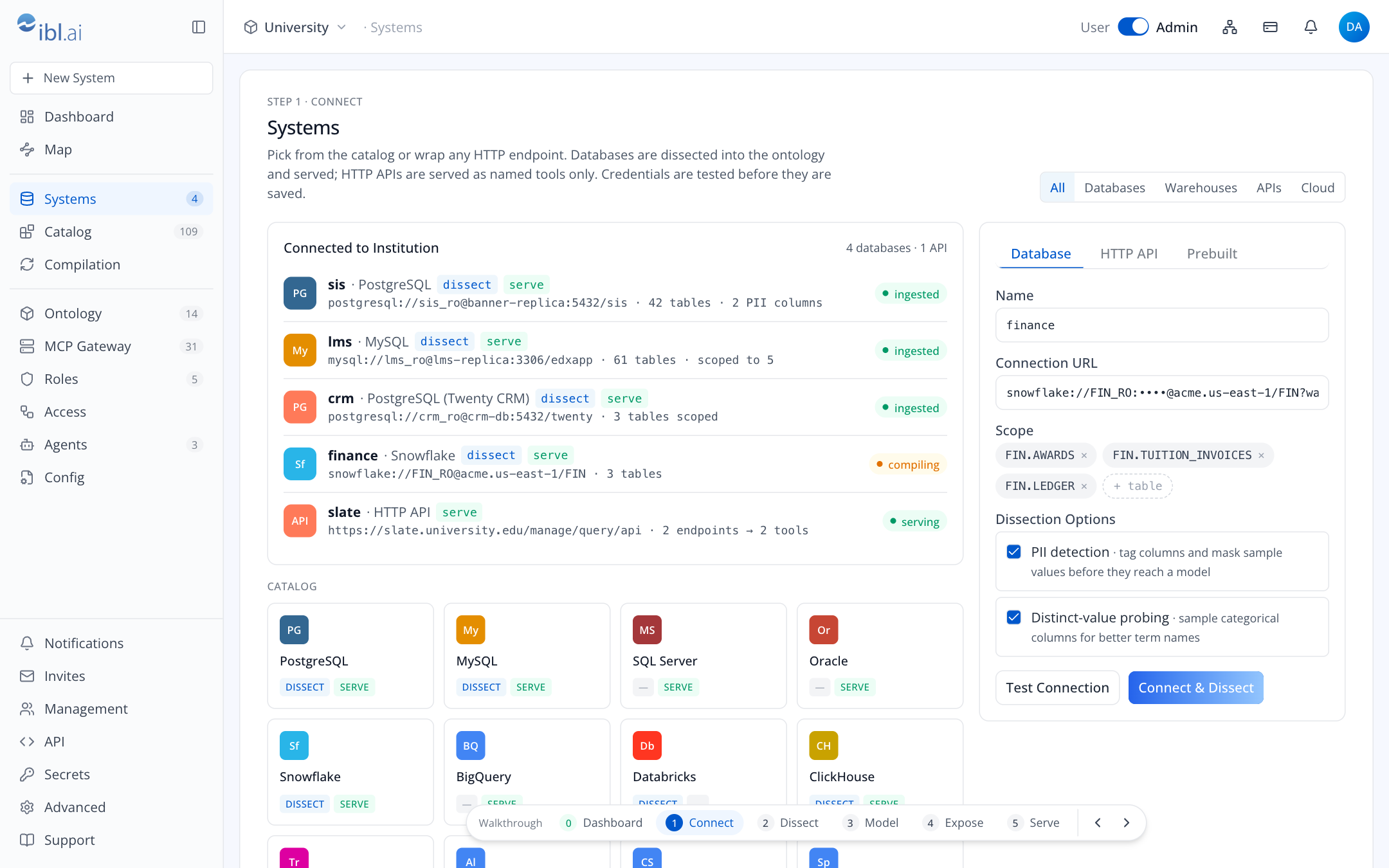
Open Systems and pick the engine in the catalog, or press New System in the sidebar. The catalog shows two capabilities per kind:
- DISSECT the engine can read it and infer terms.
- SERVE the server runtime can expose it as tools. The console serves PostgreSQL, MySQL, ClickHouse and Snowflake. A database the engine dissects but the console does not serve (Trino, Databricks, …) appears in the map but gets no tools.
Enter the Connection URL with the read-only login. The system's name is its database's name, read from the URL (
postgresql://ontology_ro:…@sis-db:5432/sisissis). It is the prefix you see everywhere, e.g.sis.students.Scope: add the schemas (
public) or tables (public.students) to include. Leave it empty for everything.Dissection Options
- PII detection tags columns that look personal (email, names, identifiers) and masks their sample values before any sample reaches a model. Leave it on.
- Distinct-value probing samples categorical columns so terms get better names
(
enrollments.status → REGISTERED, DROPPED, WAITLIST, WITHDRAWN).
Both are engine-wide switches: they apply to every system of the platform.
Test Connection. The engine tries the login and reports what it sees, in its own words.
Connect & Dissect. The console:
- saves the password in
$ONTOLOGY_HOME/platforms/<platform>/envon the platform's server (mode 0600), for serving, - sets the two engine switches,
- creates the connection in the engine, which stores it in its own database (or Vault) and starts the ingest.
The password now exists in exactly two places on the platform's server and nowhere else. A console hosted elsewhere (the pages-only build) passes it through to the server and keeps none. You land on Map.
- saves the password in
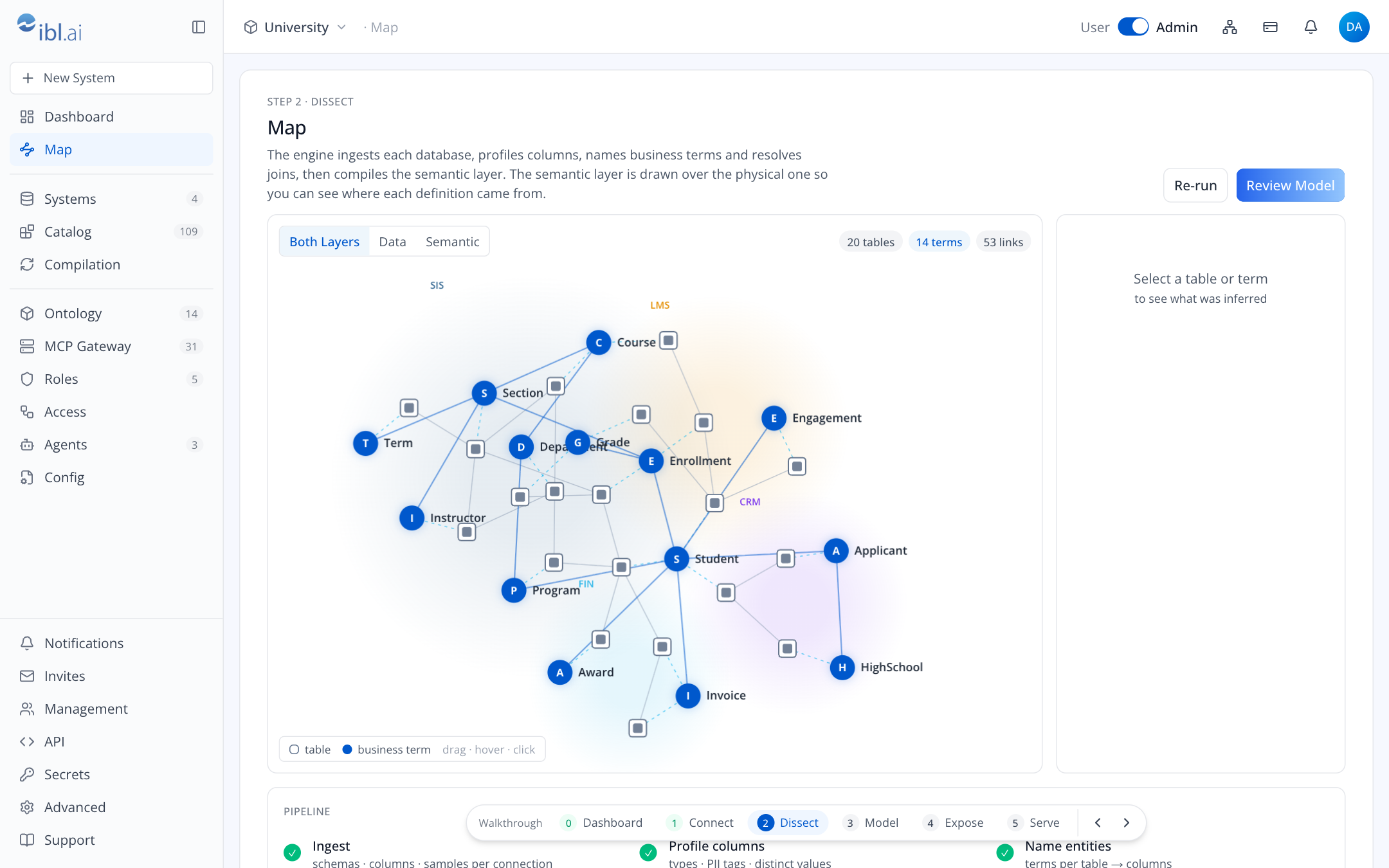
- As the engine reads the database, its tables appear in the map clustered by system, and the stages advance. The engine reports no progress of its own, so the stages and the log follow what it has read so far.
- Start a compile with Re-run on the Map, or Run now on Compilation. The terms the engine names float above the tables. Click any node to see what was inferred. Terms that span several systems (the same Student in SIS, LMS and CRM) are called out for certification.
- The pipeline ends when the compile does. Its last line counts the tools your certified terms produce, which is none until you certify one on Ontology.
Adding an HTTP API
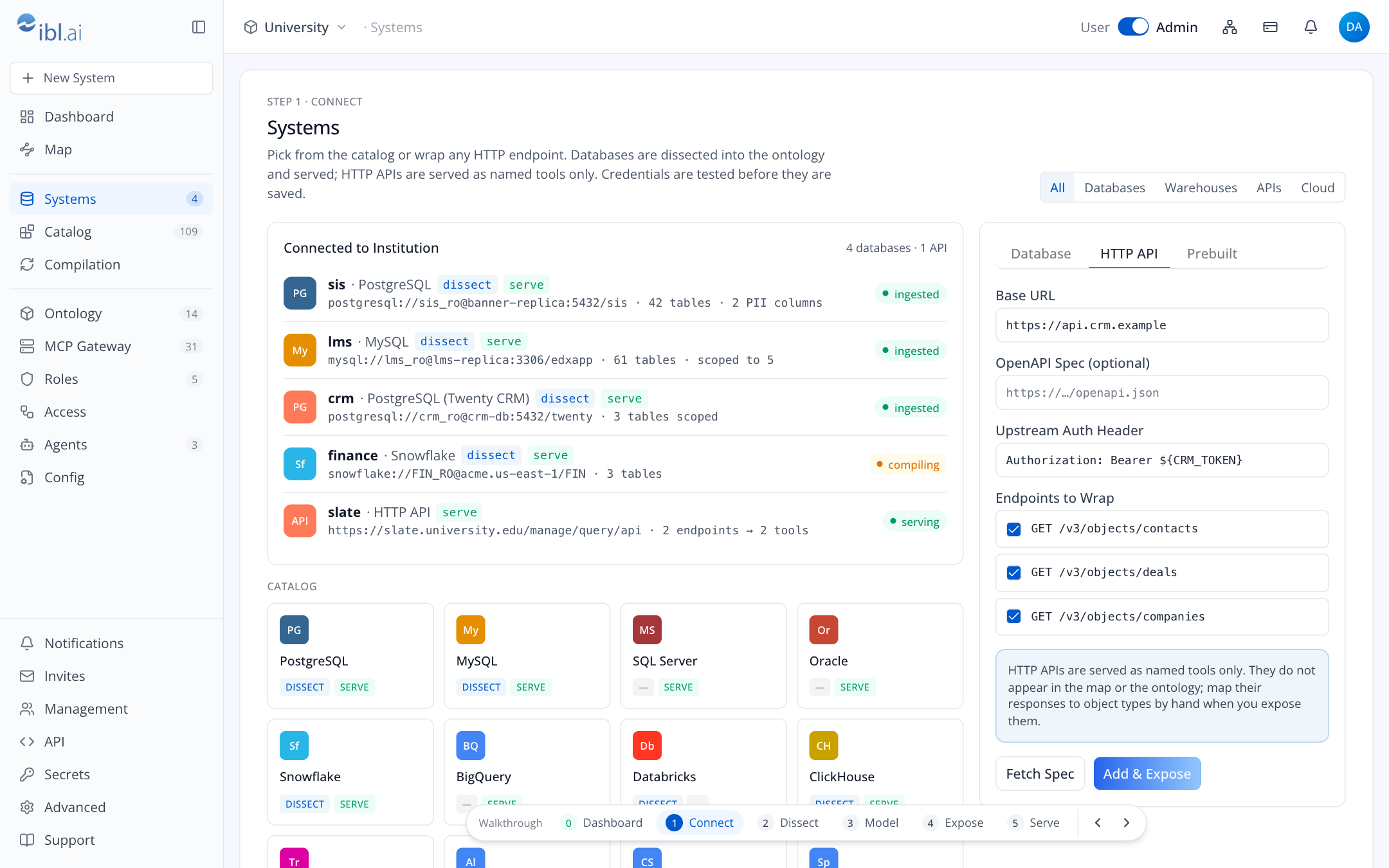
HTTP APIs are not dissected. The runtime calls them live, as named tools, with an upstream credential that never leaves the host.
- Systems → HTTP API tab. Enter the Base URL. The host refuses an address it may not call, in the rule's own words. An address on the host's own machine is taken outside production only.
- If the API has an OpenAPI document, enter its URL and press Fetch Spec. The host fetches it under the same address rule as the base URL, with the auth header when the document is on the API's own address, and lists its operations as endpoints.
- Upstream Auth Header: the header the API expects, e.g.
Authorization: Bearer <secret>. A value alone, such asBearer <secret>, is sent asAuthorization, as written. The host moves the secret into$ONTOLOGY_HOME/platforms/<platform>/envand keeps${NAME}in its place. You may write${NAME}yourself for a secret already inenv. - Tick the Endpoints to Wrap, or name them by hand. Each becomes an
httptool.GETandHEADendpoints go in the toolset<api>-reads; the rest go in<api>-writes, which is reached only by a policy that names it. - Add & Expose saves the API in
$ONTOLOGY_HOME/platforms/<platform>/apis.yamland takes you to the server builder.
Because APIs do not pass through the engine, their responses are not object types. If an endpoint returns something the ontology already models (an applicant, a course), say so in the tool's description so agents connect the two.
Prebuilt toolsets
Each connected database the console serves has a raw toolset, <system>-raw, with
execute_sql and list_tables. Tick the ones you need on the Prebuilt tab and the server
builder opens with them ticked. Add one only for analysts who genuinely need ad-hoc SQL, and keep it
on the read-only login. A raw toolset counts as writing, so it is reached only by a policy that
names it.
After connecting
- Catalog lists every database, schema, table and column the engine read, with tags (PII) and the terms mapped to each.
- Compilation shows whether a compile is running, when the last one succeeded or failed, and the switches (compilation, PII detection, probing).
- Ontology is where you review and certify what the engine inferred before it becomes tools (permissions.md covers who may certify).
Changing or removing a source
The engine's own UI is not served on the server's host name: it opens through an SSH tunnel to the server (operations.md).
- Rotating a password: change it in the engine's own UI (Settings → Connections) and in
$ONTOLOGY_HOME/platforms/<platform>/envunder<NAME>_DB_PASSWORD, then deploy each server that uses it again. - Re-scoping tables: change the connection's scope in the engine's UI and compile again; terms already certified are kept.
- Removing a system: delete the connection in the engine's UI. Then edit each server that used its toolsets, untick them and deploy again; a save that names a toolset that no longer exists is refused with its name.
Troubleshooting
| Symptom | Likely cause | Where to look |
|---|---|---|
| Test Connection fails | firewall or wrong login | the engine's message; can the host reach db:port with psql or mysql and the same URL? |
| Connected, but no tables ever appear | the engine's CONNECTION_STRINGS is set | an engine run from its own checkout: empty it in that engine's .env and restart the engine |
| Tables appear, no terms | no compile has run, or it failed | Compilation page: last failure; the engine's logs on the host |
| No relationships (PostgreSQL) | the login does not own the tables | the engine reads declared keys only as their owner; the server's OPENAI_API_KEY lets it infer joins instead |
| Terms are poorly named | columns are opaque codes, probing off | turn on distinct-value probing; add column descriptions in the engine's UI and compile again |
| PII column not tagged | detector missed it | tag the column pii in the engine's UI; tags are honoured on the next compile |
| Tool returns permission error | login lacks SELECT on a joined table | grant SELECT; the certified SQL shows the tables involved |
503, “No engine is connected” | the server has no engine for this platform | the server's operator sets AO_URL, or writes $ONTOLOGY_HOME/platforms/<platform>/engine.json (network.md) |
503, “ONTOLOGY_PLATFORM is not set” | the server has an engine but names no platform | the server's operator sets ONTOLOGY_PLATFORM (install.md) |
403, “serves another platform” | the server's ONTOLOGY_PLATFORM names another | connect this platform's own server; a server with an engine of its own serves one platform |
| A system shows no tools | the console does not serve that kind of database | it stays in the map without tools |