/iblai-vibe-os-agent-cowork
Mirrored from
iblai/base·skills/agents/iblai-vibe-os-agent-cowork/SKILL.md. This page is generated — edit it in the repository, not here.
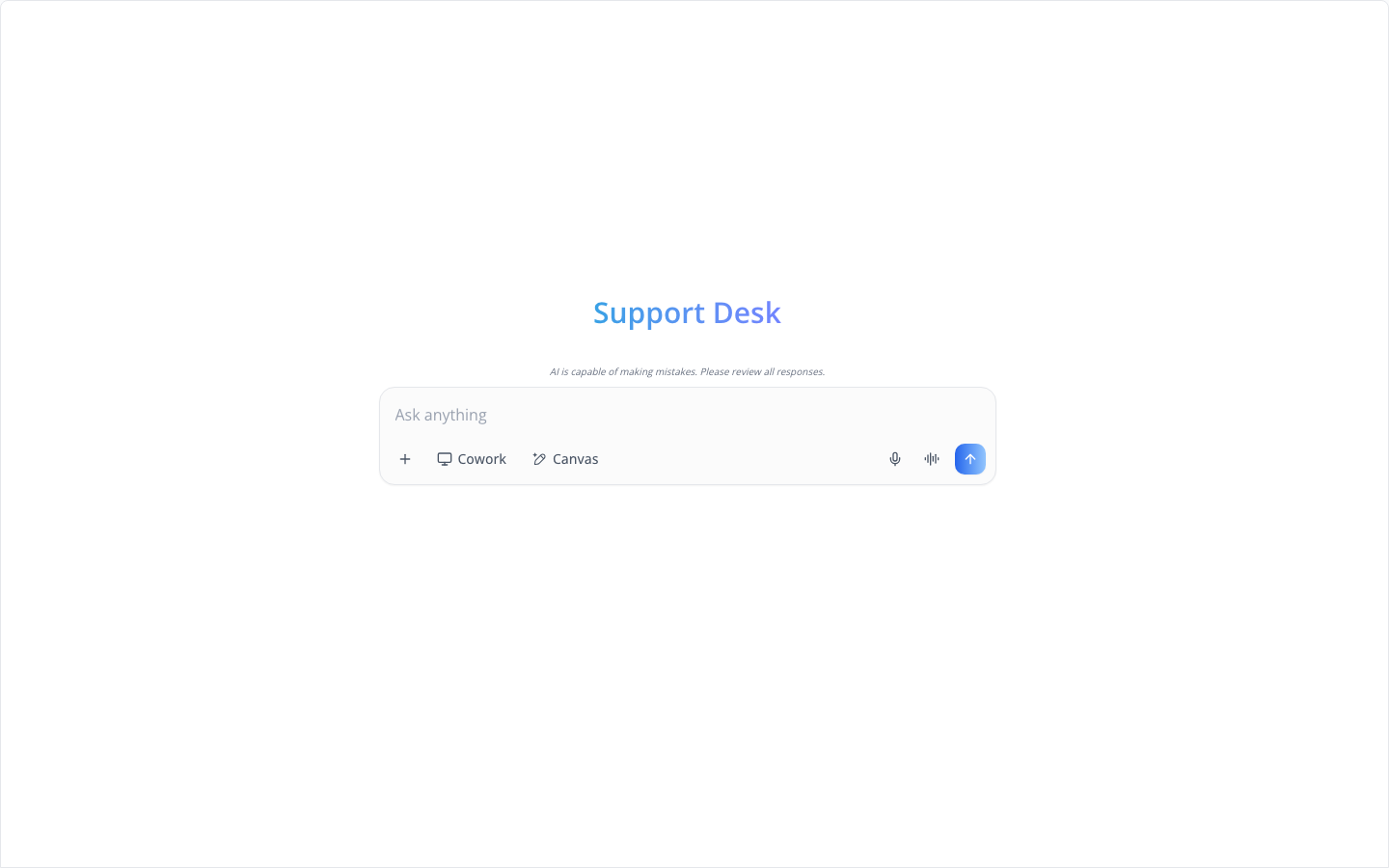
Cowork lets the agent use your computer. Turn it on under the message box and the agent can see what is on the screen, open apps, and click and type for you, including in your browser on sites you are signed in to. It asks once before it starts, walks a Mac through the two permissions macOS needs, and works next to Code in the same turn. The first half of this page is how to use it; the second half adds it to an app of your own.
Common setup (brand, conventions, env files, verification): see docs/skill-setup.md.
Using Cowork in the ibl.ai desktop app
1. Turn it on
Click Cowork under the message box. The first time, it asks Let Cowork Use Your Computer? and says what that means: it sees your screen, clicks and types for you, can act as you on sites you are signed in to, and sends what it sees to ibl.ai to work out the next step. Nothing is asked of macOS yet.
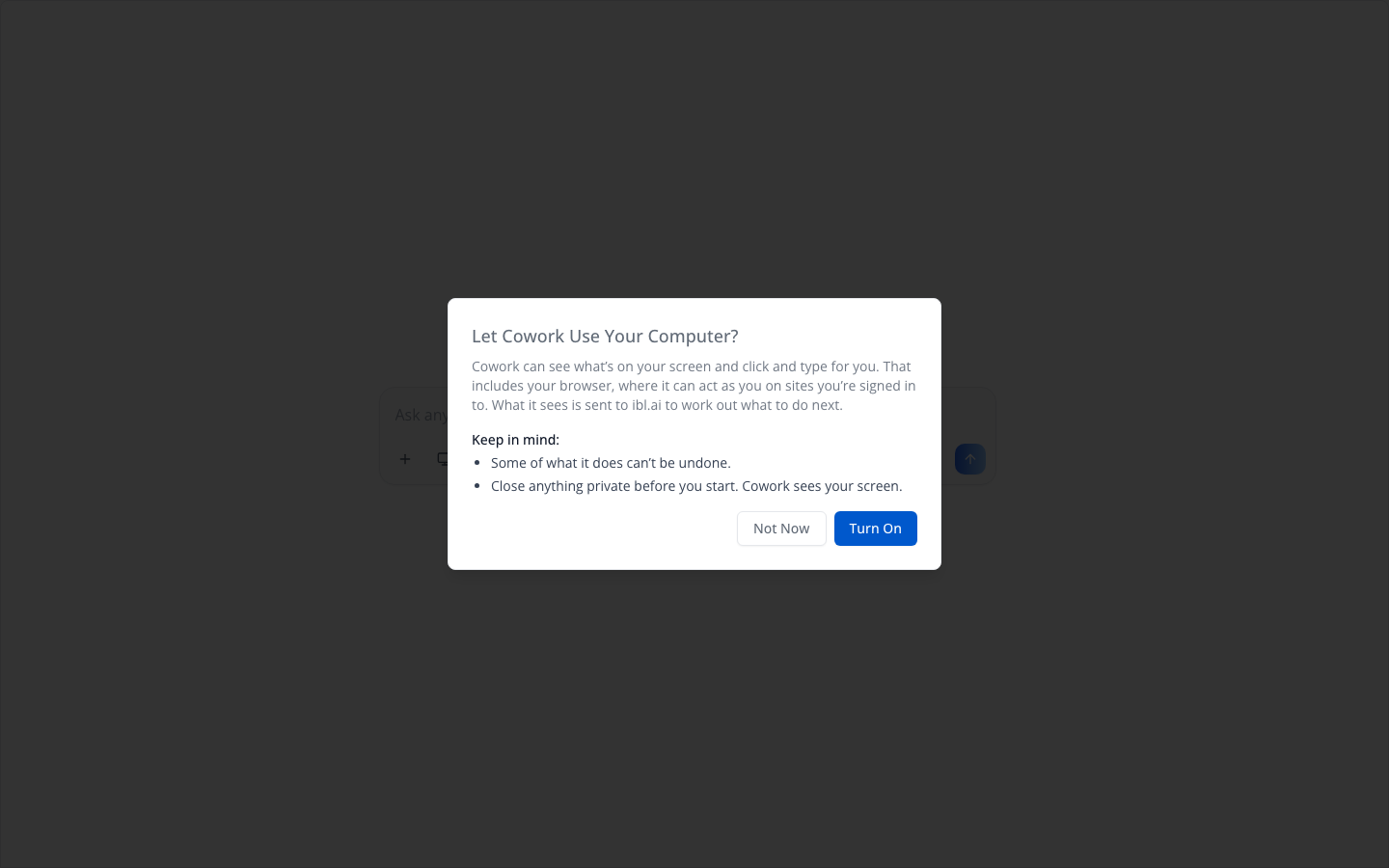
- Turn On remembers your answer and downloads the screen driver Cowork uses (once). Later, the pill turns on without asking again.
- Not Now (or Escape) leaves Cowork off and remembers nothing.
2. Give macOS its two okays (Mac only)
On a Mac the dialog becomes Finish Setting Up Cowork: a two-step list, Accessibility (so Cowork can click and type) and then Screen Recording (so it can see the screen). Only the current step has a button, so two macOS alerts never pile up, and the list updates by itself every second.
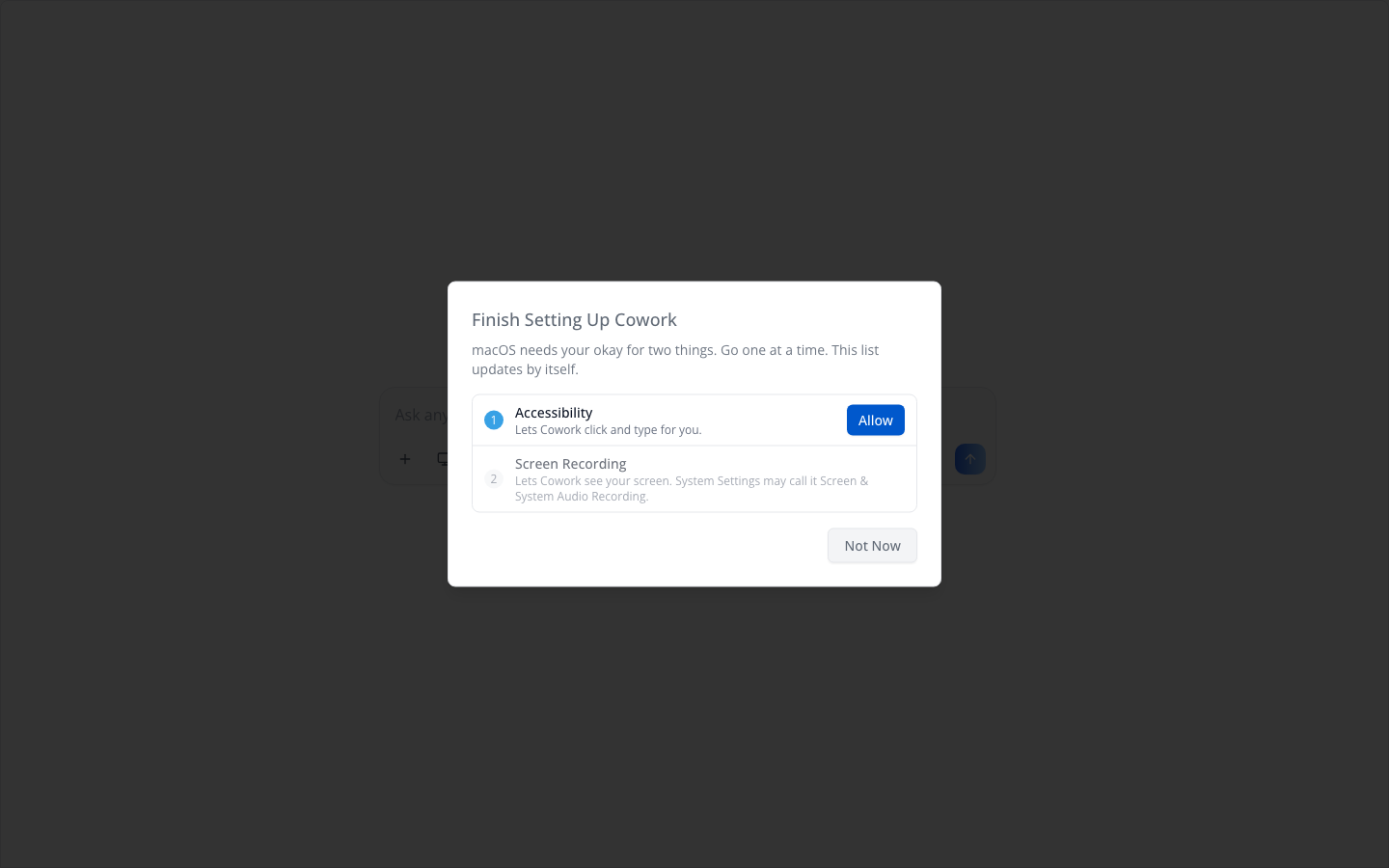
- Allow shows macOS's own alert. Switch on ibl.ai in the list; macOS may ask for your password or Touch ID. The app comes back to the front once Accessibility is on.
- Do the same for Screen Recording. System Settings may call it Screen & System Audio Recording. Once a step has been asked, its button reads Open Settings: it asks again and opens that page of System Settings.
- Screen Recording only counts after the app restarts. When macOS offers to quit and reopen ibl.ai, choose Quit & Reopen, or press Restart ibl.ai in the dialog. Setup picks itself back up after the restart and finishes on its own.
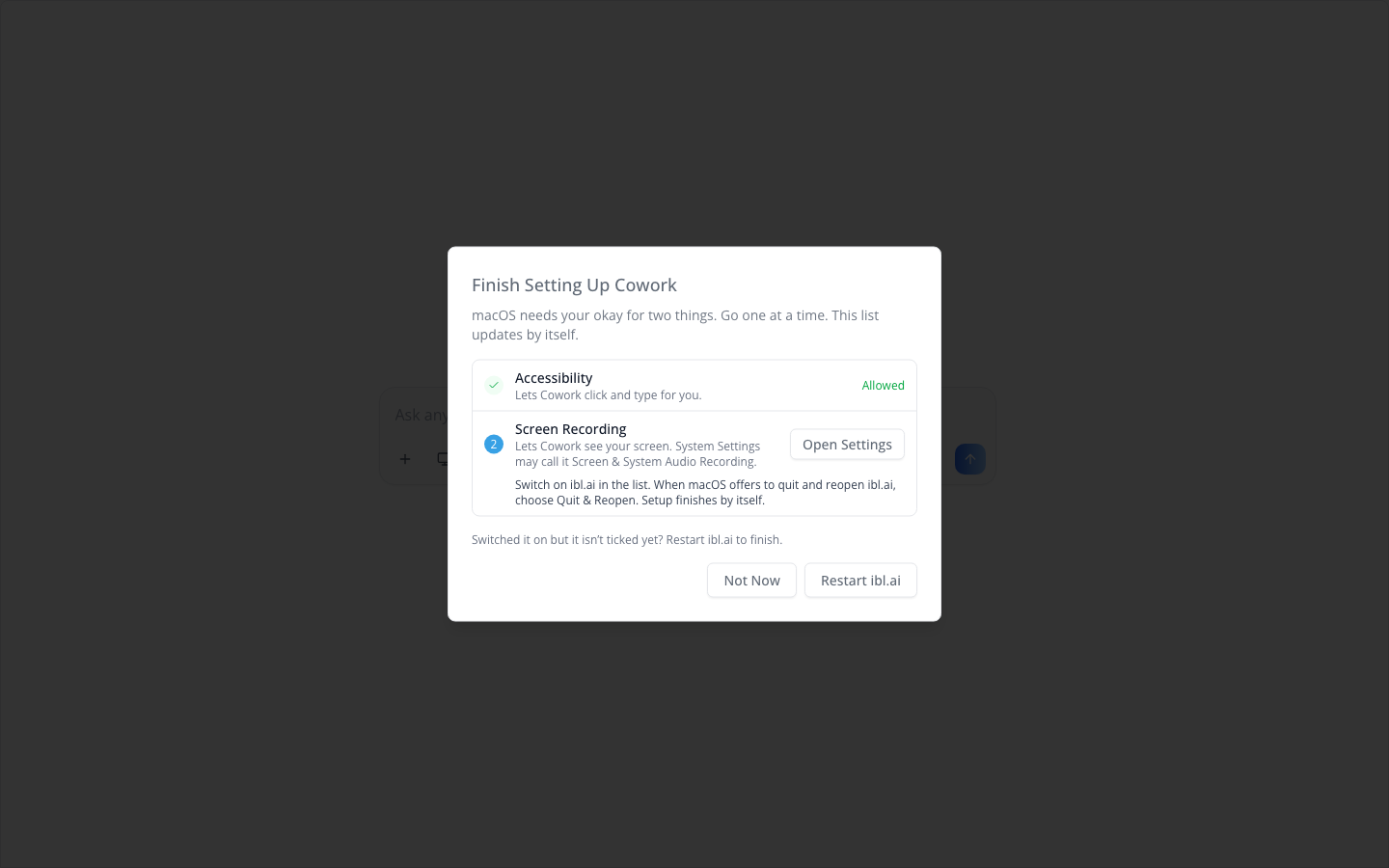
A setup resumes after a restart only within ten minutes of your last step there. Leave it longer, or press Not Now, and Cowork stays off; it never reopens the dialog later or turns itself on. Not Now keeps your consent, so the next try starts at the list.
3. It's on
Once both are allowed, Cowork turns on with Cowork is on. and the pill turns blue. Click the pill again to turn it off; that also stops the driver.
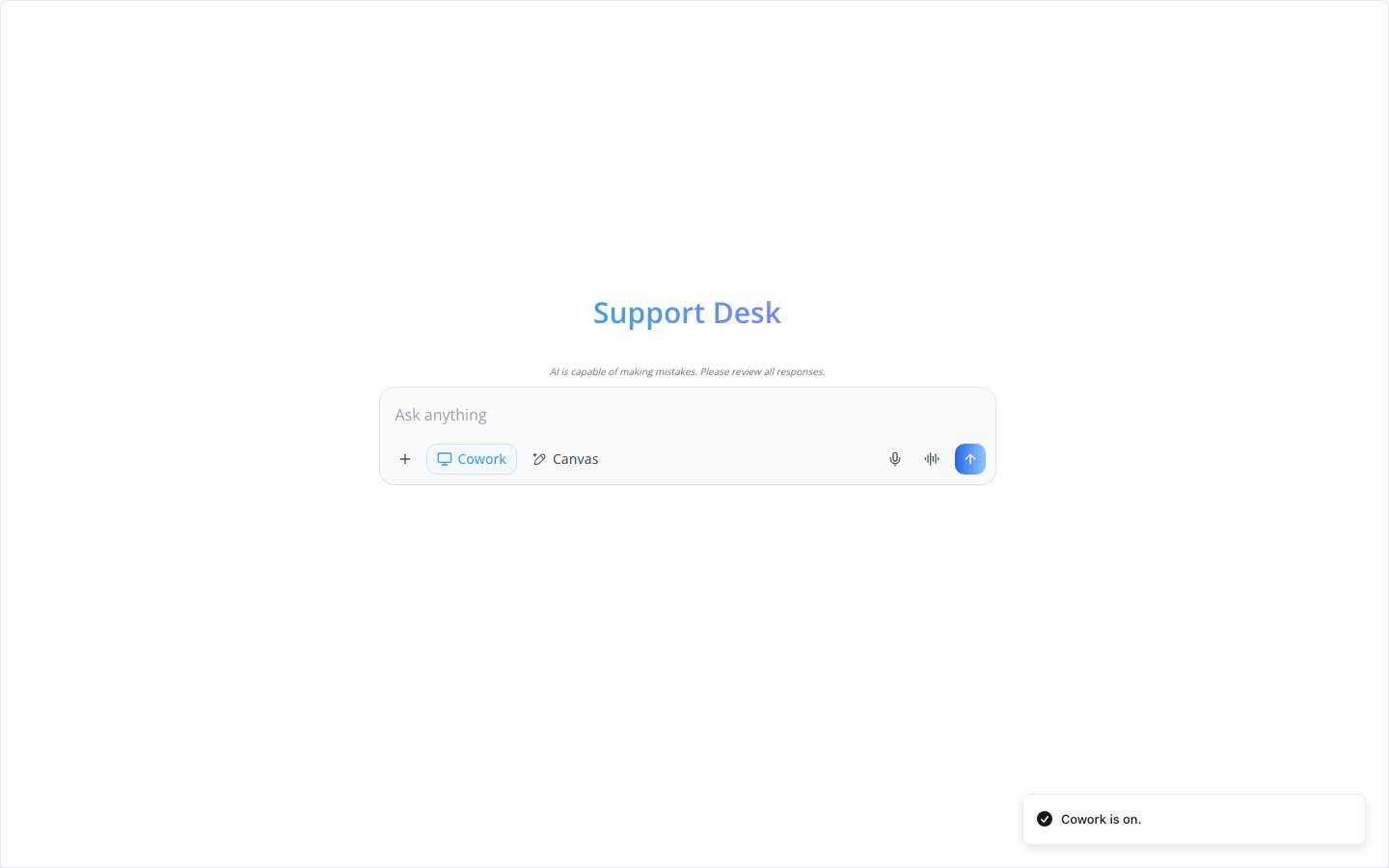
Windows and Linux ask for no permissions: after the consent, Cowork turns straight on.
4. Which model does the work
- Signed in, Local Models off: your organization's models, on its credits.
- Local Models on: the model on this computer, which must be at least
12 GB. A smaller one gets Your local model is too small for Cowork;
pick a bigger one in Local Models
(
/iblai-vibe-local-llm). The first reply in a chat can take a few minutes, and the line under the reply says so (Thinking on this computer…). Small models still make mistakes on long tasks.
5. With Code
Turn on both Code and Cowork and Code keeps the turn: its agent gets the screen tools too, so one message can edit files and click around the screen. Code's Approvals covers both:
- Ask Me: a permission card before every file change, command and screen action.
- Automatic: no cards. Its hint adds With Cowork on, it also acts on your screen without asking.
Turning Cowork on or off mid-chat keeps the chat. See
/iblai-vibe-os-agent-code-mode.
6. In a browser-extension side panel
In a side panel (the ibl.ai Chrome extension's), Cowork drives the tab you are looking at instead of the computer, so there is no driver and no macOS setup. The pill opens a small panel: the on/off switch, a note on what it reads (never password or payment fields), Approvals, and Record a skill when the extension offers it.
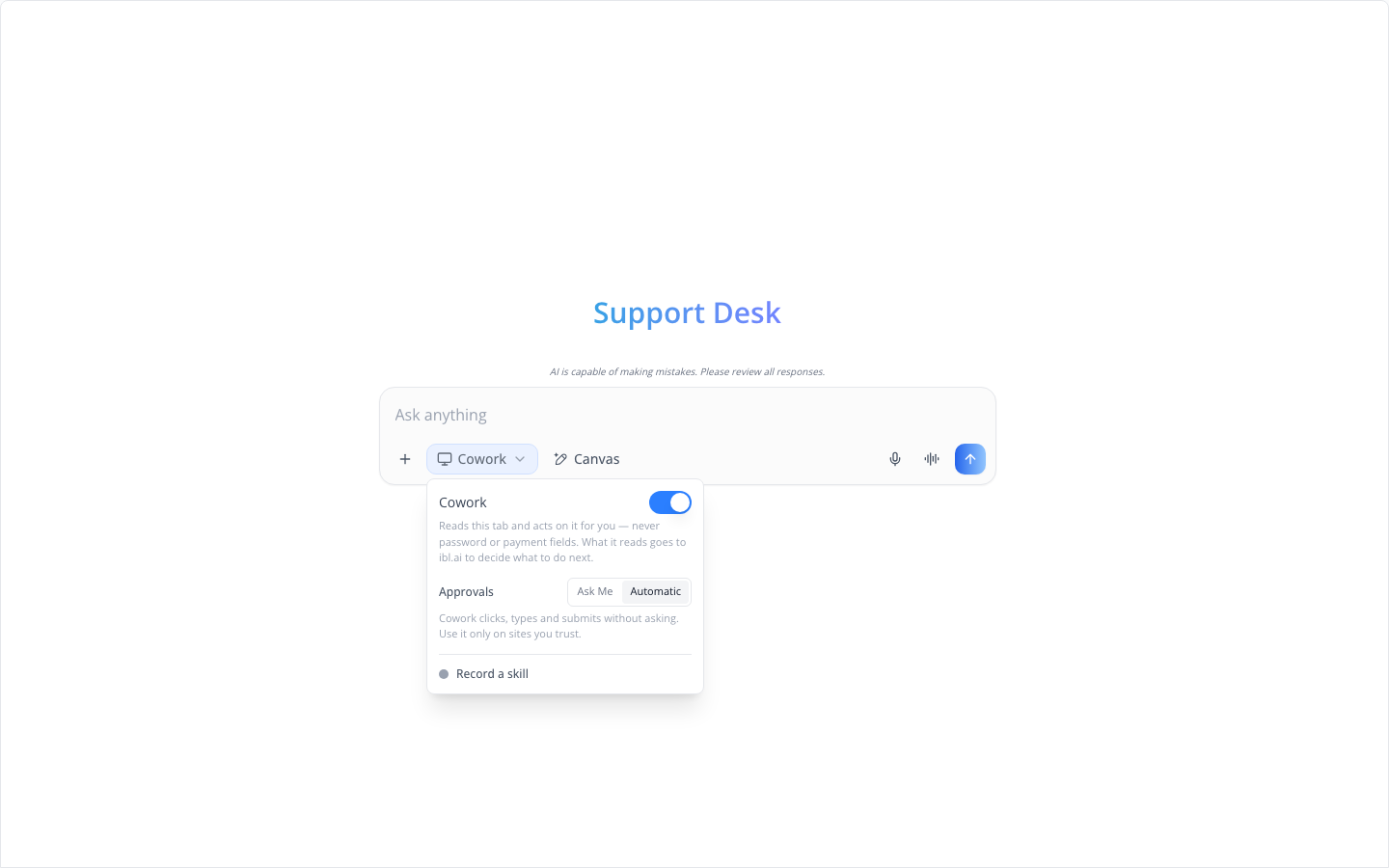
- Automatic (the default): Cowork clicks, types and submits without asking. Use it only on sites you trust.
- Ask Me: it checks with you before it submits a form.
- Record a skill watches what you do on the page; Stop recording shows how many steps it caught.
When something's off
| You see | What to do |
|---|---|
| The pill is grey; hovering it says Cowork isn’t available in the App Store version of the app. | The Mac App Store build cannot run the driver. Use the build from ibl.ai |
| Cowork isn’t supported on KDE Plasma yet. / … on this operating system. | Linux: KDE Plasma is not supported yet. Use another session |
| Cowork isn’t supported on this desktop session. | An unsupported Linux session, or (in your own app) a desktop build without Cowork's Rust: see Step 1 below, or hide the pill with features: { cowork: false } |
| Cowork on GNOME needs the WinRects helper installed, then a session restart. | Install the helper, sign out and back in |
| Turn on “Local Models” first / Your local model is too small for Cowork | Step 4 |
| Screen Recording stays unticked after you switched ibl.ai on | Restart ibl.ai; the grant counts only after a relaunch |
| No Cowork pill on a phone | Cowork drives a computer; phones have none |
Adding Cowork to your own app
How it works, in one paragraph: the SDK <Chat> owns everything people
see and the turn itself: the pill, the consent, the macOS steps, the side
panel, and the loop that sends a Cowork message to the model with the
screen tools and runs each tool call. Your Tauri app provides the driver
those tools come from: it downloads and verifies cua-driver, runs it as a
child of the app (so it inherits the app's macOS grants), passes JSON-RPC
lines to and from it, and answers the grant, relaunch and on-device-model
commands. The copies in assets/tauri/src-tauri/
are the OS app's own files; the mechanics, every command and event, and the
wiring are in references/.
Prerequisites
- Tauri shell via
/iblai-vibe-ops-build. - Code mode's Rust via
/iblai-vibe-os-agent-code-mode(Step 1 there). Cowork's modules call into it, and it calls into Cowork's; the Code pill itself is optional. - Sign-in via
/iblai-vibe-auth: Cowork on the organization's models needs the session token and the org. @iblai/iblai-js@^2.83.0(resolves@iblai/web-containers1.79.0). The guided macOS setup and Code with Cowork are not in releases before 2.81.0, and the side panel's Record a skill row not before 2.83.0.- Platform: a macOS, Windows, or Linux (X11 or Sway) desktop. KDE
Plasma is not supported yet, GNOME needs its WinRects helper, and phones
never show the pill. On a Mac, ship the Developer ID / notarized
.dmgfrom/iblai-vibe-ops-build: the App Sandbox must be off, so the Mac App Store build shows the pill disabled. No Info.plist key or entitlement is needed; both grants are asked at run time (references/macos.md).
Step 1: Rust — drop in the modules
mkdir -p src-tauri/permissions
cp <skill>/assets/tauri/src-tauri/src/*                           src-tauri/src/
cp <skill>/assets/tauri/src-tauri/permissions/cowork.toml         src-tauri/permissions/
cp <skill>/assets/tauri/src-tauri/capabilities/macos-permissions.json src-tauri/capabilities/| File | What it is |
|---|---|
cua_driver_installer.rs | Downloads the pinned driver (0.17.0, from the trycua/cua GitHub releases), checks its SHA-256 against the release's checksums.txt, installs it under ~/.local/share/iblai/bin/ (on macOS: quarantine flag removed, signed ad hoc). A cua-driver already on PATH wins. Installed the first time Cowork is switched on, not at launch |
cua_driver_mcp.rs | Runs the one driver child, forwards its JSON-RPC lines (cua_driver_send, the cua-driver:message / cua-driver:closed events), and holds the macOS commands: request_cowork_permission, open_privacy_settings, relaunch_app, bring_app_to_front. Also the daemon Code's agent reaches when Cowork is on |
local_llm_openai.rs | local_llm_openai_stream / _cancel: a Cowork turn on Local Models, streamed from the model on this computer over a Tauri channel, on a copy sized to 32,768 tokens |
permissions/cowork.toml | One allow-* per command, as the cowork set |
capabilities/macos-permissions.json | The tauri-plugin-macos-permissions checks and requests, macOS only |
Then wire them: the module, the tauri-plugin-macos-permissions plugin
(macOS only), the commands and the hooks, exactly as in
references/lib-rs-wiring.md; add the
Cargo entries from references/cargo-deps.toml
and reference the cowork set per
references/capabilities.md. Every command
and event: references/tauri-commands.md.
The shell's own commands (open_external_url, allow_in_app_purchase,
get_locked_tenant) must stay allowed. Tauri refuses any app command no
capability allows once src-tauri/permissions/ holds a file, and the SDK
falls back quietly. A shell from /iblai-vibe-ops-build has
permissions/shell.toml and lists them. If yours doesn't, copy
shell.toml
in and add its three allow-* entries to default.json.
cd src-tauri && cargo check # must compile before touching the frontendStep 2: Frontend — your app's name in the setup
The SDK <Chat> shows the pill on a Tauri desktop that answers
check_cua_driver_status, and the starter's chat page needs no other
change. config.features.cowork (default true) is the only switch.
The setup's strings name the ibl.ai app (Switch on ibl.ai in the list,
Restart ibl.ai). In System Settings macOS lists your app under its own
name, the productName in tauri.conf.json. Override those five strings
through <Chat>'s labels, keyed as in the SDK's chat catalog:
import type { ChatLabels } from "@iblai/iblai-js/web-containers/next";

const APP = "My App"; // productName in src-tauri/tauri.conf.json

// <Chat labels={coworkLabels} … />
export const coworkLabels: ChatLabels = {
  chatInputFormInsideButtons: {
    coworkStepAskedAccessibility: `Switch on ${APP} in the list. macOS may ask for your password or Touch ID.`,
    coworkStepAskedScreenRecording: `Switch on ${APP} in the list. When macOS offers to quit and reopen ${APP}, choose Quit & Reopen. Setup finishes by itself.`,
    coworkRelaunchHint: `Switched it on but it isn’t ticked yet? Restart ${APP} to finish.`,
    coworkRelaunch: `Restart ${APP}`,
    coworkOpenSettingsManually: `Open System Settings › Privacy & Security › {pane}, then switch on ${APP}.`,
  },
};
Keep {pane}: the SDK fills it with Accessibility or Screen
Recording. Two more strings, coworkConsentBody and coworkTabNote, name
ibl.ai as the place what Cowork sees is sent (the platform, not the app).
Override them the same way if your app words that differently.
A desktop build without Step 1 shows a disabled pill (Cowork isn’t
supported on this desktop session.), because the status call fails. In a
Tauri app that does not ship Cowork, pass features: { cowork: false } in
the chat's config.
Step 3 (optional): a browser-extension side panel
In a side panel the same pill drives the open tab through your extension's
own worker. Pass config.browse: run gets the person's message while
Cowork is on, stop ends the run, and recording adds Record a skill.
// lib/panel-browse.ts — the side panel's config.browse
import type { ChatBrowseBridge } from "@iblai/iblai-js/web-containers/next";

type PanelMessage =
  | { type: "run"; goal: string }
  | { type: "stop" }
  | { type: "record"; on: boolean };

export function panelBrowse(opts: {
  isRunning: boolean;
  send: (message: PanelMessage) => void;
  recording?: { isRecording: boolean; count: number };
}): ChatBrowseBridge {
  return {
    inExtensionPanel: true,
    isRunning: opts.isRunning,
    run: (goal) => opts.send({ type: "run", goal }),
    stop: () => opts.send({ type: "stop" }),
    recording: opts.recording && {
      ...opts.recording,
      start: () => opts.send({ type: "record", on: true }),
      stop: () => opts.send({ type: "record", on: false }),
    },
  };
}
The panel's Approvals choice is saved as ibl_cowork_approvals (manual
or auto; anything else reads as auto) in the panel page's
localStorage. Read it when you start a run, and ask before a form is
submitted when it is manual.
Linked SDK exports
From @iblai/iblai-js/web-containers:
useCuaDriver— the hook behind the pill:status,isSupported,unsupportedReason,install,stop,refreshPermissions,requestPermission(kind, openSettings),openPrivacySettings,bringToFront,relaunch. Outside the desktop app every call does nothing.CUA_DRIVER_TAURI_COMMANDS,CUA_DRIVER_TAURI_EVENTS— the command names the hook invokes and the install events your Rust emits;MACOS_PERMISSIONS_COMMANDS— the plugin's grant checks.requestPermissiontakes"accessibility"or"screen_recording"and resolves"granted","not_granted"or"unsupported";unsupportedReasonis"unsupported_os","kde_unproven","gnome_helper_missing","unknown_session"or"sandboxed". The SDK exports no types or constant for these, so compare the strings.isCoworkEnabled,setCoworkEnabled— the on/off preference (ibl_cowork_enabled);modelSupportsCowork— the 12 GB local-model check.
From @iblai/iblai-js/web-containers/next: the types ChatFeatures
(cowork) and ChatBrowseBridge. Its recording shape has no exported
name; use NonNullable<ChatBrowseBridge["recording"]>.
What the SDK keeps in localStorage: ibl_cowork_enabled,
ibl_cowork_consent, ibl_cowork_setup_pending and
ibl_cowork_setup_pending_at (the ten-minute resume), and the side
panel's ibl_cowork_approvals; the panel's on/off is in session storage
(ibl_cowork_panel).
Platform data
| Call | Purpose |
|---|---|
POST {chat host}/api/ai-mentor/orgs/{org}/v1/chat/completions (openai/gpt-5, streamed, the user's session token) | A Cowork turn on the organization's models; {chat host} is the origin of config.baseWsUrl |
https://github.com/trycua/cua/releases | The pinned cua-driver and its checksums.txt |
| The model on this computer (Ollama) | A Cowork turn on Local Models, through local_llm_openai_stream |
Security
- Consent first. The SDK shows the consent before it downloads anything
or asks macOS for a grant. Keep the pill opt-in; never turn
ibl_cowork_enabledon for the user. - Cowork acts as the user. It sees the screen and types into whatever is signed in. What it sees goes to the model; on Local Models it stays on the computer.
- Approvals. In the side panel the default is Automatic; with Code, Code's Approvals decides (Automatic is the default when nothing is saved). An automatic carry-on prompt to a local model says it approves nothing.
- Mac App Store builds cannot run the driver: the pill shows disabled with the reason, by design.
Verify
cd src-tauri && cargo check— zero errors.pnpm build— zero errors;pnpm testpasses.pnpm exec tauri devon a Mac, signed in: open a chat, click Cowork, Turn On, allow Accessibility, allow Screen Recording, Restart ibl.ai; after the relaunch the setup finishes with Cowork is on. Ask it to "open Calculator and add 2 and 2".- Touch test
/in the browser as/iblai-vibe-ops-testsays: in a plain browser there is no Cowork pill (no desktop to drive).
Related skills
/iblai-vibe-os-agent-code-mode— Code; with both on, Code keeps the turn and gets the screen./iblai-vibe-ops-build— the Tauri shell this drops into./iblai-vibe-local-llm— the on-device models Cowork can run on./iblai-vibe-agent-chat— the SDK chat that renders the pill (config.features.cowork)./iblai-vibe-agent-skills— where a recorded skill lands.