Course: Discussions Tab
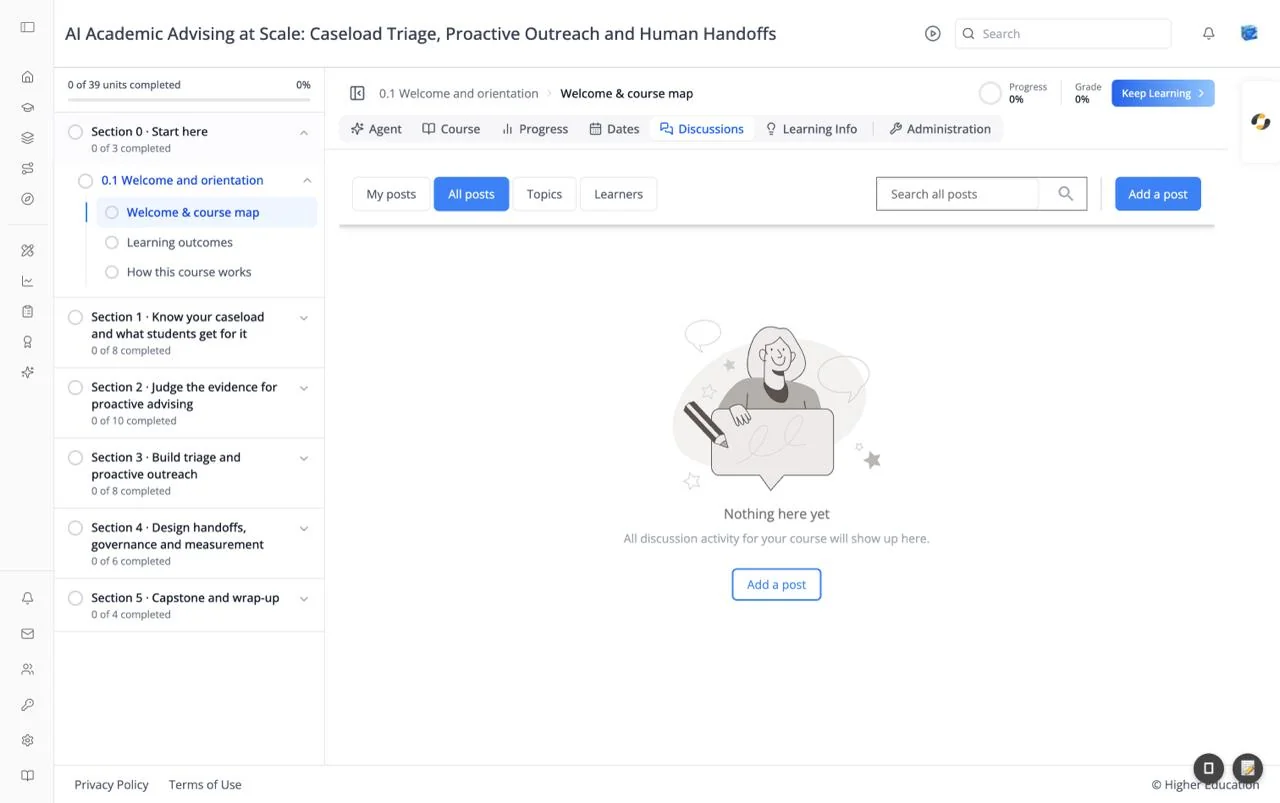
Overview
The Discussions tab is the course forum, where learners and the course team post questions, answer each other, and talk about the material. Units can also link to a discussion topic of their own.
When there are no posts yet, the page reads "Nothing here yet": "All discussion activity for your course will show up here."
Target Audience
Learner | Course staff (moderators and community TAs)
Features
My posts / All posts / Topics / Learners
Four views across the top: posts you wrote or follow, every post in the course, posts grouped by topic, and a list of learners with their activity.
Search all posts
Searches post titles and text.
Add a post
Starts a new post: choose a topic, write a title and your message, and post it as a question or a discussion.
Moderation
Moderators, administrators, and community TAs can edit, pin, close, and remove posts. These roles are given in Membership.
How to Use
Step 1: Look before you post
Search, or browse Topics, to see whether someone has already asked your question.
Step 2: Add a post
Click Add a post, choose a topic, and write your question or discussion.
Step 3: Follow up
Open My posts to see replies to your posts.