Profile: Public Profile
Overview
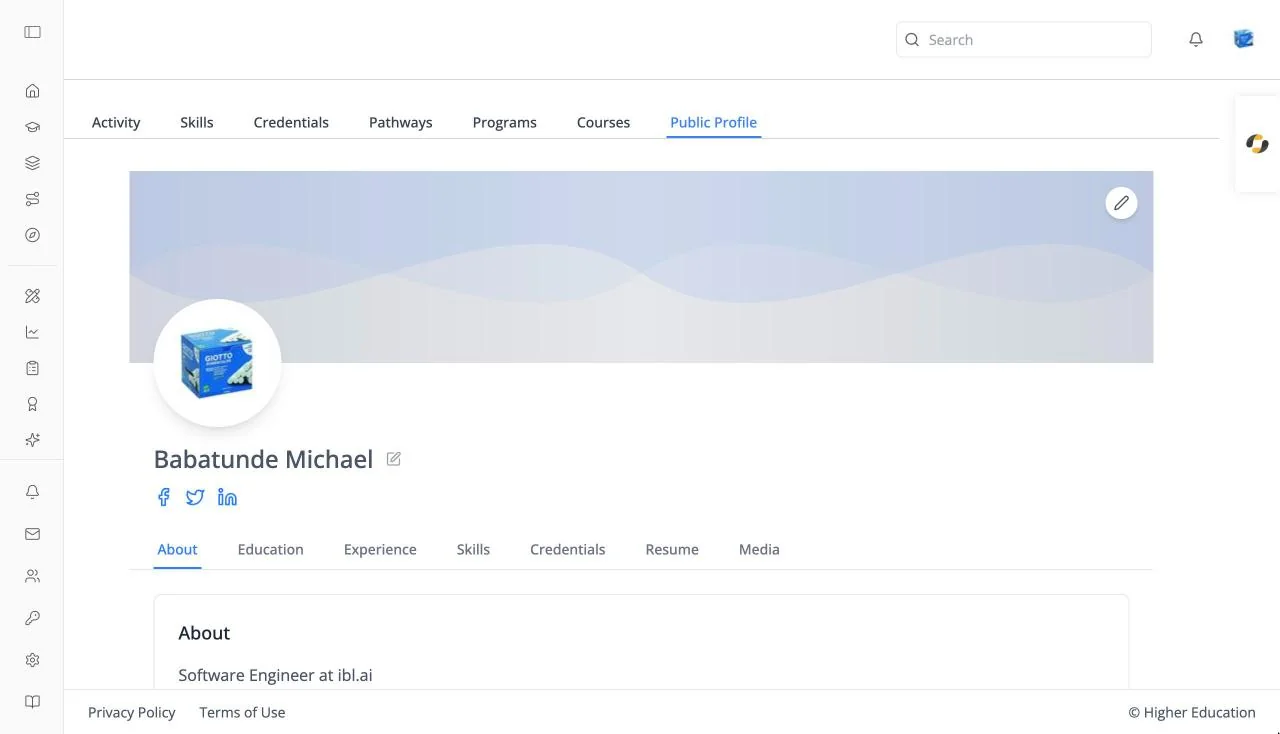
Public Profile is your profile as other people see it: your banner, photo, name, bio, and social links, followed by your education, experience, skills, credentials, resume, and media. It is the last tab of your learner profile.
The pencil buttons on the banner and beside your name open the profile dialog, where you edit these details.
Target Audience
Learner
Features
About
Your bio.
Education
Each entry with its degree, institution, years ("Present" if ongoing), and grade. Click the pencil to edit it. Empty: "No education found."
Experience
Headed Work Experience: each role with its title, company, and years. Click the pencil to edit it. Empty: "No experience found."
Skills
Your earned, self-reported, and desired skills, read-only.
Credentials
Your earned credentials, read-only.
Resume
Your uploaded resume with a viewer: Previous Page, "Page X of Y", Next Page, zoom out, zoom in, Rotate Left, and Rotate Right. Hidden when your organization doesn't use resumes. Empty: "No resume found."
Media
Add files and links to show on your profile. Under Upload Media, choose File Upload to attach a file (up to 25MB; tick This is a resume for a PDF resume) or Link Upload to add a URL to a website, document, or video, then click Upload File or Add Link. Everything you have added appears under Uploaded Media. Empty: "No media found."
How to Use
Step 1: Check how you appear
Open Public Profile and look through each tab.
Step 2: Fill the gaps
Click a pencil to add your bio, education, or experience.
Step 3: Show your work
On Media, upload files or add links to work you are proud of.