Analytics: Transcripts
Overview
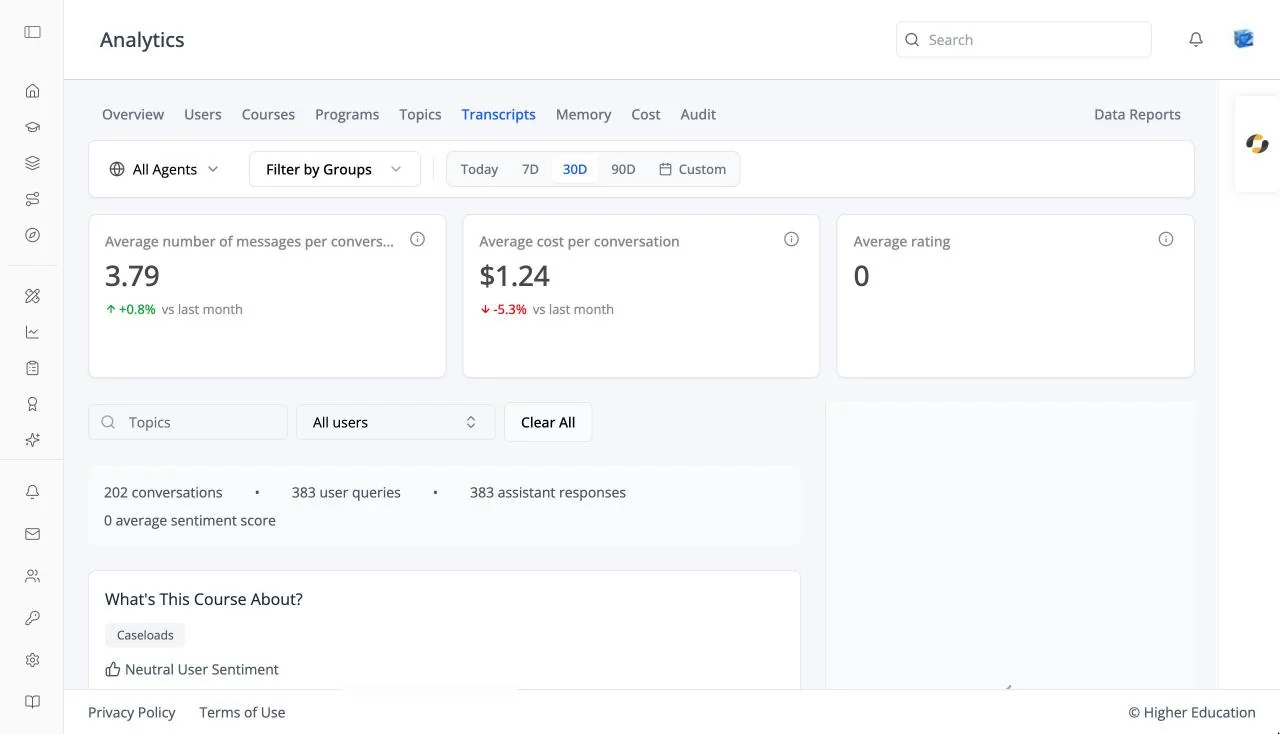
The Transcripts tab lets you read the conversations people have had with the AI agents, including what the agent retrieved to answer them. See also OS Analytics: Transcripts, which uses the same viewer.
Target Audience
Administrator | Analytics viewers | Watchers
Features
Transcript cards
Average number of messages per conversation, Average cost per conversation, and Average rating.
Filters
Topics (choose several), a user filter (All users by default), and Clear All.
Summary
A line above the list totals the filtered conversations: conversations, user queries, assistant responses, and the average sentiment score.
Conversation list
Each conversation shows its message count, estimated cost, creation date, and sentiment (Positive, Neutral, or Negative), paged as "Page X of Y • N total records".
Conversation Transcript
Click a conversation to read it, with the agent and model named at the top. Show Details on a turn reveals its metadata, request context, and Retrieved Documents. Before you choose one: "Select a conversation to view its transcript".
How to Use
Step 1: Filter
Choose a topic or user to narrow the list.
Step 2: Read
Click a conversation and read the transcript. Check Retrieved Documents when an answer looks wrong, to see what the agent was working from.