Onboarding
Overview
Onboarding is a guided, question-by-question flow that your organization can set up for new members. It runs inside the normal LMS frame at /onboarding, with the current step's icon, title, and subtitle shown in the top bar. The questions are configured by your organization's administrators, and the flow ends by introducing you to an AI assistant.
Members move through the questions with Continue, Back, and Submit. The last step, "Meet your assistant", embeds the agent with the prompt "Ask your assistant anything to get started." An organization can configure more than one agent; a link to /onboarding/<agent id> opens the flow for a specific one.
If your organization has not set anything up, the page reads "Nothing to set up yet": "Your organization has not set up an onboarding experience. Nothing is required from you — head on in." Click Continue to go to the Home page.
Target Audience
Learner | Administrator
Features
Member flow
The organization's own questions, followed by "Meet your assistant". When the flow is finished you are taken to the Home page.
Administrator preview
Administrators see the member flow too, as a preview: their answers are not saved. This lets an administrator check exactly what new members will see.
Administrator set-up flow
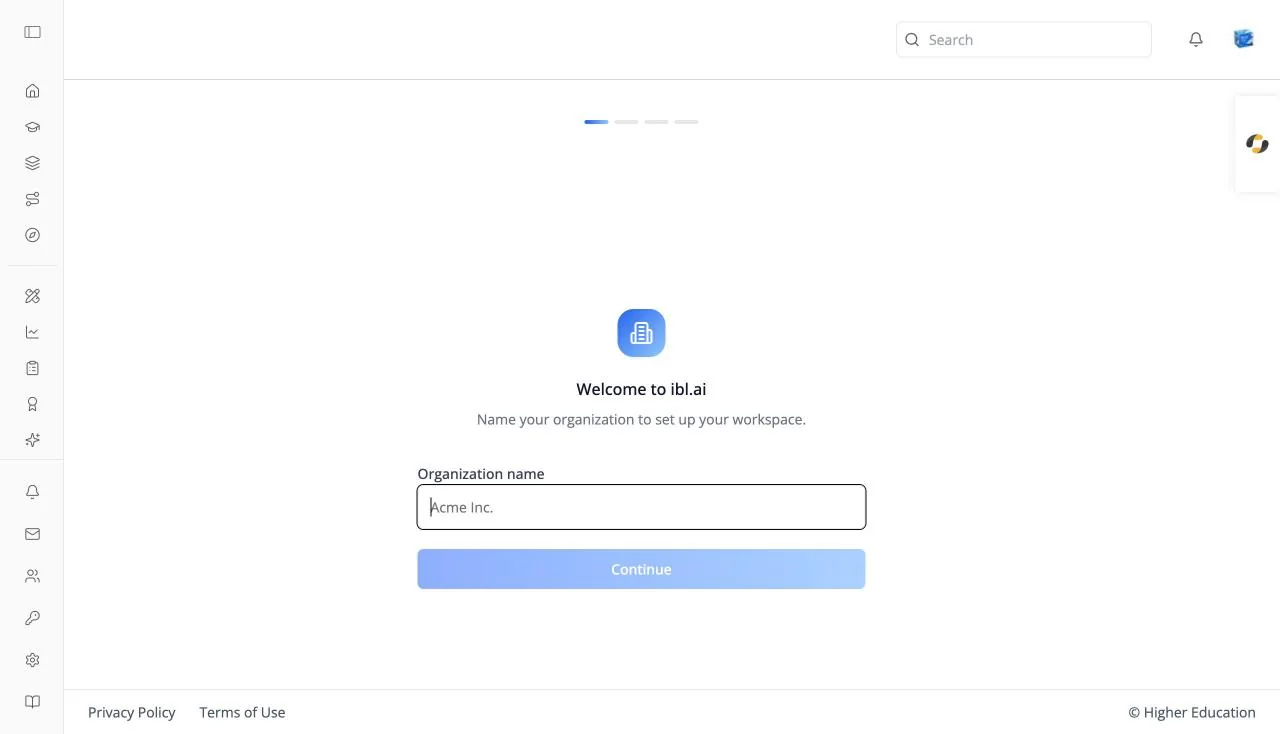
When no member onboarding exists yet, administrators get a short workspace set-up instead:
- Welcome: "Name your organization to set up your workspace." Enter an Organization name.
- What best describes your sector?: Higher Education, K-12, Enterprise, or Government.
- Invite your team: "Teammates can collaborate on agents and your workspace."
- You're all set: confirms the organization is ready, with Complete and Back.
How to Use
Step 1: Open onboarding
Follow the onboarding link your organization shared, or go to /onboarding.
Step 2: Answer each question
Click Continue after each answer, or Back to change an earlier one. Click Submit on the last question.
Step 3: Meet your assistant
Ask the assistant your first question, then continue to the Home page.