Profile: Privacy
Overview
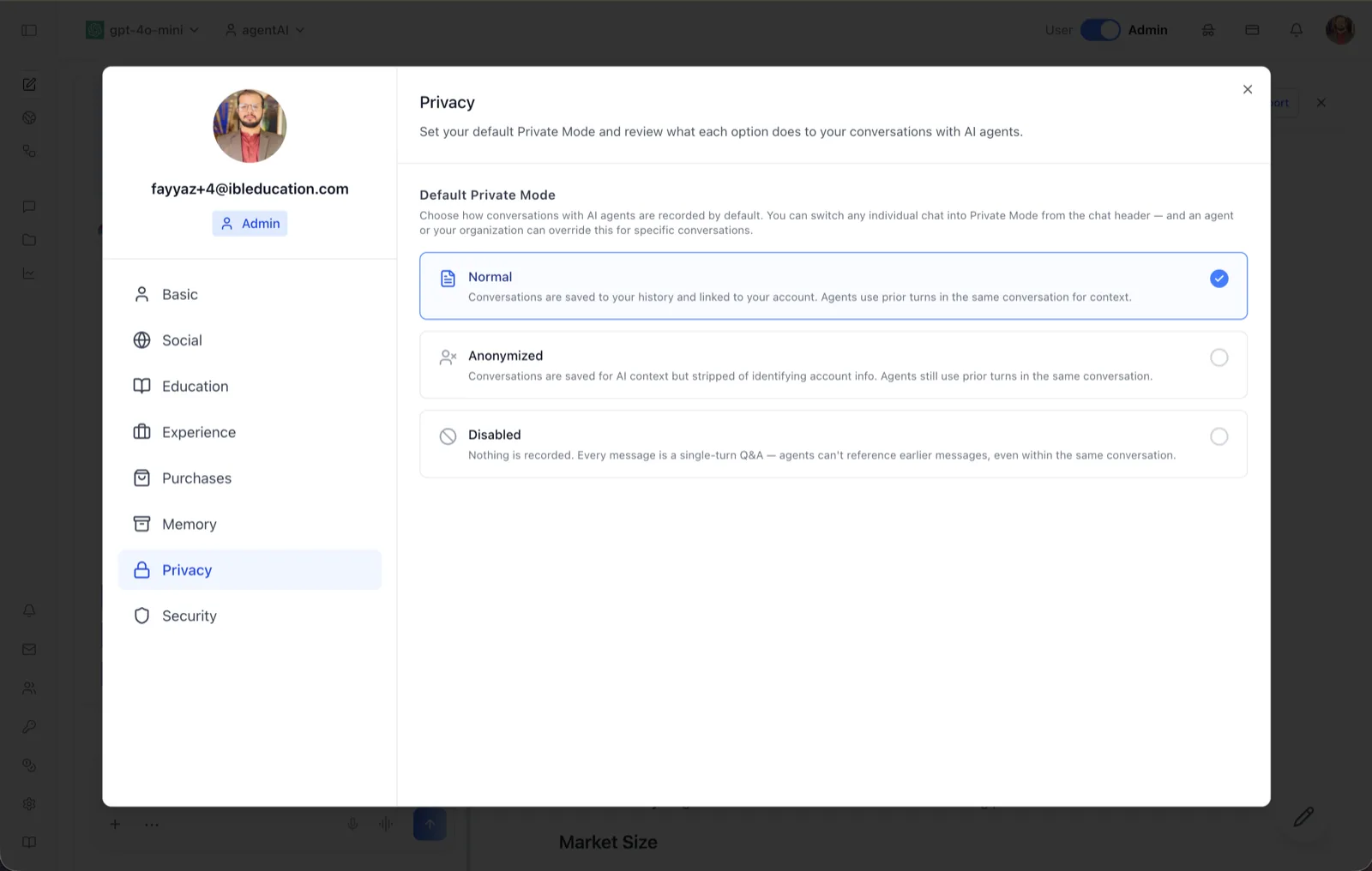
The Privacy tab of the User Profile dialog sets your default Private Mode — how your conversations with AI agents are recorded. Its header reads "Set your default Private Mode and review what each option does to your conversations with AI agents."
The setting chosen here is a default, not a lock. As the on-screen description states, you can switch any individual chat into Private Mode from the chat header, and an agent or your organization can override the default for specific conversations.
To reach this screen, click your avatar in the top-right corner of the OS header, open your profile, and select "Privacy" in the left navigation rail.
Target Audience
User — any account holder deciding how much of their conversation history is retained. Organization administrators can additionally impose overrides at the agent or organization level.
Default Private Mode Options
The three options are mutually exclusive; the selected one is highlighted with a check mark. In the screenshot, "Normal" is selected.
Normal
Per the on-screen description: "Conversations are saved to your history and linked to your account. Agents use prior turns in the same conversation for context." This is the standard mode — full history, full in-conversation context.
Anonymized
Per the on-screen description: "Conversations are saved for AI context but stripped of identifying account info. Agents still use prior turns in the same conversation." Content is retained for context, but without the link to your identity.
Disabled
Per the on-screen description: "Nothing is recorded. Every message is a single-turn Q&A — agents can't reference earlier messages, even within the same conversation." This is the strictest mode: no history and no multi-turn context at all.
How to Use
Step 1: Open the Privacy tab
Click your avatar in the top-right of the header, open your profile, and choose "Privacy" from the left navigation.
Step 2: Choose a default mode
Click Normal, Anonymized, or Disabled. The selected card is highlighted and becomes the default recording behavior for your future conversations with agents.
Step 3: Override per conversation when needed
For any single chat, use the Private Mode control in the chat header to depart from your default. Note that an agent or your organization may also enforce a specific mode for particular conversations.